Solved laptop wont bootup.

longshanks

New member
Member
VIP
Local time
4:11 AM
Messages
156
I have a second hand Dell latitude d520.it worked fine until monday this week.
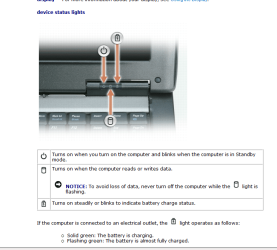
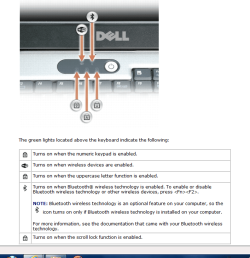
it had a 512 memory card. and it worked fine (if a little slow) a friend gave me a new 1gb card.i installed it in DIMM A slot located under the keyboard.now it wont work i tried it with the old one back in still won't work.the lights come on then go off.check pic's below 1st pic five lights top two both flash on/off.
bottom three first stay's on other two flash.
pic 2. first power light stays'on.middle on/off instantly.next battrery light blinks on/off/about every 30 sec's. after about a min/min and half all go out.
any suggestions (Keep it clean ).
 

Attachments
  • Capture.PNG laptop 1.PNG
    Capture.PNG laptop 1.PNG
    52.2 KB · Views: 4
  • Capture.PNG laptop 2.PNG
    Capture.PNG laptop 2.PNG
    49 KB · Views: 2

My Computer

OS
windows 7
Motherboard
asus
Memory
2gb
Monitor(s) Displays
acer
Hard Drives
seagate
I take the laptop apart, replaced some parts, and then it doesn't work. That would make my prime suspect a loose, damaged, or improperly replaced part.

Did you have to remove other parts to get to the DIMM slots? I would retrace my steps and very carefully check every connection, then try again.

Sorry if this is obvious, but you did unplug the power supply and remove the battery before working on it, correct? That would rule out any electrical damage.

Another thought: do you know if that laptop has a BIOS reset pin hole?
If not you can try and reset a laptop BIOS by unplugging the power supply and removing the battery and then press and hold the power button for 20 to 30 seconds to discharge all power from the system. Then put everything back and try again.
 

My Computer

Computer type
PC/Desktop
Computer Manufacturer/Model Number
Home Built - Jan 2013
OS
Windows 7 64 Bit Home Premium SP1
CPU
i7-3820
Motherboard
Asus P9X79-PRO - Bios 4608
Memory
GSkill F3-14900CL9Q - 16GB
Graphics Card(s)
EVGA GeForce GTX660 - Driver 352.86
Sound Card
On board Realtek ALC898
Monitor(s) Displays
Acer S271HL
Screen Resolution
1920 x 1080
Hard Drives
#1- Samsung 840 Pro Series
#2- Western Digital WD1002FAEX Sata3 Black
#3- Western Digital WD1002FAEX Sata3 Black
PSU
Corsair CMPSU-850TX-V2 - 850 watt (by Seasonic)
Case
Corsair Obsidian 550D
Cooling
Standard 3 120mm case fans, Cooler Master Hyper 212 EVO
Keyboard
MS KC-0405
Mouse
Intellimouse 5-button
Internet Speed
56 Mbits/Sec (on a good day)
Antivirus
Avast & Malwarebytes
Browser
Firefox
Other Info
Asus DVD - DRW-24B1ST 24X
NO i forgot to take out the battery.(DUMMY) i bet ive' fried the system. thanks anyway,TVEBLEM.you tried
thats all i can ask.
 

My Computer

OS
windows 7
Motherboard
asus
Memory
2gb
Monitor(s) Displays
acer
Hard Drives
seagate
All may not be lost.
Try resetting the BIOS - that may be all it needs.
 

My Computer

Computer type
PC/Desktop
Computer Manufacturer/Model Number
Home Built - Jan 2013
OS
Windows 7 64 Bit Home Premium SP1
CPU
i7-3820
Motherboard
Asus P9X79-PRO - Bios 4608
Memory
GSkill F3-14900CL9Q - 16GB
Graphics Card(s)
EVGA GeForce GTX660 - Driver 352.86
Sound Card
On board Realtek ALC898
Monitor(s) Displays
Acer S271HL
Screen Resolution
1920 x 1080
Hard Drives
#1- Samsung 840 Pro Series
#2- Western Digital WD1002FAEX Sata3 Black
#3- Western Digital WD1002FAEX Sata3 Black
PSU
Corsair CMPSU-850TX-V2 - 850 watt (by Seasonic)
Case
Corsair Obsidian 550D
Cooling
Standard 3 120mm case fans, Cooler Master Hyper 212 EVO
Keyboard
MS KC-0405
Mouse
Intellimouse 5-button
Internet Speed
56 Mbits/Sec (on a good day)
Antivirus
Avast & Malwarebytes
Browser
Firefox
Other Info
Asus DVD - DRW-24B1ST 24X
laptop won't bootup

thanks tveblem. but how do i do that ,i am not the best on computers ,
your help will be greatfully recieved
 

My Computer

OS
windows 7
Motherboard
asus
Memory
2gb
Monitor(s) Displays
acer
Hard Drives
seagate
Look on the bottom of your laptop and see if there is a very small hole with the word RESET next to it.
If so:

  • Shut down the computer.
  • Unplug the power supply
  • Remove the battery
  • Use a large paperclip (straightened out) to stick into the reset hole to depress the reset switch underneath (you can't see it, but you may 'feel' it click).
  • Then put the battery back in.
  • Plug in the power supply
  • And start the computer.
If no Reset hole, then

  • Shut down the computer.
  • Unplug the power supply
  • Remove the battery
  • Press and hold the power button for 20 to 30 seconds to discharge all power from the system.
  • Then put The battery back in.
  • Plug in the power supply
  • And start the computer.
 

My Computer

Computer type
PC/Desktop
Computer Manufacturer/Model Number
Home Built - Jan 2013
OS
Windows 7 64 Bit Home Premium SP1
CPU
i7-3820
Motherboard
Asus P9X79-PRO - Bios 4608
Memory
GSkill F3-14900CL9Q - 16GB
Graphics Card(s)
EVGA GeForce GTX660 - Driver 352.86
Sound Card
On board Realtek ALC898
Monitor(s) Displays
Acer S271HL
Screen Resolution
1920 x 1080
Hard Drives
#1- Samsung 840 Pro Series
#2- Western Digital WD1002FAEX Sata3 Black
#3- Western Digital WD1002FAEX Sata3 Black
PSU
Corsair CMPSU-850TX-V2 - 850 watt (by Seasonic)
Case
Corsair Obsidian 550D
Cooling
Standard 3 120mm case fans, Cooler Master Hyper 212 EVO
Keyboard
MS KC-0405
Mouse
Intellimouse 5-button
Internet Speed
56 Mbits/Sec (on a good day)
Antivirus
Avast & Malwarebytes
Browser
Firefox
Other Info
Asus DVD - DRW-24B1ST 24X
Back
Top