laptop wont go to sleep properly

obaidrock1

New member
Local time
12:36 AM
Messages
10
Greetings,

Whenever i try to put my laptop to sleep, either by choosing the sleep option or by closing the lid, my laptop always goes into this state where the screen is switched off but the system is still on. The air from the exhaust is hot and constant but no other sounds coming from laptop (Picture attached). After which the computer dosent respond to anything and the only way to take it out of it is by switching off the computer by holding the power button and starting it again. For some reason, this only happens when im in my office during day time and when i go home, this dosent happen (i.e. goes to sleep normally). Please help me in this issue.

Thanks.
 

Attachments
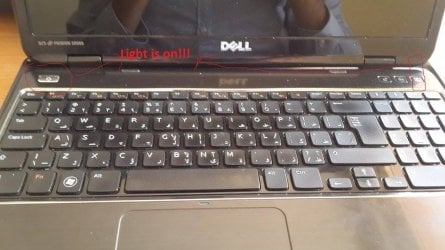
  • 12167288_10153079893386689_1322141633_n.jpg
    12167288_10153079893386689_1322141633_n.jpg
    75.8 KB · Views: 0
  • 12170282_10153079893396689_1452595298_n.jpg
    12170282_10153079893396689_1452595298_n.jpg
    21.4 KB · Views: 0

My Computer My Computer

At a glance

Windows 7 Home Premium 64bitIntel Core i5-2410M16 GBNvidia 525M
Computer type
Laptop
Computer Manufacturer/Model Number
Dell
OS
Windows 7 Home Premium 64bit
CPU
Intel Core i5-2410M
Memory
16 GB
Graphics Card(s)
Nvidia 525M
Hard Drives
500 GB
Antivirus
Microsoft Security Essentials
Browser
Chrome
hello Obaid mate two things run Speccy to see the temps on the machine https://www.piriform.com/speccy/download

Plus please run these

http://www.sevenforums.com/tutorials/1538-sfc-scannow-command-system-file-checker.html

http://www.sevenforums.com/tutorials/433-disk-check.html< if necessary include the /f and /r in the command line as per Option2 and/or safe mode

http://www.superantispyware.com/

http://www.malwarebytes.org/products/malwarebytes_free/

http://www.bleepingcomputer.com/download/adwcleaner/

ADW download from bleeping computer delete any rubbish found with themalware scans

(NBIf one is running Kaspersky security it may rant about ADW - just ignore it ordisable Kaspersky while the ADW is being used)
 

My Computer My Computer

At a glance

Desk1 7 Home Prem / Desk2 10 Pro / Main lap A...Desk1 i5 3750K / Laptop i7 GTX 860M / Desk2 i...Desk1 8GB (1866) / Desk2 16GB (1333) / Laptop...Desk 1& 2NVidia GTX 650 & Laptops on board Intel
Computer type
PC/Desktop
Computer Manufacturer/Model Number
Own build (new) Desk1 / Asus ROG Win 7 / Desk2 1st build
OS
Desk1 7 Home Prem / Desk2 10 Pro / Main lap Asus ROG 10 Pro 2 laptop Toshiba 7 Pro Asus P2520 7 & 10
CPU
Desk1 i5 3750K / Laptop i7 GTX 860M / Desk2 i5 2500
Motherboard
Desk1 Asus P877-V / Desk2 Gigabyte H67 UD3H / Laptop ?
Memory
Desk1 8GB (1866) / Desk2 16GB (1333) / Laptop 8Gb DDR3
Graphics Card(s)
Desk 1& 2NVidia GTX 650 & Laptops on board Intel
Sound Card
Desk 1 & 2 -XONAR DG Realtek High Def audio Laptop
Monitor(s) Displays
Desk 1 Benq HD 2450 / Desk2 Philips 24" / Laptop 17.5"
Screen Resolution
1920x1080 D1 & D2 & Laptop 1
Hard Drives
Desk1 Samsung 120GB 830 SSD
Asus ROG 256GB 850 Pro SSD
Desk2 Samsung 840 256 SSD
Toshiba 120GB EVO
PSU
Desk 1 Corsair HX 1050/ Laptop ? / Desk 2 Corsair HX 650
Case
Desk 1 Cooler HAF XM ? Toshiba laptop / Desk2 Coolermaster
Cooling
Fans on all Desk1 -2 Desk2 - all Coolermasters 5 Laptop ?
Keyboard
Desk 1 MS Sidewinder X6 Desk 2 MS Sidewinder X 4
Mouse
Desk 1&2 - Gigabyte MS 900 gamer - laptop - Logitec wireless
Internet Speed
ADSL2+
Other Info
One other Desktop (tester) and spare Toshba laptop both with SSD's
Running Kaspersky 2016 ISS on all machines config'd identically
Logitec audio stereo systems on each machine (x3)
Canon MG5250MFC
Router/modem TP-Link running WPA2SK
Back
Top