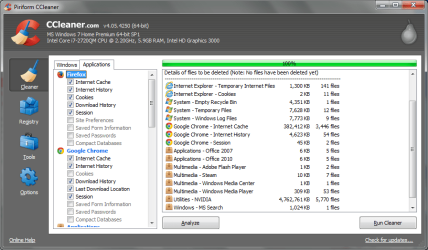
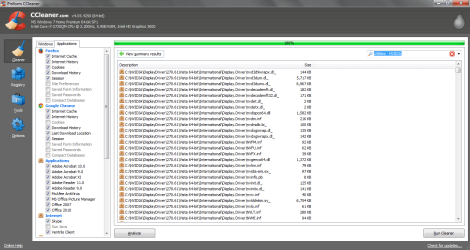
I upgraded to the latest version of CCleaner today (4.05) and upon running the Analyze button, its picking up 5 gigabytes of junk files... I have a hard time believing that and now I'm not sure if running it will muck up my computer. Particularly, there is a large amount of nvidia files popping up which seems unusual. Attached are some screen shots of what it's picking up as a whole and some of the nvidia files it's scanning. Maybe its better, but i'd like some more opinions icnic:
Attachments
Ccleaner scan.png
35.9 KB
· Views: 28
Nvidia1.png
40.6 KB
· Views: 27
nvidia2.png
40.2 KB
· Views: 22
My Computer
At a glance
Windows 7 Home Premium 64biti7 2720qm6gb DDR3 1333Gt 540m
Gyration wireless, Logitech wireless, Dell USB wired
Mouse
Gyration wireless, Logitech wireless, V7 USB wired
Internet Speed
Spectrum - 100Mbps D / 10Mbps U
Antivirus
Avast, MBAM3, EMET, WinPatrol
Browser
Pale Moon, Firefox, IE
Other Info
2 multi-boot PC's
Mainly HTPC/Office/Gen purpose (no gaming).
Trendnet USB KVM.
LG DVD burner/Blue Ray Player.
Tray system for removable SATA backup drives.
Not currently OCd, under-volted.
I use Hybrid sleep, rarely re-boot or shutdown.
Hauppauge HD-PVR, Avermedia PCIe TV Tuner, Hauppauge PCI TV Tuner.
Could possibly be a bug. What do you have checkmarked in ccleaner? Is it the default options or no? Judging by your screenshots it looks some of the defaults were checked as well as others.
My Computer
At a glance
Windows 10 ProAMD Ryzen 5 2400G Processor with Radeon RX Ve...G.SKILL Ripjaws V Series 16GB (2 x 8GB) 288-P...2047MB NVIDIA GeForce GTX 1060 6GB (EVGA)
It was most of the defaults, but I let the cleaner run. I looked at the video drivers it was grabbing and they were all old versions, plus the Link David posted said it was safe to run.
My Computer
At a glance
Windows 7 Home Premium 64biti7 2720qm6gb DDR3 1333Gt 540m
Yeah, personally I have never see anything bad come from ccleaner. I have used it A LOT. Like, every PC I ever worked on. Never a single issue. But, that does not mean one could not exist.
Even the reg cleaner. Although I usually only run this when the pc has over 1GB of data to clean or more.
Your results there are what I usually see when I clean someones pc for the first time.
Anyways, its probably just got better with the recent update on finding more junk. Go ccleaner
I'm actually considering buying the paid version for the simple fact that I want to support the developer.
It's pretty good software.
Its on sale for $20 now....
Thing is though, there is not much difference between paid and free.
My Computer
At a glance
Windows 10 ProAMD Ryzen 5 2400G Processor with Radeon RX Ve...G.SKILL Ripjaws V Series 16GB (2 x 8GB) 288-P...2047MB NVIDIA GeForce GTX 1060 6GB (EVGA)
Those Nvidia files are not needed anyway. Unless overclocking I would not have the Nvidia display software installed and certainly not starting up with Win7, just the driver.
I don't know how deleting files which are not needed or wanted can be considered a bug. That's what CCLeaner does best for years. It may be the most popular app in the tech world.
Nvidia is not listed in 4.04 (Applications/Utilities) but is listed in 4.05.
People are asking about these files because there is a change in ver 4.05 that is not documented in the Release Notes.
I like having the CPU utility software installed, and disabled from auto startup.
These programs allow a lot more configuration options than the built in Windows program.
Occasionally I use some of these additional settings such as adjusting overscan.
Gyration wireless, Logitech wireless, Dell USB wired
Mouse
Gyration wireless, Logitech wireless, V7 USB wired
Internet Speed
Spectrum - 100Mbps D / 10Mbps U
Antivirus
Avast, MBAM3, EMET, WinPatrol
Browser
Pale Moon, Firefox, IE
Other Info
2 multi-boot PC's
Mainly HTPC/Office/Gen purpose (no gaming).
Trendnet USB KVM.
LG DVD burner/Blue Ray Player.
Tray system for removable SATA backup drives.
Not currently OCd, under-volted.
I use Hybrid sleep, rarely re-boot or shutdown.
Hauppauge HD-PVR, Avermedia PCIe TV Tuner, Hauppauge PCI TV Tuner.

 icnic: