Large installer and winsxs folders

Vcize

New member
Local time
9:17 AM
Messages
2
My windows/installer and windows/winsxs folders are 12.7gb and 12.1gb respectively. In fact, my windows folder takes up 40gb of my 68gb of usable space.

I've done some reading about this and people seem to say not to clear these out and instead to just uninstall software. However, when going into "Add or remove programs" all of my software only adds up to 2gb total. So how are there 12.7gb of installers/uninstallers for 2gb of actual software? Surely there is lots of unused stuff in there and in the winsxs folder, can I clear them out?
 

My Computer My Computer

At a glance

Windows 7 Ultimate x64
Computer type
PC/Desktop
OS
Windows 7 Ultimate x64
Hello Vcize,

The folder "%WINDIR%\winsxs" mostly consists of hardlinks to system files, backup of Updates and multiple DLL file versions to keep compatibility with programs.
So yeah it is big, but the size is also fooling us cause hardlinks point to a single file to reduce hard disk space, though Explorer does not know that, so the size is much smaller than it seems.
out-web.net/?p=623

To decrease the size, first fully update your system to get the update for the option 'Windows Update Cleanup' in 'Disk Cleanup' which came originally from Windows 8.
blogs.technet.com/b/askpfeplat/archive/2013/10/08/breaking-news-reduce-the-size-of-the-winsxs-directory-and-free-up-disk-space-with-a-new-update-for-windows-7-sp1-clients.aspx

Also i recommend you use Ccleaner to remove other kind of temporary files and history.

Good luck ^^.
 

My Computer My Computer

At a glance

Primary OS: Archlinux with Kde-Plasma5 x86-64...i5-4570 3.2GHz8GiBNvidia GeForce GTX 660 (Msi TwinFrozr III)
Computer type
PC/Desktop
Computer Manufacturer/Model Number
Custom build
OS
Primary OS: Archlinux with Kde-Plasma5 x86-64. Secondary OS: Windows 8.1 x64. UEFI Setup.
CPU
i5-4570 3.2GHz
Motherboard
Asus H87-PLUS
Memory
8GiB
Graphics Card(s)
Nvidia GeForce GTX 660 (Msi TwinFrozr III)
Screen Resolution
1920 * 1080
Hard Drives
Samsung SSD 840 PRO 128Gib (Linux) [Is technically not a HDD]
WD Red 1TB (Data+Windows)
PSU
Corsair Gaming GS600 (600W)
Case
Zalman Z9 Plus
Internet Speed
46Mbps (5,75MBps) Down. 5Mbps (0,625MBps) Up.
Antivirus
Avast, but never really needed any AV though...
Browser
Firefox only ^^.
Unfortunately I've already done the disk cleanup that includes Windows Update Cleanup. I will give Ccleaner a look.
 

My Computer My Computer

At a glance

Windows 7 Ultimate x64
Computer type
PC/Desktop
OS
Windows 7 Ultimate x64

My Computers My Computers

  • At a glance

    7 X64i5 84002x8gb 3200mhz
    Computer type
    PC/Desktop
    OS
    7 X64
    CPU
    i5 8400
    Motherboard
    gigabyte b365m ds3h
    Memory
    2x8gb 3200mhz
    Hard Drives
    various
    PSU
    pure power 11 400w cm
    Case
    Coolermaster
    Cooling
    cryorig m9i
  • At a glance

    7x64g54008gb ddr4 2400
    Computer type
    PC/Desktop
    OS
    7x64
    CPU
    g5400
    Motherboard
    ga b365m ds3h
    Memory
    8gb ddr4 2400
    PSU
    xfx pro 450w
If you have been using your install for a long time and you have installed a lot of software (even if you have uninstalled it) space seems to be gobbled up for no apparent reason.

When I have performed a clean install and reinstalled the latest versions of the software I use, the overall size of the install is smaller.

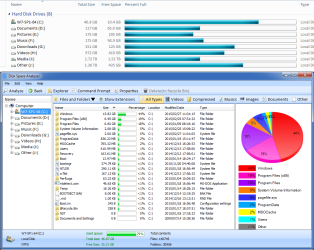
Here's my OS partition:
Disk Usage (2015-02-27).png
I suspect that in a few months time I will be using more space, even if I don't install anything new.
 

My Computer My Computer

At a glance

W7 Ultimate SP1, LM19.2 MATE, W10 Home 1703, ...AMD Phenom II x6 1100T, 3.3 GHz12GB DDR3 1333 G-Skill (4GB x 2), G-Skill (2G...NVIDIA GeForce GTX 660
Computer type
PC/Desktop
Computer Manufacturer/Model Number
n/a
OS
W7 Ultimate SP1, LM19.2 MATE, W10 Home 1703, W10 Pro 1703 VM, #All 64 bit
CPU
AMD Phenom II x6 1100T, 3.3 GHz
Motherboard
ASUS M4A88T-M/USB3 (AM3)
Memory
12GB DDR3 1333 G-Skill (4GB x 2), G-Skill (2GB x 2)
Graphics Card(s)
NVIDIA GeForce GTX 660
Sound Card
Realtek?
Monitor(s) Displays
Samsung S23B350
Screen Resolution
1920x1080
Hard Drives
WD Green 2TB (SATA), WD Green 3TB (SATA), WD Blue 4TB (SATA), WD Blue 6TB (SATA)
PSU
Cooler Master
Case
Antec GX300 Tower
Cooling
3x Antec TRICOOL 120mm Fans
Mouse
Wired Optical
Internet Speed
DSL
Antivirus
Avast
Browser
Pale Moon (64 bit)
Other Info
2018-12-27 Upgraded HDDs
2015-12-10 Upgraded case, graphics card, storage
2015-08-15 Upgraded motherboard & RAM
2015-07-15 Upgraded LM17.1 to LM17.2
Back
Top