Last login

Matt92

New member
Local time
1:05 AM
Messages
2
Um, i was wondering if you could see the last FEW log in's...becaue a lot of things changed in my laptop, and i want to see who logged in the last few times...is there a way, if there is could you guys be kind enough to help me, please
Matt
 

My Computer

OS
windows 7 64

My Computer

Computer type
PC/Desktop
Computer Manufacturer/Model Number
Bruce ... somewhere in his 40's
OS
Windows 7 Ultimate 32bit SP1
CPU
Intel(R) Core(TM)2 Quad CPU @ 2.40GHz, 2400 MHz
Motherboard
INTEL/D975XBX2
Memory
4 GB
Graphics Card(s)
ATI Radeon HD 2600 Pro
Monitor(s) Displays
Samsung SyncMaster 914v
Screen Resolution
1280 x 1024
Hard Drives
2/500GB each ... ST3500630AS ATA Device.
One is not connected
PSU
Rocketfish 700 W
Case
G.Skill Gigabyte Chassis
Keyboard
Standard PS/2 Keyboard
Mouse
Microsoft PS/2 Mouse
Internet Speed
DSL
Antivirus
Avira Internet Security
Browser
IE 11
Other Info
ATI HDMI Audio
You're welcome :)
 

My Computer

Computer type
PC/Desktop
Computer Manufacturer/Model Number
Bruce ... somewhere in his 40's
OS
Windows 7 Ultimate 32bit SP1
CPU
Intel(R) Core(TM)2 Quad CPU @ 2.40GHz, 2400 MHz
Motherboard
INTEL/D975XBX2
Memory
4 GB
Graphics Card(s)
ATI Radeon HD 2600 Pro
Monitor(s) Displays
Samsung SyncMaster 914v
Screen Resolution
1280 x 1024
Hard Drives
2/500GB each ... ST3500630AS ATA Device.
One is not connected
PSU
Rocketfish 700 W
Case
G.Skill Gigabyte Chassis
Keyboard
Standard PS/2 Keyboard
Mouse
Microsoft PS/2 Mouse
Internet Speed
DSL
Antivirus
Avira Internet Security
Browser
IE 11
Other Info
ATI HDMI Audio
In Seven, by default all auditing is off by default.

Here's how to turn logon / logoff auditing on. Please notice you need to have Seven Professional, Ultimate or Enterprise to use gpedit:
  • Type gpedit.msc to Start Menu > Search and hit Enter to open Group Policy Editor
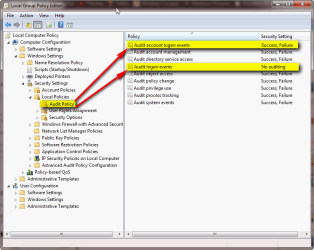
  • Browse to Local Computer Policy > Computer Configuration > Windows Settings > Security Settings > Local Policies > Audit Policy
  • If you want to audit (log) both logon, logoff and credentials given when UAC needs a permission to continue, right click Audit account logon events and select Properties
  • If you want to audit only logon / logoff but not when UAC credentials are used, right click Audit logon events and select Properties
    .
    Audit_Access_1.png
    .
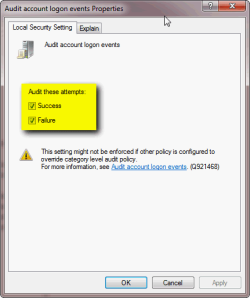
  • Select which to audit, success, failure or both
    .
    Audit_Access_2.png
    .
  • Click OK to save settings
  • Close gpedit

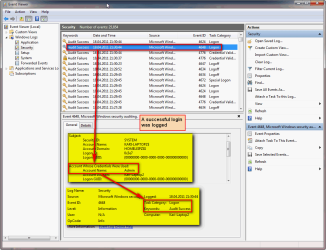
To read the logs:
  • Type Event Viewer in Start Menu > Search and hit Enter to open Windows Event Viewer
  • Browse to Windows logs > Security

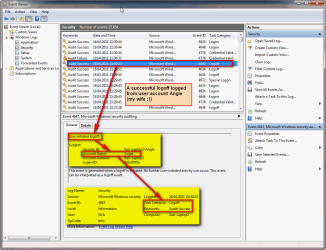
Some examples of logs. First, a successfull logoff:

Audit_Access_4.png

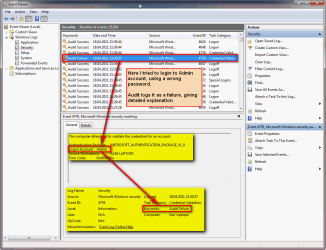
A logon failure:

Audit_Access_3.png

Logon success:

Audit_Access_5.png

Kari
 

My Computer

Computer type
Laptop
Computer Manufacturer/Model Number
HP ENVY 17-1150eg
OS
Windows 10 Pro x64 EN-GB
CPU
1.6 GHz Intel Core i7-720QM Processor
Memory
6 GB
Graphics Card(s)
ATI Mobility Radeon HD 5850 Graphics
Sound Card
Beats sound system with integrated subwoofer
Monitor(s) Displays
17" laptop display, 22" LED and 32" Full HD TV through HDMI
Screen Resolution
1600*900 (1), 1920*1080 (2&3)
Hard Drives
Internal: 2 x 500 GB SATA Hard Disk Drive 7200 rpm
External: 2TB for backups, 3TB USB3 network drive for media
Cooling
As Envy runs a bit warm, I have it on a Cooler Master pad
Keyboard
Logitech diNovo Media Desktop Laser (bluetooth)
Mouse
Logitech Performance Mouse MX
Internet Speed
50/10 Mbps VDSL
Antivirus
Windows Defender 4.3.9431.0
Browser
Maxthon 3.5.2., IE11
Back
Top