Solved Last Windows Update Caused Extreme Slowness and Disabled Wireless

johkar1

New member
Local time
10:00 AM
Messages
3
I have automatic Windows updates set on my Dell Laptop. I was using it fine and had no problems and then left for a couple of hours. When I returned a windows update had been installed and the computer had rebooted. It now takes 2-5 minutes to activate/launch anything after a click...if it works at all. Booting up takes at least 10 minutes and involves many blank screens before the desktop shows...and then the icons finally show up. The wireless internet no longer works...it won't even show the neighbors networks. I can connect via Ethernet to my router. Troubleshooting errors out. System restore errors out. I can access my files...but it would take forever to copy anything in its current state.

I was able to launch it in safe mode w/networking but it was no better. I have Norton and nothing was detected. I ran other virus checking software like MalwareBytes and it only found a few tracking cookies. I've run the update checker and it can't find anything to fix...or it errors. I've run Disk Cleanup and it made no difference. The hard-drive is only 1% fragmented.

What else can I try?
 

My Computer My Computer

At a glance

Windows 7 Home Premium 64-bitIntel Core i5 2.27GHz4GB
Computer type
Laptop
Computer Manufacturer/Model Number
Dell Studio 1558
OS
Windows 7 Home Premium 64-bit
CPU
Intel Core i5 2.27GHz
Memory
4GB
Antivirus
Norton
Browser
IE, Chrome, Firefox
Uninstall Norton antivirus while you work on this issue.

Install Microsoft Security Essentials for now.

You can put Norton back on later - if you must.

Uninstall each of the latest round of updates and see if that helps things.
 

My Computer My Computer

At a glance

W7 Pro SP1 64biti78GBIntel HD Graphics
Computer type
Laptop
Computer Manufacturer/Model Number
Employer provided Dell Latitude
OS
W7 Pro SP1 64bit
CPU
i7
Memory
8GB
Graphics Card(s)
Intel HD Graphics
Hard Drives
crappy SSD
Antivirus
Employer mandated Symantec Endpoint Protection
Browser
Pale Moon 64bit, IE11 64bit & Chrome 64bit
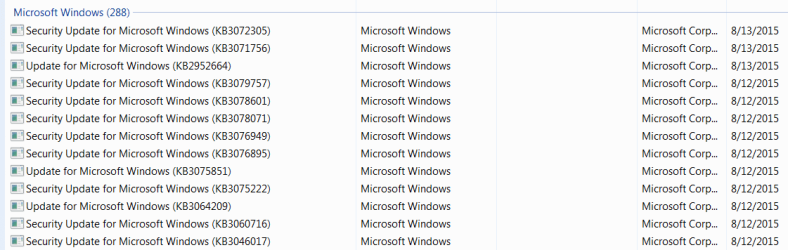
Thanks for the reply. I have already uninstalled Norton based on some responses from another source. There are quite a few Windows Security updates and three Windows Updates (see attachment) that happened on 8-12-2015 when this problem started. Should I start with the Windows Updates or do I need to do them in order? I'm asking because this may take a very long time given the current state of the laptop. It might go just a tad faster if I can do it in Safe Mode. This is assuming it will work at all...crossing fingers. Note: ignore the 8-13 dates on the updates the screenshot is from my other laptop...both received the same updates. The problem laptop received them all on 8-12.
 

Attachments

  • Capture.PNG
    Capture.PNG
    9.2 KB · Views: 0
Last edited:

My Computer My Computer

At a glance

Windows 7 Home Premium 64-bitIntel Core i5 2.27GHz4GB
Computer type
Laptop
Computer Manufacturer/Model Number
Dell Studio 1558
OS
Windows 7 Home Premium 64-bit
CPU
Intel Core i5 2.27GHz
Memory
4GB
Antivirus
Norton
Browser
IE, Chrome, Firefox
I understand that the laptop is slow and uninstalling updates might take a while, but I don't know which ones to start with. I would uninstall all updates from the 13th and the 12th... every one of them. If the computer suddenly gets faster after uninstalling one of them - then we have our answer. (I don't think that will happen.)

If you uninstall all of the updates (from the 13th and the 12th) and the computer is still slow, then we are looking in the wrong place. You can re-install them.
 

My Computer My Computer

At a glance

W7 Pro SP1 64biti78GBIntel HD Graphics
Computer type
Laptop
Computer Manufacturer/Model Number
Employer provided Dell Latitude
OS
W7 Pro SP1 64bit
CPU
i7
Memory
8GB
Graphics Card(s)
Intel HD Graphics
Hard Drives
crappy SSD
Antivirus
Employer mandated Symantec Endpoint Protection
Browser
Pale Moon 64bit, IE11 64bit & Chrome 64bit
Uninstalling updates was going to take a month. I ensured all my important data was backed up and restored the laptop to Dell's factory install. I did this because it was an older laptop and I could easily reinstall software. All is well. Thanks for the help.
 

My Computer My Computer

At a glance

Windows 7 Home Premium 64-bitIntel Core i5 2.27GHz4GB
Computer type
Laptop
Computer Manufacturer/Model Number
Dell Studio 1558
OS
Windows 7 Home Premium 64-bit
CPU
Intel Core i5 2.27GHz
Memory
4GB
Antivirus
Norton
Browser
IE, Chrome, Firefox
That works too :-)
 

My Computer My Computer

At a glance

W7 Pro SP1 64biti78GBIntel HD Graphics
Computer type
Laptop
Computer Manufacturer/Model Number
Employer provided Dell Latitude
OS
W7 Pro SP1 64bit
CPU
i7
Memory
8GB
Graphics Card(s)
Intel HD Graphics
Hard Drives
crappy SSD
Antivirus
Employer mandated Symantec Endpoint Protection
Browser
Pale Moon 64bit, IE11 64bit & Chrome 64bit
Back
Top