Latitude 6530 Installation From USB Fails - No Device Drivers Found.

30th November

New member
Local time
2:03 PM
Messages
10
Hello, I'm new to the forum and a bit overwhelmed with info.


If someone can post me a link to the program I could tell you more about my current system beyond it's a Dell Inspiron 1750 purchaed in Dec 2009, running a pre-installed Windows 7 64 bit Home Premium.


I am trying to migrate to a more powerful and slightly newer machine, which is a Latitude E6530, 3rd gen Intel core i7-3520M processor.


I've downloaded an ISO for the target processor from Heidoc but it only had Win 7 Professional on it, so I'm not sure my product key would work on that. But anyway when I put that on a USB using Rufus and booted the target PC, I get to the point where it says "No device drivers were found...."


Any help gladly accepted, thanks in anticipation.
 

My Computer My Computer

At a glance

Home Premium 64bit
Computer type
PC/Desktop
Computer Manufacturer/Model Number
Dell
OS
Home Premium 64bit
I've downloaded an ISO for the target processor from Heidoc

What does that mean? I wasn't aware heidoc has iso files for specific cpus.

Did you download G13K9_PW4KGA00_W7SP1PRO64_ROW(DL).iso That is the file isted by heidoc for Latitude E6530

"No device drivers were found...."

At what point do you get that message?
 
Last edited:

My Computers My Computers

  • At a glance

    7 X64i5 84002x8gb 3200mhz
    Computer type
    PC/Desktop
    OS
    7 X64
    CPU
    i5 8400
    Motherboard
    gigabyte b365m ds3h
    Memory
    2x8gb 3200mhz
    Hard Drives
    various
    PSU
    pure power 11 400w cm
    Case
    Coolermaster
    Cooling
    cryorig m9i
  • At a glance

    7x64g54008gb ddr4 2400
    Computer type
    PC/Desktop
    OS
    7x64
    CPU
    g5400
    Motherboard
    ga b365m ds3h
    Memory
    8gb ddr4 2400
    PSU
    xfx pro 450w
The Dell win 7 iso files contain all the editions. If it is called Pro they have integrated some drivers and updates into the pro image. And it includes slp activation for pro edition.

The other editions are as released by MS. If you made a bootable flash drive from the dell iso:

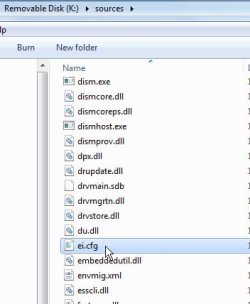
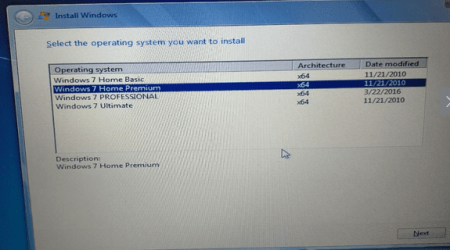
You could look in the sources folder on the usb stick and delete the file called ei.cfg.

delete-eicfg.jpg


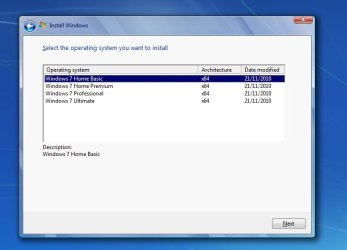
Then setup will offer the choice of editions to install..like this

editions.jpg
 

My Computers My Computers

  • At a glance

    7 X64i5 84002x8gb 3200mhz
    Computer type
    PC/Desktop
    OS
    7 X64
    CPU
    i5 8400
    Motherboard
    gigabyte b365m ds3h
    Memory
    2x8gb 3200mhz
    Hard Drives
    various
    PSU
    pure power 11 400w cm
    Case
    Coolermaster
    Cooling
    cryorig m9i
  • At a glance

    7x64g54008gb ddr4 2400
    Computer type
    PC/Desktop
    OS
    7x64
    CPU
    g5400
    Motherboard
    ga b365m ds3h
    Memory
    8gb ddr4 2400
    PSU
    xfx pro 450w
That was a business class laptop, so it probably came with win7 Pro. Activation shouldn't be an issue because pro activation is included with the dell media, no separate product key required.
 

My Computers My Computers

  • At a glance

    7 X64i5 84002x8gb 3200mhz
    Computer type
    PC/Desktop
    OS
    7 X64
    CPU
    i5 8400
    Motherboard
    gigabyte b365m ds3h
    Memory
    2x8gb 3200mhz
    Hard Drives
    various
    PSU
    pure power 11 400w cm
    Case
    Coolermaster
    Cooling
    cryorig m9i
  • At a glance

    7x64g54008gb ddr4 2400
    Computer type
    PC/Desktop
    OS
    7x64
    CPU
    g5400
    Motherboard
    ga b365m ds3h
    Memory
    8gb ddr4 2400
    PSU
    xfx pro 450w
If you are using a different iso, make sure to use usb2 port.
 

My Computers My Computers

  • At a glance

    7 X64i5 84002x8gb 3200mhz
    Computer type
    PC/Desktop
    OS
    7 X64
    CPU
    i5 8400
    Motherboard
    gigabyte b365m ds3h
    Memory
    2x8gb 3200mhz
    Hard Drives
    various
    PSU
    pure power 11 400w cm
    Case
    Coolermaster
    Cooling
    cryorig m9i
  • At a glance

    7x64g54008gb ddr4 2400
    Computer type
    PC/Desktop
    OS
    7x64
    CPU
    g5400
    Motherboard
    ga b365m ds3h
    Memory
    8gb ddr4 2400
    PSU
    xfx pro 450w
Wow, thanks for the ideas, will work through and get back to you.
 

My Computer My Computer

At a glance

Home Premium 64bit
Computer type
PC/Desktop
Computer Manufacturer/Model Number
Dell
OS
Home Premium 64bit
The error message about cd/dvd driver is often becuase setup cant find the installation media. One possible culprit is missing usb3 drivers.

If you are using the DELL iso, it contains usb3 drivers although they might not be the correct ones for your model.

Using dvd or usb2 to install is a way around that.
 

My Computers My Computers

  • At a glance

    7 X64i5 84002x8gb 3200mhz
    Computer type
    PC/Desktop
    OS
    7 X64
    CPU
    i5 8400
    Motherboard
    gigabyte b365m ds3h
    Memory
    2x8gb 3200mhz
    Hard Drives
    various
    PSU
    pure power 11 400w cm
    Case
    Coolermaster
    Cooling
    cryorig m9i
  • At a glance

    7x64g54008gb ddr4 2400
    Computer type
    PC/Desktop
    OS
    7x64
    CPU
    g5400
    Motherboard
    ga b365m ds3h
    Memory
    8gb ddr4 2400
    PSU
    xfx pro 450w
Yes I did download G13K9_PW4KGA00_W7SP1PRO64_ROW(DL).iso

Today I deleted the EI.CFG file as you suggested.

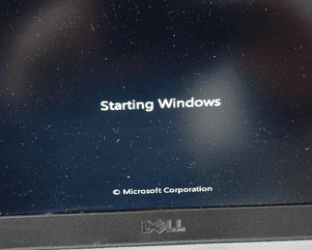
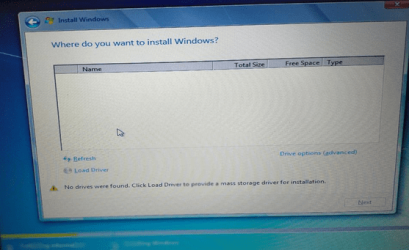
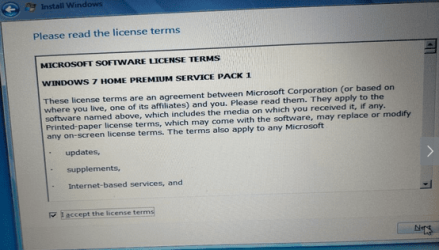
So then I booted the target machine using a USB stick and got the following screens,
Win 7 pic 1.PNG

Win 7 pic 4.PNG

Win 7 Pic 2.PNG

Win7 pic 3.PNG

win 7 pic 8.PNG

win 7 pic 9.PNG


Win 7 pic 5.PNG


Win 7 pic 6.PNG


win 7 pic 10.PNG


win 7 pic 11.PNG So no drivers found


win 7 pic 12.PNG


win 7 pic 13.PNG
 

Attachments

  • win 7 pic 7.PNG
    win 7 pic 7.PNG
    81.1 KB · Views: 14

My Computer My Computer

At a glance

Home Premium 64bit
Computer type
PC/Desktop
Computer Manufacturer/Model Number
Dell
OS
Home Premium 64bit
1. You can install Professional on that machine. The dell media will automatically activate Pro for you. It wont automatically activate home premium, so install Professional.


2. It is asking for mass storage drivers. Some are included in the dell media , but possibly not the correct ones for your machine.

First, Check in bios if it recognizes there is a harddisk in the machine.

If bios doesn't see the hard disk,then the problem is not the installation media.
 

My Computers My Computers

  • At a glance

    7 X64i5 84002x8gb 3200mhz
    Computer type
    PC/Desktop
    OS
    7 X64
    CPU
    i5 8400
    Motherboard
    gigabyte b365m ds3h
    Memory
    2x8gb 3200mhz
    Hard Drives
    various
    PSU
    pure power 11 400w cm
    Case
    Coolermaster
    Cooling
    cryorig m9i
  • At a glance

    7x64g54008gb ddr4 2400
    Computer type
    PC/Desktop
    OS
    7x64
    CPU
    g5400
    Motherboard
    ga b365m ds3h
    Memory
    8gb ddr4 2400
    PSU
    xfx pro 450w
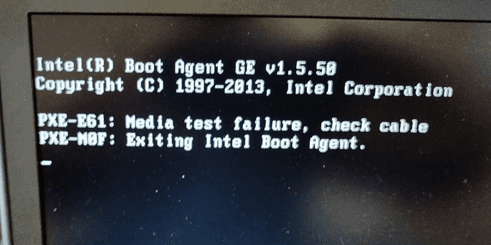
In your first pic the pxe message indicates it is trying to boot from a network. You can stop it doing that:

Tap F2 to get into bios. Go to setup > advanced settings ( or it might be under "system configuration") and disable network boot ( or it might be called integrated nic ).Then F10 to save your changes.

While you are in bios check if it has detected the HD.
 
Last edited:

My Computers My Computers

  • At a glance

    7 X64i5 84002x8gb 3200mhz
    Computer type
    PC/Desktop
    OS
    7 X64
    CPU
    i5 8400
    Motherboard
    gigabyte b365m ds3h
    Memory
    2x8gb 3200mhz
    Hard Drives
    various
    PSU
    pure power 11 400w cm
    Case
    Coolermaster
    Cooling
    cryorig m9i
  • At a glance

    7x64g54008gb ddr4 2400
    Computer type
    PC/Desktop
    OS
    7x64
    CPU
    g5400
    Motherboard
    ga b365m ds3h
    Memory
    8gb ddr4 2400
    PSU
    xfx pro 450w
Have disabled Integrated NIC in boot sequence


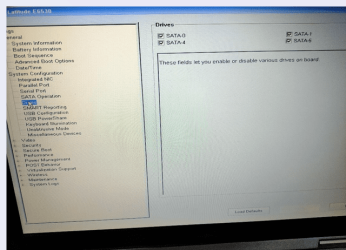
Looked at config. The SATA operation has the AHCI enabled, is that correct?


For drives, it shows SATA-0, SATA-1, SATA-4 and SATA-5


Is that OK?
 

My Computer My Computer

At a glance

Home Premium 64bit
Computer type
PC/Desktop
Computer Manufacturer/Model Number
Dell
OS
Home Premium 64bit
Yes ahci is correct.

For drives, it shows SATA-0, SATA-1, SATA-4 and SATA-5

Those are ports.Do you have 4 disks connected?
 

My Computers My Computers

  • At a glance

    7 X64i5 84002x8gb 3200mhz
    Computer type
    PC/Desktop
    OS
    7 X64
    CPU
    i5 8400
    Motherboard
    gigabyte b365m ds3h
    Memory
    2x8gb 3200mhz
    Hard Drives
    various
    PSU
    pure power 11 400w cm
    Case
    Coolermaster
    Cooling
    cryorig m9i
  • At a glance

    7x64g54008gb ddr4 2400
    Computer type
    PC/Desktop
    OS
    7x64
    CPU
    g5400
    Motherboard
    ga b365m ds3h
    Memory
    8gb ddr4 2400
    PSU
    xfx pro 450w
drives screen.PNG


This is what the drives screen shows, what do I need to do next please?
 

My Computer My Computer

At a glance

Home Premium 64bit
Computer type
PC/Desktop
Computer Manufacturer/Model Number
Dell
OS
Home Premium 64bit
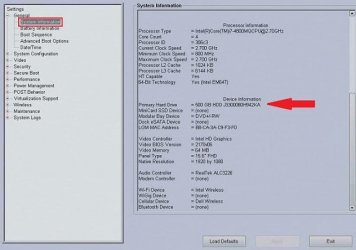
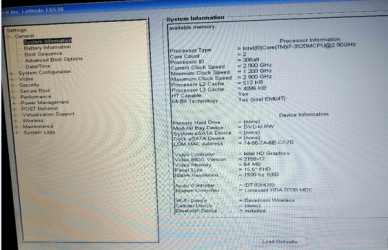
Look under system information. You might need to then scroll down to where it says device information. Ther should be a hard disk listed there.

dell-6540.jpeg
 

My Computers My Computers

  • At a glance

    7 X64i5 84002x8gb 3200mhz
    Computer type
    PC/Desktop
    OS
    7 X64
    CPU
    i5 8400
    Motherboard
    gigabyte b365m ds3h
    Memory
    2x8gb 3200mhz
    Hard Drives
    various
    PSU
    pure power 11 400w cm
    Case
    Coolermaster
    Cooling
    cryorig m9i
  • At a glance

    7x64g54008gb ddr4 2400
    Computer type
    PC/Desktop
    OS
    7x64
    CPU
    g5400
    Motherboard
    ga b365m ds3h
    Memory
    8gb ddr4 2400
    PSU
    xfx pro 450w
No hdd.PNG


BIOS not detected the HDD. Any ideas welcome thank you.
 

My Computer My Computer

At a glance

Home Premium 64bit
Computer type
PC/Desktop
Computer Manufacturer/Model Number
Dell
OS
Home Premium 64bit
Several possibilties, including but not limited to:

1. There is no hd in the machine.

2. There is an hd but not connected properly. Not uncommon if the machine has been dropped or banged about. The solution is to unplug and replug the hd. Quite often that does the job.

3. There is an hd. It is connected properly. It is dead. Solution is a replacement hd.

You will need to take the back off the thing to check. Looks quite easy, just a little flap with 4 screws. That is easier than most - you dont need to take the whole back off that machine.
How to replace the HDD of DELL Latitude E6520, E6530, E6420, E6430 with a SSD - YouTube
 

My Computers My Computers

  • At a glance

    7 X64i5 84002x8gb 3200mhz
    Computer type
    PC/Desktop
    OS
    7 X64
    CPU
    i5 8400
    Motherboard
    gigabyte b365m ds3h
    Memory
    2x8gb 3200mhz
    Hard Drives
    various
    PSU
    pure power 11 400w cm
    Case
    Coolermaster
    Cooling
    cryorig m9i
  • At a glance

    7x64g54008gb ddr4 2400
    Computer type
    PC/Desktop
    OS
    7x64
    CPU
    g5400
    Motherboard
    ga b365m ds3h
    Memory
    8gb ddr4 2400
    PSU
    xfx pro 450w
How embarrassing, no HD in the slot. Sorry to waste your time but thanks for your help and patience.
 

My Computer My Computer

At a glance

Home Premium 64bit
Computer type
PC/Desktop
Computer Manufacturer/Model Number
Dell
OS
Home Premium 64bit
:-)
 

My Computers My Computers

  • At a glance

    7 X64i5 84002x8gb 3200mhz
    Computer type
    PC/Desktop
    OS
    7 X64
    CPU
    i5 8400
    Motherboard
    gigabyte b365m ds3h
    Memory
    2x8gb 3200mhz
    Hard Drives
    various
    PSU
    pure power 11 400w cm
    Case
    Coolermaster
    Cooling
    cryorig m9i
  • At a glance

    7x64g54008gb ddr4 2400
    Computer type
    PC/Desktop
    OS
    7x64
    CPU
    g5400
    Motherboard
    ga b365m ds3h
    Memory
    8gb ddr4 2400
    PSU
    xfx pro 450w
It's time for a SSD.
Have used many Crucial BX500
So far so good
 

My Computers My Computers

  • At a glance

    Windows 7 HP 64i5 6600K - 800MHz to 4200MHz4+4G GSkill DDR4 3000IG - Intel 530
    Computer type
    PC/Desktop
    Computer Manufacturer/Model Number
    custom build
    OS
    Windows 7 HP 64
    CPU
    i5 6600K - 800MHz to 4200MHz
    Motherboard
    GA-Z170-HD3P
    Memory
    4+4G GSkill DDR4 3000
    Graphics Card(s)
    IG - Intel 530
    Monitor(s) Displays
    Samsung 226BW
    Screen Resolution
    1680x1050
    Hard Drives
    (1) -1 SM951 – 128GB M.2 AHCI PCIe SSD drive for Windows 7 and Lubuntu
    (2) -1 WD SATA 3 - 1T for Data
    (3) -1 WD SATA 3 - 1T for backup
    PSU
    Thermaltake 450W TR2 gold
    Keyboard
    Old and good Chicony mechanical keyboard
    Mouse
    Logitech mX performance - 9 buttons (had to disable some)
    Internet Speed
    500Mb/s
    Browser
    Firefox 64
    Other Info
    TinyWall firewall
  • At a glance

    Windows 7 Proi7-4500U 800MHz to 3.0GHz(4+4)G DDR3 1600IG intel 4400 + NVIDIA GeForce GT 745M
    Computer type
    Laptop
    System Manufacturer/Model Number
    Asus Q550LF
    OS
    Windows 7 Pro
    CPU
    i7-4500U 800MHz to 3.0GHz
    Motherboard
    Asus Q550LF
    Memory
    (4+4)G DDR3 1600
    Graphics Card(s)
    IG intel 4400 + NVIDIA GeForce GT 745M
    Sound Card
    Realtek
    Monitor(s) Displays
    LG Display LP156WF4-SPH1
    Screen Resolution
    1920 x 1080
    Hard Drives
    BX500 120G SSD for Windows and programs +
    1T HDD for data
    Internet Speed
    500 Mb/s
    Browser
    Firefox
    Other Info
    TinyWall firewall
Try getting a Windows 10 ISO and putting the Windows 7 install.wim in the Windows 10 sources folder.
 

My Computer My Computer

At a glance

Windows 11 x64
Computer type
Laptop
Computer Manufacturer/Model Number
MSI
OS
Windows 11 x64
Back
Top