Solved Launch a program on boot - delayed, with no UAC.

Callender

New member
Guru
VIP
Local time
9:24 PM
Messages
4,776
Location
United Kingdom
Hi,

I've been looking for a way to launch programs on startup without installing any "startup delayer" type of software. This post has been edited to include the solution that was kindly provided by MilesAhead.

Perhaps this method might suit other users.

I started with a single program as a test. Other programs can be added to the batch file if needed.

1). Create an elevated shortcut to the program. See: http://www.sevenforums.com/tutorials/11949-elevated-program-shortcut-without-uac-prompt-create.html

2). Create a batch file to launch the program with a delay and save the batch file in the following location:

%Userprofile%\AppData\Roaming\Microsoft\Windows\Start Menu\Programs\Startup
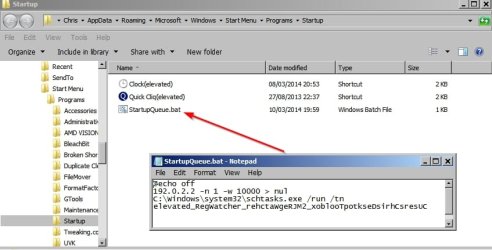
StartupQueue2.jpg

Example batch file (not for use on other machines):

@echo off
192.0.2.2 -n 1 -w 10000 > nul
C:\Windows\system32\schtasks.exe /run /tn TASKNAME

In the above example 10000 (milliseconds)sets the required delay of 10 seconds- use a higher or lower number if needed. Replace TASKNAME with the name of your task. You can find it in Task Scheduler. (Start > Run then type Taskschd.msc then click OK).

Note: You may get better results if you substitute the line

192.0.2.2 -n 1 -w 10000 > nul

with

ping -n 40 127.0.0.1 > NUL 2>&1

For this test
elevated_RegWatcher_rehctaWgeRJM2_xoblooTpotkseDsirhCsresUC is the task name as shown in Task Scheduler.

Screenshot of Task Scheduler:
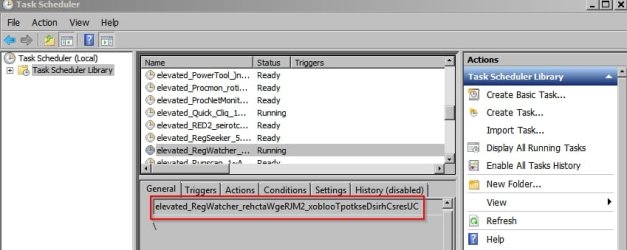
Task Scheduler.jpg

If you have security software on your machine that might interfere with unknown files that attempt to run be sure to set it to trust the file that you created.
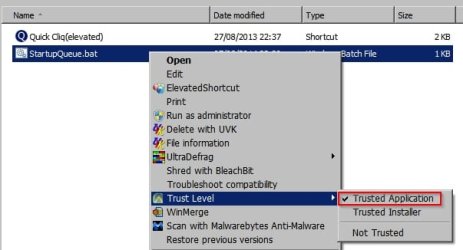
Trust Level.jpg

Reboot.

That's it.
 
Last edited:

My Computer

Computer type
Laptop
Computer Manufacturer/Model Number
ASUS
OS
Microsoft Windows 7 Home Premium 64-bit 7601 Multiprocessor Free Service Pack 1
CPU
AMD C-60 APU with Radeon(tm) HD Graphics
Motherboard
ASUSTeK COMPUTER INC. X501U
Memory
4.00 GB
Graphics Card(s)
AMD Radeon HD 6290 Graphics
Sound Card
(1) AMD High Definition Audio Device (2) Realtek High Defi
Screen Resolution
1366 x 768 x 32 bits (4294967296 colors) @ 60 Hz
Hard Drives
Hitachi HTS545050A7E380 SATA Disk Device
Antivirus
Comodo CIS & FW, SecureAplus App Whitelisting, Threatfire
Browser
Cyberfox 64bit, Opera 64bit, Airfox
Other Info
Spy-The-Spy, HitmanPro.Alert, Norton Connect Safe, MJRegWatcher, BitDefender TrafficLight, Voodoo Shield, Zemana AntiMalware

My Computer

Computer Manufacturer/Model Number
HP Media Center
OS
Windows 7 32 bit
CPU
AMD 5200+ dual core
Memory
2 GB
Graphics Card(s)
NVidia GeForce 6150SE 128 MB
Monitor(s) Displays
CRT
Screen Resolution
1280x1024
Hard Drives
500 GB Sata internal :

SIIG USB 3.0 docking stations w/WD Caviar Black 6 Gb/s drives
Keyboard
PS/2
Mouse
PS/2 Wheel Mouse
Other Info
SIIG USB 3.0 PCIexpress card.
Wait in batch script

ping for delay using 127.0.0.1 does not work as expected.

scripting - How to wait in a batch script? - Stack Overflow

relevant excerpt:

NOTE: The 192.0.2.x address is reserved as per RFC 3330 so it definitely will not exist in the real world. Quoting from the spec:
yadda yadda


Hi,

Thanks very much indeed for the advice. The script that I'm using seems to work okay and I've tested using different delays.

I got the suggestion here:

command line - windows ping cmd help - Super User

and looked here plus a few other places:

command line - windows ping cmd help - Super User

Also tried the following - neither of them worked:

@echo off
start "" "C:\Users\Chris\Desktop\Toolbox 2\MJRegWatcher\RegWatcher.exe"
timeout /10

@echo off
start "" "C:\Users\Chris\Desktop\Toolbox 2\MJRegWatcher\RegWatcher.exe"
timeout /t 10

Then I tried using wait and sleep and also tried including RUNAS but nothing worked.

If I understand you correctly I should use a non-existent address?
 

My Computer

Computer type
Laptop
Computer Manufacturer/Model Number
ASUS
OS
Microsoft Windows 7 Home Premium 64-bit 7601 Multiprocessor Free Service Pack 1
CPU
AMD C-60 APU with Radeon(tm) HD Graphics
Motherboard
ASUSTeK COMPUTER INC. X501U
Memory
4.00 GB
Graphics Card(s)
AMD Radeon HD 6290 Graphics
Sound Card
(1) AMD High Definition Audio Device (2) Realtek High Defi
Screen Resolution
1366 x 768 x 32 bits (4294967296 colors) @ 60 Hz
Hard Drives
Hitachi HTS545050A7E380 SATA Disk Device
Antivirus
Comodo CIS & FW, SecureAplus App Whitelisting, Threatfire
Browser
Cyberfox 64bit, Opera 64bit, Airfox
Other Info
Spy-The-Spy, HitmanPro.Alert, Norton Connect Safe, MJRegWatcher, BitDefender TrafficLight, Voodoo Shield, Zemana AntiMalware
If I understand you correctly I should use a non-existent address?
Right. I was doing the same thing for a delay. I was only going for a 5 or 10 second delay. That's probably why I never noticed the discrepancy. In the link I posted this ping is used:
ping 192.0.2.2 -n 1 -w 10000 > nul

by using a non-existent address it allows you to use the -w param to get longer delays. As this person pointed out, if you use 127.0.0.1 that's the current host. It will answer the ping. So the -w will never time out. By using an IP guaranteed not to exist, the value for -w will time out on every ping. In his example to get a minute delay instead of 10 seconds you can change the -n value to 6 etc..

I should have organized code snippets. If I did for batch, that would be one of them. :)
 

My Computer

Computer Manufacturer/Model Number
HP Media Center
OS
Windows 7 32 bit
CPU
AMD 5200+ dual core
Memory
2 GB
Graphics Card(s)
NVidia GeForce 6150SE 128 MB
Monitor(s) Displays
CRT
Screen Resolution
1280x1024
Hard Drives
500 GB Sata internal :

SIIG USB 3.0 docking stations w/WD Caviar Black 6 Gb/s drives
Keyboard
PS/2
Mouse
PS/2 Wheel Mouse
Other Info
SIIG USB 3.0 PCIexpress card.
Launch a program on boot - delayed, with no UAC - Updated.

I've just found another solution. Tested on my machine and working just fine.

Software required:

AUTORUN ORGANIZER 1.31 - Advanced Autorun Manager for Windows

Alternate download:

Download Autorun Organizer - MajorGeeks

How to use:

Create an Elevated Shortcut with no UAC prompt - to the program that you need to run on startup. See the tutorial here:

http://www.sevenforums.com/tutorials/11949-elevated-program-shortcut-without-uac-prompt-create.html

Once you have created the Elevated Shortcut get the taskname from task scheduler. In this example I've created an Elevated Shortcut for the process Regwatcher.exe

Task Scheduler.jpg

Then run Autorun Organizer by right clicking and choosing "Run as Administrator"

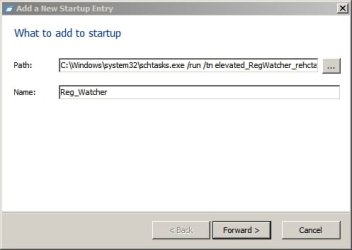
In the window that opens click the "Add" button in the toolbar. Enter the path as shown:

C:\Windows\system32\schtasks.exe /run /tn taskname

If your taskname contains spaces - wrap the taskname in quotes.

Give the Startup Entry a name.

Add a New Startup Entry.jpg

Click "Forward"

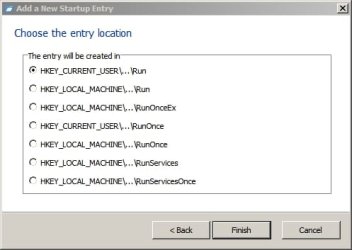
Choose a location for the entry - refer to the registry locations shown in Method 4 of the tutorial here:

http://www.sevenforums.com/tutorials/1401-startup-programs-change.html

Add a New Startup Entry 2.jpg

Add the desired location then click "Finish"

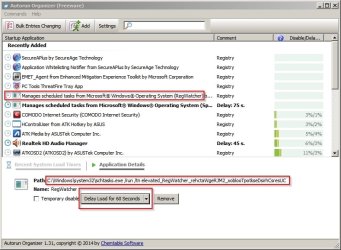
Highlight the entry that you've just created and choose the required delay in seconds. Click the drop down arrow to manually input a delay.

Delay Load.jpg

   Tip

You can right click any existing entry shown in the Autorun Organizer window and set a delay.


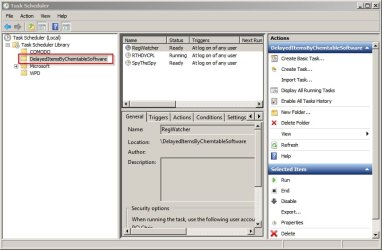
A new task will be created and is shown in Task Scheduler under "DelayedItemsByChemtableSofware"

Task Scheduler Delayed Items.jpg

Edit:

   Note

Unfotunately once Autorun Organizer has done it's job and all delayed startup items have launched it will leave a process running in the background - StartupCheckingService.exe


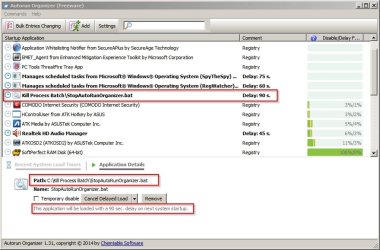
However you can actually use AutoRun Organizer to launch a delayed batch file to kill it's own running process.

Here's how:

Copy the following into notepad and save it somewhere handy as a batch file.

Code:
@echo off

TASKKILL /F /IM StartupCheckingService.exe

Add the batch file to the delayed startup list by adding it's file path.

Stop Autorun Organizer.jpg

Choose a sufficient delay - the batch file must run only after all other delayed items have launched.
 
Last edited:

My Computer

Computer type
Laptop
Computer Manufacturer/Model Number
ASUS
OS
Microsoft Windows 7 Home Premium 64-bit 7601 Multiprocessor Free Service Pack 1
CPU
AMD C-60 APU with Radeon(tm) HD Graphics
Motherboard
ASUSTeK COMPUTER INC. X501U
Memory
4.00 GB
Graphics Card(s)
AMD Radeon HD 6290 Graphics
Sound Card
(1) AMD High Definition Audio Device (2) Realtek High Defi
Screen Resolution
1366 x 768 x 32 bits (4294967296 colors) @ 60 Hz
Hard Drives
Hitachi HTS545050A7E380 SATA Disk Device
Antivirus
Comodo CIS & FW, SecureAplus App Whitelisting, Threatfire
Browser
Cyberfox 64bit, Opera 64bit, Airfox
Other Info
Spy-The-Spy, HitmanPro.Alert, Norton Connect Safe, MJRegWatcher, BitDefender TrafficLight, Voodoo Shield, Zemana AntiMalware
Back
Top