Solved Launch bookmark with Run keyboard command

nabilalk

New member
Power User
Local time
11:20 PM
Messages
299
I'm a big fan of saving shortcuts to the System folder and then launching programs with the Run command

Example: Documents folder launched via Run => docs (it's fast)

I cannot figure out how to do the same for bookmarks for websites. When I add a bookmark shortcut I get an error when trying to launch from Run.

Any help would be appreciated.

:cool:
 

My Computer

Computer Manufacturer/Model Number
Gateway M6827
OS
Win 7 Professional 32-bit
CPU
Intel Core 2 Duo CPU T5750 @ 2.00 GHz
Memory
3GB
Monitor(s) Displays
ViewSonic Vx900
Screen Resolution
1280x1024
Hard Drives
150GB Hard Drive
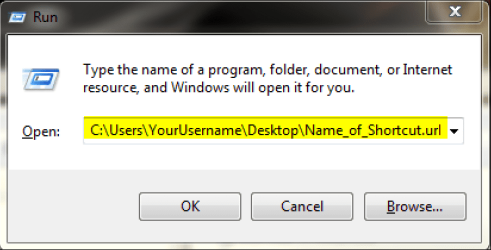
Give your URL shortcut a short name, type the name of the shortcut to Run dialog:

Launch_URL_from_Run.png

Do not forget the .url extension.

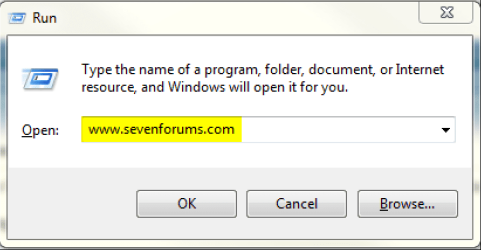
If you want to you can also type the whole URL on Run dialog to open a webpage. In this case you do not need shortcut on desktop:

Launch_URL_from_Run_2.png

Kari
 

My Computer

Computer type
Laptop
Computer Manufacturer/Model Number
HP ENVY 17-1150eg
OS
Windows 10 Pro x64 EN-GB
CPU
1.6 GHz Intel Core i7-720QM Processor
Memory
6 GB
Graphics Card(s)
ATI Mobility Radeon HD 5850 Graphics
Sound Card
Beats sound system with integrated subwoofer
Monitor(s) Displays
17" laptop display, 22" LED and 32" Full HD TV through HDMI
Screen Resolution
1600*900 (1), 1920*1080 (2&3)
Hard Drives
Internal: 2 x 500 GB SATA Hard Disk Drive 7200 rpm
External: 2TB for backups, 3TB USB3 network drive for media
Cooling
As Envy runs a bit warm, I have it on a Cooler Master pad
Keyboard
Logitech diNovo Media Desktop Laser (bluetooth)
Mouse
Logitech Performance Mouse MX
Internet Speed
50/10 Mbps VDSL
Antivirus
Windows Defender 4.3.9431.0
Browser
Maxthon 3.5.2., IE11
Give your URL shortcut a short name, type the name of the shortcut to Run dialog:

View attachment 199525

Do not forget the .url extension.

If you want to you can also type the whole URL on Run dialog to open a webpage. In this case you do not need shortcut on desktop:

View attachment 199524

Kari
Thanks for the info. Unfortunately, your solution is not what I'm after. I don't want to have to type out the whole url or the filepath. I want to type: Win+R to open Run dialog, and then "stream" for example without the quotes. And I want it to launch the URL in by default browser. I launch countless other apps and folders with that method Word (Microsoft Word), docs (My Documents) music (My Music) etc...

The whole point is to be as fast as possible with the keyboard. Unless I misunderstood you?
 

My Computer

Computer Manufacturer/Model Number
Gateway M6827
OS
Win 7 Professional 32-bit
CPU
Intel Core 2 Duo CPU T5750 @ 2.00 GHz
Memory
3GB
Monitor(s) Displays
ViewSonic Vx900
Screen Resolution
1280x1024
Hard Drives
150GB Hard Drive
First example in my post: Give your .url shortcut a short name. Launch RUN dialog, type the name of the shortcut as I told to launch website. You need to type also the .url extension.

If that is too slow for you, why don't you use batch files? Create for instance an SF.bat that includes the .url shortcut for Seven Forums. Now it's enough to type SF to RUN to launch Seven forums.

I assumed you understand that the location you save these shortcuts must be included in your Windows PATH environment variable?

I can not explain it more simply. Sorry.

Kari
 

My Computer

Computer type
Laptop
Computer Manufacturer/Model Number
HP ENVY 17-1150eg
OS
Windows 10 Pro x64 EN-GB
CPU
1.6 GHz Intel Core i7-720QM Processor
Memory
6 GB
Graphics Card(s)
ATI Mobility Radeon HD 5850 Graphics
Sound Card
Beats sound system with integrated subwoofer
Monitor(s) Displays
17" laptop display, 22" LED and 32" Full HD TV through HDMI
Screen Resolution
1600*900 (1), 1920*1080 (2&3)
Hard Drives
Internal: 2 x 500 GB SATA Hard Disk Drive 7200 rpm
External: 2TB for backups, 3TB USB3 network drive for media
Cooling
As Envy runs a bit warm, I have it on a Cooler Master pad
Keyboard
Logitech diNovo Media Desktop Laser (bluetooth)
Mouse
Logitech Performance Mouse MX
Internet Speed
50/10 Mbps VDSL
Antivirus
Windows Defender 4.3.9431.0
Browser
Maxthon 3.5.2., IE11
An alternative is to use a launcher that lets you create an alias. Some examples are Slickrun and FARR. In fact in Windows you can still do DosKey, believe it or not. I did a sort of mini-tutorial in a post here:

Tip of the day/General Tips etc - Page 11 - Digital Video Forums

edit: If the DosKey approach seems too complicated you might try using an AutoHotKey script to sit in the tray that uses "hotstrings" to expand abbreviations or run sections of script:

http://www.autohotkey.com/docs/Hotstrings.htm

For example, I have one when I'm typing in Chromium, like right now, I can hit the 'q' key twice in succesion then hit the Tab key, and it will select all the text in this editbox and launch another of my hotkey programs so I can easily paste it into another program.
 

My Computer

Computer Manufacturer/Model Number
HP Media Center
OS
Windows 7 32 bit
CPU
AMD 5200+ dual core
Memory
2 GB
Graphics Card(s)
NVidia GeForce 6150SE 128 MB
Monitor(s) Displays
CRT
Screen Resolution
1280x1024
Hard Drives
500 GB Sata internal :

SIIG USB 3.0 docking stations w/WD Caviar Black 6 Gb/s drives
Keyboard
PS/2
Mouse
PS/2 Wheel Mouse
Other Info
SIIG USB 3.0 PCIexpress card.
First example in my post: Give your .url shortcut a short name. Launch RUN dialog, type the name of the shortcut as I told to launch website. You need to type also the .url extension.

If that is too slow for you, why don't you use batch files? Create for instance an SF.bat that includes the .url shortcut for Seven Forums. Now it's enough to type SF to RUN to launch Seven forums.

I assumed you understand that the location you save these shortcuts must be included in your Windows PATH environment variable?

I can not explain it more simply. Sorry.

Kari
Thanks for taking the time. I guess I don't get what you mean by "give your .url shortcut a short name"? I have attached a shortcut to a url that I'm trying to launch. I had to put it in a folder and a zip in order to attach it. I put the shortcuts in the System folder (C:\Windows\System)

Thanks.
 

Attachments

My Computer

Computer Manufacturer/Model Number
Gateway M6827
OS
Win 7 Professional 32-bit
CPU
Intel Core 2 Duo CPU T5750 @ 2.00 GHz
Memory
3GB
Monitor(s) Displays
ViewSonic Vx900
Screen Resolution
1280x1024
Hard Drives
150GB Hard Drive
nabilalk,

The shortcut that you put in the system32 folder should just be named blackboard

open the run window

type blackboard.url <<< this is where you have to add ".url"

The OS hides that ".url" extension even if you tell the OS to show extensions.

Edit: here is an examle using another website:


But you really should consider learning AutoHotKey or AutoIt3 as mentioned in this post.
 
Last edited:

My Computer

Computer type
Laptop
Computer Manufacturer/Model Number
Employer provided Dell Latitude
OS
W7 Pro SP1 64bit
CPU
i7
Memory
8GB
Graphics Card(s)
Intel HD Graphics
Hard Drives
crappy SSD
Antivirus
Employer mandated Symantec Endpoint Protection
Browser
Pale Moon 64bit, IE11 64bit & Chrome 64bit
nabilalk,

The shortcut that you put in the system32 folder should just be named blackboard

open the run window

type blackboard.url <<< this is where you have to add ".url"

The OS hides that ".url" extension even if you tell the OS to show extensions.

Edit: here is an examle using another website:


But you really should consider learning AutoHotKey or AutoIt3 as mentioned in this post.
Got it! Thanks, and I will look at the Autohotkey options that you and others have mentioned. Also what app did you use to make the screenshare that you posted on Youtube?
 

My Computer

Computer Manufacturer/Model Number
Gateway M6827
OS
Win 7 Professional 32-bit
CPU
Intel Core 2 Duo CPU T5750 @ 2.00 GHz
Memory
3GB
Monitor(s) Displays
ViewSonic Vx900
Screen Resolution
1280x1024
Hard Drives
150GB Hard Drive

My Computer

Computer type
Laptop
Computer Manufacturer/Model Number
Employer provided Dell Latitude
OS
W7 Pro SP1 64bit
CPU
i7
Memory
8GB
Graphics Card(s)
Intel HD Graphics
Hard Drives
crappy SSD
Antivirus
Employer mandated Symantec Endpoint Protection
Browser
Pale Moon 64bit, IE11 64bit & Chrome 64bit
Back
Top