LCD Wide-screen Display

akramh

New member
Power User
VIP
Local time
7:18 AM
Messages
282
Location
Amman, Jordan
Hi, who here has a LCD Wide-screen Display? what model is it and how much did it cost you? I'm thinking of buying one, looked around in amazon but there are so many choices. I want at least 22", maybe samsong/viewsonic/LG as I heard they have the best price/quality. I don't want Audio or TV Tunner as that will make it more expensive, and also it will not be considered a computer part which will make it eligable for customs , our country does not put costums on computer related parts, but does on TV and other electronics.
 

My Computer

Computer Manufacturer/Model Number
home made
OS
Windows 7 7264x64(main), 7260x86(secendary), XP SP3 Triple Boot
CPU
Intel Core 2 Duo E7400 2.8Mhz
Motherboard
Intel G33 express chipset
Memory
2GB DD2 667
Graphics Card(s)
Intel(R) 82G33 Graphics and Memory Controller Hub
Sound Card
Realtek Built into the G31
Monitor(s) Displays
19"
Screen Resolution
1280x1024
Hard Drives
320GB SATA (Main), 160GB IDE (Backup)
Case
Gigabyte SETTO
Keyboard
Genius
Mouse
Logitech
Internet Speed
1MB Download, 128k Upload
Many LCD's are sold under different names, but are manufactured by the same company. Its really up to you on what features you would use and how much you want to spend.

One feature I like is Picture & Picture.

A good high resolution is always worth the extra dough, makes for great video/game picture quality.

Check with Newegg PC Monitors. They also have many to choose from.

With Seven being geared to Touch Screen, you might want to consider one of them. ;)

Newegg Touch screen Monitors
 

My Computer

Computer Manufacturer/Model Number
POS
OS
OS3.5
CPU
celery
Motherboard
Good Question ...Unknown
Memory
memory never forgets
Graphics Card(s)
OB
Sound Card
OB
Monitor(s) Displays
HUGE
Screen Resolution
168000000x105000000
Hard Drives
full
PSU
OEM 65watt
Case
N/A
Cooling
OB
Keyboard
OB
Mouse
mouse
Internet Speed
1 Trillion MBps
Other Info
Still An Awesome Forum!
Tocuhscreens! I don't need them but I think my father would like something like that.. thanks for the links!


Well my favorite so far:
SamSung 2343BWX 23" with the 2048 x 1152 resolution and just $219. the max resolution is even higher than 1080p (1920x1080p) but I heard it's also not good to have the typical TV screen resolutions for PCs... I wonder if it does support 1920x1080p as well...
my max card resolution is only 1600x1200 though, but that's just using the built-in intel graphics.. I could get a better video card later.
 

My Computer

Computer Manufacturer/Model Number
home made
OS
Windows 7 7264x64(main), 7260x86(secendary), XP SP3 Triple Boot
CPU
Intel Core 2 Duo E7400 2.8Mhz
Motherboard
Intel G33 express chipset
Memory
2GB DD2 667
Graphics Card(s)
Intel(R) 82G33 Graphics and Memory Controller Hub
Sound Card
Realtek Built into the G31
Monitor(s) Displays
19"
Screen Resolution
1280x1024
Hard Drives
320GB SATA (Main), 160GB IDE (Backup)
Case
Gigabyte SETTO
Keyboard
Genius
Mouse
Logitech
Internet Speed
1MB Download, 128k Upload
Well my favorite so far:
SamSung 2343BWX 23" with the 2048 x 1152 resolution and just $219. the max resolution is even higher than 1080p (1920x1080p) but I heard it's also not good to have the typical TV screen resolutions for PCs... I wonder if it does support 1920x1080p as well...
my max card resolution is only 1600x1200 though, but that's just using the built-in intel graphics.. I could get a better video card later.

Ha, akramh,

I bought the same LCD for my friend's daughter 3 months ago. Good LCD though without HDMI plug and speakers.

You can download its manual here:
http://www.samsung.com/hk_en/consum...pe=giantseries&model_cd=LS23MYZAFV/XSH&mode=C

It supoorts 1920x1080 and 1680x1050 and other resolutions, depending on your configuration.

You are highly advised to use the DVI cord to nonnect the graghic card and LCD if you buy SamSung 2343BWX 23". With this kind of connection, you will easily configure the resolusion via the operation system.

What's the best buy of LCD? To me, it must be good quality, best price, and most important, reliable after service!!

Hope this might be your reference.

woolswell
 
Last edited:

My Computer

OS
Server 2008 R2 SP1, Win7 x64 Pro SP1
CPU
Intel Core 2 Duo E6700 @3.3GHz
Motherboard
ASUS P5W DH DELUXE
Memory
Transcend DDRII 800 4GB (2 x 2GB )
Graphics Card(s)
GeForce 7950GX2
Sound Card
Realtek ALC882M Integrated on board
Monitor(s) Displays
ACER AL2723 27" LCD
Screen Resolution
1920x1200
Hard Drives
WD 6401 AALS 640G x 1
Seagate 160 GB (Barracuda 7200.7) x 2
PSU
Zippy PSL-6720P(G1)720W
Case
Thermaltake Kandalf VA9000SWA
Cooling
Zalman CNPS9500
Keyboard
Standard
Mouse
Standard
Internet Speed
10M, Cable
Other Info
Above is one of my desktops.
I use two flat panels, Samsung SyncMaster 244T ($870 with shipping) and Samsung LNT4665F ($1600 but was an extended warranty upgrade from a failed 32 inch 18 months after purchase). Prices have come down quite a bit since I purchased.

Connected to the 24 inch is a PS2 and XBox360, as well as the PC (secondary monitor). Once I started using the 46 inch as a PC monitor, there is simply no going back to something as small as the 24. The 46-inch often finds either one of the game systems attached to it, as well as the Samsung Home Theatre System, but we mostly watch PC-based video and streams.

I did try 720p (on the failed 32 inch Samsung) for a while, but as a long time user of 1600x1200 VGA, I could not tolerate the lower resolution due to the lack of workspace. I returned to my Sony 21-inch VGA during that period.

I am considering this one at TigerDirect for use on the laptop (did I mention my beautiful wife watches streaming video from her home nation?). It has DVI-D and HDMI inputs. Hellagood bargain.

One thing I DO NOT LIKE about widescreen and Windows 7 with the Explore shell - in WS, I keep the taskbar on the left side of the screen. This causes the Show Desktop icon to be at the opposite corner from the majority of my shell level mouse action (Start Orb and taskbar icons). I hate that.

Personally, I would trade specs for screen size/resolution. I do not game (my Number One does), so I don't care about response times, and I have never noticed any blurring in DVD playback.
 
I am consideringthis one at TigerDirect for use on the laptop (did I mention my beautiful wife watches streaming video from her home nation?). It has DVI-D and HDMI inputs. Hellagood bargain.

One thing I DO NOT LIKE about widescreen and Windows 7 with the Explore shell - in WS, I keep the taskbar on the left side of the screen. This causes the Show Desktop icon to be at the opposite corner from the majority of my shell level mouse action (Start Orb and taskbar icons). I hate that.

Personally, I would trade specs for screen size/resolution. I do not game (my Number One does), so I don't care about response times, and I have never noticed any blurring in DVD playback.

Hi, Atman,

The I-INC 281DPB 28" is pretty hot here in my country, too.:)

Frankly speaking, I will not choose the SamSung 2343BWX 23" today. 3 month ago, it was "good price" comparing with other LCDs when I chose it for my friend's daughter.

There are numorous better choices (at least in my country) since this is really a bad time for those LCD manufacturers. The price of most LCDs just goes down to the bottom today.

2048 x 1152 on a little 23" screen? I don't think it's very pratical.
 
Last edited:

My Computer

OS
Server 2008 R2 SP1, Win7 x64 Pro SP1
CPU
Intel Core 2 Duo E6700 @3.3GHz
Motherboard
ASUS P5W DH DELUXE
Memory
Transcend DDRII 800 4GB (2 x 2GB )
Graphics Card(s)
GeForce 7950GX2
Sound Card
Realtek ALC882M Integrated on board
Monitor(s) Displays
ACER AL2723 27" LCD
Screen Resolution
1920x1200
Hard Drives
WD 6401 AALS 640G x 1
Seagate 160 GB (Barracuda 7200.7) x 2
PSU
Zippy PSL-6720P(G1)720W
Case
Thermaltake Kandalf VA9000SWA
Cooling
Zalman CNPS9500
Keyboard
Standard
Mouse
Standard
Internet Speed
10M, Cable
Other Info
Above is one of my desktops.
Viewsonic's are good I'd go w/ that if it's less than Samsung. Why not get a 24"er?
 

My Computer

Computer Manufacturer/Model Number
Dell E520
OS
7600x64 RTM
CPU
Intel® Q6700, 2.66 GHz stock clock (upgraded)
Motherboard
Dell
Memory
4g (upgraded)
Graphics Card(s)
Sapphire Radeon Toxic HD 3870 512MB GDDR4 (upgraded)
Sound Card
HT Omega Claro Plus (upgraded)
Monitor(s) Displays
22' , 40"
Screen Resolution
1050, 1080p
Hard Drives
1.5tb (upgraded)
PSU
Zalman 600w (upgraded)
Case
Dell
Cooling
stock Dell
Keyboard
dell
Mouse
dell
Internet Speed
100m Fiber optical
Other Info
Bought the Dell secondhand for cheap and upgraded cpu, vga, ram, soundcard, psu and HDD's.

My Computer

OS
Server 2008 R2 SP1, Win7 x64 Pro SP1
CPU
Intel Core 2 Duo E6700 @3.3GHz
Motherboard
ASUS P5W DH DELUXE
Memory
Transcend DDRII 800 4GB (2 x 2GB )
Graphics Card(s)
GeForce 7950GX2
Sound Card
Realtek ALC882M Integrated on board
Monitor(s) Displays
ACER AL2723 27" LCD
Screen Resolution
1920x1200
Hard Drives
WD 6401 AALS 640G x 1
Seagate 160 GB (Barracuda 7200.7) x 2
PSU
Zippy PSL-6720P(G1)720W
Case
Thermaltake Kandalf VA9000SWA
Cooling
Zalman CNPS9500
Keyboard
Standard
Mouse
Standard
Internet Speed
10M, Cable
Other Info
Above is one of my desktops.
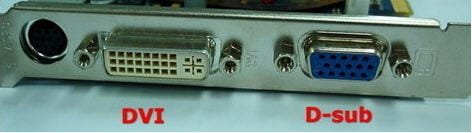
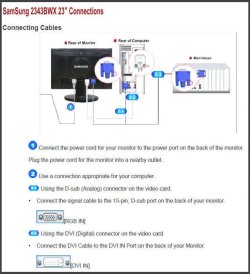
on the connection it says D-Sub DVI, does that mean it only supports DVI? because I don't have DVI.. I have an analog output from my current motherboard. what does D-sub stand for?

EDIT after some googling, I think d-sub refers to the 9-pin analog connection , which I hate, so I think I can use this monitor, right?
 

My Computer

Computer Manufacturer/Model Number
home made
OS
Windows 7 7264x64(main), 7260x86(secendary), XP SP3 Triple Boot
CPU
Intel Core 2 Duo E7400 2.8Mhz
Motherboard
Intel G33 express chipset
Memory
2GB DD2 667
Graphics Card(s)
Intel(R) 82G33 Graphics and Memory Controller Hub
Sound Card
Realtek Built into the G31
Monitor(s) Displays
19"
Screen Resolution
1280x1024
Hard Drives
320GB SATA (Main), 160GB IDE (Backup)
Case
Gigabyte SETTO
Keyboard
Genius
Mouse
Logitech
Internet Speed
1MB Download, 128k Upload
I'm running two of These ... and I love them.
They're the only ones I could find without a Glossy bezel that shines back at you or shows Fingerprints.

Samsungs warranty is great.
My previous two Samsung 204B's developed a backlite problem ..
I filled out the online warranty .. Got a service number ..
Took them to the local UPS store .. and about a week later two refurbs were delivered to my door... No charge for anything.
 

My Computer

Computer Manufacturer/Model Number
HP d4996t (upgraded)
OS
XP MCE .... XP Pro 64 .... W7 U x64
CPU
E6750, 2.67GHz C2D
Memory
4GB, PC2 6400
Graphics Card(s)
GeForce 9400GT
Monitor(s) Displays
Twin Samsung 2443BWT
Screen Resolution
1920x1200
Hard Drives
Many .. 3 Installed
PSU
460W
Internet Speed
Cable
Actually, D-Sub means any of the connectors that are shaped like a D (rounded corner trapezoid). LPT ports, COM ports, VGA, DVI, game port/midi et cetera.
 
on the connection it says D-Sub DVI, does that mean it only supports DVI? because I don't have DVI.. I have an analog output from my current motherboard. what does D-sub stand for?

EDIT after some googling, I think d-sub refers to the 9-pin analog connection , which I hate, so I think I can use this monitor, right?

Images below will tell all:

Image 1:
1.JPG

Iamge 2:
2.JPG
 

My Computer

OS
Server 2008 R2 SP1, Win7 x64 Pro SP1
CPU
Intel Core 2 Duo E6700 @3.3GHz
Motherboard
ASUS P5W DH DELUXE
Memory
Transcend DDRII 800 4GB (2 x 2GB )
Graphics Card(s)
GeForce 7950GX2
Sound Card
Realtek ALC882M Integrated on board
Monitor(s) Displays
ACER AL2723 27" LCD
Screen Resolution
1920x1200
Hard Drives
WD 6401 AALS 640G x 1
Seagate 160 GB (Barracuda 7200.7) x 2
PSU
Zippy PSL-6720P(G1)720W
Case
Thermaltake Kandalf VA9000SWA
Cooling
Zalman CNPS9500
Keyboard
Standard
Mouse
Standard
Internet Speed
10M, Cable
Other Info
Above is one of my desktops.
thanks woolswell and Antman :) +rep for you both!

what does 20000:1 mean?
 

My Computer

Computer Manufacturer/Model Number
home made
OS
Windows 7 7264x64(main), 7260x86(secendary), XP SP3 Triple Boot
CPU
Intel Core 2 Duo E7400 2.8Mhz
Motherboard
Intel G33 express chipset
Memory
2GB DD2 667
Graphics Card(s)
Intel(R) 82G33 Graphics and Memory Controller Hub
Sound Card
Realtek Built into the G31
Monitor(s) Displays
19"
Screen Resolution
1280x1024
Hard Drives
320GB SATA (Main), 160GB IDE (Backup)
Case
Gigabyte SETTO
Keyboard
Genius
Mouse
Logitech
Internet Speed
1MB Download, 128k Upload

My Computer

Computer Manufacturer/Model Number
Keeps changing - (Custom)
OS
Windows 7 Professional x64
CPU
Intel Core i7 860
Motherboard
Gigabyte GA-P55-UD4P
Memory
4GB DDR3 Mushkin 1600Mhz @ 7-8-7-20
Graphics Card(s)
MSI GTS250 1GB DDR3 Twin Frozr
Sound Card
Onboard realtek
Monitor(s) Displays
Samsung SyncMaster 24" P2450 + Samsung 20" 2033
Screen Resolution
1920 X 1080 and 1600 X 900 (#2 system 1440 X 900)
Hard Drives
Patriot Inferno 120GB SSD + 3 WD Blue 640GB drives
PSU
Corsair 750 HX Modular
Case
Lancool PC-K62
Cooling
Cooler Master TX3 CPU cooler and 4-140mm and 1-120mm case
Keyboard
Gigabyte USB keyboard
Mouse
Microsoft wireless laser mouse 5000
Internet Speed
7 Mb down 1.5 up
Other Info
System #2: AMD Phenom II X6 1055T (Freezer 7 Pro cooler) - Gigabyte 880GMA-UD2H - WD 500GB Black - 9500GT (1GB) 500W OCZ modular PSU - Antec 200 case. System #3 (LapTop) Core 2 Duo T6670 - 320GB 7200RPM HD - 4GB DDR3 RAM.
what does 20000:1 mean?
I think you're referring to the contrast ratio ... The range between black and white.
Basically speaking, it means that the blacks will be really black .. and the Colors will be bright.
The higher the number .. the better looking the picture will (should) be.
 

My Computer

Computer Manufacturer/Model Number
HP d4996t (upgraded)
OS
XP MCE .... XP Pro 64 .... W7 U x64
CPU
E6750, 2.67GHz C2D
Memory
4GB, PC2 6400
Graphics Card(s)
GeForce 9400GT
Monitor(s) Displays
Twin Samsung 2443BWT
Screen Resolution
1920x1200
Hard Drives
Many .. 3 Installed
PSU
460W
Internet Speed
Cable
thanks woolswell and Antman :) +rep for you both!

what does 20000:1 mean?

You are welcome, akramh,

It's very easy to find your replies here and there in our SevenForums. If you got something to ask, I should be ashamed of myself for no reponding.......:confused:

The following basic knowledge of LCD monitors might be useful to you:
Monitor Specification.........(TFT CENTRAL)
http://www.tftcentral.co.uk/specs.htm

...........................................................................................................................

In my previous reply, I declared that the price of LCD monitors is going to the bottom nowadays.

Take an example, the Samsung F2380 23" plus a 4GB flash disk is only US$ 287 here. What a killing price of a 23" LCD monitor with C-PVA panel!!! If you can purchase the F2380 23" with this price in Jordan, just go for it.


Samsung F2380 23":
http://www.digitalversus.com/news_id-9497.html
 
Last edited:

My Computer

OS
Server 2008 R2 SP1, Win7 x64 Pro SP1
CPU
Intel Core 2 Duo E6700 @3.3GHz
Motherboard
ASUS P5W DH DELUXE
Memory
Transcend DDRII 800 4GB (2 x 2GB )
Graphics Card(s)
GeForce 7950GX2
Sound Card
Realtek ALC882M Integrated on board
Monitor(s) Displays
ACER AL2723 27" LCD
Screen Resolution
1920x1200
Hard Drives
WD 6401 AALS 640G x 1
Seagate 160 GB (Barracuda 7200.7) x 2
PSU
Zippy PSL-6720P(G1)720W
Case
Thermaltake Kandalf VA9000SWA
Cooling
Zalman CNPS9500
Keyboard
Standard
Mouse
Standard
Internet Speed
10M, Cable
Other Info
Above is one of my desktops.

My Computer

Computer Manufacturer/Model Number
Black_Box (homebuilt)
OS
windows 7 RTM x64
CPU
Phenom II 965 Quad Core 3.4Ghz
Motherboard
Asus M4A79T Deluxe
Memory
Mushkin Blackline 8GB (4x2gb)
Graphics Card(s)
XFX Radeon 5970 Black Edition
Sound Card
onboard
Monitor(s) Displays
Dell 2408WPF-main Dell E248WFP-secondary
Screen Resolution
1920x1200-main 1920x1200-secondary
Hard Drives
OCZ Vertex Limited Edition 100GB (OS)
x1 WD Black Edition 500GB drive (Storage)
PSU
XFX 850w Black Edition (Modular)
Case
Mountian Mods H2go
Cooling
CoolITSystems ECO A.L.C.
Keyboard
Logitech MX 5500 wireless keyboard
Mouse
Razor Copperhead
Internet Speed
16Mb down/2Mb up Wowway Cable Internet
Once you go "Dual" you'll never go back.
True dat.

In another thread, Antman posted/boasted:

I wrestled a bit with VirtualBox, but it is now working flawlessly and suits my purpose 100%. I now have a virtual streaming HTPC running on a second monitor. This VM HTPC has it's own HID - ATI Remote Wonder Plus. Two separate users are utilizing a single computer independently and simultaneously.
 
I take it this is not going to be used for serious photography work. If it is, you want to check for color and brightness uniformity across the screen, and have some hardware-based way of calibrating them. I'm using a couple of these which admitedly are not cheap but very uniform and have a good viewing angle tolerance:

EIZO FlexScan SX2461W

As already stated above, once you go dual anything less is too cruel :D.
 

My Computer

Computer Manufacturer/Model Number
Custom workstation /// Lenovo X61t tablet notebook
OS
Windows 7 RTM x64
CPU
Core i7 980X @ 4.04GHz OC /// Core Duo L7500 @ 1.6GHz
Motherboard
Asus P6T6 WS Revolution ///
Memory
12GB G. Skill @ DDR-1600 OC /// 4GB
Graphics Card(s)
Saphire HD4870 Toxic 1GB /// Intel Mobile GMA X3100
Monitor(s) Displays
Dual Eizo 24" SX2461W /// 12"
Screen Resolution
1920x1200 /// 1400x1050
Hard Drives
Workstation:
5x 750GB Barracuda-11 on Areca ARC-1220;
4x 1.5TB Barracuda-11 on Intel ICH10R;
Volumes:
300GB RAID 0, 2.7TB RAID 10 on Intel;
100GB RAID 0, 1.4TB RAID 10 on Areca ///
Notebook: G.Skill Titan 256GB SSD
PSU
Tagan ITZ 1100
Case
GHS-1500 ///
Cooling
Thermalright IFX-14 + a slew of stealth fans ///
Keyboard
Logitech Edge ///
Mouse
Logitech Wireless Optical Trackball
Internet Speed
5Mbps down / 820Kbps up
Other Info
Main use: photography;
DVD Drive: L.G GGW-H20L Blu-Ray / DVD;
OC: QPI/DRAM @ 1.33v, CPU @ 1.293v, DRAM Bus @ 1.65v, CPU PLL @ 1.88v, CPU mult = 25x, BCLK = 160, DDR3-1604 @ 7-8-7-24
in sig & sys specs

$230 USD back in Feb
 

My Computer

Computer Manufacturer/Model Number
Asus V2-M3M8200 Barebones
OS
Windows 7 Professional x64
CPU
AMD Phenom II X4 925
Motherboard
V2-M3M8200 (basically a M3N78-VM)
Memory
4x1024mb Kingston HyperX DDR2-1066 KHX8500D2/1G
Graphics Card(s)
Asus GTS 450 OC
Sound Card
Creative Sound Blaster X-Fi Titanium PCIe
Monitor(s) Displays
Asus 24" LCD VH242H
Screen Resolution
1920x1080
Hard Drives
WDC WD5000AAKS
WDC WD5002ABYS
Seagate ST325062 USB-to-IDE
Fujitsu 160GB Pocket USB HDD
PSU
Antec Earthwatts EA-430D
Case
Asus V2-M3M8200
Cooling
120mm side fan & 80mm front & 92mm rear fan
Keyboard
Dell USB mini Multimedia
Mouse
Logitech MX518
Internet Speed
Comcast Xfinity
Other Info
Logitech Webcam Pro 9000
Accurian 40-1462 Speakers
little dot MKII Headphone Amp
Back
Top