Leadtek WinFast TV 2000 XP (Deluxe), Windows 7 Pro 64 B

Awesome to know that people still use this thread!!!

OH, I can also confirm that this procedure works 100% for Windows 8 Pro x64 too!

How do I know, because that is what I am currently using!

And guys, please click my rep button if this post helps you.....

Enjoy....
 

My Computer My Computer

At a glance

Windows 8 Pro x64AMD Phenom II X6 1055T8GB DDR2-800 (4 X 2GB)POV 560Ti 2GB and XFX 8800 GTS 512
Computer type
PC/Desktop
Computer Manufacturer/Model Number
Custom
OS
Windows 8 Pro x64
CPU
AMD Phenom II X6 1055T
Motherboard
ASUS Crosshair II Formula
Memory
8GB DDR2-800 (4 X 2GB)
Graphics Card(s)
POV 560Ti 2GB and XFX 8800 GTS 512
Sound Card
Onboard
Monitor(s) Displays
Benq G2420HDB & HP ww2207
Screen Resolution
1920x1080 @ 60Hz & 1680x1050 @ 60Hz
Hard Drives
Seagate 250GB - Boot,
Seagate 500GB x2 - in RAID as Personal Data Drive,
Seagate 2TB - As 1st data drive
Seagate 2TB - As 2nd data drive
PSU
Antec 850W
Case
Cooler Master Centurion
Cooling
Zalman CNPS9300
Keyboard
Logitech G11
Mouse
Logitech Performance MX
Internet Speed
4096 / 640 Uncapped
Antivirus
ESET NOD 32
Browser
Firefox
Please HELP!!! Where can I find btwdmdrv-src5.3.8.64.zip? I don`t find anymore.
 

My Computer My Computer

At a glance

Windows 7 64bit
Computer type
PC/Desktop
OS
Windows 7 64bit
These are the only drivers I have for this card, and they are the one I use.

Hope it helps...
 

Attachments

My Computer My Computer

At a glance

Windows 8 Pro x64AMD Phenom II X6 1055T8GB DDR2-800 (4 X 2GB)POV 560Ti 2GB and XFX 8800 GTS 512
Computer type
PC/Desktop
Computer Manufacturer/Model Number
Custom
OS
Windows 8 Pro x64
CPU
AMD Phenom II X6 1055T
Motherboard
ASUS Crosshair II Formula
Memory
8GB DDR2-800 (4 X 2GB)
Graphics Card(s)
POV 560Ti 2GB and XFX 8800 GTS 512
Sound Card
Onboard
Monitor(s) Displays
Benq G2420HDB & HP ww2207
Screen Resolution
1920x1080 @ 60Hz & 1680x1050 @ 60Hz
Hard Drives
Seagate 250GB - Boot,
Seagate 500GB x2 - in RAID as Personal Data Drive,
Seagate 2TB - As 1st data drive
Seagate 2TB - As 2nd data drive
PSU
Antec 850W
Case
Cooler Master Centurion
Cooling
Zalman CNPS9300
Keyboard
Logitech G11
Mouse
Logitech Performance MX
Internet Speed
4096 / 640 Uncapped
Antivirus
ESET NOD 32
Browser
Firefox
I can`t install...
XeW1z
 

Attachments

  • tvcard.png
    tvcard.png
    36.2 KB · Views: 7

My Computer My Computer

At a glance

Windows 7 64bit
Computer type
PC/Desktop
OS
Windows 7 64bit
OK, I have no idea why it is looking for Serial Port drivers....

What TV card do you have? Make and Model....
 

My Computer My Computer

At a glance

Windows 8 Pro x64AMD Phenom II X6 1055T8GB DDR2-800 (4 X 2GB)POV 560Ti 2GB and XFX 8800 GTS 512
Computer type
PC/Desktop
Computer Manufacturer/Model Number
Custom
OS
Windows 8 Pro x64
CPU
AMD Phenom II X6 1055T
Motherboard
ASUS Crosshair II Formula
Memory
8GB DDR2-800 (4 X 2GB)
Graphics Card(s)
POV 560Ti 2GB and XFX 8800 GTS 512
Sound Card
Onboard
Monitor(s) Displays
Benq G2420HDB & HP ww2207
Screen Resolution
1920x1080 @ 60Hz & 1680x1050 @ 60Hz
Hard Drives
Seagate 250GB - Boot,
Seagate 500GB x2 - in RAID as Personal Data Drive,
Seagate 2TB - As 1st data drive
Seagate 2TB - As 2nd data drive
PSU
Antec 850W
Case
Cooler Master Centurion
Cooling
Zalman CNPS9300
Keyboard
Logitech G11
Mouse
Logitech Performance MX
Internet Speed
4096 / 640 Uncapped
Antivirus
ESET NOD 32
Browser
Firefox
Winfast TV2000 XP Deluxe
 

My Computer My Computer

At a glance

Windows 7 64bit
Computer type
PC/Desktop
OS
Windows 7 64bit
Well there's your problem then!!!!!

This thread and these drivers ONLY work for the TV2000 Deluxe card, NOT the XP card...
I did mention this previously in this thread!

You can get Windows 7 drivers from the Leadtech website...

Good luck...
 

My Computer My Computer

At a glance

Windows 8 Pro x64AMD Phenom II X6 1055T8GB DDR2-800 (4 X 2GB)POV 560Ti 2GB and XFX 8800 GTS 512
Computer type
PC/Desktop
Computer Manufacturer/Model Number
Custom
OS
Windows 8 Pro x64
CPU
AMD Phenom II X6 1055T
Motherboard
ASUS Crosshair II Formula
Memory
8GB DDR2-800 (4 X 2GB)
Graphics Card(s)
POV 560Ti 2GB and XFX 8800 GTS 512
Sound Card
Onboard
Monitor(s) Displays
Benq G2420HDB & HP ww2207
Screen Resolution
1920x1080 @ 60Hz & 1680x1050 @ 60Hz
Hard Drives
Seagate 250GB - Boot,
Seagate 500GB x2 - in RAID as Personal Data Drive,
Seagate 2TB - As 1st data drive
Seagate 2TB - As 2nd data drive
PSU
Antec 850W
Case
Cooler Master Centurion
Cooling
Zalman CNPS9300
Keyboard
Logitech G11
Mouse
Logitech Performance MX
Internet Speed
4096 / 640 Uncapped
Antivirus
ESET NOD 32
Browser
Firefox
PLEASE NOTE: THIS IS ONLY FOR THE WINFAST TV2000 XP DELUXE CARD!!! Not sure about the others for now!!!

I didn`t find drivers for WINFAST TV2000 XP Deluxe card x64 on Leadtek website
 

My Computer My Computer

At a glance

Windows 7 64bit
Computer type
PC/Desktop
OS
Windows 7 64bit
OK, sorry man, I have a million things on the go here.....

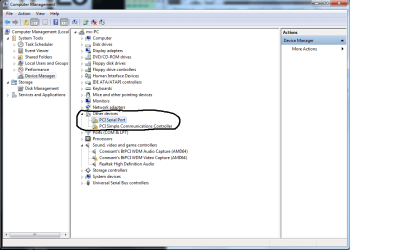
Just looking at your screen shot, the TV card IS ALREADY installed!

I have attached a screen shot of my 2 drivers installed too.

Not sure what drivers you need for the Serial card you have.

All you need to do is install Dscaler and you are good to go....
 

Attachments

  • Installed.jpg
    Installed.jpg
    17.7 KB · Views: 180

My Computer My Computer

At a glance

Windows 8 Pro x64AMD Phenom II X6 1055T8GB DDR2-800 (4 X 2GB)POV 560Ti 2GB and XFX 8800 GTS 512
Computer type
PC/Desktop
Computer Manufacturer/Model Number
Custom
OS
Windows 8 Pro x64
CPU
AMD Phenom II X6 1055T
Motherboard
ASUS Crosshair II Formula
Memory
8GB DDR2-800 (4 X 2GB)
Graphics Card(s)
POV 560Ti 2GB and XFX 8800 GTS 512
Sound Card
Onboard
Monitor(s) Displays
Benq G2420HDB & HP ww2207
Screen Resolution
1920x1080 @ 60Hz & 1680x1050 @ 60Hz
Hard Drives
Seagate 250GB - Boot,
Seagate 500GB x2 - in RAID as Personal Data Drive,
Seagate 2TB - As 1st data drive
Seagate 2TB - As 2nd data drive
PSU
Antec 850W
Case
Cooler Master Centurion
Cooling
Zalman CNPS9300
Keyboard
Logitech G11
Mouse
Logitech Performance MX
Internet Speed
4096 / 640 Uncapped
Antivirus
ESET NOD 32
Browser
Firefox

My Computer My Computer

At a glance

Windows 8 Pro x64AMD Phenom II X6 1055T8GB DDR2-800 (4 X 2GB)POV 560Ti 2GB and XFX 8800 GTS 512
Computer type
PC/Desktop
Computer Manufacturer/Model Number
Custom
OS
Windows 8 Pro x64
CPU
AMD Phenom II X6 1055T
Motherboard
ASUS Crosshair II Formula
Memory
8GB DDR2-800 (4 X 2GB)
Graphics Card(s)
POV 560Ti 2GB and XFX 8800 GTS 512
Sound Card
Onboard
Monitor(s) Displays
Benq G2420HDB & HP ww2207
Screen Resolution
1920x1080 @ 60Hz & 1680x1050 @ 60Hz
Hard Drives
Seagate 250GB - Boot,
Seagate 500GB x2 - in RAID as Personal Data Drive,
Seagate 2TB - As 1st data drive
Seagate 2TB - As 2nd data drive
PSU
Antec 850W
Case
Cooler Master Centurion
Cooling
Zalman CNPS9300
Keyboard
Logitech G11
Mouse
Logitech Performance MX
Internet Speed
4096 / 640 Uncapped
Antivirus
ESET NOD 32
Browser
Firefox
I`ve installed DScaler, and I`ve created DScaler.ini file and I put in the folder ProgramFiles(x86)/DScaler, but no picture appears.
 

My Computer My Computer

At a glance

Windows 7 64bit
Computer type
PC/Desktop
OS
Windows 7 64bit
Hi again...

1) Have you configured the BT848.inf file correctly as mentioned in the instructions I posted a few pages back?

2) As I have also previously mentioned,I am in South Africa, and my dscaler.ini settings will be VERY different from yours (unless you are also in South Africa!). You will need to run through the setup in DScaler and configure the tuner settings to which ever part of the world you are in. I can take a while!

3) The DScaler.ini file should be in [FONT=&quot]C:\Users\%username%\Application Data\DScaler4\DScaler.ini[/FONT]


If it still does not work after this, you can do 1 of 2 things....
1) Re-install Windows XP on your system and use the original software.
2) Go to your nearest TV shop and buy a small TV to put next to your computer.


Hope this can help you.
 

My Computer My Computer

At a glance

Windows 8 Pro x64AMD Phenom II X6 1055T8GB DDR2-800 (4 X 2GB)POV 560Ti 2GB and XFX 8800 GTS 512
Computer type
PC/Desktop
Computer Manufacturer/Model Number
Custom
OS
Windows 8 Pro x64
CPU
AMD Phenom II X6 1055T
Motherboard
ASUS Crosshair II Formula
Memory
8GB DDR2-800 (4 X 2GB)
Graphics Card(s)
POV 560Ti 2GB and XFX 8800 GTS 512
Sound Card
Onboard
Monitor(s) Displays
Benq G2420HDB & HP ww2207
Screen Resolution
1920x1080 @ 60Hz & 1680x1050 @ 60Hz
Hard Drives
Seagate 250GB - Boot,
Seagate 500GB x2 - in RAID as Personal Data Drive,
Seagate 2TB - As 1st data drive
Seagate 2TB - As 2nd data drive
PSU
Antec 850W
Case
Cooler Master Centurion
Cooling
Zalman CNPS9300
Keyboard
Logitech G11
Mouse
Logitech Performance MX
Internet Speed
4096 / 640 Uncapped
Antivirus
ESET NOD 32
Browser
Firefox
Hi guys,

Time to revive a VERY old thread!!! :)

I have put a VERY comprehensive guide together for installing this...

Drivers and modified files are attached, as is the complete guide.

Let me know how it goes! ;)

Thank you! It worked perfectly (I just needed the capture from composite video, for security cam)
Card is Winfast 2000 XP Deluxe, sys win 7 ultimate 64x
 

My Computer My Computer

At a glance

win7
Computer type
PC/Desktop
OS
win7
Glad you got it sorted! :)
 

My Computer My Computer

At a glance

Windows 8 Pro x64AMD Phenom II X6 1055T8GB DDR2-800 (4 X 2GB)POV 560Ti 2GB and XFX 8800 GTS 512
Computer type
PC/Desktop
Computer Manufacturer/Model Number
Custom
OS
Windows 8 Pro x64
CPU
AMD Phenom II X6 1055T
Motherboard
ASUS Crosshair II Formula
Memory
8GB DDR2-800 (4 X 2GB)
Graphics Card(s)
POV 560Ti 2GB and XFX 8800 GTS 512
Sound Card
Onboard
Monitor(s) Displays
Benq G2420HDB & HP ww2207
Screen Resolution
1920x1080 @ 60Hz & 1680x1050 @ 60Hz
Hard Drives
Seagate 250GB - Boot,
Seagate 500GB x2 - in RAID as Personal Data Drive,
Seagate 2TB - As 1st data drive
Seagate 2TB - As 2nd data drive
PSU
Antec 850W
Case
Cooler Master Centurion
Cooling
Zalman CNPS9300
Keyboard
Logitech G11
Mouse
Logitech Performance MX
Internet Speed
4096 / 640 Uncapped
Antivirus
ESET NOD 32
Browser
Firefox
Hi Deanos,
Thanks for your instructions. I am ready to try it out, but I am a bit afraid to use the command prompt. Never did that before.
Do I typ the two lines with the bcedit.exe after each other? I mean do I have to click on ENTER after the DISABLE_INTEGRITY_CHECKS? And then typ the second line and hit Enter again?
And is there a space between exe and -set?
And this is for the Leadtek WinFast TV 2000 XP (Deluxe) card? Because there is some confusion in this thread about that.
And is the capture option working with this, because I want to use it for that.

Johanna
 

My Computer My Computer

At a glance

Windows 7 Home
Computer type
PC/Desktop
OS
Windows 7 Home
Which PVR2 application?

And which PVR2 application are you all running?
I have the PVR2 2.03.24 version, but I doubt that will work on my Windows 7 Home.
I tried to search for the application for Windows 7 but I couldn't find anything.

Johanna
 

My Computer My Computer

At a glance

Windows 7 Home
Computer type
PC/Desktop
OS
Windows 7 Home
Video but no audio

Ok I installed the card, followed the instructions of Deanos and the card is working now. :)
The only problem is, I don't have audio.
I have hooked up my VCR to the card. S video to the S video of the card.
Audio to audio in of card and then from audio out to line in on my computer. I selected the external audio at audio input and at the settings selected the line in at the audio mixer. But no audio!
I tried the other options too, but can't seem to get it to work.
Anybody has an idea?

Edited: Ok all is working now. Again thanks to Deanos for the instructions! :D

Johanna
 
Last edited:

My Computer My Computer

At a glance

Windows 7 Home
Computer type
PC/Desktop
OS
Windows 7 Home
Thanks Deanos. Now I can watch TV on Windows 7 64 Bit with Winfast TV 2000 XP Deluxe card. :)

PS: Just use DScaler422 Alpha. Any previous version does not work with Winfast TV 2000 XP Deluxe cards.
 

My Computer My Computer

At a glance

W7 64
Computer type
PC/Desktop
OS
W7 64
Awesome to know that people still use this thread!!!

OH, I can also confirm that this procedure works 100% for Windows 8 Pro x64 too!

How do I know, because that is what I am currently using!

And guys, please click my rep button if this post helps you.....

Enjoy....

Hi Deanos,

Firstly, thanks for your contribution!
My card using your 64bit driver detect OK @ windows 7 64bit

but the driver for VIDEO part did not work @ Windows 8 Pro 64bit. Do we need to modify driver with Windows 8?!?
 

My Computer My Computer

At a glance

Windows 7 Ultimate x64
Computer type
PC/Desktop
OS
Windows 7 Ultimate x64
Back
Top