Learning to use WMC

TiGmsm

New member
Local time
1:26 PM
Messages
2
Hello,

I'm new to WMC, long being a TiVo user. There are several features of the TiVo that I miss or have yet to find how to use. Can any help me by answering my questions directly or sending me a link to a site that might be able to help? Thanks!

I'm looking for the WMC equivalent of these TiVo features:

1. Season Pass: record all the episodes of a particular show playing on one channel. Do not duplicate episodes that repeat. This is good for premium channel shows that first air on Sunday night then repeat for a week or so.

2. Wish List: record all episodes of a particular show or type of show. Do not duplicate episodes that repeat. This is good for watching sports such at baseball where nearly every game is televised on two channels. Locally, the SF Giants games are broadcast on a local channel or the Comcast sportsnet channel.

3. Season Pass Manager: put all the Season Pass and Wish List requests in a single list that describes their recording priority when conflicts arise.

4. To Do List: a list of planned recordings. This shows what is scheduled for recording and when.

5. Keep at Most/Keep Until...: This a feature of both Season Pass and Wish List where I can specify the number of episodes to keep before being deleted to make room for new episodes.

6. Delete and Recover: When I delete shows, I sometimes realize I made a mistake and want to recover a show recently deleted. Is this possible with WMC?

7. Group shows by Title: Group all the episodes of a show in a directory. Can WMC do this? I may be too new to WMC to realize this will happen automatically as shows build up in my library.

I really like the commercial skip feature of MCEBuddy. Are there any tip sites that I could read to make the best use of this tool?

Thanks for any answers or suggestions!

-Bob
 
Last edited:

My Computer

OS
W7 Ultimate 64
Wow! Over 100 views but not one response. Is it something I said?

I'm trying to learn to use WMC after years of using TiVo. WMC seems pretty clucky in comparison. I imagine it's due to my TiVo-centric paradigm. Any tips on where to go to learn to best use WMC?

Help! Thanks!

-Bob
 

My Computer

OS
W7 Ultimate 64
Hi Bob, welcome to the Seven Forums.


This should cover most of your questions:
  • Clik a show in Guide, click Record series:
    .
    WMC_01.png
    .
  • You'll see now the red dots on that show in the guide, marking that recording is scheduled. One dot = single show recording, three dots = series recording:
    .
    WMC_08.png
    .
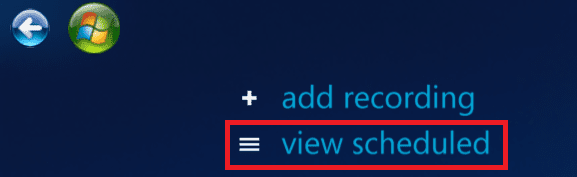
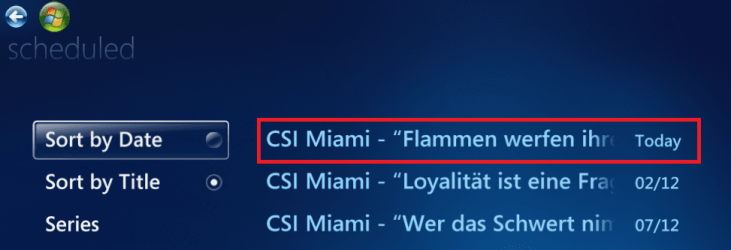
  • Now click TV > Recorded TV on WMC main page, on next page click the series you want to edit or click View scheduled. Click the show you want to edit:
    .
    WMC_03.png
    .
    WMC_04.png
    .
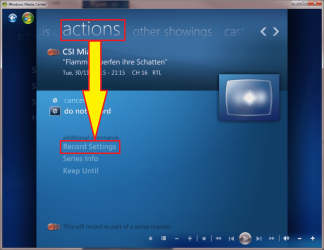
  • Click Actions > Record settings:
    .
    WMC_05.png
    .
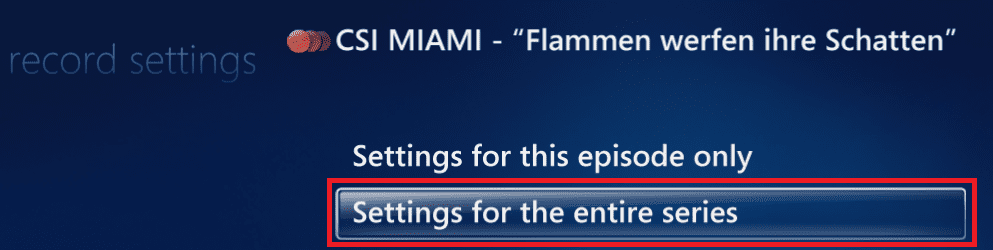
  • Click Settings for the entire series:
    .
    WMC_06.png
    .
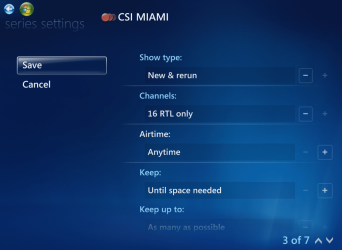
  • From settings page choose what, how and when to record, how long to keep and so on:
    .
    WMC_07.PNG
    .
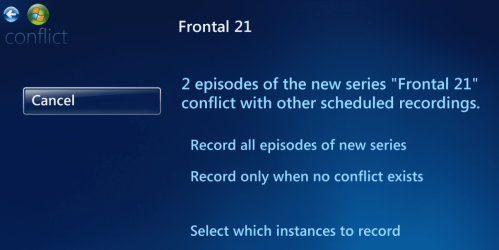
  • When you setup a new recording, a dialog tells you if there's a scheduling conflict. Choose priorities here:
    .
    WMC_09.PNG
That at least should help you to start.

Kari
 

My Computer

Computer type
Laptop
Computer Manufacturer/Model Number
HP ENVY 17-1150eg
OS
Windows 10 Pro x64 EN-GB
CPU
1.6 GHz Intel Core i7-720QM Processor
Memory
6 GB
Graphics Card(s)
ATI Mobility Radeon HD 5850 Graphics
Sound Card
Beats sound system with integrated subwoofer
Monitor(s) Displays
17" laptop display, 22" LED and 32" Full HD TV through HDMI
Screen Resolution
1600*900 (1), 1920*1080 (2&3)
Hard Drives
Internal: 2 x 500 GB SATA Hard Disk Drive 7200 rpm
External: 2TB for backups, 3TB USB3 network drive for media
Cooling
As Envy runs a bit warm, I have it on a Cooler Master pad
Keyboard
Logitech diNovo Media Desktop Laser (bluetooth)
Mouse
Logitech Performance Mouse MX
Internet Speed
50/10 Mbps VDSL
Antivirus
Windows Defender 4.3.9431.0
Browser
Maxthon 3.5.2., IE11
I too am new at wmc. Do I have to import my videos from my external HD to my C:/ drive for wmc to work effeciantly? I would like to just play them from my external drive using wmc. Thanks
 

My Computer

Computer Manufacturer/Model Number
gateway laptop
OS
win7 32bit win7 home premium
I too am new at wmc. Do I have to import my videos from my external HD to my C:/ drive for wmc to work effeciantly? I would like to just play them from my external drive using wmc. Thanks
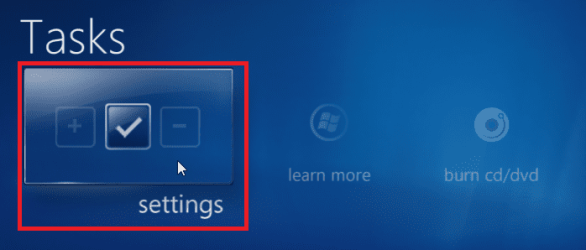
  • In WMC main page, click Tasks > Settings
    .
    WMC_Media_Library_1.png
    .
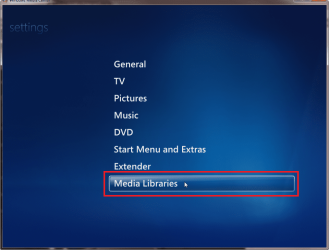
  • Choose Media Libraries, click Next
    .
    WMC_Media_Library_2.png
    .
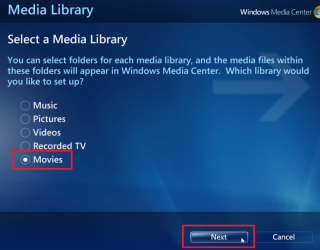
  • Choose a library you want to add folders to, click Next
    .
    WMC_Media_Library_3.png
    .
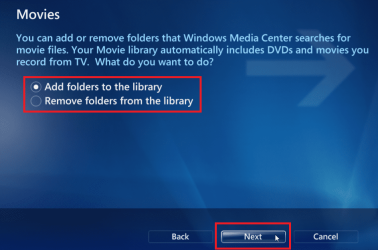
  • Choose Add folders to the library, click Next
    .
    WMC_Media_Library_4.png
    .
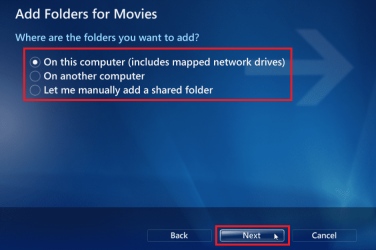
  • Choose the location where the folders you want to add are, click Next
    .
    WMC_Media_Library_5.png
    .
  • Select the folders you want to add to the library, click Next
    .
    WMC_Media_Library_6.png
    .
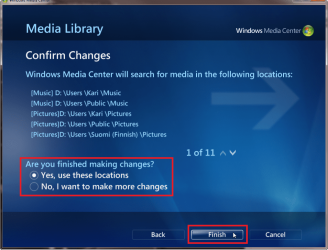
  • Choose Yes, use these locations if you are done, or choose No, I want to make more changes if you want to add more folders to this or another library. Click Finish (or Continue if you want to make more changes)
    .
    WMC_Media_Library_7.png
Kari
 

My Computer

Computer type
Laptop
Computer Manufacturer/Model Number
HP ENVY 17-1150eg
OS
Windows 10 Pro x64 EN-GB
CPU
1.6 GHz Intel Core i7-720QM Processor
Memory
6 GB
Graphics Card(s)
ATI Mobility Radeon HD 5850 Graphics
Sound Card
Beats sound system with integrated subwoofer
Monitor(s) Displays
17" laptop display, 22" LED and 32" Full HD TV through HDMI
Screen Resolution
1600*900 (1), 1920*1080 (2&3)
Hard Drives
Internal: 2 x 500 GB SATA Hard Disk Drive 7200 rpm
External: 2TB for backups, 3TB USB3 network drive for media
Cooling
As Envy runs a bit warm, I have it on a Cooler Master pad
Keyboard
Logitech diNovo Media Desktop Laser (bluetooth)
Mouse
Logitech Performance Mouse MX
Internet Speed
50/10 Mbps VDSL
Antivirus
Windows Defender 4.3.9431.0
Browser
Maxthon 3.5.2., IE11
I did alright all the way up to the screen that says "my movies that include sub folders" With that screen missing it shows that my movies are on my hard drives instead of my external drive
 

My Computer

Computer Manufacturer/Model Number
gateway laptop
OS
win7 32bit win7 home premium
ok I found the screen that says "E:\including subfolders" (E:\ is my external drive) but when I click next wmc will be looking for videos on my c:\ drive. How do get it to say "my videos that include subfolders"? Thanks again for the help
 

My Computer

Computer Manufacturer/Model Number
gateway laptop
OS
win7 32bit win7 home premium
I did alright all the way up to the screen that says "my movies that include sub folders" With that screen missing it shows that my movies are on my hard drives instead of my external drive
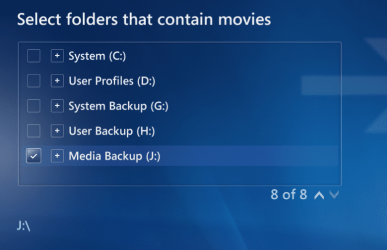
When selecting folders, they can be located on any HD connected to your computer. For instance, here I have chosen an external backup drive to be included, with all its subfolders:

WMC_Media_Library_8.PNG

Of course I could also choose only some of the folders on that drive, instead of selecting the whole drive.

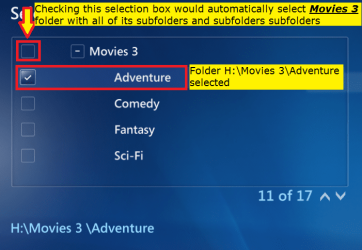
If you select a folder that includes subfolders, it says FOLDERNAME including subfolders. If you don't want to include all subfolders, you have to browse to that subfolder you want to add, and only include that.

Kari
 

My Computer

Computer type
Laptop
Computer Manufacturer/Model Number
HP ENVY 17-1150eg
OS
Windows 10 Pro x64 EN-GB
CPU
1.6 GHz Intel Core i7-720QM Processor
Memory
6 GB
Graphics Card(s)
ATI Mobility Radeon HD 5850 Graphics
Sound Card
Beats sound system with integrated subwoofer
Monitor(s) Displays
17" laptop display, 22" LED and 32" Full HD TV through HDMI
Screen Resolution
1600*900 (1), 1920*1080 (2&3)
Hard Drives
Internal: 2 x 500 GB SATA Hard Disk Drive 7200 rpm
External: 2TB for backups, 3TB USB3 network drive for media
Cooling
As Envy runs a bit warm, I have it on a Cooler Master pad
Keyboard
Logitech diNovo Media Desktop Laser (bluetooth)
Mouse
Logitech Performance Mouse MX
Internet Speed
50/10 Mbps VDSL
Antivirus
Windows Defender 4.3.9431.0
Browser
Maxthon 3.5.2., IE11
In your example, is "media backup" a folder in your j:\ drive with all your movies in the folder called Media Backup? It looks like I should make a folder called "My Videos" and put my movies in that folder.
 

My Computer

Computer Manufacturer/Model Number
gateway laptop
OS
win7 32bit win7 home premium
No, Media Backup is the name of one of my external USB drives. The selection mark on the left side shows I have selected the whole drive. If i wanted to choose only some foders from this drive, I would click it open and choose individual folders.
 

My Computer

Computer type
Laptop
Computer Manufacturer/Model Number
HP ENVY 17-1150eg
OS
Windows 10 Pro x64 EN-GB
CPU
1.6 GHz Intel Core i7-720QM Processor
Memory
6 GB
Graphics Card(s)
ATI Mobility Radeon HD 5850 Graphics
Sound Card
Beats sound system with integrated subwoofer
Monitor(s) Displays
17" laptop display, 22" LED and 32" Full HD TV through HDMI
Screen Resolution
1600*900 (1), 1920*1080 (2&3)
Hard Drives
Internal: 2 x 500 GB SATA Hard Disk Drive 7200 rpm
External: 2TB for backups, 3TB USB3 network drive for media
Cooling
As Envy runs a bit warm, I have it on a Cooler Master pad
Keyboard
Logitech diNovo Media Desktop Laser (bluetooth)
Mouse
Logitech Performance Mouse MX
Internet Speed
50/10 Mbps VDSL
Antivirus
Windows Defender 4.3.9431.0
Browser
Maxthon 3.5.2., IE11
The name of my drive is "My Book" (Western Digital). I only have 5 videos on it for a test. I am missing something . I will have to attack this again in the morning when I am fresh. Thanks again
 

My Computer

Computer Manufacturer/Model Number
gateway laptop
OS
win7 32bit win7 home premium
The name of my drive is "My Book" (Western Digital). I only have 5 videos on it for a test. I am missing something . I will have to attack this again in the morning when I am fresh. Thanks again
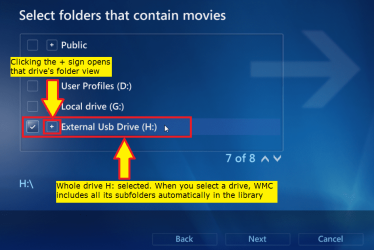
OK, one more try. Click the screenshots to enlarge them, to read the explanations:

WMC_Media_Library_9.png

WMC_Media_Library_10.png

WMC_Media_Library_11.png

WMC_Media_Library_12.png

Kari
 

My Computer

Computer type
Laptop
Computer Manufacturer/Model Number
HP ENVY 17-1150eg
OS
Windows 10 Pro x64 EN-GB
CPU
1.6 GHz Intel Core i7-720QM Processor
Memory
6 GB
Graphics Card(s)
ATI Mobility Radeon HD 5850 Graphics
Sound Card
Beats sound system with integrated subwoofer
Monitor(s) Displays
17" laptop display, 22" LED and 32" Full HD TV through HDMI
Screen Resolution
1600*900 (1), 1920*1080 (2&3)
Hard Drives
Internal: 2 x 500 GB SATA Hard Disk Drive 7200 rpm
External: 2TB for backups, 3TB USB3 network drive for media
Cooling
As Envy runs a bit warm, I have it on a Cooler Master pad
Keyboard
Logitech diNovo Media Desktop Laser (bluetooth)
Mouse
Logitech Performance Mouse MX
Internet Speed
50/10 Mbps VDSL
Antivirus
Windows Defender 4.3.9431.0
Browser
Maxthon 3.5.2., IE11
Thanks for your patience. No matter what I do it says "No changes made" "No folders added"
Jerry
 

My Computer

Computer Manufacturer/Model Number
gateway laptop
OS
win7 32bit win7 home premium
Thanks for your patience. No matter what I do it says "No changes made" "No folders added"
Jerry
It means the folders you are adding are already included in library.
 

My Computer

Computer type
Laptop
Computer Manufacturer/Model Number
HP ENVY 17-1150eg
OS
Windows 10 Pro x64 EN-GB
CPU
1.6 GHz Intel Core i7-720QM Processor
Memory
6 GB
Graphics Card(s)
ATI Mobility Radeon HD 5850 Graphics
Sound Card
Beats sound system with integrated subwoofer
Monitor(s) Displays
17" laptop display, 22" LED and 32" Full HD TV through HDMI
Screen Resolution
1600*900 (1), 1920*1080 (2&3)
Hard Drives
Internal: 2 x 500 GB SATA Hard Disk Drive 7200 rpm
External: 2TB for backups, 3TB USB3 network drive for media
Cooling
As Envy runs a bit warm, I have it on a Cooler Master pad
Keyboard
Logitech diNovo Media Desktop Laser (bluetooth)
Mouse
Logitech Performance Mouse MX
Internet Speed
50/10 Mbps VDSL
Antivirus
Windows Defender 4.3.9431.0
Browser
Maxthon 3.5.2., IE11
You are right. THe videos were in my library. I just didnt know what my video library looked like. Thanks again. Jerry
 

My Computer

Computer Manufacturer/Model Number
gateway laptop
OS
win7 32bit win7 home premium
You are welcome.
 

My Computer

Computer type
Laptop
Computer Manufacturer/Model Number
HP ENVY 17-1150eg
OS
Windows 10 Pro x64 EN-GB
CPU
1.6 GHz Intel Core i7-720QM Processor
Memory
6 GB
Graphics Card(s)
ATI Mobility Radeon HD 5850 Graphics
Sound Card
Beats sound system with integrated subwoofer
Monitor(s) Displays
17" laptop display, 22" LED and 32" Full HD TV through HDMI
Screen Resolution
1600*900 (1), 1920*1080 (2&3)
Hard Drives
Internal: 2 x 500 GB SATA Hard Disk Drive 7200 rpm
External: 2TB for backups, 3TB USB3 network drive for media
Cooling
As Envy runs a bit warm, I have it on a Cooler Master pad
Keyboard
Logitech diNovo Media Desktop Laser (bluetooth)
Mouse
Logitech Performance Mouse MX
Internet Speed
50/10 Mbps VDSL
Antivirus
Windows Defender 4.3.9431.0
Browser
Maxthon 3.5.2., IE11
Back
Top