LED monitor displays black text as mix of red, black, blue

sdowney717

New member
Power User
VIP
Local time
12:53 AM
Messages
705
I had to switch monitors and video cards both when the old monitor broke, which was working perfectly, it was 1650 by 1080 max resolution. This new monitor is 1080p, wide screen. 1920 by 1080.

The old AMD card was x1650, the new video card is Gt610.

This new Westnghouse Tv - monitor combo, an LD2240 has terrible text colors. Instead of all black it just randomly throws up colored text. If I zoom the screen the text reverts to all black, If I zoom out the screen, the text goes to a mix of black, red, blue letters. If I do a full zoom out, black text looks like a lit up Christmas tree of colors.

I am using an HDMI cable and Nvidia 368 driver.

Here is a picture taken with a cell phone. If I shared a screen shot, you will see normal colors.

Will getting an DVI to HDMI adapter help? The monitor TV only has VGA and HDMI, no DVI input.

If I change from 1080p to 1080i, the text color issue is solved, but the text is not as sharp.

20160711_092205.jpg
 

My Computer My Computer

At a glance

Windows 7 Ultimate x64
OS
Windows 7 Ultimate x64
You're sure that the monitor supports 1080p not 1080i? I ask because some TV's only support up to 1080i.

Based on what you've said and are showing us, I think this might be the case. Judging from that picture, that TV does not like 1080p.

Edit:

Although I just checked the model out online and the literature all says 1080p. Is there a setting on the TV that allows you to switch between 1080i and 1080p? Or does it do it automatically?

Edit again:

I just went through the instruction book, and nowhere does it say 1080p. Something you could try is going into the PC settings and adjusting the clock and the phase controls. It may help, or it may only apply to the TV's VGA connector, I don't know.
 

My Computer My Computer

At a glance

Win 7 Pro x64/Win 10 Pro x64 dual bootAMD FX 8350 Vishera @ 420016 GB Mushkin Blackline DDR3-2400 @ 1866 (9-1...XFX Radeon R9 280 Double D Black Edition
Computer type
PC/Desktop
Computer Manufacturer/Model Number
Mellon Labs (custom build)
OS
Win 7 Pro x64/Win 10 Pro x64 dual boot
CPU
AMD FX 8350 Vishera @ 4200
Motherboard
ASUS M5A97 R2.0
Memory
16 GB Mushkin Blackline DDR3-2400 @ 1866 (9-10-10-10-31)
Graphics Card(s)
XFX Radeon R9 280 Double D Black Edition
Sound Card
Realtek HD Audio on MB. Sounds great.
Monitor(s) Displays
Acer 24", Acer 22"
Screen Resolution
3840 x 1080
Hard Drives
1 x Mushkin Chronos 120 GB SSD (Win 10)
1 x Samsung 850 EVO 250 GB SSD (Win 7)
1 x WD 1TB SATA Blue
1 x WD 1TB SATA Green
PSU
Corsair TX-750
Case
CoolerMaster HAF 912+
Cooling
Coolermaster Seidon 240M Liquid AIO. 6 case fans
Keyboard
Logitech G710+
Mouse
Logitech G500s
Internet Speed
Much better since I got fiber, but still way overpriced.
Antivirus
MSE, Malware Bytes for scanning
Browser
Firefox
Other Info
Corsair VOID USB headphones.

A Mellon Labs X-1 - LCD Smartie driven system status display.

Brought to you by the letter E
The nvidia driver control panel lists 1080p as native resolution for the LD2240.
1080i, the odd coloring goes away on text. But this also makes the text fuzzier, not as crisp.

PC settings seem to be all for the VGA input port.
It seems the HDTV monitor designer thinks HDMI is for video, and VGA for the PC.
I have read other HDTV's, the HDMI has given people various text issues, which when they rename to the port, PC, goes away, but was only for Samsung models. Explanation was post processing by the TV of the signal was messing up the text. So renaming the port, made the HDTV stop destroying the pure signal from the video card in the PC. None of that info was in their HDTV manuals.

This one has no such ability.

When hooked to HDMI, and HDMI selected as source, go to menu picture settings, the PC settings says N/A.
So PC settings appear to be only for the VGA input port.

I am going to try the monitor on several other PC's running HDMI which use different video cards.

Do you think getting a DVI to HDMI converter and running off the video card's DVI port would make it better?
 

My Computer My Computer

At a glance

Windows 7 Ultimate x64
OS
Windows 7 Ultimate x64
Do you think getting a DVI to HDMI converter and running off the video card's DVI port would make it better?
I doubt it if your problem is the HDMI connector on the TV. If you can find one cheap enough, you could try it, but I wouldn't hold my breath, sadly.
 

My Computer My Computer

At a glance

Win 7 Pro x64/Win 10 Pro x64 dual bootAMD FX 8350 Vishera @ 420016 GB Mushkin Blackline DDR3-2400 @ 1866 (9-1...XFX Radeon R9 280 Double D Black Edition
Computer type
PC/Desktop
Computer Manufacturer/Model Number
Mellon Labs (custom build)
OS
Win 7 Pro x64/Win 10 Pro x64 dual boot
CPU
AMD FX 8350 Vishera @ 4200
Motherboard
ASUS M5A97 R2.0
Memory
16 GB Mushkin Blackline DDR3-2400 @ 1866 (9-10-10-10-31)
Graphics Card(s)
XFX Radeon R9 280 Double D Black Edition
Sound Card
Realtek HD Audio on MB. Sounds great.
Monitor(s) Displays
Acer 24", Acer 22"
Screen Resolution
3840 x 1080
Hard Drives
1 x Mushkin Chronos 120 GB SSD (Win 10)
1 x Samsung 850 EVO 250 GB SSD (Win 7)
1 x WD 1TB SATA Blue
1 x WD 1TB SATA Green
PSU
Corsair TX-750
Case
CoolerMaster HAF 912+
Cooling
Coolermaster Seidon 240M Liquid AIO. 6 case fans
Keyboard
Logitech G710+
Mouse
Logitech G500s
Internet Speed
Much better since I got fiber, but still way overpriced.
Antivirus
MSE, Malware Bytes for scanning
Browser
Firefox
Other Info
Corsair VOID USB headphones.

A Mellon Labs X-1 - LCD Smartie driven system status display.

Brought to you by the letter E
Is there any way to align the LED in the HDTV?
Looking at the image with a magnifier lens, it looks as if about a half of all the letters have the colors overlapping not entirely perfect. Like the letters are color fringed. It is much less noticeable is you zoom in the text by holding control and roll the scroll on the mouse.
When zoomed way out, all the text goes color craziness, seems like an alignment type issue.
 

My Computer My Computer

At a glance

Windows 7 Ultimate x64
OS
Windows 7 Ultimate x64
I'm not 100% sure, but I don't think an LCD screed is alignable, nor is an LED. I could be wrong.

But based on everything that I know about electronics, this would have to be something that was done by a TV repair shop.
 

My Computer My Computer

At a glance

Win 7 Pro x64/Win 10 Pro x64 dual bootAMD FX 8350 Vishera @ 420016 GB Mushkin Blackline DDR3-2400 @ 1866 (9-1...XFX Radeon R9 280 Double D Black Edition
Computer type
PC/Desktop
Computer Manufacturer/Model Number
Mellon Labs (custom build)
OS
Win 7 Pro x64/Win 10 Pro x64 dual boot
CPU
AMD FX 8350 Vishera @ 4200
Motherboard
ASUS M5A97 R2.0
Memory
16 GB Mushkin Blackline DDR3-2400 @ 1866 (9-10-10-10-31)
Graphics Card(s)
XFX Radeon R9 280 Double D Black Edition
Sound Card
Realtek HD Audio on MB. Sounds great.
Monitor(s) Displays
Acer 24", Acer 22"
Screen Resolution
3840 x 1080
Hard Drives
1 x Mushkin Chronos 120 GB SSD (Win 10)
1 x Samsung 850 EVO 250 GB SSD (Win 7)
1 x WD 1TB SATA Blue
1 x WD 1TB SATA Green
PSU
Corsair TX-750
Case
CoolerMaster HAF 912+
Cooling
Coolermaster Seidon 240M Liquid AIO. 6 case fans
Keyboard
Logitech G710+
Mouse
Logitech G500s
Internet Speed
Much better since I got fiber, but still way overpriced.
Antivirus
MSE, Malware Bytes for scanning
Browser
Firefox
Other Info
Corsair VOID USB headphones.

A Mellon Labs X-1 - LCD Smartie driven system status display.

Brought to you by the letter E
Odd but tiny icons are NOT affected, only text. Such as on Chrome, the right left arrows, the reload button are all finely carved no color fringing.
The tiny icon extensions on the right are all perfect as are the icon symbols in the address bar.
The symbols in the tabs are all perfect.

So what is it about text that is different, the font? Somehow fonts are different. Is there a way to modify how fonts are displayed?
 

My Computer My Computer

At a glance

Windows 7 Ultimate x64
OS
Windows 7 Ultimate x64
Since I use Chrome mostly I went looking at font settings. There is a font extension
https://chrome.google.com/webstore/...bm?utm_source=chrome-app-launcher-info-dialog

I installed then set size to 21px.
Color fringing problem seems to have disappeared.
It has made the text bigger on all web sites so is easier to read which I like. 1920 by 1080, some text was hard on the eyes being so small on some sites.
Of course this fix just masks the problem.

Editing, I found 21px to large. Set to 17px is better. Some sites at 21px, the page elements overlapped. That is the only change I made to the fonts.
 

My Computer My Computer

At a glance

Windows 7 Ultimate x64
OS
Windows 7 Ultimate x64
I found out the problem is subpixel antialiasing. I need to read up more on this one.

Antialiasing 101 - HTML5 Rocks
Anti-aliased fonts hurt eyes and damage eyesight
https://en.wikipedia.org/wiki/Subpixel_rendering
https://www.grc.com/ctwhat.htm
Understanding Sub-Pixel (LCD Screen) Anti-Aliased Font Rendering

Can this be set to greyscale in windows and Chrome browsers?

I dual boot Ubuntu and windows 7.
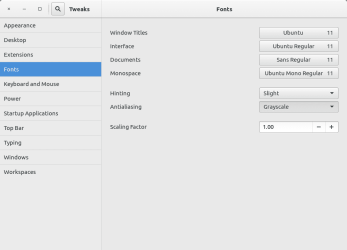
I booted ubuntu, and went in gnome-tweak-tool. Looking at font settings found this, if set to 'greyscale' from 'Rgba', the color fringing entirely vanishes on Ubuntu system menus, but still exists on Chrome web browser text.
 

Attachments

  • greyscale versus Rgba.png
    greyscale versus Rgba.png
    12 KB · Views: 2

My Computer My Computer

At a glance

Windows 7 Ultimate x64
OS
Windows 7 Ultimate x64
ok, here is an interesting page for my monitor.
The tiny text examples for windows all show for me lots of red and blue color fringing.
The tiny text examples under the linux section show perfect black, no color fringing, yet the author complains heavily.

I really do not understand what is going on with the Rgba antialiasing here but apparently it is my issue and this LED monitor.
How do those text samples appear to you?
Anti-Grain Geometry - Texts Rasterization Exposures

The tiny text under the heading, "The FontFocus Way of Grid-fitting" appears PERFECT to me.

The tiny text under heading, "Sounds impossible? OK, one more sample.", looks terrible to me, lots of color fringing.

The tiny text under heading, "-aliasing of any kind is inappropriate, while most Linux people do namely that. The picture below is the result of anti-aliased rasterization with both, FreeType and Win32 GetGlyphOutline()."

Looks absolutely perfect to me.
 

My Computer My Computer

At a glance

Windows 7 Ultimate x64
OS
Windows 7 Ultimate x64
I'm not 100% sure, but I don't think an LCD screed is alignable, nor is an LED. I could be wrong.

But based on everything that I know about electronics, this would have to be something that was done by a TV repair shop.

Apparently this is done by that USB service port. Binary hex files can be uploaded to the HDTV to make adjustments. Not that we can do this.

Westinghouse LCD TV service menu access? - AVS Forum | Home Theater Discussions And Reviews

I have the HDTV looking pretty sharp on the text for now, so I can live with it. It was very annoying to see multicolored text. I also installed some Chrome font extensions and made adjustments.
 

My Computer My Computer

At a glance

Windows 7 Ultimate x64
OS
Windows 7 Ultimate x64
Well, I'm glad that you got it mostly working. I wish I could have done more to help, but congrats on your solution.
 

My Computer My Computer

At a glance

Win 7 Pro x64/Win 10 Pro x64 dual bootAMD FX 8350 Vishera @ 420016 GB Mushkin Blackline DDR3-2400 @ 1866 (9-1...XFX Radeon R9 280 Double D Black Edition
Computer type
PC/Desktop
Computer Manufacturer/Model Number
Mellon Labs (custom build)
OS
Win 7 Pro x64/Win 10 Pro x64 dual boot
CPU
AMD FX 8350 Vishera @ 4200
Motherboard
ASUS M5A97 R2.0
Memory
16 GB Mushkin Blackline DDR3-2400 @ 1866 (9-10-10-10-31)
Graphics Card(s)
XFX Radeon R9 280 Double D Black Edition
Sound Card
Realtek HD Audio on MB. Sounds great.
Monitor(s) Displays
Acer 24", Acer 22"
Screen Resolution
3840 x 1080
Hard Drives
1 x Mushkin Chronos 120 GB SSD (Win 10)
1 x Samsung 850 EVO 250 GB SSD (Win 7)
1 x WD 1TB SATA Blue
1 x WD 1TB SATA Green
PSU
Corsair TX-750
Case
CoolerMaster HAF 912+
Cooling
Coolermaster Seidon 240M Liquid AIO. 6 case fans
Keyboard
Logitech G710+
Mouse
Logitech G500s
Internet Speed
Much better since I got fiber, but still way overpriced.
Antivirus
MSE, Malware Bytes for scanning
Browser
Firefox
Other Info
Corsair VOID USB headphones.

A Mellon Labs X-1 - LCD Smartie driven system status display.

Brought to you by the letter E
Back
Top