Left or right cursor button cursed

PinkiPad

New member
Member
VIP
Local time
12:57 PM
Messages
100
At times, I will use the left and right cursor buttons -- the 4 arrows on the lower right on my laptop -- and rather than the cursor moving, it will change tabs to the left or right. It isn't an everyday thing but when it happens, it frustrates me. I use Firefox' latest build.

Why does it happen and how do I fix it?
 

My Computer

Computer type
Laptop
Computer Manufacturer/Model Number
MS Windows 7 Home Premium 64-bit SP1
OS
Win 7 64 bit
CPU
Intel Atom N450 1.66 ghz
Motherboard
Dell Inc 00DKZ
Memory
2 gig single channel DDR2
Graphics Card(s)
Generic PnP Monitor, Intwl Graphics Media Accelerator 3150
Screen Resolution
1024x600
Hard Drives
2.44gb Western Digital
Mouse
none
Internet Speed
WiFi
Antivirus
MalwareBytes
Browser
Firefox
Other Info
Dell 14z 5432
Have a look in Control Panel\All Control Panel Items\Ease of Access Center\Make the mouse easier to use and see if a setting there needs to be checked, e.g. Mouse Keys.
 

My Computer

Computer type
PC/Desktop
Computer Manufacturer/Model Number
Home Built Desktop By DataTech
OS
Windows 7 Ultimate X64 SP1
CPU
Intel i5-2550K, Differing ~4.4-4.8GHz No built in GPU
Motherboard
ASUS P8Z68-V PRO/GEN3
Memory
16GB G.Skill Sniper 1866MHz @ 2133MHz 2x8GB
Graphics Card(s)
ASUS GTX650TIB-DC2OC-2GD5, (650TI Boost)
Sound Card
Onboard Realtek 5-1
Monitor(s) Displays
Samsung P2570HD
Screen Resolution
1920x1080
Hard Drives
Samsung 840 Pro 256GB SSD for OS, 500GB Seagate Constellation (Enterprise drive) for Data
PSU
Corsair HX650W
Case
Inwin Dragon Rider
Cooling
Hyper 212 EVO w/two Noctua fans, push-pull, @1300 RPM
Keyboard
E-Z Eyes, bright yellow keys with large characters
Mouse
steelseries SENSEI Laser Pro Gaming
Internet Speed
48-51Mbs Mbs down, 11 Mbs up Xfinity Cable
Antivirus
Norton Internet Security 2013
Browser
IE 10, Opera, Pale Moon if needed
Other Info
4 case fans, LG BluRay-RE, ASUS DVD-RW, Mr. Fusion power supply, 1.21 gigawatts.
Thank you. Turn on mouse keys is unchecked. I haven't changed that setting since I got this two years ago. This isn't constant, just happens occasionally during normal use. I always think back to what I just did but nothing out of the ordinary has happened. No specific keys pressed, no specific website visited.
 

My Computer

Computer type
Laptop
Computer Manufacturer/Model Number
MS Windows 7 Home Premium 64-bit SP1
OS
Win 7 64 bit
CPU
Intel Atom N450 1.66 ghz
Motherboard
Dell Inc 00DKZ
Memory
2 gig single channel DDR2
Graphics Card(s)
Generic PnP Monitor, Intwl Graphics Media Accelerator 3150
Screen Resolution
1024x600
Hard Drives
2.44gb Western Digital
Mouse
none
Internet Speed
WiFi
Antivirus
MalwareBytes
Browser
Firefox
Other Info
Dell 14z 5432
You could be accidently pressing one of the ALT keys or one sticks down at times.
 

My Computer

Computer type
PC/Desktop
Computer Manufacturer/Model Number
Home Built Desktop By DataTech
OS
Windows 7 Ultimate X64 SP1
CPU
Intel i5-2550K, Differing ~4.4-4.8GHz No built in GPU
Motherboard
ASUS P8Z68-V PRO/GEN3
Memory
16GB G.Skill Sniper 1866MHz @ 2133MHz 2x8GB
Graphics Card(s)
ASUS GTX650TIB-DC2OC-2GD5, (650TI Boost)
Sound Card
Onboard Realtek 5-1
Monitor(s) Displays
Samsung P2570HD
Screen Resolution
1920x1080
Hard Drives
Samsung 840 Pro 256GB SSD for OS, 500GB Seagate Constellation (Enterprise drive) for Data
PSU
Corsair HX650W
Case
Inwin Dragon Rider
Cooling
Hyper 212 EVO w/two Noctua fans, push-pull, @1300 RPM
Keyboard
E-Z Eyes, bright yellow keys with large characters
Mouse
steelseries SENSEI Laser Pro Gaming
Internet Speed
48-51Mbs Mbs down, 11 Mbs up Xfinity Cable
Antivirus
Norton Internet Security 2013
Browser
IE 10, Opera, Pale Moon if needed
Other Info
4 case fans, LG BluRay-RE, ASUS DVD-RW, Mr. Fusion power supply, 1.21 gigawatts.
I'm not at my laptop but I believe the alt key is on the lest side. Cursor up/down/left/right is on the right. I only type with right hand due to disability. So I can't hit it. I Googled and can't find anyone else with my problem.
 

My Computer

Computer type
Laptop
Computer Manufacturer/Model Number
MS Windows 7 Home Premium 64-bit SP1
OS
Win 7 64 bit
CPU
Intel Atom N450 1.66 ghz
Motherboard
Dell Inc 00DKZ
Memory
2 gig single channel DDR2
Graphics Card(s)
Generic PnP Monitor, Intwl Graphics Media Accelerator 3150
Screen Resolution
1024x600
Hard Drives
2.44gb Western Digital
Mouse
none
Internet Speed
WiFi
Antivirus
MalwareBytes
Browser
Firefox
Other Info
Dell 14z 5432
When the computer is turned OFF, you might try blowing out the keys with compressed air, in case dirt, dust, cat hairs, etc have got under the keys.
 

My Computer

Computer type
PC/Desktop
Computer Manufacturer/Model Number
Built them myself, Science Experiments !
OS
Win7 Enterprise, Win7 x86 (Ult 7600), Win7 x64 Ult 7600, TechNet RTM on AMD x64 (2.8Ghz)
CPU
AMD fx8350 4ghz, AMD-32 2400mhz, AMD-64 3200mhz, AMDx64 2.8G
Motherboard
SIS 755, ECS-K8M890M-M (Ult 7600), GigaByte & others
Memory
2gb, 4gb on the Ult 7600, 4gb on Technet RTM, 32gb on FX8350
Graphics Card(s)
Draw my own Graphics, several nVidia cards
Sound Card
on motherboard
Monitor(s) Displays
19" flat scr, 28" I-Inc widescr,22" Emprex Widescr, 23" Acer
Screen Resolution
1280 x 1024, 1440 x 900, 1920 x 1080
Hard Drives
6 pata Ide HD's & 2 Sata HD's
added 80gb external on Ult 7600 computer,
numerous extra 1tb, 2TB, 3Tb SATA HD's
A collection of ext HD Docks w/ HDs
PSU
430w, 550w, 600w, 700, 800, etc
Case
All Generic Full Towers
Cooling
Open Air & a few fans, some w/ colored LEDs
Keyboard
Compaq & Dell recycled from GoodWill
Mouse
Made in China Optical Wired Mouse
Internet Speed
Fast Cable InterNet
Antivirus
AVG Free on 24 different Desktops, NO Problems!
Browser
IE 8 is preferred, but use FireFox sometimes
Other Info
Linksys Routers, switches, & Hubs
Too Many USB Flash Drives to count, Biggest is 64GB !
Eight computers in my home network.
Sixteen computers at my business network.
Linked via TeamViewer !
Lots of old used spare computer parts everywhere!
I have been fooling around and I don't find any key combo that makes the arrow keys switch tabs. If the cursor is hovered on the menu in a browser the arrow keys scroll through it.
 

My Computer

Computer type
PC/Desktop
Computer Manufacturer/Model Number
Home Built Desktop By DataTech
OS
Windows 7 Ultimate X64 SP1
CPU
Intel i5-2550K, Differing ~4.4-4.8GHz No built in GPU
Motherboard
ASUS P8Z68-V PRO/GEN3
Memory
16GB G.Skill Sniper 1866MHz @ 2133MHz 2x8GB
Graphics Card(s)
ASUS GTX650TIB-DC2OC-2GD5, (650TI Boost)
Sound Card
Onboard Realtek 5-1
Monitor(s) Displays
Samsung P2570HD
Screen Resolution
1920x1080
Hard Drives
Samsung 840 Pro 256GB SSD for OS, 500GB Seagate Constellation (Enterprise drive) for Data
PSU
Corsair HX650W
Case
Inwin Dragon Rider
Cooling
Hyper 212 EVO w/two Noctua fans, push-pull, @1300 RPM
Keyboard
E-Z Eyes, bright yellow keys with large characters
Mouse
steelseries SENSEI Laser Pro Gaming
Internet Speed
48-51Mbs Mbs down, 11 Mbs up Xfinity Cable
Antivirus
Norton Internet Security 2013
Browser
IE 10, Opera, Pale Moon if needed
Other Info
4 case fans, LG BluRay-RE, ASUS DVD-RW, Mr. Fusion power supply, 1.21 gigawatts.
It's very odd, I know. There are no pets, dust or dirt -- I'm young but in a nursing home since I woke from my year-long coma. I've tried to replicate it but can't.
 

My Computer

Computer type
Laptop
Computer Manufacturer/Model Number
MS Windows 7 Home Premium 64-bit SP1
OS
Win 7 64 bit
CPU
Intel Atom N450 1.66 ghz
Motherboard
Dell Inc 00DKZ
Memory
2 gig single channel DDR2
Graphics Card(s)
Generic PnP Monitor, Intwl Graphics Media Accelerator 3150
Screen Resolution
1024x600
Hard Drives
2.44gb Western Digital
Mouse
none
Internet Speed
WiFi
Antivirus
MalwareBytes
Browser
Firefox
Other Info
Dell 14z 5432
Good you are doing as well as you are. :D
I'll ask for some help, stay tuned, it may be hours or days before someone else chimes in.
 

My Computer

Computer type
PC/Desktop
Computer Manufacturer/Model Number
Home Built Desktop By DataTech
OS
Windows 7 Ultimate X64 SP1
CPU
Intel i5-2550K, Differing ~4.4-4.8GHz No built in GPU
Motherboard
ASUS P8Z68-V PRO/GEN3
Memory
16GB G.Skill Sniper 1866MHz @ 2133MHz 2x8GB
Graphics Card(s)
ASUS GTX650TIB-DC2OC-2GD5, (650TI Boost)
Sound Card
Onboard Realtek 5-1
Monitor(s) Displays
Samsung P2570HD
Screen Resolution
1920x1080
Hard Drives
Samsung 840 Pro 256GB SSD for OS, 500GB Seagate Constellation (Enterprise drive) for Data
PSU
Corsair HX650W
Case
Inwin Dragon Rider
Cooling
Hyper 212 EVO w/two Noctua fans, push-pull, @1300 RPM
Keyboard
E-Z Eyes, bright yellow keys with large characters
Mouse
steelseries SENSEI Laser Pro Gaming
Internet Speed
48-51Mbs Mbs down, 11 Mbs up Xfinity Cable
Antivirus
Norton Internet Security 2013
Browser
IE 10, Opera, Pale Moon if needed
Other Info
4 case fans, LG BluRay-RE, ASUS DVD-RW, Mr. Fusion power supply, 1.21 gigawatts.
The next time that the keyboard's arrow keys go crazy, open the On-Screen Keyboard* and click on those left and right arrow "keys". If they do not cause a tab change in Firefox, then check the real keyboard again to be sure that the computer is still acting up.

If both the real and the virtual keyboard cause a change of tabs within Firefox, then we need to concentrate on Firefox plug-ins and settings. If only the real keyboard causes this tab change problem, then maybe the keyboard is going bad.

Since the problem comes and goes, it is unlikely to be software remapping key functions.


*Click on Start and begin to type
on-scre
....
into the search field. Or keep a shortcut to this keyboard on your desktop while we troubleshoot this issue.
 

My Computer

Computer type
Laptop
Computer Manufacturer/Model Number
Employer provided Dell Latitude
OS
W7 Pro SP1 64bit
CPU
i7
Memory
8GB
Graphics Card(s)
Intel HD Graphics
Hard Drives
crappy SSD
Antivirus
Employer mandated Symantec Endpoint Protection
Browser
Pale Moon 64bit, IE11 64bit & Chrome 64bit
What are you doing when this happens? Browsing, writing a document, editing a text document?

Is it always in the same application or does the issue affect all applications (Word, Notepad, Firefox,etc). If it is related to a specific application, there might be a setting to modify this behavior.

At times, I will use the left and right cursor buttons -- the 4 arrows on the lower right on my laptop -- and rather than the cursor moving, it will change tabs to the left or right. It isn't an everyday thing but when it happens, it frustrates me. I use Firefox' latest build.

Why does it happen and how do I fix it?
 

My Computer

Computer type
Laptop
Computer Manufacturer/Model Number
HP Pavilion dv6-6c10us
OS
x64 (6.3.9600) Win8.1 Pro & soon dual boot x64 (6.1.7601) Win7_SP1 HomePrem
CPU
AMD A6-3420M APU with Radeon(tm) HD Graphics
Motherboard
Hewlett-Packard 1805
Memory
6.00 GB
Graphics Card(s)
AMD Radeon(TM) HD 6520G
Sound Card
(1) AMD High Definition Audio Device (2) IDT High Definiti
Monitor(s) Displays
HP W2072a 20" LCD (1600 x 900) @ 60 Hz
Screen Resolution
1366 x 768 x 32 bits (4294967296 colors) @ 60 Hz
Hard Drives
ST640LM0 00 HM641JI SATA Disk Device
Keyboard
Logitech k520 wireless KB
Mouse
Logitech m320 wireless mouse (bundled with KB)
Internet Speed
15/5 | 54 MB Wireless 'n'
Antivirus
Realtime: Defender or Avast | On-demand: Malwarebytes, ESET
Browser
IE 11 on Win8, IE 10 on win 7
Other Info
Media: [Gimp, Audacity, VLC] || Comm: [WEmail 2012, Skype] || Productivity: [OpenOffice,| Textpad] || Utils: [Sysinternals, cCleaner, Speccy, Defraggler]

My Computer

Computer type
PC/Desktop
Computer Manufacturer/Model Number
Home Built Desktop By DataTech
OS
Windows 7 Ultimate X64 SP1
CPU
Intel i5-2550K, Differing ~4.4-4.8GHz No built in GPU
Motherboard
ASUS P8Z68-V PRO/GEN3
Memory
16GB G.Skill Sniper 1866MHz @ 2133MHz 2x8GB
Graphics Card(s)
ASUS GTX650TIB-DC2OC-2GD5, (650TI Boost)
Sound Card
Onboard Realtek 5-1
Monitor(s) Displays
Samsung P2570HD
Screen Resolution
1920x1080
Hard Drives
Samsung 840 Pro 256GB SSD for OS, 500GB Seagate Constellation (Enterprise drive) for Data
PSU
Corsair HX650W
Case
Inwin Dragon Rider
Cooling
Hyper 212 EVO w/two Noctua fans, push-pull, @1300 RPM
Keyboard
E-Z Eyes, bright yellow keys with large characters
Mouse
steelseries SENSEI Laser Pro Gaming
Internet Speed
48-51Mbs Mbs down, 11 Mbs up Xfinity Cable
Antivirus
Norton Internet Security 2013
Browser
IE 10, Opera, Pale Moon if needed
Other Info
4 case fans, LG BluRay-RE, ASUS DVD-RW, Mr. Fusion power supply, 1.21 gigawatts.
I could not find anything specific in a search on:

  • "arrow keys change firefox browser tabs not browser cursor"

  • "will caret browsing in ff change tabs?"

  • or "arrow keys do not move firefox browser cursor"
I did find that for every search, search pointed to Caret Browsing that will allow cursor movement within the active tab, but when caret is turned on it will not switch to another tab.

I have tested caret browsing with my 26.0 version of Firefox (FF) and cannot get it to switch tabs, it will only move the cursor within the active tab. Do you have the most recent version of FF?
Caret Browsing | How to Turn Caret Browsing On or Off in Mozilla Firefox?
Update Firefox to the latest version


If I may expand on the suggestions of my esteemed members:

I would first try the suggestion by DocBrown and blow out the keyboard, see if one of your family, friends or caregivers can help with that by finding and blowing out the keyboard with a can of compressed air.

UsernameIssues suggestions follow by checking the behavior of your laptop against the on-screen keyboard behavior.
There are add-on's to modify the keyboard in FF like Pentadactyl can you recall if you have any installed?

To check the FF plug-ins and settings it would be best if you ran FF in Safe Mode for Firefox


Even though you mentioned this only happens while using FF Slartybart has an interesting angle.

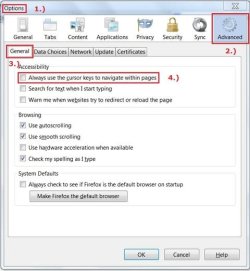
There are settings in FF that can be checked out, go to Tools in the menu bar of FF; then Options (1.), Advanced Section (2.) General Tab (3.) and see what your settings are for (#4.), notice my #4. is unchecked:

fftabsetting .jpg

I haven't explored whether or not your issue can be affected or crossover into other applications.

There are settings in about:config but try these suggestions first before or if we venture there.

 

My Computer

Computer type
PC/Desktop
Computer Manufacturer/Model Number
Gateway DX4831-01e (Mid-Tower Desktop)
OS
Originally Win 7 Hm Prem x64 Ver 6.1.7600 Build 7601-SP1 | Upgraded to Windows 10 December 14, 2019
CPU
Intel i3 530 2.93GHz, 2933MHz 2 Cores 4 Logical Processors
Motherboard
Gateway H57M01 133 megahertz
Memory
6GB of 1,333MHz DDR3 SDRAM
Graphics Card(s)
32MB Intel Graphics Media Accelerator HD IGChip
Sound Card
Realtek High Definition Audio
Monitor(s) Displays
Gateway HX2000 20inch TFT active matrix TN
Screen Resolution
1600 x 900 x 59 hertz
Hard Drives
WDC WD10EADS-00M2B0 [HDD] (1000.20 GB) -- drive 0,
HL-DT-ST DVDRAM GH41N [CD-ROM dr]
Four card readers, and Four USB 2.0
PSU
300watts.
Case
Mid-Tower Desktop
Cooling
Stock from Gateway
Keyboard
Natural Ergonomic Keyboard 4000, see Other Info
Mouse
Orig. Gateway wore out now using Insignia USB wired optical
Internet Speed
Vz FIOS 10ms png 57.64Mbps down 65.53Mbps up Speedtest.org
Antivirus
Zamana Anti-logger with Anti-malware, MSE, Windows Firewall,
Browser
IE11.0.9600.19399-Upd ver11.0.135, Firefox 68.0.1 x64
Other Info
System Specs by Belarc.

BIOS: American Megatrends Inc. P01-A0 11/17/2009

Replaced the MS 'Natural' Standard PS/2 Enhanced 101-102 Keyboard with a new Natural Ergonomic Keyboard 4000 on August 1st 2014.

Canon Pixma MG3222 Printer.

Updated to IE11 on 12102015 | Fios Quantum Router g1100

Additional AV: SpywareBlaster, manual Mbam, SAS
Thank you to all. Ok, Options/Settings/General all are checked but the first and last items.

If plugin related, wouldn't this always happen?

I'm typing with one finger, in Firefox,then need to scroll up oe down in a page. Or just browsing through and hit the up arrow. Never Ctrl which indeed on both sides of keyboard.

Did I answer all? Oh that article didn't seem to mention this situation.

It's very intermittent. I wish I could make it happen. I don't change settings, I don't install new software very often. Lid is open 90 minutes a day. No pets, dust, cooties or food in keyboard. Turned this over and nothing fell out. No dustcan but if anything was trapped I'd think this would happen more often.

I appreciate all the help. Keep it coming!
 

My Computer

Computer type
Laptop
Computer Manufacturer/Model Number
MS Windows 7 Home Premium 64-bit SP1
OS
Win 7 64 bit
CPU
Intel Atom N450 1.66 ghz
Motherboard
Dell Inc 00DKZ
Memory
2 gig single channel DDR2
Graphics Card(s)
Generic PnP Monitor, Intwl Graphics Media Accelerator 3150
Screen Resolution
1024x600
Hard Drives
2.44gb Western Digital
Mouse
none
Internet Speed
WiFi
Antivirus
MalwareBytes
Browser
Firefox
Other Info
Dell 14z 5432
~~~
If plugin related, wouldn't this always happen?
~~~
A plugin or even a native Firefox feature can be created in such a way as to only work when an edit field is detected. In my case, there are some forums that I visit where Firefox does not do any spell checking while I'm in the post composition field. My guess is that this is because of the way that Firefox detects that it is in an edit field or there are ways for the forum's software to turn off the spell checking... thus encouraging the members to use the forum's spell check feature.

If you notice this happening again, please let us know what website you were visiting, what you were doing at the time (e.g. making a post) and maybe take a screenshot of the entire screen. As I mentioned earlier, testing with the virtual keyboard might help too.

I understand how frustrating it is to not be able to reproduce this issue at will. But don't worry, this thread can stay open for as long as it takes.
 

My Computer

Computer type
Laptop
Computer Manufacturer/Model Number
Employer provided Dell Latitude
OS
W7 Pro SP1 64bit
CPU
i7
Memory
8GB
Graphics Card(s)
Intel HD Graphics
Hard Drives
crappy SSD
Antivirus
Employer mandated Symantec Endpoint Protection
Browser
Pale Moon 64bit, IE11 64bit & Chrome 64bit
I have no memory so will print out those directions at my laptop tomorrow. I'll put up a note so when it happens I can go on screen

I don't use many programs other than Firefox, FTP, Notepad, and occasionally others. Mostly those three. I'm becoming familiar with Chrome but there are features I miss.

I'm counting on y'all. I'll be patient because this happened just twice, maybe a month apart. It's real frustrating to have it be infrequent but being so I know my keyboard is fine as in my OS.
 

My Computer

Computer type
Laptop
Computer Manufacturer/Model Number
MS Windows 7 Home Premium 64-bit SP1
OS
Win 7 64 bit
CPU
Intel Atom N450 1.66 ghz
Motherboard
Dell Inc 00DKZ
Memory
2 gig single channel DDR2
Graphics Card(s)
Generic PnP Monitor, Intwl Graphics Media Accelerator 3150
Screen Resolution
1024x600
Hard Drives
2.44gb Western Digital
Mouse
none
Internet Speed
WiFi
Antivirus
MalwareBytes
Browser
Firefox
Other Info
Dell 14z 5432
Try tapping F7 when it happens next time. Firefox F7 toggles caret browsing
 

My Computer

Computer type
Laptop
Computer Manufacturer/Model Number
HP Pavilion dv6-6c10us
OS
x64 (6.3.9600) Win8.1 Pro & soon dual boot x64 (6.1.7601) Win7_SP1 HomePrem
CPU
AMD A6-3420M APU with Radeon(tm) HD Graphics
Motherboard
Hewlett-Packard 1805
Memory
6.00 GB
Graphics Card(s)
AMD Radeon(TM) HD 6520G
Sound Card
(1) AMD High Definition Audio Device (2) IDT High Definiti
Monitor(s) Displays
HP W2072a 20" LCD (1600 x 900) @ 60 Hz
Screen Resolution
1366 x 768 x 32 bits (4294967296 colors) @ 60 Hz
Hard Drives
ST640LM0 00 HM641JI SATA Disk Device
Keyboard
Logitech k520 wireless KB
Mouse
Logitech m320 wireless mouse (bundled with KB)
Internet Speed
15/5 | 54 MB Wireless 'n'
Antivirus
Realtime: Defender or Avast | On-demand: Malwarebytes, ESET
Browser
IE 11 on Win8, IE 10 on win 7
Other Info
Media: [Gimp, Audacity, VLC] || Comm: [WEmail 2012, Skype] || Productivity: [OpenOffice,| Textpad] || Utils: [Sysinternals, cCleaner, Speccy, Defraggler]
Ok. F7 or On Screen Keyboard. Will do so next time this happens. Been a while ... whicj os good!

Happy New Year!
 

My Computer

Computer type
Laptop
Computer Manufacturer/Model Number
MS Windows 7 Home Premium 64-bit SP1
OS
Win 7 64 bit
CPU
Intel Atom N450 1.66 ghz
Motherboard
Dell Inc 00DKZ
Memory
2 gig single channel DDR2
Graphics Card(s)
Generic PnP Monitor, Intwl Graphics Media Accelerator 3150
Screen Resolution
1024x600
Hard Drives
2.44gb Western Digital
Mouse
none
Internet Speed
WiFi
Antivirus
MalwareBytes
Browser
Firefox
Other Info
Dell 14z 5432

My Computer

Computer type
Laptop
Computer Manufacturer/Model Number
HP Pavilion dv6-6c10us
OS
x64 (6.3.9600) Win8.1 Pro & soon dual boot x64 (6.1.7601) Win7_SP1 HomePrem
CPU
AMD A6-3420M APU with Radeon(tm) HD Graphics
Motherboard
Hewlett-Packard 1805
Memory
6.00 GB
Graphics Card(s)
AMD Radeon(TM) HD 6520G
Sound Card
(1) AMD High Definition Audio Device (2) IDT High Definiti
Monitor(s) Displays
HP W2072a 20" LCD (1600 x 900) @ 60 Hz
Screen Resolution
1366 x 768 x 32 bits (4294967296 colors) @ 60 Hz
Hard Drives
ST640LM0 00 HM641JI SATA Disk Device
Keyboard
Logitech k520 wireless KB
Mouse
Logitech m320 wireless mouse (bundled with KB)
Internet Speed
15/5 | 54 MB Wireless 'n'
Antivirus
Realtime: Defender or Avast | On-demand: Malwarebytes, ESET
Browser
IE 11 on Win8, IE 10 on win 7
Other Info
Media: [Gimp, Audacity, VLC] || Comm: [WEmail 2012, Skype] || Productivity: [OpenOffice,| Textpad] || Utils: [Sysinternals, cCleaner, Speccy, Defraggler]
Back
Top