
Left Sided Wallpapers

Coventeena

New member
Local time
11:18 PM
Messages
2
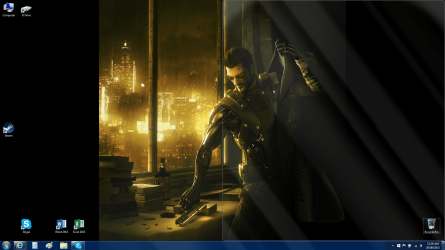
If I had the time to spare I could probably find thissomewhere else in the forum but… Yah… Life and long weeks away because of workhappened and here I am. Anyway I have a wallpaper slideshow of saved images andfan art of games I play and I’m getting tired of only seeing half of thepicture. I have the default wallpaper settings so that all pictures are set to:Fit to screen mode. As a result they all sit in the centre of the screen and Ihave Skype snapped to the right half of my screen and its cutting off half thewallpaper as I said. I was wondering if there was any way to force the picturesto the left without going to the picture folder and editing the 1000+ picturesso they have a really wide right edge. (This more effects the full bodyportraits than anything else because they are tall and skinny.) I know I couldjust keep adjusting the width of Skype so I could see it, but I don’t feel likeputting in that much effort considering I have the wallpaper set to changeevery 10min.
I will also attach a picture of my desktop (with most ofthe icons blanked out, you don’t need to know what I have) I run an Aero themeand have taken the screen shot with Skype open but mouse of the ‘show desktop’button down the far right that way you can see the picture and the outline ofSkype and hopefully understand what I’m saying.


Attachments
  • desktop.png
    desktop.png
    437.8 KB · Views: 3

My Computer

Computer type
PC/Desktop
OS
Windows 7 Home Premium 64bit
Hi and welcome to SevenForums,
I would guess Fill would be the easiest option to use
Center will give you the same space on each side of course :/
Stretch will kill the images completely

I don't know of anyway to force the images to the left

Images the proper screen size has to start some time even at 1600x900 would appear better than a portrait image will,
Usually a matter of taking screen shots of the images in full screen or an increased page zoom rate instead of saving them as a download or save picture as... is a good start.
 

My Computer

Computer type
PC/Desktop
Computer Manufacturer/Model Number
Custom assembled by me :}
OS
Win-7-Pro64bit 7-H-Prem-64bit
CPU
i7-5930K 2nd i9-9940x both water blocked VRM's too
Motherboard
ASUS SABERTOOTH X99 2nd ASUS x299 Apex
Memory
Trident-z 3200C14 2nd Trident-z 3600C16
Graphics Card(s)
EVGA 1080ti ftw3 2nd Titan Xp both water blocked
Sound Card
Built-in Realtek
Monitor(s) Displays
1-AOC G2460PG 24"G-Sync 144Hz/ 2nd 1-ASUS VG248QE 24" 144Hz
Screen Resolution
1920 x 1080 144Hz
Hard Drives
2-Samsung M.2 Evo & Evo Plus
2-Samsung 850 EVO 500GB SSD's/ 3-2.5 W.D. Black 1tb-&3-1tb/3-3.5 WD Black 1tb hdd's
PSU
EVGA SuperNOVA 1000-P2 2nd 1200-P2
Case
2-Corsair Obsidian Series 450D Black ATX Mid Tower
Cooling
Custom water loops
Keyboard
Logitech G710+/ 2nd Logitech G910
Mouse
2-RedDragon M901 Perdition 16400 dpi Gaming mouse = wired
Internet Speed
Comcast Ping 19ms 89.31mbps download speed 6.12mbps upload
Antivirus
Malwarebytes Pro/ Superantispyware Pro
Browser
FireFox & Pale moon
Other Info
2nd ASUS X299 Apex/Intel i9-9940x with Custom water loop/7H-Prem-x64/Corsair 450D case/Ram Trident-z 3600C16 4x8gb / Samsung970Evo plus 500gb SSD/Dual ssd EZ swap evo/PSU EVGA SuperNova 1200w-P2 80+Platinum/GPU Titan Xp /8-ML-140 on push-pull on 2-280GTX rads
Thanks for the welcome.

I have tinkered with fill and stretch and the others and they all work finewhen I get a widescreen wallpaper but I was just hoping for a way to move theskinnier ones. I’m not super worried about the whole thing, it would just beone of those things that would be nice to have, if you know what I mean
 

My Computer

Computer type
PC/Desktop
OS
Windows 7 Home Premium 64bit
Back
Top