Lenovo G50-30 Dual Boot Windows 7, 8.x - IMPOSSIBLE!

nexatron

New member
Local time
11:16 AM
Messages
3
I have come to the conclusion that it is impossible to configure this laptop to dual boot Windows 7 and 8.1, unless anyone knows better. The issue seems to be with the BIOS settings which appear to be mutually exclusive to booting either Windows 7 or Windows 8.x – but not both.
Whether opting for a MBR or GPT configuration, or installing Windows 8 from USB media or within Windows 7 the issue remains.


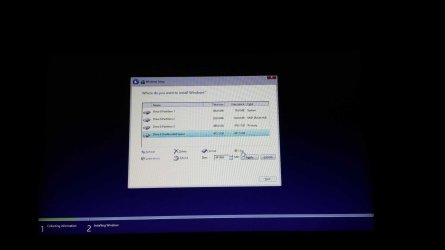
I ‘downgraded’ the pre-installed, bloatware ridden Windows 8.1 on this laptop to a clean install of Windows 7 Pro with no problems using default Windows 7 BIOS settings (Win 7 OS, load default settings) on a 500GB partition using DISKPART as per directions on this site. The problem occurs when trying to install Windows 8.1 on the remaining unallocated 500GB partition on my hard drive using these Windows 7 optimised BIOS settings. When booting 8.1 directly from USB (downloaded 8.1 – same version - using Windows media creation tool as I have OEM key in BIOS) the installation will freeze (no mouse pointer) on the initial ‘select keyboard layout’ screen. If I attempt an installation from within Windows 7 it’ll get as far as to when it reboots then hang.


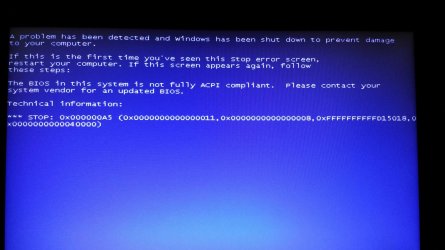
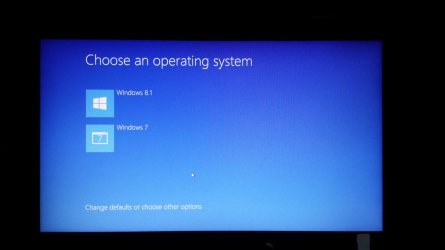
Sure, I can load Windows 8 optimised settings in BIOS and then install 8.1. Problem is then when I select 7 from the bootloader, booting will freeze during the formation of the Windows logo with a BSD 0xA5 BIOS in system not fully ACPI compliant.. error – and there’s no ACPI settings in BIOS. If I then change back to Windows 7 optimised settings, I’ll get into a ‘Your PC ran into a problem and needs to restart...’ loop. I’ve updated BIOS from A7CN40WW to the latest A7CN43WW to no avail. I’ve also attempted an GPT/UEFI install and run into the same issue, and I’ve tried about ever permutation of BIOS settings available.


[FONT=&quot]Any help here would be greatly appreciated as I’m tearing my hair out over this one.:cry:[/FONT]
 

My Computer My Computer

At a glance

Windows 7 Professional x642.16 gigahertz Intel Pentium N35308 GBIntel(R) HD Graphics
Computer type
Laptop
Computer Manufacturer/Model Number
Lenovo G50-30
OS
Windows 7 Professional x64
CPU
2.16 gigahertz Intel Pentium N3530
Motherboard
LENOVO Lancer 5A6 31900058WIN
Memory
8 GB
Graphics Card(s)
Intel(R) HD Graphics
Hard Drives
1 TB WDC WD10JPCX-24UE4T0
Antivirus
ESET Smart Security Version 5.0.95.0
Browser
Mozilla - Firefox Version 33.1.1
What happens to UEFI and CSM when you choose Win7 optimized default? Can you wipe the HD to remove all code then boot Win7 as a UEFI device, install it to first partiiton, then boot Win8 as UEFI device and install to second partition? What exact error or failure do you get?

What if you set CSM enabled and first to boot, then try the above?

What if you set CSM enabled, first to boot, and then load Win7 optimized defaults?

Are there other choices besides Win8 and Win7 optimized defaults?

What are the exact CSM, Legacy BIOS, BIOS Boot order settings available after turning off Secure Boot. Pictures would help. Screenshots and Files - Upload and Post in Seven Forums - Windows 7 Forums
 
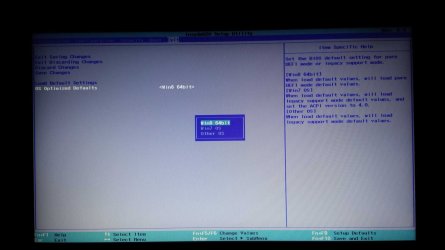
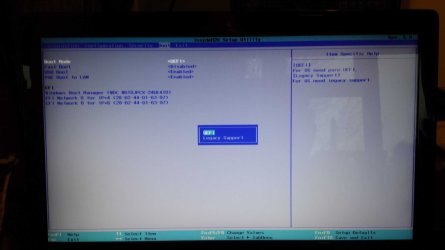
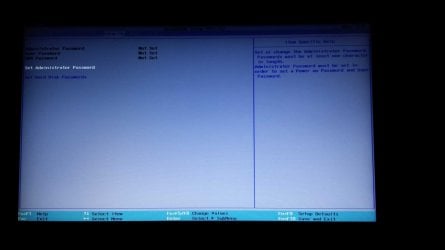
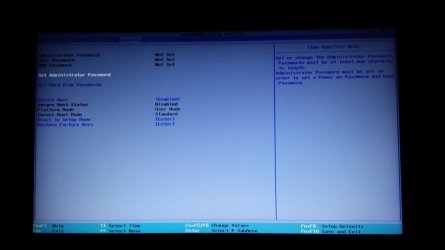
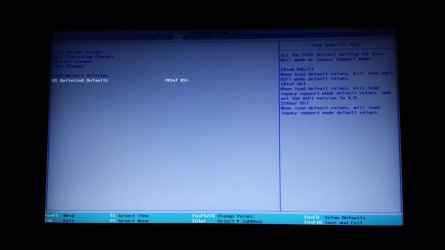
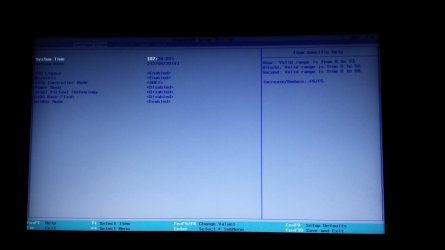
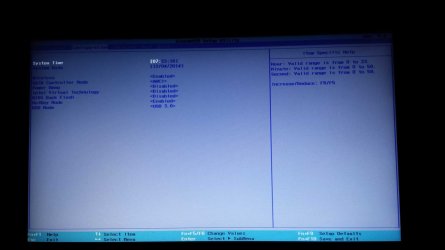
OK geezer, thanks for your prompt response and apologies for my delay. Screen shots are below.


  • · When Windows 7 optimised is selected, legacy is enabled support (CSM is not available in this BIOS but I believe ‘legacy support’ is the equivalent) with UEFI configured to boot first. I change usb mode to 2.0 as per instructions and installed Windows 7, changed usb mode to 3.0 then installed all drivers including drivers for usb 3.0.
  • · Yes, I can perform a CLEAN or CLEAN ALL during DISKPART to remove all code from the hard drive.
  • · Yes I can then install Windows 7 on a first partition as a boot device either UEFI/GPT mode or legacy/MBR.
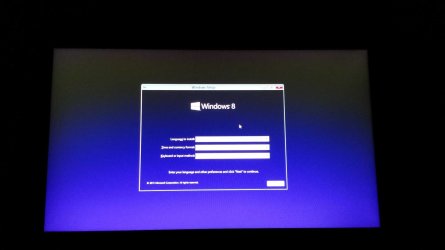
  • · The problem then arises when I try and install Windows 8 on a second partition. Using any combination of BIOS settings with Win 7 OS selected on (either UEFI/GPT mode or legacy/MBR) causes Windows 8 to freeze on the language select screen with no mouse pointer.
  • · I could then select Win 8 OS optimised defaults in BIOS, disable secure and successfully install Windows 8. Trouble is when I select Windows 7 to boot from the bootloader it will hang at the formation of the Windows logo while booting with an 0xA5 BSD STOP ERROR (illustrated in screen shots).
  • · Yes there is another choice in BIOS – other OS – but similarly I cannot boot Windows 7 using this despite attempting numerous other BIOS settings.
And just when I thought I was getting nowhere, now I can’t even enter the BIOS settings, either with the novo button or by using Fn + F2. All I get now is a static cursor in the upper right corner of the screen although Windows 7 still boots (bootblock must be OK). I’ve somehow managed to semi-brick it and corrupt BIOS by over use of the novo button. Oh joy:cool:. I’m thinking of bring a hammer to this darn thing unless anyone can persuade me to do otherwise:mad:.
:mad:
 

Attachments

  • BIOS_exit_ selection.jpg
    BIOS_exit_ selection.jpg
    126.5 KB · Views: 120
  • boot_legacy support.jpg
    boot_legacy support.jpg
    75.1 KB · Views: 3
  • boot_uefi.jpg
    boot_uefi.jpg
    46.2 KB · Views: 2
  • boot_uefi_legacy_select.jpg
    boot_uefi_legacy_select.jpg
    53.4 KB · Views: 3
  • configuration_usb2_3.jpg
    configuration_usb2_3.jpg
    113.5 KB · Views: 4
  • security.jpg
    security.jpg
    55.4 KB · Views: 2
  • secure.jpg
    secure.jpg
    51.9 KB · Views: 2
  • exit_W7_optimised.jpg
    exit_W7_optimised.jpg
    58.7 KB · Views: 2
  • configuration_W8.jpg
    configuration_W8.jpg
    47.8 KB · Views: 2
  • configuration_W7_usb3.jpg
    configuration_W7_usb3.jpg
    77.7 KB · Views: 2
  • W8_install_ with_pointer.jpg
    W8_install_ with_pointer.jpg
    50.5 KB · Views: 2
  • W8_install_hang_no_pointer.jpg
    W8_install_hang_no_pointer.jpg
    44.5 KB · Views: 1
  • acpi.jpg
    acpi.jpg
    125.6 KB · Views: 2
  • W7_boot_hang.jpg
    W7_boot_hang.jpg
    75 KB · Views: 1
  • os_select.jpg
    os_select.jpg
    62.9 KB · Views: 1
  • your_pc_ran.jpg
    your_pc_ran.jpg
    39.4 KB · Views: 1
  • W8_after_boot_attempt_hang.jpg
    W8_after_boot_attempt_hang.jpg
    125.5 KB · Views: 2
  • W8_install_partition_select.jpg
    W8_install_partition_select.jpg
    54.4 KB · Views: 1
  • W8_clean_install.jpg
    W8_clean_install.jpg
    42 KB · Views: 1

My Computer My Computer

At a glance

Windows 7 Professional x642.16 gigahertz Intel Pentium N35308 GBIntel(R) HD Graphics
Computer type
Laptop
Computer Manufacturer/Model Number
Lenovo G50-30
OS
Windows 7 Professional x64
CPU
2.16 gigahertz Intel Pentium N3530
Motherboard
LENOVO Lancer 5A6 31900058WIN
Memory
8 GB
Graphics Card(s)
Intel(R) HD Graphics
Hard Drives
1 TB WDC WD10JPCX-24UE4T0
Antivirus
ESET Smart Security Version 5.0.95.0
Browser
Mozilla - Firefox Version 33.1.1
There's a BIOS update from November. Did you install it? It may be the fix for this: Laptops and netbooks :: Lenovo G Series laptops :: G50 30 Notebook Lenovo - Lenovo Support (CA)

I see Secure Boot still set to Enabled. It must be completely disabled.

You have tried to install both 7 and 8 at both 8- and 7-optimized defaults in both UEFI GPT and Legacy MBR mode?

Have you tried both OS's using flash stick install method, formatting flash stick using Rufus? UEFI Bootable USB Flash Drive - Create in Windows

If BIOS will not respond to hotkeys or Lenovo button and you don't have easy access to CMOS battery to reset the BIOS to defaults, then I'd install Windows 8 to UEFI if its available presently then enter BIOS setup using How to enter Setup Utility (F1) or Boot Menu (F12) on a Microsoft Windows 8/8.1 preloaded PC - Lenovo Support (US)

The model's Win7 downgrade issues have been aired here since last summer in Lenovo G50 Win7 Install Problem - Windows 7 Help Forums with regular updating from those struggling with it. The latest which might apply is this checklist:
Here some info I found about that matter in a blog - click. It's written in bulgarian but it says the following:
1. OS Optimized Defaults - select "Win7 OS".
2. Load Default Settings - Hit Enter
3. Load Optimized Defaults - choose Yes! - this is the key point!
4. Then go to Configuration -> USB Mode - choose USB 2.0
5. Next go to Boot -> Boot Mode - switch to Legacy Support
6. Boot -> Boot Priority - switch to Legacy First
7. Exit -> Exit Saving Changes -> Yes

That's it.

I also recall on my G500 that to Dual Boot with 7 I had to choose it as the Optimized OS while at the same time loading Optimized Defaults. It's tricky.
 
Tricky is an understatement – it’s more like an exercise in frustration.


  • Yes, I have installed the latest BIOS update, A7CN43WW, released in November (I wish I hadn’t as you’ll soon read) but this hasn’t overcome the issue (the laptop had version A7CN40WW when purchased).
  • Yes, I have installed with secure boot disabled. The enabled options are just displayed here for illustration.
  • Yes, I have tried to install both 7 and 8 at both 8- and 7-optimized defaults in both UEFI GPT and Legacy MBR mode.
  • Yes, I have tried to install both OS's using flash stick install method, formatting flash stick using Rufus.

  • I’ve already disassembled and desoldered one leg of the RTC battery to clear CMOS BIOS settings to no avail – the problem is with the BIOS integrity itself, and as it seems to be locked on windows 7 optimised settings, I can’t install Windows 8 and modify BIOS settings from there.
  • I am aware of the G50-30 downgrade issues and this was never a problem. I used similar instructions to install Windows 7.
Now, another issue with this bloody laptop is that the BIOS update tool by default does not allow the flashing of current or legacy BIOS. It seems Lenovo and their non-existent customer support, doesn’t like people actually using their computers. I even extracted the self-extracting executable and modified the platforms.ini [Bios_Version_Check] flag to enable flashing of the current BIOS to restore functionality. However, this doesn’t work as platform.ini is created by the tool itself, InsydeFlash.exe, so immediately over-writes any modded flags when it is run.


I read that it is also possible to restore BIOS from a USB stick while booting if the extracted bioss.fd is renamed to a default name, using Fn+B while booting. The trouble here is that to find this default name the tool used doesn’t work as this BIOS is RSA signed and modding just one byte will result in a brick.


So it looks as though (unless anyone knows better), I’ll have to wait for a BIOS update to even have the privilege of accessing BIOS settings again.


A real shower of sh** this one, as we say in the UK.:mad:
 

My Computer My Computer

At a glance

Windows 7 Professional x642.16 gigahertz Intel Pentium N35308 GBIntel(R) HD Graphics
Computer type
Laptop
Computer Manufacturer/Model Number
Lenovo G50-30
OS
Windows 7 Professional x64
CPU
2.16 gigahertz Intel Pentium N3530
Motherboard
LENOVO Lancer 5A6 31900058WIN
Memory
8 GB
Graphics Card(s)
Intel(R) HD Graphics
Hard Drives
1 TB WDC WD10JPCX-24UE4T0
Antivirus
ESET Smart Security Version 5.0.95.0
Browser
Mozilla - Firefox Version 33.1.1
Is it still covered by the one-year tech support and parts warranty? If so ask for a supervisor to arrange an RMA or get elevated support. Let them know the issue is being aired in the top tech forums and is already the top Google search result for the model so their support (or not) will be on display for the world to see.

Remember if you get non-helpful Support you can keep calling back in. I'd insist the elevate this to a supervisor and if necessary management. If they want you to pay for extended Support then ask what they can offer exactly.
 
Can you rollback BIOS to the previous version?

Lenovo solders the RTC battery? I often wonder about OEMs - one mfgr seals the main laptop battery, you cannot remove it - sheesh!

You might still try giving support a call - some Mobos are being replaced by Lenovo after even the warranty expires. As Greg mentioned - call and if the results are not satisfactory, call again and escalate the issue.

Here are some things I came across while searching.

As the system comes up, Shift + F2 or tapping esc might get you into BIOS

Reset CMOS: remove AC power, remove DC power, press and hold the power button for 2 full minutes to drain residual charge.
Boot using AC only - any luck getting into BIOS?

If that doesn't work, try: remove battery and AC power, wait 5 minutes
connect AC power ONLY - leave the battery out
press and hold the insert key, then while holding the insert key, press the power button
a popup should appear asking for the boot device - do not select anything
press the TAB key and the BIOS menu should appear.

There are a couple of settings that you might want to check
Fast or rapid boot should be disabled.
Signed drivers should be disabled.

I think you and Greg went over the other settings (Secure Boot=disabled, UEFI | Legacy=UEFI)

and the last thing I can think of is: software and hardware SHOULD be backward compatible, but they are never fully forward compatible (updates and patches MIGHT get over the hurdle, but it's still bubble gum and rubber bands).

You might have already tried this, if so I missed it.
Win8 should be the initial install and dual boot Win7 after that is stable - it shouldn't matter to the end user which OS was installed first, they can boot to either one. It might matter to Windows7 since some of the BIOS changes and hardware advances were geared to Win8. Anyway, that's how I would approach a Win8 / Win7 dual boot.

Good luck,

Bill
.
 

My Computer My Computer

At a glance

x64 (6.3.9600) Win8.1 Pro & soon dual boot x6...AMD A6-3420M APU with Radeon(tm) HD Graphics6.00 GBAMD Radeon(TM) HD 6520G
Computer type
Laptop
Computer Manufacturer/Model Number
HP Pavilion dv6-6c10us
OS
x64 (6.3.9600) Win8.1 Pro & soon dual boot x64 (6.1.7601) Win7_SP1 HomePrem
CPU
AMD A6-3420M APU with Radeon(tm) HD Graphics
Motherboard
Hewlett-Packard 1805
Memory
6.00 GB
Graphics Card(s)
AMD Radeon(TM) HD 6520G
Sound Card
(1) AMD High Definition Audio Device (2) IDT High Definiti
Monitor(s) Displays
HP W2072a 20" LCD (1600 x 900) @ 60 Hz
Screen Resolution
1366 x 768 x 32 bits (4294967296 colors) @ 60 Hz
Hard Drives
ST640LM0 00 HM641JI SATA Disk Device
Keyboard
Logitech k520 wireless KB
Mouse
Logitech m320 wireless mouse (bundled with KB)
Internet Speed
15/5 | 54 MB Wireless 'n'
Antivirus
Realtime: Defender or Avast | On-demand: Malwarebytes, ESET
Browser
IE 11 on Win8, IE 10 on win 7
Other Info
Media: [Gimp, Audacity, VLC] || Comm: [WEmail 2012, Skype] || Productivity: [OpenOffice,| Textpad] || Utils: [Sysinternals, cCleaner, Speccy, Defraggler]
i install win7 32bit on g50-30 i made allmost all what i need then i update bios to a7cn43ww and stuck on bsod cd with win7 can;t boot or usb with win7 too i made bios reflash back using usb pen and this: http://download.lenovo.com/consumer/hnt/lenovo_g40_30_g50_30_bsod_solution_20140925.pdf after reflash i load win7 settings (boot mode legacy and boot first EFI) and win7 boot again if you need fix just downgrade bios back to a7cn40ww
i attached bios if they will erase it from pdf file
 

Attachments

My Computer My Computer

At a glance

windows 7 unlimate 32bit
Computer type
PC/Desktop
Computer Manufacturer/Model Number
hp9690ew
OS
windows 7 unlimate 32bit
Confirm BIOS flash then change BIOS settings to Boot Mode Legacy, but First Boot UEFI (which seems contradictory)??

This results in UEFI install? Any other needed settings? What about Reset to Defaults? Which choice there?
 
Bios a7cn43ww will not allow CD/usb with win7 installation or installed win7 (before bios upgrade) - BIOS is LOCKED to win8 (or badly updated) You must downgrade bios from a7cn43ww to a7cn40ww (tutorial and files up)m then in Bios setup sellect OS type to Win7 and press laod defaults this will set boot to legacy but boot order to EFI this will allow you to install or boot installed win7 to make downgrade you have to set BIOS BACK FLASH = Enable in a7cn43ww without this downgrade is not possible.
 

My Computer My Computer

At a glance

windows 7 unlimate 32bit
Computer type
PC/Desktop
Computer Manufacturer/Model Number
hp9690ew
OS
windows 7 unlimate 32bit
What is BIOS BACK FLASH? Is that a setting in the BIOS or a description you're making of needing to downgrade BIOS before WIn7 will install?
 
option BIOS BACK FLASH is in lenovo bios, you must enable this options (disabled by default) because bios flash tool with older bios version will not be able to downgrade bios from 43ww to 40ww version. to install win7 on lenovo g50-30 you must have bios in a7cn40ww version if you have 43ww version, win7 installation will not pass (BSOD 0x000000a5, bios is not acpi compilant etc...)
 

My Computer My Computer

At a glance

windows 7 unlimate 32bit
Computer type
PC/Desktop
Computer Manufacturer/Model Number
hp9690ew
OS
windows 7 unlimate 32bit
G50 Windows 7 installation problem

Background information:
I want to dual boot Windows 8.1 and 7.
System is pre-installed with windows 8.1
System is on a GPT drive
I made a Drive partition created for windows 7, and I want to install windows 7 to a GPT partition, not MBR.
UEFI is enabled, fast boot disabled, secure boot disabled.
I have also formatted a USB stick with win 7 for GPT(UEFI).

The problem:
I'm trying to install to the GPT partition I created for windows 7. However, I am unable to boot from USB.
UEFI does not allow me to boot from USB.
If I enable legacy bios, USB is detected but cannot be booted as the USB is formatted for GPT.
If I use UEFI mode, I can only boot into windows 8.1 and I cannot boot from USB.
How can I boot from the Windows 7 installation USB? Please help.
 

My Computer My Computer

At a glance

OS
Computer type
PC/Desktop
OS
OS
Yes, windows 8.1 boots with secure boot disabled. I did format the USB using option 1 successfully.(GPT option for UEFI) No errors were present in the log.

Edit: Post 12 may be incorrect. You do not have to revert the bios to install windows 7.
To solve the ACPI non compliant problem: In the BIOS
1.exit tab>change windows8OS optimised defaults to win 7 optimised defaults>
2.load default bios values>
3.change legacy mode to UEFI>save and exit.
Edit 2: I do not know if the above applies to the newer BIOS, my BIOS version is 40ww.

I have now installed win 7 to a GPT partition without using the USB, since it was unable to boot from the USB

The issue has not been completely solved however. After the win 7 installation, it automatically attempted to reboot into win 7, so I had to manually stop it from booting into win 7, and change the bios settings from 'win864bitOS' to win7, load setting defaults, change legacy to UEFI, save and exit. If I did not change the bios, windows 7 would not even attempt to boot and the installation would fail, thus causing it to automatically revert the installation.

So now even though win 7 is installed, it cannot boot if I load default bios settings for windows 8 and other OS. A red bar will flash at the top if I try to do this. If I change the bios to win 7 OS with UEFI enabled, it can boot, but windows cannot start. The windows 7 logo appears and shines brightly, but that is as far as I can get. I am unable to start windows 7. I believe that the default bios settings for win 7 OS is only compatible with MBR installations and not GPT, even if I enable UEFI. Please advise.
 

My Computer My Computer

At a glance

OS
Computer type
PC/Desktop
OS
OS
I was never able to get my Lenovo G500 to Dual Boot WIndows 8 which it came with and Windows 7. I had to delete all partitions to get it installed to UEFI. One thing I later learned that I did not try is to choose Other OS or Windows 7 OS defaults and then Exit saving those settings. Perhaps that will allow the Dual Boot, but I doubt it.

There are many BIOS' which will not allow keeping the factory Windows 8 install with a new Win7 UEFI install in Dual Boot, until the drive is wiped or all partitions deleted Win7 will not install. Then you can even install Windows 8 to a second partition and achieve a Dual Boot with UEFI, but it will not work with the existing one except on certain rare BIOS'.
 
I think what you said is true, Lenovo G50 refuses to boot from the win 7 installation USB, so I did not use the USB. Choosing win 7 OS defaults(using the method I mentioned in my previous post) will allow win 7 to install in UEFI mode successfully(while having win 8 pre-installed), but win 7 will not start. It will be successfully installed because win 7 will boot and get the win 7 logo, but it cannot go past that point. I suspect this is due to Lenovo's sub-standard BIOS.
 

My Computer My Computer

At a glance

OS
Computer type
PC/Desktop
OS
OS
Not yet, I'll try the startup repair after this post.
No, I haven't tried installing it again, because I will need to sit through the whole installation in order to prevent it from rebooting into Win 7 during the installation. This, currently, is a clean install.
The ISO was previously obtained from Digital River.
 

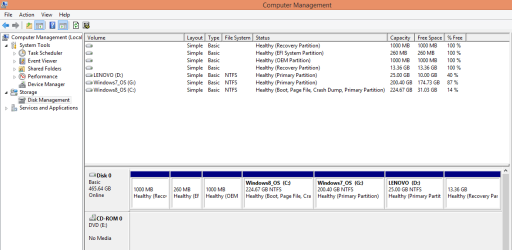
Attachments

  • Diskmanagement.png
    Diskmanagement.png
    18.8 KB · Views: 2

My Computer My Computer

At a glance

OS
Computer type
PC/Desktop
OS
OS
How do I do startup repair? I'm not given that option. I only have three options: safe mode/networking/cmd.
Win 7 cannot start in all 3 options.

I highly suspect that the Lenovo G50 is incapable of running Windows 7 in UEFI/GPT mode. Buyer beware.
 
Last edited:

My Computer My Computer

At a glance

OS
Computer type
PC/Desktop
OS
OS
Back
Top