Lenovo G780 replaced harddrive, network adapter drivers fail

n1tr0g3n8

New member
Local time
9:23 AM
Messages
2
I recently bought a new Lenovo G780, as my old HP laptop failed on me. However, the harddrive from my HP was fine, so when I got the new computer I decided to just take the harddrive out of my HP and put it into my new Lenovo. I've got the drivers for everything else to work, except my wireless network adapter refuses to install drivers from any source I can find. The adapter is an Atheros AR9285. I've tried lenovo's online drivers, and have even bought Driver Manager and asked the support staff to find drivers that work for me. They said they found one that worked, but I tried installing it and it said that "This computer is not manufactured by Quanta Computers" and then didn't install it. I have them working on that right now. But seriously, if they don't find a solution, what could the problem be? And how do I get my network adapter working again?

Here is some additional important information:
-The harddrive they gave me came with windows 7 x64 home edition. I am using windows 7 x64 professional.
-The wireless network adapter works if I use the harddrive the computer came with
-I am a chemical engineering college student who needs internet to do his assignments, and this little netgear usb adapter my friend lent me isn't cutting it ;)

Please help me. Let me know if you need any further information
 

My Computer My Computer

At a glance

Windows 7 Professional x64
OS
Windows 7 Professional x64
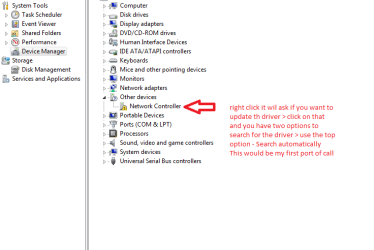
Hello and welcome nitro Mate one thing I didn't see you mention is the Device Manager in Control Panel have you tried that yet? CP > Device manager > open it up like in pic right click the adaptor > it will ask you to look for updates - it may come back as the correct one or not. See pic first.

If not have a look at this thread Best Atheros AR 9285 Driver? - Tech Support Forum there maybe something in there.
 

Attachments

  • cp.PNG
    cp.PNG
    14.8 KB · Views: 62

My Computer My Computer

At a glance

Desk1 7 Home Prem / Desk2 10 Pro / Main lap A...Desk1 i5 3750K / Laptop i7 GTX 860M / Desk2 i...Desk1 8GB (1866) / Desk2 16GB (1333) / Laptop...Desk 1& 2NVidia GTX 650 & Laptops on board Intel
Computer type
PC/Desktop
Computer Manufacturer/Model Number
Own build (new) Desk1 / Asus ROG Win 7 / Desk2 1st build
OS
Desk1 7 Home Prem / Desk2 10 Pro / Main lap Asus ROG 10 Pro 2 laptop Toshiba 7 Pro Asus P2520 7 & 10
CPU
Desk1 i5 3750K / Laptop i7 GTX 860M / Desk2 i5 2500
Motherboard
Desk1 Asus P877-V / Desk2 Gigabyte H67 UD3H / Laptop ?
Memory
Desk1 8GB (1866) / Desk2 16GB (1333) / Laptop 8Gb DDR3
Graphics Card(s)
Desk 1& 2NVidia GTX 650 & Laptops on board Intel
Sound Card
Desk 1 & 2 -XONAR DG Realtek High Def audio Laptop
Monitor(s) Displays
Desk 1 Benq HD 2450 / Desk2 Philips 24" / Laptop 17.5"
Screen Resolution
1920x1080 D1 & D2 & Laptop 1
Hard Drives
Desk1 Samsung 120GB 830 SSD
Asus ROG 256GB 850 Pro SSD
Desk2 Samsung 840 256 SSD
Toshiba 120GB EVO
PSU
Desk 1 Corsair HX 1050/ Laptop ? / Desk 2 Corsair HX 650
Case
Desk 1 Cooler HAF XM ? Toshiba laptop / Desk2 Coolermaster
Cooling
Fans on all Desk1 -2 Desk2 - all Coolermasters 5 Laptop ?
Keyboard
Desk 1 MS Sidewinder X6 Desk 2 MS Sidewinder X 4
Mouse
Desk 1&2 - Gigabyte MS 900 gamer - laptop - Logitec wireless
Internet Speed
ADSL2+
Other Info
One other Desktop (tester) and spare Toshba laptop both with SSD's
Running Kaspersky 2016 ISS on all machines config'd identically
Logitec audio stereo systems on each machine (x3)
Canon MG5250MFC
Router/modem TP-Link running WPA2SK
First i want to confirm one thing. You moved HDD from HP laptop to Lenovo.. with operating system that was installed on HP? and did not do a clean reinstall or clone OS from lenovo HDD? Was the windows 7 pro OEM from HP laptop or is it retail? You know that you can not transfer OEM license to another PC right?
There is not jus license problem with oem but it is bad to use os that was installed and cofigured for other computer by just moving HDD.. Clean install is recommended.
 

My Computer My Computer

At a glance

Windows 7 pro 64bit. (SP1)Intel core I5 24008GB DDR3 KingstonGigabyte GF GTX650OC
Computer type
PC/Desktop
Computer Manufacturer/Model Number
Self Built PC
OS
Windows 7 pro 64bit. (SP1)
CPU
Intel core I5 2400
Motherboard
Gigabyte H61
Memory
8GB DDR3 Kingston
Graphics Card(s)
Gigabyte GF GTX650OC
Sound Card
Realtek HD audio
Monitor(s) Displays
LCD 20"
Screen Resolution
1600x900
Hard Drives
INTEL SSD 320 80GB +Seagate 7200.12 1TBx3
PSU
Coolermaster RX450W
Case
Coolermaster atx case
Cooling
stock cooler
Keyboard
logitech
Mouse
logitech
Internet Speed
FTTD 100mbps
First i want to confirm one thing. You moved HDD from HP laptop to Lenovo.. with operating system that was installed on HP? and did not do a clean reinstall or clone OS from lenovo HDD? Was the windows 7 pro OEM from HP laptop or is it retail? You know that you can not transfer OEM license to another PC right?
There is not jus license problem with oem but it is bad to use os that was installed and cofigured for other computer by just moving HDD.. Clean install is recommended.

First i want to confirm one thing. You moved HDD from HP laptop to Lenovo.. with operating system that was installed on HP? and did not do a clean reinstall or clone OS from lenovo HDD? -Yes

Was the windows 7 pro OEM from HP laptop or is it retail? -I got it through my school for free, so lets call that retail. The harddrive is also not the original HP harddrive

You know that you can not transfer OEM license to another PC right?
There is not jus license problem with oem but it is bad to use os that was installed and cofigured for other computer by just moving HDD.. Clean install is recommended. -Not sure what OEM means, but it sounds like this is probably the problem. So if I were to do a clean install, what would be the best way to do this without losing data? I have a lot of programs I need for school which I don't exactly have the discs for... I do have my roommate's 1 TB external HD which I could use for this purpose, and can get the operating system disc when I go home for thanksgiving.

To the other person, your suggestion was the first thing I tried, but windows Device Manager doesn't even recognize the device as Atheros. It just calls it "Network Adapter".

Thanks for your help guys, I really appreciate it!
 

My Computer My Computer

At a glance

Windows 7 Professional x64
OS
Windows 7 Professional x64
Hum first up OEM means Original Equipment Manufacturer.
1st Say if you bought a retail laptop and it was preloaded then that would be an OEM that the dealer or company used.
2nd If you build a computer yourself or you significantly alter a machine say replace the hard drive and opto drive or add extra RAM then you can buy an OEM for a significantly lower price than retail - that you use for installing on that machine and ONLY that machine as it will be tied to that motherboard forever.
The only exception is if the motherboard you install that OEM on dies then you ask Microsoft very nicely if you can install it on another board / machine - after telling them the circumstances. They are usually very helpful with that. Any more than once though I think you would be pushing your luck:)

He he the other person - I like that LOL!! No when you right click on Network adaptor you should get the adaptors make come up - see my Desk 1 CP pic.

Another thing you could try to find the adaptor is to download either or both of the following free apps - they are invaluable for finding all sorts of things out re your machine. They will even let you know what the OS activation code is and passwords on your machine are etc etc Speccy is also great for seeing how the system is health wise - CPU temps, what hardware there is etc etc

Buy SIW Pro or Download SIW Home Edition << get the free one!! or

Speccy - System Information - Free Download << watch out for any add ons like Google bar ro whatever.

Just a couple of things when you answer a post you just need to click on Quote - it will take you to an answer window with the quote in it this will save you having to type what the quote in the post said.
Lastly I will try and PM you re something I want to let you know.:)


John
 

My Computer My Computer

At a glance

Desk1 7 Home Prem / Desk2 10 Pro / Main lap A...Desk1 i5 3750K / Laptop i7 GTX 860M / Desk2 i...Desk1 8GB (1866) / Desk2 16GB (1333) / Laptop...Desk 1& 2NVidia GTX 650 & Laptops on board Intel
Computer type
PC/Desktop
Computer Manufacturer/Model Number
Own build (new) Desk1 / Asus ROG Win 7 / Desk2 1st build
OS
Desk1 7 Home Prem / Desk2 10 Pro / Main lap Asus ROG 10 Pro 2 laptop Toshiba 7 Pro Asus P2520 7 & 10
CPU
Desk1 i5 3750K / Laptop i7 GTX 860M / Desk2 i5 2500
Motherboard
Desk1 Asus P877-V / Desk2 Gigabyte H67 UD3H / Laptop ?
Memory
Desk1 8GB (1866) / Desk2 16GB (1333) / Laptop 8Gb DDR3
Graphics Card(s)
Desk 1& 2NVidia GTX 650 & Laptops on board Intel
Sound Card
Desk 1 & 2 -XONAR DG Realtek High Def audio Laptop
Monitor(s) Displays
Desk 1 Benq HD 2450 / Desk2 Philips 24" / Laptop 17.5"
Screen Resolution
1920x1080 D1 & D2 & Laptop 1
Hard Drives
Desk1 Samsung 120GB 830 SSD
Asus ROG 256GB 850 Pro SSD
Desk2 Samsung 840 256 SSD
Toshiba 120GB EVO
PSU
Desk 1 Corsair HX 1050/ Laptop ? / Desk 2 Corsair HX 650
Case
Desk 1 Cooler HAF XM ? Toshiba laptop / Desk2 Coolermaster
Cooling
Fans on all Desk1 -2 Desk2 - all Coolermasters 5 Laptop ?
Keyboard
Desk 1 MS Sidewinder X6 Desk 2 MS Sidewinder X 4
Mouse
Desk 1&2 - Gigabyte MS 900 gamer - laptop - Logitec wireless
Internet Speed
ADSL2+
Other Info
One other Desktop (tester) and spare Toshba laptop both with SSD's
Running Kaspersky 2016 ISS on all machines config'd identically
Logitec audio stereo systems on each machine (x3)
Canon MG5250MFC
Router/modem TP-Link running WPA2SK
Back
Top