Solved Lenovo ideacentre B320 on Windows 7 keeps going into sleep!!!

ahiranta

New member
Local time
2:11 PM
Messages
25
How silly is that when you buy a new computer state of the arts blabla really cool and then every so many minutes its shuts down into sleep mode with no appeared solution within the normal setting. I do a lot of playing around with photo and video editing and that makes me watch slide shows a lot to check how it is going to look only to find my screen going black over and over again grrrrrr or watching internet tv.....what a crap. Anyway I am a complete know nothing when it comes to computers but your instructions were so easy and clear that even I solved it. THANK YOU SOOOOO MUCH for your effort to put this online!

Kindest regards.
Bianca


UPDATE:
It is still going to black screen grrrrr. Although the sleep option has turned grey as you said it would after restarting this computer my first try to watch a slideshow was cut short after it went back onto a black screen only after about 15 photo's. What to do next? any suggestions? Thanks.

Even worse it started going into sleep while I was browsing the net as well.

While I was using skype trying to recieve help to solve this problem I let a slideshow run as I did before but no sleep mode was activated. Skype running at the same time obviously kept the computer from going into sleep mode.
 

My Computer My Computer

At a glance

windows 7
OS
windows 7
Check the power options, nearly all new computers are default to go into sleep mode as an energy saver. You can disable these in Start -> Control Panel -> Power Options -> Change when the computer sleeps
 

My Computer My Computer

At a glance

Windows 7 Professional 64-bitIntel Core 2 Quad Q9505 2.83GHz8GBATI Radeon HD 5700
Computer Manufacturer/Model Number
Custom Built
OS
Windows 7 Professional 64-bit
CPU
Intel Core 2 Quad Q9505 2.83GHz
Memory
8GB
Graphics Card(s)
ATI Radeon HD 5700
Sound Card
Realtek HD Audio
Monitor(s) Displays
Generic PnP Monitor (23" TV)
Screen Resolution
1920x1080 (with 1024x768 extended display)
Hard Drives
1TB WDC WD10EARS-00Y5B1 ATA
PSU
550W (Can't confirm)
Keyboard
Microsoft Comfort Curve 2000 v1
Mouse
Microsoft Basic Optical Mouse
Internet Speed
6.5Mbps Download, 0.35Mbps Upload
Already tried that many time over

Thank you for your reply. Your suggestion was the first thing I have done and repeatedly tried over the last few days with no change. I even followed instruction found online on how to disable the sleep mode but I am told that this only disabled the sleep mode choice and not the sleep mode itself.

Please anyone out there who has an idea to solve this annoying problem please feel free to bring forward further suggestions.

Kindest regards.
 

My Computer My Computer

At a glance

windows 7
OS
windows 7
If you have disabled sleep mode from happening and it continues to go into sleep mode, then Lenovo have probably installed software on your PC that will put it into sleep mode regardless of what setting you change. Did your PC come with default software already installed on it??
 

My Computer My Computer

At a glance

Windows 7 Professional 64-bitIntel Core 2 Quad Q9505 2.83GHz8GBATI Radeon HD 5700
Computer Manufacturer/Model Number
Custom Built
OS
Windows 7 Professional 64-bit
CPU
Intel Core 2 Quad Q9505 2.83GHz
Memory
8GB
Graphics Card(s)
ATI Radeon HD 5700
Sound Card
Realtek HD Audio
Monitor(s) Displays
Generic PnP Monitor (23" TV)
Screen Resolution
1920x1080 (with 1024x768 extended display)
Hard Drives
1TB WDC WD10EARS-00Y5B1 ATA
PSU
550W (Can't confirm)
Keyboard
Microsoft Comfort Curve 2000 v1
Mouse
Microsoft Basic Optical Mouse
Internet Speed
6.5Mbps Download, 0.35Mbps Upload
Thank you

Thank you for you reply.

Yes the computer came ready to go with a recovery disc and a VERY small manual...lol

It is a great computer, just love it, but this going into sleep mode drives my patience through the roof. I have bolted the screen up against the wall....just in case....hahaha.

Seriously it would be great if you or anyone else for that matter would be able to help me solve this.
 

My Computer My Computer

At a glance

windows 7
OS
windows 7
I think you need to check Lenovo's Energy Management setup, which if I'm not mistaken, takes precedence over Windows Power Management.

http://www.lenovos103t.com/2010/03/tip-no-4-tweak-lenovo-energy-management.html

My affair with the Lenovo S10: Losing Sleep over Hibernation?

You may get some answers from Lenovo support too.

http://consumersupport.lenovo.com/uk/en/DriversDownloads/drivers.html

User guides here:

http://consumersupport.lenovo.com/uk/en/UserGuide/Guide_list.aspx?CategoryID=156819
 

My Computer My Computer

At a glance

Windows 7 Ultimate SP1 64-BitIntel Core i7 870 @ 2.93GHz8Gb Dual-Channel DDR3 @ 664MHznVidia GeForce GTX 460 1024MB dedicated RAM
Computer Manufacturer/Model Number
HP Pavilion Elite 495UK
OS
Windows 7 Ultimate SP1 64-Bit
CPU
Intel Core i7 870 @ 2.93GHz
Motherboard
MSI 2A9C (CPU1)
Memory
8Gb Dual-Channel DDR3 @ 664MHz
Graphics Card(s)
nVidia GeForce GTX 460 1024MB dedicated RAM
Sound Card
Realtek HD Audio
Monitor(s) Displays
HP2310i
Screen Resolution
1920 x 1080
Hard Drives
1x1954GB Hitachi HDS22020ALA 330 (RAID), 1x1954GB Hitachi External for backup and storage
PSU
460W
Case
HP Elite
Cooling
Air cooled
Keyboard
Logitech K750 solar-powered keyboard
Mouse
Logitech Wireless M180 mouse
Internet Speed
2Mb
Other Info
Pure Avanti Flow Internet Radio with iPod Dock, 64Gb iPod, HP USB Speakers, Sony MDR-V500 Headphones, Sony Vaio F-Series Laptop
Thank you for your reply. I followed your links but still no change to my computer going onto a black screen whenever It likes to do so. In the Lenovo BIOS setup utility settings I can see : ACPI standby mode [S3 (str) ] but this is grey and not accessable to me. This is as close as I can get so far in trying to make any changes within the Lenovo system so far. No matter what kind of settings I use in Windows, screen keeps going onto black after I have not touch my mouse or screen for a few minutes which happens a lot when I watch slideshows, video, internet TV, TV or read a book on my computer from the Kindle store? So, please someone out there who has come across this problem before feel free to share how you changed it. Thank you. Kindest regards, Bianca.
 

My Computer My Computer

At a glance

windows 7
OS
windows 7
Screen keeps going black!

My new computer screen keeps going onto black. I have a Lenovo since 3 weeks and from the start it keeps going onto a black screen. Now matter what I have tried so far it keeps doing it which is very annoying and makes working on this computer almost impossible. I have posted a treat before within this forum to so far without any success. I came across information which said to go to start type in search: cmd then enter then type in powercfg-a enter and I get the following message:

"powercfg-a! is not recognized as an internal or external command, operable program or batch file.

The computer is running windows 7.

I tried all the power setting, changed it many times over. REstarted the computer many times over but no change.

anyone?
 

My Computer My Computer

At a glance

windows 7
OS
windows 7
Screen goes black

I have a new Lenovo running windows 7 and I have the same problem my screen keeps going black as if I am inactive. editing and watching movies is impossible without having to touch my mouse or the enter button every few minutes. I have already tried all the power setting but it has not made any change so far. Using the computer becomes a very challenging task at the moment testing my patience to the limit. Any idea? I have already tried typing in CMD in the search and then powercfg-a but instead of showing me what is causing the computer to go to sleep I get the message that "powercfg-a" is not recognized as an internal or external command, operable program or batch file. Would be great if someone out there could help me solve this. Thanks.
 

My Computer My Computer

At a glance

windows 7
OS
windows 7
Try typing powercfg -lastwake this will tell what last woke your PC if it has been going to sleep. Note the space between the "g" and the "-".
 

My Computer My Computer

At a glance

Windows 7 Ultimate X64 SP1Intel i5-2550K, Differing ~4.4-4.8GHz No buil...16GB G.Skill Sniper 1866MHz @ 2133MHz 2x8GBASUS GTX650TIB-DC2OC-2GD5, (650TI Boost)
Computer type
PC/Desktop
Computer Manufacturer/Model Number
Home Built Desktop By DataTech
OS
Windows 7 Ultimate X64 SP1
CPU
Intel i5-2550K, Differing ~4.4-4.8GHz No built in GPU
Motherboard
ASUS P8Z68-V PRO/GEN3
Memory
16GB G.Skill Sniper 1866MHz @ 2133MHz 2x8GB
Graphics Card(s)
ASUS GTX650TIB-DC2OC-2GD5, (650TI Boost)
Sound Card
Onboard Realtek 5-1
Monitor(s) Displays
Samsung P2570HD
Screen Resolution
1920x1080
Hard Drives
Samsung 840 Pro 256GB SSD for OS, 500GB Seagate Constellation (Enterprise drive) for Data
PSU
Corsair HX650W
Case
Inwin Dragon Rider
Cooling
Hyper 212 EVO w/two Noctua fans, push-pull, @1300 RPM
Keyboard
E-Z Eyes, bright yellow keys with large characters
Mouse
steelseries SENSEI Laser Pro Gaming
Internet Speed
48-51Mbs Mbs down, 11 Mbs up Xfinity Cable
Antivirus
Norton Internet Security 2013
Browser
IE 10, Opera, Pale Moon if needed
Other Info
4 case fans, LG BluRay-RE, ASUS DVD-RW, Mr. Fusion power supply, 1.21 gigawatts.
thank you

Thank you for your quick reply. I did what you suggested and it says; 0
any other suggestions?

Thanks.
 

My Computer My Computer

At a glance

windows 7
OS
windows 7
Please keep this issue to one thread rather than posting all over the site about it.
 

My Computer My Computer

At a glance

Windows 11
Computer type
PC/Desktop
OS
Windows 11
I made a mistake

when I typed in powercfg- h I did not put the space in the correct place.

So I did the command powercfg -a again and now I get this:
The following sleep states are avaible on this system: Hibernate
The following sleep states are Not avaible on this system:
Standby (S1)
The current power policy has disabled this standby state.
Standby (S2)
The system firmware does not support this standby state.
The current power policy has disabled this standby state.
Standby (S3)
The current power policy has disabled this standby state.
Hybrid sleep.

I do not know anything about computer other then how to use the editing software and to go online etc.

but the fact that it says system firmware does not support this standby state! could that be it which is causing my screen to go black every few minutes?

Thank you!
 

My Computer My Computer

At a glance

windows 7
OS
windows 7
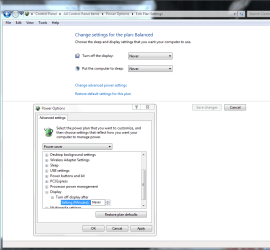
Yes, go to Power Options/Change Plan Settings/Change Advanced power settings. Scroll down to Display and expand it, then expand the next item, Turn off display after, and set it to Never. Click apply and exit. Maybe this will work.

Capture.PNG
 

My Computer My Computer

At a glance

Windows 7 Ultimate X64 SP1Intel i5-2550K, Differing ~4.4-4.8GHz No buil...16GB G.Skill Sniper 1866MHz @ 2133MHz 2x8GBASUS GTX650TIB-DC2OC-2GD5, (650TI Boost)
Computer type
PC/Desktop
Computer Manufacturer/Model Number
Home Built Desktop By DataTech
OS
Windows 7 Ultimate X64 SP1
CPU
Intel i5-2550K, Differing ~4.4-4.8GHz No built in GPU
Motherboard
ASUS P8Z68-V PRO/GEN3
Memory
16GB G.Skill Sniper 1866MHz @ 2133MHz 2x8GB
Graphics Card(s)
ASUS GTX650TIB-DC2OC-2GD5, (650TI Boost)
Sound Card
Onboard Realtek 5-1
Monitor(s) Displays
Samsung P2570HD
Screen Resolution
1920x1080
Hard Drives
Samsung 840 Pro 256GB SSD for OS, 500GB Seagate Constellation (Enterprise drive) for Data
PSU
Corsair HX650W
Case
Inwin Dragon Rider
Cooling
Hyper 212 EVO w/two Noctua fans, push-pull, @1300 RPM
Keyboard
E-Z Eyes, bright yellow keys with large characters
Mouse
steelseries SENSEI Laser Pro Gaming
Internet Speed
48-51Mbs Mbs down, 11 Mbs up Xfinity Cable
Antivirus
Norton Internet Security 2013
Browser
IE 10, Opera, Pale Moon if needed
Other Info
4 case fans, LG BluRay-RE, ASUS DVD-RW, Mr. Fusion power supply, 1.21 gigawatts.
nope

Thanks, but no. Done it many time without the desired result. I even have changed that display setting this morning to 4 hours instead of never in case that would make a difference but it has not.

The message: The firmware does not support this standby state. Do you know what that means? Could that be part of the problem?

Thanks
 

My Computer My Computer

At a glance

windows 7
OS
windows 7
I tried powercfg -h off

Because you said to pay attention on the space between powercfg -"..." I have retried something I had found online as a solution which is cmd and then enter and then type powercfg -h off. This time nothing happened as was said in the advice, which I see as a good thing lol. Lets see if it is going to make a difference. It should have turned of the sleep mode. I am just repeating what I have read because truly I have no idea what I am talking about.

I will sit for a few minutes and see if my display stays on. Will keep you posted.

Thanks.
 

My Computer My Computer

At a glance

windows 7
OS
windows 7
the screen still keeps going black

Nope it has not made any difference!

Anyone?
 

My Computer My Computer

At a glance

windows 7
OS
windows 7
Bianca can you go to your BIOS, or does Lenovo have a setup utility you access from within Windows? You need to try to get ACPI standbby mode S3 set in your BIOS.
 

My Computer My Computer

At a glance

Windows 7 Ultimate X64 SP1Intel i5-2550K, Differing ~4.4-4.8GHz No buil...16GB G.Skill Sniper 1866MHz @ 2133MHz 2x8GBASUS GTX650TIB-DC2OC-2GD5, (650TI Boost)
Computer type
PC/Desktop
Computer Manufacturer/Model Number
Home Built Desktop By DataTech
OS
Windows 7 Ultimate X64 SP1
CPU
Intel i5-2550K, Differing ~4.4-4.8GHz No built in GPU
Motherboard
ASUS P8Z68-V PRO/GEN3
Memory
16GB G.Skill Sniper 1866MHz @ 2133MHz 2x8GB
Graphics Card(s)
ASUS GTX650TIB-DC2OC-2GD5, (650TI Boost)
Sound Card
Onboard Realtek 5-1
Monitor(s) Displays
Samsung P2570HD
Screen Resolution
1920x1080
Hard Drives
Samsung 840 Pro 256GB SSD for OS, 500GB Seagate Constellation (Enterprise drive) for Data
PSU
Corsair HX650W
Case
Inwin Dragon Rider
Cooling
Hyper 212 EVO w/two Noctua fans, push-pull, @1300 RPM
Keyboard
E-Z Eyes, bright yellow keys with large characters
Mouse
steelseries SENSEI Laser Pro Gaming
Internet Speed
48-51Mbs Mbs down, 11 Mbs up Xfinity Cable
Antivirus
Norton Internet Security 2013
Browser
IE 10, Opera, Pale Moon if needed
Other Info
4 case fans, LG BluRay-RE, ASUS DVD-RW, Mr. Fusion power supply, 1.21 gigawatts.
right

Ok, I have no idea how to get into my BIOS or the answer to your question if I have access from within Windows. Are you able to guide me step by step?

Thank you.
 

My Computer My Computer

At a glance

windows 7
OS
windows 7
Only generically. When you reboot there is maybe a Lenovo logo screen or something like that which shows first. On that screen, normally at the bottom is a list of key to press for various operations, setup, boot order or similar. You want to press what it says for SETUP or BIOS.
when you get there it will look confusing. Along the top are different items you highlight with the arrow keys, such as Peripherals, Advanced, or similar. You need to find one about hardware or onboard setting. Scroll to find a page for stand-by settings. when you find it find one for ACPI settings and standby modes. When you find it, you may need to highlight it with the arrow keys and will get a sub windows which hopefully will list disabled/S1, S2, and S3. you want to see if you can enable S3. When done use Esc key back to the main window and press F10 and Yes to save settings and restart.

Your BIOS may have different terminology, if you fell uneasy about this, take a photo of what your BIOS looks like so we can give more specific instructions. Don't change anything if you are unsure. We are here to help.:)
 

My Computer My Computer

At a glance

Windows 7 Ultimate X64 SP1Intel i5-2550K, Differing ~4.4-4.8GHz No buil...16GB G.Skill Sniper 1866MHz @ 2133MHz 2x8GBASUS GTX650TIB-DC2OC-2GD5, (650TI Boost)
Computer type
PC/Desktop
Computer Manufacturer/Model Number
Home Built Desktop By DataTech
OS
Windows 7 Ultimate X64 SP1
CPU
Intel i5-2550K, Differing ~4.4-4.8GHz No built in GPU
Motherboard
ASUS P8Z68-V PRO/GEN3
Memory
16GB G.Skill Sniper 1866MHz @ 2133MHz 2x8GB
Graphics Card(s)
ASUS GTX650TIB-DC2OC-2GD5, (650TI Boost)
Sound Card
Onboard Realtek 5-1
Monitor(s) Displays
Samsung P2570HD
Screen Resolution
1920x1080
Hard Drives
Samsung 840 Pro 256GB SSD for OS, 500GB Seagate Constellation (Enterprise drive) for Data
PSU
Corsair HX650W
Case
Inwin Dragon Rider
Cooling
Hyper 212 EVO w/two Noctua fans, push-pull, @1300 RPM
Keyboard
E-Z Eyes, bright yellow keys with large characters
Mouse
steelseries SENSEI Laser Pro Gaming
Internet Speed
48-51Mbs Mbs down, 11 Mbs up Xfinity Cable
Antivirus
Norton Internet Security 2013
Browser
IE 10, Opera, Pale Moon if needed
Other Info
4 case fans, LG BluRay-RE, ASUS DVD-RW, Mr. Fusion power supply, 1.21 gigawatts.
Back
Top