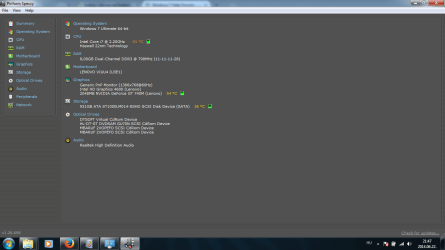
Like two days ago or so, I've installed Dragon Age: Origins by Bioware. Everything was fine, I created my character, completed my first quest then suddenly my laptop turned off. Since that, every time I try to play something (eg. StarCraft 2, Skyrim) my laptop randomly turns off without warning. I tried uninstalling Dragon Age but it didn't really help.
I googled the problem, and I found that I should look it up in the Event Viewer (Windows 7 Ultimate x64).
Every time it turns off I get three errors:
Any ideas, suggestions why this is caused? Or how to fix it?
I googled the problem, and I found that I should look it up in the Event Viewer (Windows 7 Ultimate x64).
Every time it turns off I get three errors:
Code:
Event 18, WHEA-Logger

A fatal hardware error has occurred.

Reported by component: Processor Core
Error Source: Machine Check Exception
Error Type: Cache Hierarchy Error
Processor ID: 0

The details view of this entry contains further information.

Log name: System
Source: WHEA-Logger
Event ID: 18
Level: Error
User: LOCAL SERVICE
OpCode: Info


[URL="http://www.sevenforums.com/#"]-[/URL] <Event xmlns="[URL]http://schemas.microsoft.com/win/2004/08/events/event[/URL]">
[URL="http://www.sevenforums.com/#"]-[/URL] <System>
<Provider Name="Microsoft-Windows-WHEA-Logger" Guid="{C26C4F3C-3F66-4E99-8F8A-39405CFED220}" />

<EventID>18</EventID>

<Version>0</Version>

<Level>2</Level>

<Task>0</Task>

<Opcode>0</Opcode>

<Keywords>0x8000000000000000</Keywords>

<TimeCreated SystemTime="2014-06-22T16:37:15.087444200Z" />

<EventRecordID>15891</EventRecordID>

<Correlation ActivityID="{F5D40D0C-0060-418C-A90B-5393AD9CEA29}" />

<Execution ProcessID="1440" ThreadID="1456" />

<Channel>System</Channel>

<Computer>NODEN-PC</Computer>

<Security UserID="S-1-5-19" />

</System>


[URL="http://www.sevenforums.com/#"]-[/URL] <EventData>
<Data Name="ErrorSource">3</Data>

<Data Name="ApicId">0</Data>

<Data Name="MCABank">7</Data>

<Data Name="MciStat">0xae0000000040110a</Data>

<Data Name="MciAddr">0xffa87fc0</Data>

<Data Name="MciMisc">0x38a0000086</Data>

<Data Name="ErrorType">9</Data>

<Data Name="TransactionType">2</Data>

<Data Name="Participation">256</Data>

<Data Name="RequestType">0</Data>

<Data Name="MemorIO">256</Data>

<Data Name="MemHierarchyLvl">2</Data>

<Data Name="Timeout">256</Data>

<Data Name="OperationType">256</Data>

<Data Name="Channel">256</Data>

<Data Name="Length">928</Data>

<Data Name="RawData">435045521002FFFFFFFF03000100000002000000A00300000525100016060E140000000000000000000000000000000000000000000000000000000000000000BDC407CF89B7184EB3C41F732CB57131FE6FF5E89C91C54CBA8865ABE14913BB68E6602A388ECF0102000000000000000000000000000000000000000000000058010000C00000000102000001000000ADCC7698B447DB4BB65E16F193C4F3DB0000000000000000000000000000000001000000000000000000000000000000000000000000000018020000800000000102000000000000B0A03EDC44A19747B95B53FA242B6E1D0000000000000000000000000000000001000000000000000000000000000000000000000000000098020000080100000102000000000000011D1E8AF94257459C33565E5CC3F7E8000000000000000000000000000000000100000000000000000000000000000000000000000000007F010000000000000002010000020000C30603000000000000000000000000000000000000000000000000000000000000000000000000000000000000000000000000000000000000000000000000000000000000000000000000000000000000000000000000000000000000000000000000000000000000000000000000000000000000000000000000000000000000000000000000000000000000000000000000000000000000000000000000000000000000000000000000000000000007000000000000000000000000000000C306030000081000BFFBDA7FFFFBEBBF0000000000000000000000000000000000000000000000000000000000000000F50157A5EFE3DE43AC72249B573FAD2C03000000000000009F00820600000000C07FA8FF000000000000000000000000000000000000000000000000000000000100000001000000FCE1DC33388ECF010000000000000000000000000000000000000000070000000A114000000000AEC07FA8FF00000000860000A0380000000000000000000000000000000000000000000000000000000000000000000000000000000000000000000000000000000000000000000000000000000000000000000000000000000000000000000000000000000000000000000000000000000000000000000000000000000000000000000000000000000000000000000000000000000000000000000000000000000000000000000000000000000000000000000000000000000000000000000000000000000000000000000000000000000000000000000000</Data>

</EventData>


</Event>
Any ideas, suggestions why this is caused? Or how to fix it?
Last edited by a moderator:
My Computer
- Computer type
- Laptop
- Computer Manufacturer/Model Number
- Lenovo Z510
- OS
- Windows 7 Ultimate x64
- CPU
- Intel(R) Core(TM) i7-4702MQ CPU @ 2.20GHZ 2.20GHZ
- Memory
- 8,00 GB
- Graphics Card(s)
- Intel(R) HD Graphics 4600
- Browser
- Mozilla Firefox