
Lenovo Z60m

PiDicus Rex

New member
Local time
11:31 PM
Messages
6
Okie, while I go off and search for answers, I'll pose this one,..

I installed build 7100 on my Lenovo Thinkpad Z60m last night, ran windows update, all the hardware seems to be found okay, but for some reason the audio side of things is seeing the laptop as having S/Pdif audio, which it doesn't, and doesn't seem to find the speakers.
Any idea's how to swap it around to the actual hardware?

PiD
 

My Computer My Computer

OS
95, 98, XP Home, XP Pro, XP Pro x64, Win7
same issue

yes! I'm not the only one! if you find the answer, please post here? I am so frustrated!
 

My Computer My Computer

Computer Manufacturer/Model Number
IBM Z60m 2529-e8u
OS
windows 7
CPU
Intel Mobile Pentium M 740 (1.86GHz)
Motherboard
ati ?
Memory
2gig
Graphics Card(s)
64MB ATI RADEON X300
Sound Card
High definition audio device? (no specs from lenovo)
Monitor(s) Displays
15.4" TFT widescreen display
Hard Drives
80 gb 7200rpm hard drive
This worked for me. It didn't give me the hard controls back, the ones located above the keyboard, but at least I have sound now.

Realtek

choose the windows 7 link.
 

My Computer My Computer

Computer Manufacturer/Model Number
IBM Z60m 2529-e8u
OS
windows 7
CPU
Intel Mobile Pentium M 740 (1.86GHz)
Motherboard
ati ?
Memory
2gig
Graphics Card(s)
64MB ATI RADEON X300
Sound Card
High definition audio device? (no specs from lenovo)
Monitor(s) Displays
15.4" TFT widescreen display
Hard Drives
80 gb 7200rpm hard drive
Having a look at that one now.
I actually went back to XP for the laptop, as I needed to have Adobe OnLocation running reliably on it.

I take it your laptop see's the Audio chipset as 'realtek' branded? Mine comes up as 'SoundMax' under XP with the Lenovo OEM drivers.


PiDicus.
 

My Computer My Computer

OS
95, 98, XP Home, XP Pro, XP Pro x64, Win7
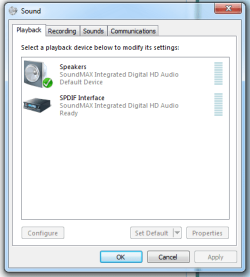
Solved sound problem with z60m

I had the same issue. Tried with Realtek, but mine is Soundmax and it didn't work. And after a milion try-and-see-what-happens solutions I finaly succeded.
Here are the steps:

1. Read this so you'll know what the problem is:
Audio not working (speakers only) on 64 bit Win 7 RC

2. Download this Soundmax drivers:
Analog Devices SoundMAX HD Audio driver 6.10.01.6570 Beta Windows Vista(32/64)/Win7(32/64)

or you could find them elsewhere...

Versions 6.xxxxx are for Vista/Win7...

3. After you install this driver (I used manual install through Device manager but it's the same) you should have the sound, but the speakers are still "unplugged". Now if you press volume button on the top up or down the speaker will "magically" start to work.

4. Now we have to keep them plugged always and to do that download from Lenovo support "Hotkey Features" drivers and install them. Voila!!!

I hope this helps,
Cheers.
 

My Computer My Computer

OS
Windows 7
Hi, im also have a Z60m and i have the same problem. But when i try to install "Analog Devices SoundMAX HD Audio driver" it says my hardware doesn't support :sarc:
Can someone help me?


edit:
Capture5.PNG
 
Last edited:

My Computer My Computer

OS
Windows 7
Try the manual install

1. Device Manager -> Update driver software...
2. Browse my computer for driver software
3. Let me pick from a list...
4. Sound, video and game controllers
5. Have disk...
6. Find "ADIHdAud.inf" in SoundMax drivers you downloaded
7. Answer that you do want to install this.

It should install now... Now you should have something like this in attachment. Now procede with the "Hotkey features procedure" and that should be it...

Hope this helps...
 

Attachments

  • capture_soundmax.png
    capture_soundmax.png
    12.5 KB · Views: 327

My Computer My Computer

OS
Windows 7
I will use my mic in skype, but it doesn't work :(

Can you help me with that.:huh:
Untitled11.png
 

My Computer My Computer

OS
Windows 7
hey guys..i have definetly the same problem..does anyone have found a solution for that..drives me crazy..thanks!
 

My Computer My Computer

OS
win7
Although a weird workaround, it DOES work. Thanks!
 

My Computer My Computer

OS
windows 7
Mate, you solution in using the sound max beta drivers work the treat. basically point to the the inf file in the i386 folder did the trick after accepting the notification of not being comatible.

Mate thanks again and love you work.

P.S. I just registered now just to thank you for this.:D:D:D
 

My Computer My Computer

Computer Manufacturer/Model Number
IBM
OS
Windows &
CPU
Intel
I'm glad it helped you :D

Regardless the previous question about the mic, sorry I don't remember now the exact solution, but I think that I used it. Built-in mic doesn't work, but it seems to me that if you insert the outer mic into the "microphone OUT" that it then recognizes it and that it works?!?

Hope it helps...
 

My Computer My Computer

OS
Windows 7
Dear rochi and other helpful people:
i was wondering if some one can PLEASE help me with my sound issue. i have installaled windows 7 on my thinkpad z60m. every thing seems to work fine but the sound does not work. i have followed what Mr. rochi said but every time i go to the link that he posted and i download the sound max, the folder is empty. and everytime i go to device manager and follow the steps to get to the inf file, it says the folder is empty and i dont find ""ADIHdAud.inf". i have been working on this for quite some time and it is driving me crazy. what is interesting is that sound came on twice but every time i turn the computer off the sound doesnt work . it only came on twice out of so many times that i turned my laptop off. also in my device manager it says that the driver for base system device is missing and the driver for unknown device is missing too. PLEASE HELP ME RESTORE MY SOUND. THANK YOU FOR YOUR TIME
 

My Computer My Computer

OS
windows 7 ultimate x64
Back
Top