Solved Let's talk about a new Windows Optimizer

Jeriff

New member
Member
Local time
11:52 PM
Messages
22
Location
New York
:cool: I've used many Windows Optimizer, such as Iobit Advanced System Care, Tuneup Utilities, SpeedUpMyPC, PCKeeper..... and I recently came across another newly released software: Toolwiz Care Still testing it...
So many Optimizer in the world,making me confused. Which one are u currently using?
Give me some advice, Thank you.:party:
 

My Computer

Computer Manufacturer/Model Number
Lenovo
OS
Windows 7 Ultimate 32bit
Graphics Card(s)
Nvidia
Screen Resolution
1366*768
Internet Speed
8M
None. Windows Seven manages itself very well. I only use CCleaner to remove temp files and such. I don't trust many "Optimizers". They can, and often will bork your system. Seven isn't XP which needed so much help to run well. Just my opinion. A Guy
 

My Computer

Computer type
PC/Desktop
OS
Windows 10 Home x64
CPU
INTEL Core i5-750 Quad-Core 3.37GHz
Motherboard
ASUS P7P55D
Memory
HyperX Fury Black Series 8GB (2 x 4GB) 1866Mhz
Graphics Card(s)
EVGA GeForce GTX 750 Superclocked 1GB 128-Bit GDDR5
Monitor(s) Displays
LG 32MA68HY 32" IPS
Screen Resolution
1920 x 1080
Hard Drives
Samsung 840 Evo 120GB, SEAGATE 500GB Barracuda® 7200.12, SATA 3 Gb/s, 7200 RPM, 16MB cache
PSU
ANTEC TruePower New TP-550, 80 PLUS, 550W
Case
ANTEC Three Hundred Illusion
Cooling
COOLER MASTER Hyper 212 Plus, 4 x 120mm 1 x 140mm Noctua's
Internet Speed
85 + Mbps
Antivirus
Avast
Browser
Vivaldi
You don't need any such 'System Optimizers' at all
Windows is a closed source system. Developers of tuneup utilities and registry cleaners do not have the core code of Win 7 and are not working on definitive information, but rather they are going on past knowledge and experience, most of which is not applicable to Win 7. Automatic cleaners will usually have to do some guesswork.

There is almost no tweaking that can be done to Win 7 to speed it up. The system is designed to diagnose itself and take care of itself which it does remarkably well. Win 7 maintains itself and that includes the registry.

System Optimizers are pure snake oil. At best they do nothing except use resources. At worst, they can mess your system up, slowing it down, and even crash it. There is no utility out there anywhere that can speed Win 7 up and improve its performance, at least not at this time.

Modifying registry keys incorrectly can cause Windows instability, or make Windows unbootable. No registry cleaner is completely safe and the potential is ever present to cause more problems than they claim to fix.

Registry cleaners cannot distinguish between good and bad. If you run a registry cleaner, it will delete all those keys which are obsolete and sitting idle; but in reality, those keys may well be needed by some programs or windows at a later time.

Windows 7 is much more efficient at managing the registry than previous Windows versions. Even if you use the CCleaner registry to delete keys left over when uninstalling programs, these few keys will not make 1 millisecond's difference in performance. If you run CCleaner or any other registry cleaner and do not know precisely what you are doing, you will have problems down the road. There are no gains to be had from using a registry cleaner and the risk is great.

Forget all the "wisdom" you learned about XP. Windows 7 is not XP and does not manage the registry the same as XP.

This isn't to say that the system does not need to be maintained. Uninstall programs that you don't use, delete unneeded and unnecessary files. Defrag your hard drive. But don't screw with the registry unless you are an in depth expert in the Win 7 registry.

Most of the time, the cure is a clean install. Using a program such as Ccleaner is fine to get rid of old and unnecessary files. A tuneup utility is not only unneeded, it can actually harm your system. Don't use them.

 

My Computer

Computer type
PC/Desktop
Computer Manufacturer/Model Number
Custom Build
OS
Windows 10 Pro x64, Arch Linux
CPU
Intel Core 2 Quad Q8200 OC'd 3.08GHz
Motherboard
Asus Rampage formula LGA775
Memory
8GB DDR2 900Mhz
Graphics Card(s)
MSI GT730 2GB GDDR5 (Kepler)
Sound Card
Supreme FX2
Monitor(s) Displays
Samsung LS22F350 LED
Screen Resolution
1080P
Hard Drives
Kingston SSDNow UV400 120GB, 500GB Hitachi, 2TB Samsung, 500GB Seagate FreeAgent, 640GB Samsung, 160GB Toshiba (Arch)
PSU
AeroCool 500W Bronze
Cooling
Cooler Master V6 + 3X fans
Keyboard
Prolink keyboard
Mouse
Logitech M705
Internet Speed
1MiB/s
Browser
Chrome Beta
you don't need any such 'system optimizers' at all
windows is a closed source system. Developers of tuneup utilities and registry cleaners do not have the core code of win 7 and are not working on definitive information, but rather they are going on past knowledge and experience, most of which is not applicable to win 7. Automatic cleaners will usually have to do some guesswork.

There is almost no tweaking that can be done to win 7 to speed it up. The system is designed to diagnose itself and take care of itself which it does remarkably well. Win 7 maintains itself and that includes the registry.

System optimizers are pure snake oil. At best they do nothing except use resources. At worst, they can mess your system up, slowing it down, and even crash it. There is no utility out there anywhere that can speed win 7 up and improve its performance, at least not at this time.

Modifying registry keys incorrectly can cause windows instability, or make windows unbootable. No registry cleaner is completely safe and the potential is ever present to cause more problems than they claim to fix.

Registry cleaners cannot distinguish between good and bad. If you run a registry cleaner, it will delete all those keys which are obsolete and sitting idle; but in reality, those keys may well be needed by some programs or windows at a later time.

Windows 7 is much more efficient at managing the registry than previous windows versions. Even if you use the ccleaner registry to delete keys left over when uninstalling programs, these few keys will not make 1 millisecond's difference in performance. If you run ccleaner or any other registry cleaner and do not know precisely what you are doing, you will have problems down the road. There are no gains to be had from using a registry cleaner and the risk is great.

Forget all the "wisdom" you learned about xp. Windows 7 is not xp and does not manage the registry the same as xp.

This isn't to say that the system does not need to be maintained. Uninstall programs that you don't use, delete unneeded and unnecessary files. Defrag your hard drive. But don't screw with the registry unless you are an in depth expert in the win 7 registry.

Most of the time, the cure is a clean install. Using a program such as ccleaner is fine to get rid of old and unnecessary files. A tuneup utility is not only unneeded, it can actually harm your system. Don't use them.

41x46.gif41x46.gif
 

My Computer

Computer Manufacturer/Model Number
acer aspire 5935g
OS
Windows 7 Home Premium x64 SP1
CPU
intel(R)core(TM)2 duo CPU T6600 @ 2.20GHz
Motherboard
intel gm45/gm47 revision 07
Memory
3 gb ddr3
Graphics Card(s)
ati radeon hd4570/512mb
Monitor(s) Displays
lop156wh2-tle1 15.3 flat
Screen Resolution
1366x768
Hard Drives
OCZ-Agility3 60gig ssd
320gig external hdd
500gig external hdd
Mouse
Optical
Internet Speed
30Mbps Down/30Mbps Up
None. Windows Seven manages itself very well. I only use CCleaner to remove temp files and such. I don't trust many "Optimizers". They can, and often will bork your system. Seven isn't XP which needed so much help to run well. Just my opinion. A Guy

I understand what u mean. once I used the Deep Scan of Iobit ASC, it broke my Windows 7. While the quick Scan does nothing harm. So, if I use these sort of Windows Optimizers, I would never use their 'Deep Scan','Deep Optimize', sort of things.
'Deep' might means breaking the core of Windows system, I think :zip:

One thing I want to talk about is, i use the Start up Booster in Toolwiz care, and the boot time shortened, 40 seconds now, compared to 1.5 minutes before. Maybe this is one thing such Windows Optimizer could do for us :D Make our PC boot faster.
 

My Computer

Computer Manufacturer/Model Number
Lenovo
OS
Windows 7 Ultimate 32bit
Graphics Card(s)
Nvidia
Screen Resolution
1366*768
Internet Speed
8M
Jeriff

Just removing start-up entries from msconfig should speed up your boot time without the use of third party optimisers and a good defrag of the drive will help also. Windows 7 comes as lean as a user would want and is balanced perfectly. Just use the inbuilt tools that are already at your disposal and you wont go far wrong.

Danny
 

My Computer

Computer Manufacturer/Model Number
acer aspire 5935g
OS
Windows 7 Home Premium x64 SP1
CPU
intel(R)core(TM)2 duo CPU T6600 @ 2.20GHz
Motherboard
intel gm45/gm47 revision 07
Memory
3 gb ddr3
Graphics Card(s)
ati radeon hd4570/512mb
Monitor(s) Displays
lop156wh2-tle1 15.3 flat
Screen Resolution
1366x768
Hard Drives
OCZ-Agility3 60gig ssd
320gig external hdd
500gig external hdd
Mouse
Optical
Internet Speed
30Mbps Down/30Mbps Up
Jeriff

Just removing start-up entries from msconfig should speed up your boot time without the use of third party optimisers and a good defrag of the drive will help also. Windows 7 comes as lean as a user would want and is balanced perfectly. Just use the inbuilt tools that are already at your disposal and you wont go far wrong.

Danny
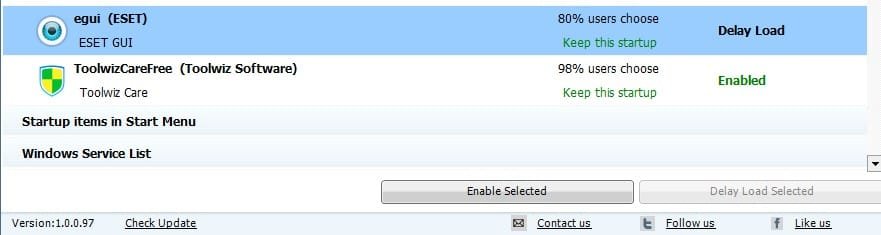
Yeah, i knew the msconfig method, but the startup manager in toolwiz care even allows me to delay a certain entry. I like this function very much. I delayed MSE,NOD 32 and tweetdeck, so the boost period becomes shorter, while they can also autostart after a short time. Maybe I am a little lazy, i don't want to double-click on their icons on desktop. Delayed auto-start fits me well.:cool:
 

Attachments

  • delay.jpg
    delay.jpg
    23.2 KB · Views: 20

My Computer

Computer Manufacturer/Model Number
Lenovo
OS
Windows 7 Ultimate 32bit
Graphics Card(s)
Nvidia
Screen Resolution
1366*768
Internet Speed
8M
Like I say Jeriff each to there own when it comes to third party tools like that. Personally I've just never found the need in windows 7. All you have mentioned above can be done with task scheduler also which is native to 7. I'm not sure I would ever delay the start of my security software though just to gain a few seconds in boot speed as you could find yourself connected to the internet with no protection.
I think it was "Take that" who sung "It only takes a minute":)

Danny
 

My Computer

Computer Manufacturer/Model Number
acer aspire 5935g
OS
Windows 7 Home Premium x64 SP1
CPU
intel(R)core(TM)2 duo CPU T6600 @ 2.20GHz
Motherboard
intel gm45/gm47 revision 07
Memory
3 gb ddr3
Graphics Card(s)
ati radeon hd4570/512mb
Monitor(s) Displays
lop156wh2-tle1 15.3 flat
Screen Resolution
1366x768
Hard Drives
OCZ-Agility3 60gig ssd
320gig external hdd
500gig external hdd
Mouse
Optical
Internet Speed
30Mbps Down/30Mbps Up
Like I say Jeriff each to there own when it comes to third party tools like that. Personally I've just never found the need in windows 7. All you have mentioned above can be done with task scheduler also which is native to 7. I'm not sure I would ever delay the start of my security software though just to gain a few seconds in boot speed as you could find yourself connected to the internet with no protection.
I think it was "Take that" who sung "It only takes a minute":)

Danny

:o maybe you are right, 1 minute is no problem. Better keep the anti-virus software auto-start....

Well, i'm still testing this new optimizer. I am always trying various software. :picnic:
 

My Computer

Computer Manufacturer/Model Number
Lenovo
OS
Windows 7 Ultimate 32bit
Graphics Card(s)
Nvidia
Screen Resolution
1366*768
Internet Speed
8M
Like I say Jeriff each to there own when it comes to third party tools like that. Personally I've just never found the need in windows 7. All you have mentioned above can be done with task scheduler also which is native to 7. I'm not sure I would ever delay the start of my security software though just to gain a few seconds in boot speed as you could find yourself connected to the internet with no protection.
I think it was "Take that" who sung "It only takes a minute":)

Danny

:o maybe you are right, 1 minute is no problem. Better keep the anti-virus software auto-start....

Well, i'm still testing this new optimizer. I am always trying various software. :picnic:

I think thats a good decision 10 seconds extra boot time or a reinstall because of infection. I know what I would choose :thumbsup:
 

My Computer

Computer Manufacturer/Model Number
acer aspire 5935g
OS
Windows 7 Home Premium x64 SP1
CPU
intel(R)core(TM)2 duo CPU T6600 @ 2.20GHz
Motherboard
intel gm45/gm47 revision 07
Memory
3 gb ddr3
Graphics Card(s)
ati radeon hd4570/512mb
Monitor(s) Displays
lop156wh2-tle1 15.3 flat
Screen Resolution
1366x768
Hard Drives
OCZ-Agility3 60gig ssd
320gig external hdd
500gig external hdd
Mouse
Optical
Internet Speed
30Mbps Down/30Mbps Up
I delayed MSE,NOD 32 and tweetdeck

You're running MSE and NOD32 at the same time? Might not be such a good idea, antiviruses usually conflict with each other since they each use low-level access to the system and that can really bork things up badly.

Strongly suggest you uninstall one of these - personally I would keep MSE and remove NOD32.

There's a huge potential for optimizing right there!
 

My Computer

Computer type
PC/Desktop
Computer Manufacturer/Model Number
Custom-built
OS
Windows 7 Professional SP1 32-bit
CPU
Intel Core 2 Duo E6600 2.4GHz
Motherboard
Asus PL5D2
Memory
4GB DDR2-667 (4x1GB in dual-channel config)
Graphics Card(s)
nVidia GeForce 9800 GT
Sound Card
Creative X-Fi XtremeMusic
Monitor(s) Displays
Acer P236H
Screen Resolution
1920x1200 (DVI)
Hard Drives
OCZ SSD Vertex Plus 60GB SATA (Firmware 3.55), 64MB cache
Hitachi HD321KJ SATA, 320GB, 7200rpm, 16MB cache
PSU
Antec TruePower 2.0
Case
Cooler Master Centurion
Cooling
Too many fans
Keyboard
Standard
Mouse
Microsoft wireless optical mouse
Internet Speed
AT&T U-verse (18mbit/sec)
Antivirus
Microsoft Security Essentials
Browser
Firefox
Other Info
Other devices:
Compaq CQ-60 laptop
Google Nexus 7 (2012) tablet
Nvidia SHIELD tablet (US/LTE)
Hardkernel ODROID-XU single-board computer (Samsung Exynos 5420)
I delayed MSE,NOD 32 and tweetdeck

You're running MSE and NOD32 at the same time? Might not be such a good idea, antiviruses usually conflict with each other since they each use low-level access to the system and that can really bork things up badly.

Strongly suggest you uninstall one of these - personally I would keep MSE and remove NOD32.

There's a huge potential for optimizing right there!

+1. Better no real time shields than 2 running.

I generally don't do tweak tools unless they have one specific function. Like now and then, maybe once every 3 months, I'll run NTREGOPT. It doesn't "clean" the Registry. It just copies the hives to new files and marks the old ones for delete on next boot. I notice smoother boots for a few days afterward.

Other than that I run a light defrag program. Now I'm using Purim free defrag. Has a few options but it doesn't beat the hell out of the drive in order to save it. It's a very quick defrag esp. if you have 60 or 70% free space on the drive before defragging.

I stay away from tools that "just do it" without telling you what they're doing. Something that gives very specific options you may be ok if you know what's involved.
 

My Computer

Computer Manufacturer/Model Number
HP Media Center
OS
Windows 7 32 bit
CPU
AMD 5200+ dual core
Memory
2 GB
Graphics Card(s)
NVidia GeForce 6150SE 128 MB
Monitor(s) Displays
CRT
Screen Resolution
1280x1024
Hard Drives
500 GB Sata internal :

SIIG USB 3.0 docking stations w/WD Caviar Black 6 Gb/s drives
Keyboard
PS/2
Mouse
PS/2 Wheel Mouse
Other Info
SIIG USB 3.0 PCIexpress card.
That's the thing about most of these "optimizers"...they don't tell you exactly what they do, and sometimes just do dumb [expletive].

I've tried out a few in the past - more to see how they work than to really try to optimize anything - and always use Total Uninstall to monitor (and undo) the changes made.

The things I've seen some of them do make me want to strangle the person who wrote them...
 

My Computer

Computer type
PC/Desktop
Computer Manufacturer/Model Number
Custom-built
OS
Windows 7 Professional SP1 32-bit
CPU
Intel Core 2 Duo E6600 2.4GHz
Motherboard
Asus PL5D2
Memory
4GB DDR2-667 (4x1GB in dual-channel config)
Graphics Card(s)
nVidia GeForce 9800 GT
Sound Card
Creative X-Fi XtremeMusic
Monitor(s) Displays
Acer P236H
Screen Resolution
1920x1200 (DVI)
Hard Drives
OCZ SSD Vertex Plus 60GB SATA (Firmware 3.55), 64MB cache
Hitachi HD321KJ SATA, 320GB, 7200rpm, 16MB cache
PSU
Antec TruePower 2.0
Case
Cooler Master Centurion
Cooling
Too many fans
Keyboard
Standard
Mouse
Microsoft wireless optical mouse
Internet Speed
AT&T U-verse (18mbit/sec)
Antivirus
Microsoft Security Essentials
Browser
Firefox
Other Info
Other devices:
Compaq CQ-60 laptop
Google Nexus 7 (2012) tablet
Nvidia SHIELD tablet (US/LTE)
Hardkernel ODROID-XU single-board computer (Samsung Exynos 5420)
I delayed MSE,NOD 32 and tweetdeck

You're running MSE and NOD32 at the same time? Might not be such a good idea, antiviruses usually conflict with each other since they each use low-level access to the system and that can really bork things up badly.

Strongly suggest you uninstall one of these - personally I would keep MSE and remove NOD32.

There's a huge potential for optimizing right there!

Well, I once run 4 anti-virus:
NOD32
MSE
Avast
Bitdefender。。。。
For complete safety :o
 

My Computer

Computer Manufacturer/Model Number
Lenovo
OS
Windows 7 Ultimate 32bit
Graphics Card(s)
Nvidia
Screen Resolution
1366*768
Internet Speed
8M
I delayed MSE,NOD 32 and tweetdeck

You're running MSE and NOD32 at the same time? Might not be such a good idea, antiviruses usually conflict with each other since they each use low-level access to the system and that can really bork things up badly.

Strongly suggest you uninstall one of these - personally I would keep MSE and remove NOD32.

There's a huge potential for optimizing right there!

Well, I once run 4 anti-virus:
NOD32
MSE
Avast
Bitdefender。。。。
For complete safety :o

I have run MSE and ESET at the same time but it really isnt a good idea because the conflict can let malware in.

4 malware apps is just overkill. If you need that many you are going to some very bad places on the internet.

You are your best defense, dont click it.
 
Last edited:

My Computer

Computer Manufacturer/Model Number
HP Pavillion dv-7 1005 Tx
OS
Win 8 Release candidate 8400
CPU
[email protected]
Memory
4 gigs
Graphics Card(s)
Nvidia 9600M
Sound Card
HD built-in
Monitor(s) Displays
17" Wxga
Screen Resolution
1440x900
Cooling
none
Internet Speed
45Mb down 5Mb up
:owell, maybe I went a little too far...
 

My Computer

Computer Manufacturer/Model Number
Lenovo
OS
Windows 7 Ultimate 32bit
Graphics Card(s)
Nvidia
Screen Resolution
1366*768
Internet Speed
8M
:owell, maybe I went a little too far...

I'm surprised the system functioned at all. I'm not a big believer in real time shields. Maybe ok if all you do is surf and email. But they interfere with really using the machine. Something you can start and stop like Sandboxie I'd be more inclined to use.
 

My Computer

Computer Manufacturer/Model Number
HP Media Center
OS
Windows 7 32 bit
CPU
AMD 5200+ dual core
Memory
2 GB
Graphics Card(s)
NVidia GeForce 6150SE 128 MB
Monitor(s) Displays
CRT
Screen Resolution
1280x1024
Hard Drives
500 GB Sata internal :

SIIG USB 3.0 docking stations w/WD Caviar Black 6 Gb/s drives
Keyboard
PS/2
Mouse
PS/2 Wheel Mouse
Other Info
SIIG USB 3.0 PCIexpress card.
Back
Top