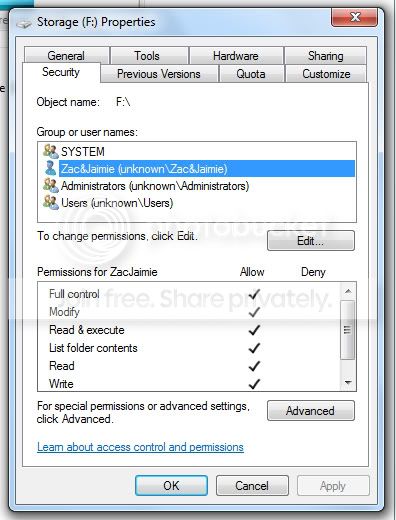
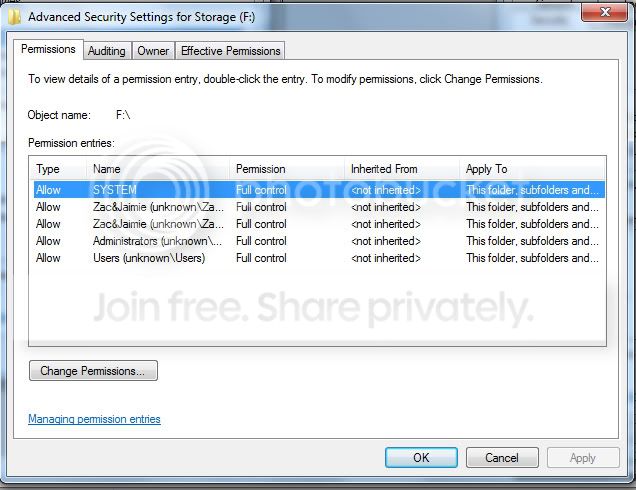
Lets try this again.

thebirdbath

New member
Local time
4:12 PM
Messages
25
I recently did a clean install of W7 on my machine. At the time of install, I unplugged the SATA storage drive in my machine and then after the successful install, plugged it back in and W7 recognized it no problem. HOWEVER!

When I open a file and change something, then try and save it...I get the following error.
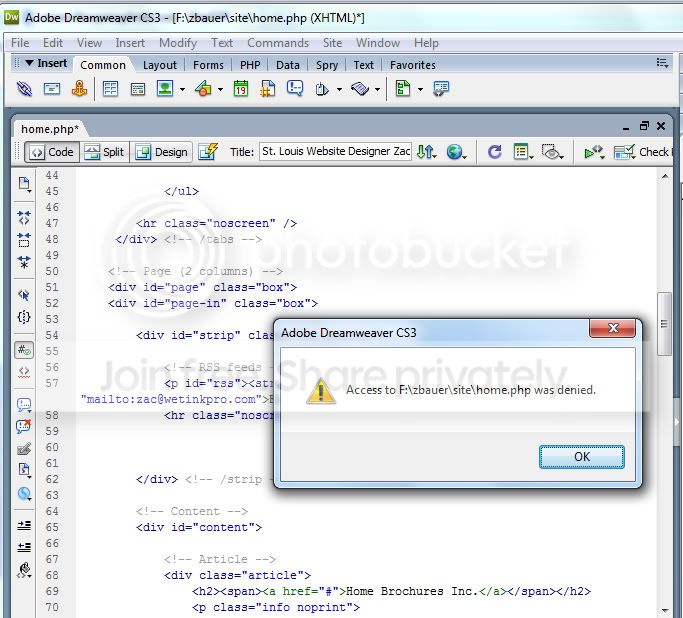
five.jpg


I get the same error with any program when I edit and save a file unless I rename it.


IMPORTANT! The only way I have found that by-passes the problem is if I right click on the application and choose "Run as Administrator", then I have no issues saving files that I edit.

I have followed the advice others have given me on this forum but it doesn't change anything. When I try to change permissions, I have to click 50 or so times on dialog boxes like below and ultimately no changes are made.
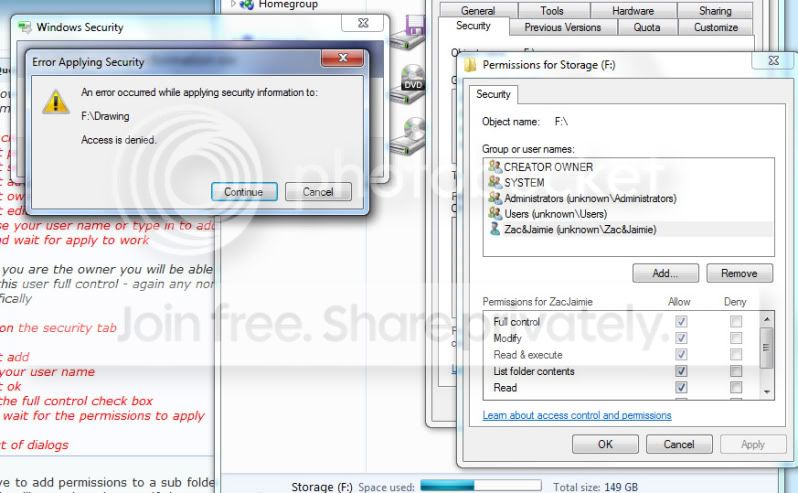
four-1.jpg


I hope someone has the answer to this or I'm switching back to XP. Someone said on this forum that this was an improvement to UAC...yeah right. I want to be able to save files without having to open up every application I use by right clicking and choosing "Run As Administrator". Additionally, I can't download files from servers to overwrite existing files on my HD because for some reason I don't have permission. :cry:

Help me out of this nightmare!
 

My Computer

OS
Windows 7
Motherboard
Asus M2N32-SLI Deluxe
Memory
3g
Graphics Card(s)
512
Hard Drives
SATA
Have you taken ownership of the folders on the drive in question? Chances are, the owner is still flagged from the previous install...
 

My Computer

Computer type
PC/Desktop
Computer Manufacturer/Model Number
Virtual Machine
OS
Windows 7 Professional 32-bit SP1
CPU
AMD A4/A6
Motherboard
Intel Corporation 440BX Desktop Reference Platform
Memory
3.00GB EDO
Graphics Card(s)
VMware SVGA 3D
Sound Card
High Definition Audio Device
Monitor(s) Displays
Generic Non-PnP Monitor on VMware SVGA 3D
Screen Resolution
1440x900
Hard Drives
1 x 60GB VMware Virtual SATA Hard Drive ATA Device
Antivirus
Kaspersky Total Security
have you tried to take ownership of the files on your storage drive?
http://www.sevenforums.com/tutorials/1911-take-ownership-shortcut.html?ltr=T

i can't remember the specifics of the problem i had, but it boiled down to this: i saved some video files and mp3s to my computer which was running vista x64. the files, as you stated was the case with you, were saved on a disk that i used for file storage. i did a clean install of the same os, but i used a different name when i set up the computer at it's first use. afterward, i couldn't move the videos or mp3 to another folder and would get an error stating that i didn't have permission to move the files. long story short, i installed the take ownership .reg file and in turn, took ownership of the files and no more problems.
 

My Computer

Computer Manufacturer/Model Number
Rig 1
OS
Windows 7 Ultimate x64
CPU
AMD Phenom II X4 940 Black Edition @ 3.4GHz (AM2+)
Motherboard
Gigabyte GA-MA790X-UD4P (AM2+)
Memory
Corsair CM2X4096-8500C5 (4 X 2GB)
Graphics Card(s)
XFX Radeon HD 5770 / Diamond Radeon HD 5770 CrossFireX
Sound Card
Asus Xonar DS (PCI)
Monitor(s) Displays
Samsung SyncMaster 932bw+ (3)
Screen Resolution
4320x900
Hard Drives
OCZ Vertex 2 80 GB - Windows 7 System --
WD Caviar Black 1TB - Music, Movies, Vids, Pics --
WD Caviar Black 640GB - User Profiles & Games --
WD My Book 320GB external
PSU
Corsair CMPSU-750TX
Case
Cooler Master HAF 932
Cooling
Corsair Hydro Series H50
Keyboard
Logitech Desktop Wave
Mouse
Logitech LX8 Laser
Internet Speed
20 down / 2 up
Other Info
LG GGC-H20L Blu-Ray / HDDVD combo --
Hauppauge HVR-1250 --
Silverstone MFP-51 --
Logitech Webcam C600
Right-click on the Drive in question > Security tab > Advance right at the bottom > Owner Tab > Change... > Select your user name, before hitting OK, hit the checkbox "Replace owner..." You will then what to go to the permission tab after leaving Owner settings. Add > Type your username into the box > Check the first check box (Full Control) under Allow. After that select the check box for "Replace permissions..." then hit OK.

You could also use "Everyone" in place of your username if you felt so inclined.
 

My Computer

Computer type
PC/Desktop
Computer Manufacturer/Model Number
Alienware Aurora ALX R4
OS
Windows 10 Pro (x64)
CPU
Intel Core i7-3930K (3.2GHz - 4.5GHz)
Motherboard
Alienware Aurora-R4 x79
Memory
4x Samsung 4GB PC3-12800 DDR3 (16GB 1600MHz)
Graphics Card(s)
Nvidia Geforce GTX 690
Sound Card
SteelSeries Siberia Elite
Monitor(s) Displays
Dell UltraSharp U3011
Screen Resolution
2560x1600
Hard Drives
Samsung 850 Pro 256 GB, Seagate 1TB Desktop Hybrid HDD, 2x Western Digital 4TB Green HDD
PSU
875W Some Dell PSU <.<
Case
Alienware Aurora ALX
Cooling
Custom Liquid Cooling (EK CPU & GPU blocks) dual EK 480RAD
Keyboard
Logitech G710+ Mechanical
Mouse
Logitech G700s
Internet Speed
Verizon Fios (50 mbps average)
Other Info
Server: Intel NUC D54250WYK: i5-4250U, 16GB, 256 GB mSATA, Windows Server 2012 R2
Right-click on the drive.

Select "properties".

Go to the Security tab.

Click the Advanced button.

Go to the Owner tab.

Who is the owner? On my data drives, the owner is SYSTEM. (On the boot drive, it's TrustedInstaller.) I'm not expert in such matters, but I have no trouble editing and re-saving files on the data drives.
 

My Computer

Computer Manufacturer/Model Number
homegrown
OS
Windows 7 Pro X64 SP1
CPU
Intel Core I7-3930k
Motherboard
Asus P9X79 Pro
Memory
16 GB Gskill DDR3-2133
Graphics Card(s)
eVGA GTX680
Sound Card
Creative X-Fi Titanium
Monitor(s) Displays
As PA246Q
Screen Resolution
1920 X 1200
Hard Drives
Corsair Force GT, 120 GB
WDC 1.5TB Caviar Black
PSU
PCP&C Silencer 750 Crossfire
Case
Silverstone FT02
Cooling
Noctua NH-D14
Keyboard
cheap Logitech USB
Mouse
Microsoft Intellimouse Explorer (old optical) USB
Internet Speed
6Mb cable
Other Info
Pioneer BDR-205
Samsung SH-203B
Monsoon 5.1 speakers
Right-click on the Drive in question > Security tab > Advance right at the bottom > Owner Tab > Change... > Select your user name, before hitting OK, hit the checkbox "Replace owner..." You will then what to go to the permission tab after leaving Owner settings. Add > Type your username into the box > Check the first check box (Full Control) under Allow. After that select the check box for "Replace permissions..." then hit OK.

You could also use "Everyone" in place of your username if you felt so inclined.

Tried that...didn't work. I get the same error as posted above.
 

My Computer

OS
Windows 7
Motherboard
Asus M2N32-SLI Deluxe
Memory
3g
Graphics Card(s)
512
Hard Drives
SATA
If the above is not working, then the drive is probably beyond repair and should be formatted. However, even when you hit the "Continue" button it does not work? And then apply the permissions?
 

My Computer

Computer type
PC/Desktop
Computer Manufacturer/Model Number
Alienware Aurora ALX R4
OS
Windows 10 Pro (x64)
CPU
Intel Core i7-3930K (3.2GHz - 4.5GHz)
Motherboard
Alienware Aurora-R4 x79
Memory
4x Samsung 4GB PC3-12800 DDR3 (16GB 1600MHz)
Graphics Card(s)
Nvidia Geforce GTX 690
Sound Card
SteelSeries Siberia Elite
Monitor(s) Displays
Dell UltraSharp U3011
Screen Resolution
2560x1600
Hard Drives
Samsung 850 Pro 256 GB, Seagate 1TB Desktop Hybrid HDD, 2x Western Digital 4TB Green HDD
PSU
875W Some Dell PSU <.<
Case
Alienware Aurora ALX
Cooling
Custom Liquid Cooling (EK CPU & GPU blocks) dual EK 480RAD
Keyboard
Logitech G710+ Mechanical
Mouse
Logitech G700s
Internet Speed
Verizon Fios (50 mbps average)
Other Info
Server: Intel NUC D54250WYK: i5-4250U, 16GB, 256 GB mSATA, Windows Server 2012 R2
have you tried to take ownership of the files on your storage drive?
http://www.sevenforums.com/tutorials/1911-take-ownership-shortcut.html?ltr=T

i can't remember the specifics of the problem i had, but it boiled down to this: i saved some video files and mp3s to my computer which was running vista x64. the files, as you stated was the case with you, were saved on a disk that i used for file storage. i did a clean install of the same os, but i used a different name when i set up the computer at it's first use. afterward, i couldn't move the videos or mp3 to another folder and would get an error stating that i didn't have permission to move the files. long story short, i installed the take ownership .reg file and in turn, took ownership of the files and no more problems.


I tried this...then I right clicked and chose "Take Ownership" I cmd type window appeared for a few seconds and then went away. I rebooted...tried to open a file, edit and save and still same access denied as pictured above.
 

My Computer

OS
Windows 7
Motherboard
Asus M2N32-SLI Deluxe
Memory
3g
Graphics Card(s)
512
Hard Drives
SATA
If the above is not working, then the drive is probably beyond repair and should be formatted. However, even when you hit the "Continue" button it does not work? And then apply the permissions?

No it doesn't work. I apply and a box pops up and runs through a bunch of files....but still doens't allow me to save and overwrite files.

The drive is fine. I didn't have this issue until I upgraded to W7.
 

My Computer

OS
Windows 7
Motherboard
Asus M2N32-SLI Deluxe
Memory
3g
Graphics Card(s)
512
Hard Drives
SATA
Look at drive properties and see if it's in the "Read Only" mode...
 

My Computer

Computer Manufacturer/Model Number
Home Grown
OS
Windows 7 Ultimate (64)
CPU
i7-2600K
Motherboard
Asus P8P67-M Pro
Memory
G.SKILL Ripjaws X Series 8GB (2 x 4GB)
Graphics Card(s)
ATI 5750
Sound Card
On-Board
Monitor(s) Displays
LG W2486L
Screen Resolution
1920X1080
Hard Drives
Intel X-25M 80 Gig SSD | Intel X-25M 160 Gig SSD | WD Black 500MB - External eSata
PSU
Zalman ZM770-XT 770 Watts
Case
Antec 180 mini
Cooling
Cooler Master V8
Internet Speed
15MB - Cable
Other Info
Sissy OC - 4.6 @ 1.3175 24/7 | 18' Idle - 55' Load

My Computer

Computer type
PC/Desktop
Computer Manufacturer/Model Number
Alienware Aurora ALX R4
OS
Windows 10 Pro (x64)
CPU
Intel Core i7-3930K (3.2GHz - 4.5GHz)
Motherboard
Alienware Aurora-R4 x79
Memory
4x Samsung 4GB PC3-12800 DDR3 (16GB 1600MHz)
Graphics Card(s)
Nvidia Geforce GTX 690
Sound Card
SteelSeries Siberia Elite
Monitor(s) Displays
Dell UltraSharp U3011
Screen Resolution
2560x1600
Hard Drives
Samsung 850 Pro 256 GB, Seagate 1TB Desktop Hybrid HDD, 2x Western Digital 4TB Green HDD
PSU
875W Some Dell PSU <.<
Case
Alienware Aurora ALX
Cooling
Custom Liquid Cooling (EK CPU & GPU blocks) dual EK 480RAD
Keyboard
Logitech G710+ Mechanical
Mouse
Logitech G700s
Internet Speed
Verizon Fios (50 mbps average)
Other Info
Server: Intel NUC D54250WYK: i5-4250U, 16GB, 256 GB mSATA, Windows Server 2012 R2
Here is my drive properties....and I'm still getting the same error pictured in the first post.

six.jpg


seven.jpg
 

My Computer

OS
Windows 7
Motherboard
Asus M2N32-SLI Deluxe
Memory
3g
Graphics Card(s)
512
Hard Drives
SATA
I'll send you a PM.
 

My Computer

Computer type
PC/Desktop
Computer Manufacturer/Model Number
Alienware Aurora ALX R4
OS
Windows 10 Pro (x64)
CPU
Intel Core i7-3930K (3.2GHz - 4.5GHz)
Motherboard
Alienware Aurora-R4 x79
Memory
4x Samsung 4GB PC3-12800 DDR3 (16GB 1600MHz)
Graphics Card(s)
Nvidia Geforce GTX 690
Sound Card
SteelSeries Siberia Elite
Monitor(s) Displays
Dell UltraSharp U3011
Screen Resolution
2560x1600
Hard Drives
Samsung 850 Pro 256 GB, Seagate 1TB Desktop Hybrid HDD, 2x Western Digital 4TB Green HDD
PSU
875W Some Dell PSU <.<
Case
Alienware Aurora ALX
Cooling
Custom Liquid Cooling (EK CPU & GPU blocks) dual EK 480RAD
Keyboard
Logitech G710+ Mechanical
Mouse
Logitech G700s
Internet Speed
Verizon Fios (50 mbps average)
Other Info
Server: Intel NUC D54250WYK: i5-4250U, 16GB, 256 GB mSATA, Windows Server 2012 R2
ok no problem
 

My Computer

OS
Windows 7
Motherboard
Asus M2N32-SLI Deluxe
Memory
3g
Graphics Card(s)
512
Hard Drives
SATA
Back
Top