Lexar 3.0 usb device

coinup

New member
Local time
6:11 AM
Messages
17
WpdBusEnumRoot\UMB\2&37c186b&0&STORAGE#VOLUME#_??_USBSTOR#DISK&VEN_LEXAR&PROD_CF__USB_3_0_READ&REV_0545#000000003455&0#

windows seems to be asking for a driver, but the manufacturer dosn't supply one, what can I do to
get this warning out of event viewer.
 

My Computer My Computer

At a glance

7 64bit Ultimatei7 3930k32GB Kingston Hyper X 1600mhzPny gtx 660
Computer type
PC/Desktop
OS
7 64bit Ultimate
CPU
i7 3930k
Motherboard
Sabertooth X79
Memory
32GB Kingston Hyper X 1600mhz
Graphics Card(s)
Pny gtx 660
Monitor(s) Displays
eizo cg243w
Screen Resolution
1920x1200
Hard Drives
WD RE4 500GB, WD Black 2TB, WD 250GB
PSU
Corsair Gaming 800w
Case
Corsair obsidian 650D with Custom Soundproofing
Cooling
Noctua DH-12
Keyboard
Filco Majistouch
Mouse
microsoft Touch
Internet Speed
1000 kb/s
Antivirus
Microsoft Security Essentials
Hi there .. What is the Model Number of your Device ?
 

My Computer My Computer

At a glance

windows 7 home 64bitINTEL-CORE I716GB
Computer Manufacturer/Model Number
W530-3630QM1
OS
windows 7 home 64bit
CPU
INTEL-CORE I7
Memory
16GB
Hard Drives
750GB
Browser
Chrome
Two things to try:

1) unplug the device. Open Disk Management (Right Click Computer->Manage->Disk Management). Insert the device. You'll see it appear as a new Disk in the lower pane. Right click it and assign it a new drive letter.

2) Do you have Samsung Kies installed? Try uninstalling it. I've seen it interfere with WPD (windows portable devices) before
 

My Computer My Computer

At a glance

Desk 1: Win 7 Pro x32; Desk 2: Windows 10 x64
Computer type
PC/Desktop
Computer Manufacturer/Model Number
Dell Optiplex 360 and Optiplex 755
OS
Desk 1: Win 7 Pro x32; Desk 2: Windows 10 x64
Hard Drives
500GB Crucial SSD in both Desktops
Other Info
Buffalo 6TB NAS, Raid 1
Some of the Lexar Devices require a Firmware update before they will work .. Try the Device in a USB 2 Port ..
 

My Computer My Computer

At a glance

windows 7 home 64bitINTEL-CORE I716GB
Computer Manufacturer/Model Number
W530-3630QM1
OS
windows 7 home 64bit
CPU
INTEL-CORE I7
Memory
16GB
Hard Drives
750GB
Browser
Chrome
lexar usb 3.0 CF/SD card reader

the item is described in the title, there is no model no. as such
 

My Computer My Computer

At a glance

7 64bit Ultimatei7 3930k32GB Kingston Hyper X 1600mhzPny gtx 660
Computer type
PC/Desktop
OS
7 64bit Ultimate
CPU
i7 3930k
Motherboard
Sabertooth X79
Memory
32GB Kingston Hyper X 1600mhz
Graphics Card(s)
Pny gtx 660
Monitor(s) Displays
eizo cg243w
Screen Resolution
1920x1200
Hard Drives
WD RE4 500GB, WD Black 2TB, WD 250GB
PSU
Corsair Gaming 800w
Case
Corsair obsidian 650D with Custom Soundproofing
Cooling
Noctua DH-12
Keyboard
Filco Majistouch
Mouse
microsoft Touch
Internet Speed
1000 kb/s
Antivirus
Microsoft Security Essentials
Hi there ... Have you tried the Card Reader in another Computer ... It does not require a Driver .. Strange that the Manufacturer states it only works with Windows 7 Vista and XP ...
 

My Computer My Computer

At a glance

windows 7 home 64bitINTEL-CORE I716GB
Computer Manufacturer/Model Number
W530-3630QM1
OS
windows 7 home 64bit
CPU
INTEL-CORE I7
Memory
16GB
Hard Drives
750GB
Browser
Chrome
Just been reading on some Forums that it did not work in Vista 64 Bit OS .. Could that be the problem .. If you know some one that has a 32 Bit OS .. I think you should try it in there Computer ... At any rate it might be a good idea to contact Lexar Support ...
 

My Computer My Computer

At a glance

windows 7 home 64bitINTEL-CORE I716GB
Computer Manufacturer/Model Number
W530-3630QM1
OS
windows 7 home 64bit
CPU
INTEL-CORE I7
Memory
16GB
Hard Drives
750GB
Browser
Chrome
the item is described in the title, there is no model no. as such

Hi!

Try to locate in C:\Windows\System32\Drivers\UMDF\

if the .dll are all there (see screenshot)

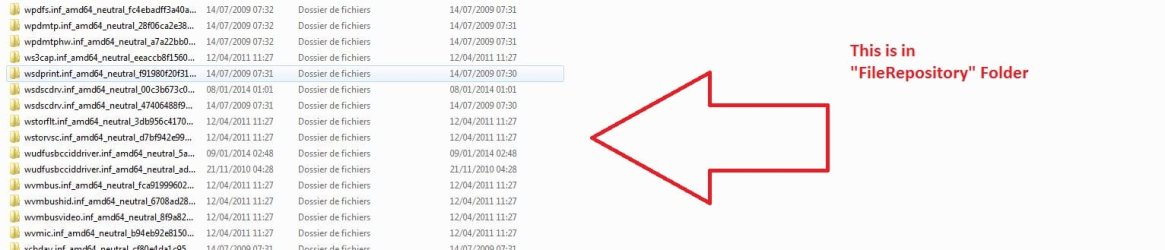
if not or missing some, then go in C:\Windows\System32\DriverStore\FileRepository\ (see screenshot)

and try to find the .dll missing and paste it in UMDF folder. Reboot.
 

Attachments

  • Capture.JPG
    Capture.JPG
    36 KB · Views: 3
  • Capture2.JPG
    Capture2.JPG
    11.9 KB · Views: 4
  • Capture3.JPG
    Capture3.JPG
    68.8 KB · Views: 2

My Computer My Computer

At a glance

Windows 7 Professional SP1 - x64 [Non-UEFI Boot]Ivy Bridge Core i5 3570K (Delidded)G.Skill "Ares" DDR3 PC3-12800 - 1600MHz (16Gb)Asus Dual-RX480-O4G
Computer type
PC/Desktop
Computer Manufacturer/Model Number
Custom Build
OS
Windows 7 Professional SP1 - x64 [Non-UEFI Boot]
CPU
Ivy Bridge Core i5 3570K (Delidded)
Motherboard
Asus P8Z77-V LE PLUS
Memory
G.Skill "Ares" DDR3 PC3-12800 - 1600MHz (16Gb)
Graphics Card(s)
Asus Dual-RX480-O4G
Sound Card
Creative Sound Blaster Z w/5.1 sound system
Monitor(s) Displays
Asus IPS 23"
Screen Resolution
16/9
Hard Drives
Internal:
500Go Sata 6Gb/s (x2)
500Go Sata 3Gb/s (x2)
SSD 60Go Sata 6Gb/s
PSU
In Win C 900W Series 80+ Platinum
Case
Thermaltake Chaser A71
Cooling
Custom Water Cooling Loop
Keyboard
Cooler Master QuickFire XTi
Mouse
Razer Imperator 2012 (4G)
Antivirus
MSE
Browser
IE 11.0.xxx Rtm
Other Info
"Raid0" with Intel Smart Response Technology (HDD/SSD)
Back
Top