Solved LG Monitor Flashes Each Time It Is Turned On

woodbine

New member
Member
VIP
Local time
1:16 AM
Messages
178
Location
Bristol, UK
I have an LG Flatron L1960TR 19" monitor for my desktop pc. Whenever I first turn it on, or I bring the pc out of sleep mode the screen on the monitor flashes/flickers for about 30 seconds. The picture is there, but flashing. After approx. 30 secs, the monitor's picture is fine.

This started about a week ago, and I'm assuming something is on the way out and will get worse. Is it likely to be the screen itself, or the separate power supply? Are monitors fixable, or normally binned when the go wrong?

Thanks for any advice.
 

My Computer My Computer

At a glance

Windows 7 Home Premium 64 bit SP1Intel i3 5403GB DDR3SD
Computer type
PC/Desktop
Computer Manufacturer/Model Number
Acer Aspire Desktop M3910
OS
Windows 7 Home Premium 64 bit SP1
CPU
Intel i3 540
Memory
3GB DDR3SD
Monitor(s) Displays
LG Flatron L1960TR
Screen Resolution
1280x1024
Keyboard
Acer
Mouse
Genius
Antivirus
Avast (Free)
Browser
I E 11
Check all the cable connections to the monitor in case they are loose or not properly plugged in.

Before doing anything listed below, shut down the computer, turn off the power at the wall plug & disconnect the power lead.

If you feel capable, remove the cover on the computer case & carefully remove the graphics card, but remember there is clip at one end that has to be released & a screw at the other where it is secured to the case. Check it out & if it has a fan be sure any fluff & dust are removed. Reinsert the card being sure it is fully seated in the slot on the motherboard.

When working on the internals you need to be very careful of damage caused by static electricity, so be sure to use an grounding strap, or perhaps follow the advise on this website.

How to Ground Yourself to Avoid Destroying a Computer with Electrostatic Discharge
 

My Computer My Computer

At a glance

Windows 7 Home Premium 64 bit sp1Intel i5 3570 3.4Ghz Ivy Bridge SKT 1155 quad...G-Skill Rip Jaws 16Gb (8x2) DDR3 -1600 PC3 12...Gigabyte NVIDIA GT610 1Gb DDR3 810/1200 PCI-E...
Computer type
PC/Desktop
Computer Manufacturer/Model Number
Self built using existing case
OS
Windows 7 Home Premium 64 bit sp1
CPU
Intel i5 3570 3.4Ghz Ivy Bridge SKT 1155 quad core
Motherboard
Gigabyte Z77-HD3 SKT 1155 2xSata 3, 4x USB 3.0
Memory
G-Skill Rip Jaws 16Gb (8x2) DDR3 -1600 PC3 12800 CL 10 red
Graphics Card(s)
Gigabyte NVIDIA GT610 1Gb DDR3 810/1200 PCI-E 2.0 Silent
Sound Card
NVIDIA High Definition & Realtech High Definition Audio
Monitor(s) Displays
2 x Philips 226V4L 16:9 aspect ratio
Screen Resolution
1920 x 1080 HD
Hard Drives
Samsung 840 Pro 256gb SSD, SATA 3.
Hitachi Touro Portable 1tb, USB 3.0 HDD used for image b/ups.
PSU
Corsair VS450
Case
Codeng
Cooling
PSU fan & CPU fan
Keyboard
Logitech
Mouse
Logitech Wireless trackball M570
Internet Speed
Wireless 3G. 3mg down & 550kb up.
Antivirus
Bitdefender Internet Security 2020
Browser
Opera (Current Version) & Firefox
Other Info
MS Office 2013 Pro. Davis weather station software. MGE Nova 600 avr UPS.
Thanks Ranger4 for your help. I will have a look at the graphics card.

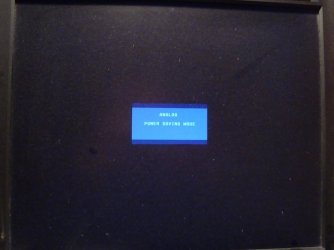
Before I do that, can I give you some more info to confirm whether its the monitor or pc? If I have the pc turned off, but still plugged in, then only turn on the monitor, I get the monitor's pop up box (see image) which always appears for a the first few seconds after turning on the monitor with the pc turned off. The thing is, this pop up flickers - but the pc is off. Can it be the graphics card in this case? Would a graphics card come into play if the pc is turned off?

Another scenario - if the pc has been on for some time and is well warmed up, and the monitor has been off for a while, then I turn it on - the screen flickers. Surely the graphics card would have been warmed up if the pc had been on for some time and wouldn't cause the monitor to flicker when I turn it on? It seems like a case of the screen flickers when turning monitor on from cold. Doesn't matter if the pc has been on for hours or only just turned on, it's the monitor that flickers for 30 secs after it's turned on.

Hope the above makes sense.
 

Attachments

  • DSC01382.jpg
    DSC01382.jpg
    537.7 KB · Views: 0

My Computer My Computer

At a glance

Windows 7 Home Premium 64 bit SP1Intel i3 5403GB DDR3SD
Computer type
PC/Desktop
Computer Manufacturer/Model Number
Acer Aspire Desktop M3910
OS
Windows 7 Home Premium 64 bit SP1
CPU
Intel i3 540
Memory
3GB DDR3SD
Monitor(s) Displays
LG Flatron L1960TR
Screen Resolution
1280x1024
Keyboard
Acer
Mouse
Genius
Antivirus
Avast (Free)
Browser
I E 11
Thanks for getting back with more info. From what you now say it would seem that the problem is the monitor. Flickering on start up is a nuisance, but not impossible to live with, but it might also indicate the monitor is starting to fail.

It certainly could be the external power supply. However, from what I have found out is your LG monitor has been discontinued. Normally monitors are not worth repairing owing to the high repair costs & when one thing fails it's only a matter of time before something else fails.

Do some research on monitors, re price & specs to find something that suits & then go into a computer shop & view some monitors, if you can. You can buy either online or at a shop. I prefer to buy at a local shop as I can ask for help if there is a problem & if it fails I can get help fairly quickly, if a replacement is needed.
 

My Computer My Computer

At a glance

Windows 7 Home Premium 64 bit sp1Intel i5 3570 3.4Ghz Ivy Bridge SKT 1155 quad...G-Skill Rip Jaws 16Gb (8x2) DDR3 -1600 PC3 12...Gigabyte NVIDIA GT610 1Gb DDR3 810/1200 PCI-E...
Computer type
PC/Desktop
Computer Manufacturer/Model Number
Self built using existing case
OS
Windows 7 Home Premium 64 bit sp1
CPU
Intel i5 3570 3.4Ghz Ivy Bridge SKT 1155 quad core
Motherboard
Gigabyte Z77-HD3 SKT 1155 2xSata 3, 4x USB 3.0
Memory
G-Skill Rip Jaws 16Gb (8x2) DDR3 -1600 PC3 12800 CL 10 red
Graphics Card(s)
Gigabyte NVIDIA GT610 1Gb DDR3 810/1200 PCI-E 2.0 Silent
Sound Card
NVIDIA High Definition & Realtech High Definition Audio
Monitor(s) Displays
2 x Philips 226V4L 16:9 aspect ratio
Screen Resolution
1920 x 1080 HD
Hard Drives
Samsung 840 Pro 256gb SSD, SATA 3.
Hitachi Touro Portable 1tb, USB 3.0 HDD used for image b/ups.
PSU
Corsair VS450
Case
Codeng
Cooling
PSU fan & CPU fan
Keyboard
Logitech
Mouse
Logitech Wireless trackball M570
Internet Speed
Wireless 3G. 3mg down & 550kb up.
Antivirus
Bitdefender Internet Security 2020
Browser
Opera (Current Version) & Firefox
Other Info
MS Office 2013 Pro. Davis weather station software. MGE Nova 600 avr UPS.
Yes, the flickering from start up isn't really a nuisance, but these things rarely stay as they are and only get worse. Thanks for your help and advice. When it gets worse, will look around for something new, probably another LG as this is a great monitor. Don't really want widescreen, as my present one is almost square. But it seems that widescreens are the most popular.
 

My Computer My Computer

At a glance

Windows 7 Home Premium 64 bit SP1Intel i3 5403GB DDR3SD
Computer type
PC/Desktop
Computer Manufacturer/Model Number
Acer Aspire Desktop M3910
OS
Windows 7 Home Premium 64 bit SP1
CPU
Intel i3 540
Memory
3GB DDR3SD
Monitor(s) Displays
LG Flatron L1960TR
Screen Resolution
1280x1024
Keyboard
Acer
Mouse
Genius
Antivirus
Avast (Free)
Browser
I E 11
Problem solved. After some research, turned out to be some bad capacitors in the monitor's separate power supply. Seems it's quite a common fault. Opened up the PSU (just 2 screws), and found some caps were bulging. Needed it fixed in a hurry, so got a new PSU for £15. As new caps are only pennies, will keep the old psu and solder in some new ones when I have time. Handy to have a spare PSU.

Thanks to all who replied, and hope this helps someone with the same problem.
 

My Computer My Computer

At a glance

Windows 7 Home Premium 64 bit SP1Intel i3 5403GB DDR3SD
Computer type
PC/Desktop
Computer Manufacturer/Model Number
Acer Aspire Desktop M3910
OS
Windows 7 Home Premium 64 bit SP1
CPU
Intel i3 540
Memory
3GB DDR3SD
Monitor(s) Displays
LG Flatron L1960TR
Screen Resolution
1280x1024
Keyboard
Acer
Mouse
Genius
Antivirus
Avast (Free)
Browser
I E 11
Thanks for getting back with the update & glad to hear you have fixed it, well done.
 

My Computer My Computer

At a glance

Windows 7 Home Premium 64 bit sp1Intel i5 3570 3.4Ghz Ivy Bridge SKT 1155 quad...G-Skill Rip Jaws 16Gb (8x2) DDR3 -1600 PC3 12...Gigabyte NVIDIA GT610 1Gb DDR3 810/1200 PCI-E...
Computer type
PC/Desktop
Computer Manufacturer/Model Number
Self built using existing case
OS
Windows 7 Home Premium 64 bit sp1
CPU
Intel i5 3570 3.4Ghz Ivy Bridge SKT 1155 quad core
Motherboard
Gigabyte Z77-HD3 SKT 1155 2xSata 3, 4x USB 3.0
Memory
G-Skill Rip Jaws 16Gb (8x2) DDR3 -1600 PC3 12800 CL 10 red
Graphics Card(s)
Gigabyte NVIDIA GT610 1Gb DDR3 810/1200 PCI-E 2.0 Silent
Sound Card
NVIDIA High Definition & Realtech High Definition Audio
Monitor(s) Displays
2 x Philips 226V4L 16:9 aspect ratio
Screen Resolution
1920 x 1080 HD
Hard Drives
Samsung 840 Pro 256gb SSD, SATA 3.
Hitachi Touro Portable 1tb, USB 3.0 HDD used for image b/ups.
PSU
Corsair VS450
Case
Codeng
Cooling
PSU fan & CPU fan
Keyboard
Logitech
Mouse
Logitech Wireless trackball M570
Internet Speed
Wireless 3G. 3mg down & 550kb up.
Antivirus
Bitdefender Internet Security 2020
Browser
Opera (Current Version) & Firefox
Other Info
MS Office 2013 Pro. Davis weather station software. MGE Nova 600 avr UPS.
Back
Top