LG TV & Dell Windows 7 64 bit - Sound won't work via HDMI

judson50

New member
Local time
11:27 PM
Messages
3
I cannot get sound to play through my HDMI cable from my desktop to my LG TV. I am able to do video but no sound.

I have a Dell Windows 7 64 bit. Kaspsersky Internet Security

I used to get sound and then after a couple of months of not connecting my Computer to my TV (because there was nothing on Hulu to watch) - I connect the HDMI cable and it doesn't play sound.

I've searched this site and tom's hardware and microsoft for hours to no avail.

Here is what I've done.

When looking in Playback Devices, I only see my Conexant HD Audio.(I've right clicked and clicked "Show Disabled and Disconnected Devices"). No LG TV shows.

I went into Device Manager, I see no HDMI in sounds. I only see Conexant HD Audio and Intel(R) Display Audio. I've also scanned for hardware changes. Nothing shows up.

I've checked the audio set up on my TV - all is set up correctly (unless someone knows something I don't know)

Under devices, My LG TV shows up and is named Generic PnP Monitor. I've Disabled/Enabled both; as well as, unistalled and reinstalled and updated drivers.

MS has no drivers nor additional updates.

I'm really at a loss.
 

My Computer My Computer

At a glance

Windows 7 64bit
Computer type
PC/Desktop
OS
Windows 7 64bit
What Model Dell do you have? It helps.

If you have Intel Display Audio, that is the audio for HDMI, unless you also have a separate video card that provides it.

Uninstall the Intel Display Audio, in the Device Manager, RIGHT click on the Intel Display audio entry then LEFT "Uninstall". DO NOT uninstall any drivers. Restart the PC and when Windows starts it will detect and reinstall the Intel Display Audio. If there were any Windows corruptions with this, the reinstall will fix it.
 

My Computer My Computer

At a glance

Windows 10 64 bitIntel i7 6700K16GB Corsair DominatorIntel CPU Graphics
Computer type
PC/Desktop
Computer Manufacturer/Model Number
My Own Build
OS
Windows 10 64 bit
CPU
Intel i7 6700K
Motherboard
ASUS ROG Maximus VIII Hero
Memory
16GB Corsair Dominator
Graphics Card(s)
Intel CPU Graphics
Sound Card
RealTek
Monitor(s) Displays
27" Dell S2719dgf
Screen Resolution
2560X1440
Hard Drives
1 TB Samsung 850 EVO SSD for Win 10 Pro
500GB Samsung 850 EVO SSD for Win 10 Insider
2 TB drive for backup
PSU
EVGA Supernova 750G2
Case
BeQuiet Silent Base 600
Cooling
Deepcool Captain 120EX
Keyboard
Microsoft Wireless 2000
Mouse
Microsoft wireless
Internet Speed
100 MB/sec (Cable)
Antivirus
Microsoft Defender and Malwarebytes
Browser
Edge/Firefox
Other Info
Cakewalk (Sonar) by BandLab and Studio One 4.1 Pro recording studio software. MOTU 896Mk3 Hybrid recording interface, Frontier Tranzport wireless control unit, Behringer X-Touch Control Surface.
Five USB connected optical drives for CD Audio production using Nero BurningROM
What Model Dell do you have? It helps.

If you have Intel Display Audio, that is the audio for HDMI, unless you also have a separate video card that provides it.

Uninstall the Intel Display Audio, in the Device Manager, RIGHT click on the Intel Display audio entry then LEFT "Uninstall". DO NOT uninstall any drivers. Restart the PC and when Windows starts it will detect and reinstall the Intel Display Audio. If there were any Windows corruptions with this, the reinstall will fix it.


Thanks for the reply. Unfortunately, it did not work. Also, it did work at one point and then just stopped; therefore, something "changed" or deleted in the computer unbeknownst to me. Could it be that terrible update windows released and the recanted and replaced a few weeks ago?

Moreover, I have MIcrosoft Windows 7 Home Premium, 6.1.7301 Service Pack 1 Build 7601; Dell Inspiron 620 X64-based PC. Intel(r) Core (TM) i3-2100 CPU @3.10 GHz, 3100 Mhz
Dell Inc. A000, 4/12/2011

Let me know if you need any other info and/or can give me another option.

Thanks again!
 

My Computer My Computer

At a glance

Windows 7 64bit
Computer type
PC/Desktop
OS
Windows 7 64bit
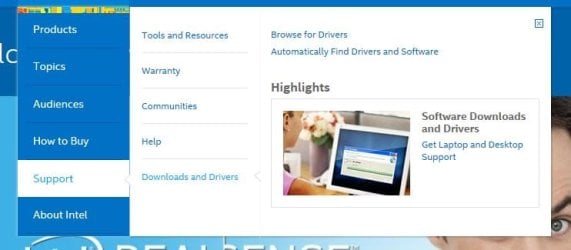
As you have Intel Video, you can get the latest driver direct from Intel. The Dell driver is an old 2011 driver (when your PC was new). Go to www.intel.com

Click on Menu and support and then "Automatically find drivers and software" Let it scan your PC.
 

Attachments

  • Capture.JPG
    Capture.JPG
    33.4 KB · Views: 1

My Computer My Computer

At a glance

Windows 10 64 bitIntel i7 6700K16GB Corsair DominatorIntel CPU Graphics
Computer type
PC/Desktop
Computer Manufacturer/Model Number
My Own Build
OS
Windows 10 64 bit
CPU
Intel i7 6700K
Motherboard
ASUS ROG Maximus VIII Hero
Memory
16GB Corsair Dominator
Graphics Card(s)
Intel CPU Graphics
Sound Card
RealTek
Monitor(s) Displays
27" Dell S2719dgf
Screen Resolution
2560X1440
Hard Drives
1 TB Samsung 850 EVO SSD for Win 10 Pro
500GB Samsung 850 EVO SSD for Win 10 Insider
2 TB drive for backup
PSU
EVGA Supernova 750G2
Case
BeQuiet Silent Base 600
Cooling
Deepcool Captain 120EX
Keyboard
Microsoft Wireless 2000
Mouse
Microsoft wireless
Internet Speed
100 MB/sec (Cable)
Antivirus
Microsoft Defender and Malwarebytes
Browser
Edge/Firefox
Other Info
Cakewalk (Sonar) by BandLab and Studio One 4.1 Pro recording studio software. MOTU 896Mk3 Hybrid recording interface, Frontier Tranzport wireless control unit, Behringer X-Touch Control Surface.
Five USB connected optical drives for CD Audio production using Nero BurningROM
As you have Intel Video, you can get the latest driver direct from Intel. The Dell driver is an old 2011 driver (when your PC was new). Go to www.intel.com

Click on Menu and support and then "Automatically find drivers and software" Let it scan your PC.

This unfortunately did not work, even after a reboot. Although I did update two necessary items.

Any other suggestions?
 

My Computer My Computer

At a glance

Windows 7 64bit
Computer type
PC/Desktop
OS
Windows 7 64bit
Back
Top