

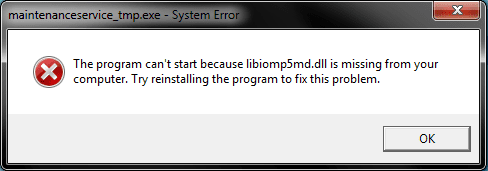
Got this after attempting to update Waterfox to 33.0.2 and from what I’ve already searched, this libiomp5md.dll seems to be an OS dll, not a Waterfox dll. :shock:
I only have experience with resolving those when installing really outdated games (e.g. Warcraft II.BNE), not on the OS-side. Literally never before, in 14 years now, had an OS-bound dll problem.
So, what do I need to do here... and is this an indication of a broader OS-install problem?
OR, could this be a fluke? I haven’t experienced any other errors on this system...
Now, Waterfox did “restart” as though it updated anyway, but I’m not sure if it actually did or not, it doesn’t list its current version anywhere I can see unlike Firefox. It is my primary browser, I do not presently have another installed on this machine, so I’m loathe to try and reinstall it from scratch.
As ever, any help or otherwise is appreciated.
I have an inkling this one’s due for a clean install anyway (generally like to do that once a year no matter what), however I’d rather avoid that presently if at all possible. I do not have a Windows 7 Ultimate x64 SP1 installer (all the ones I’ve tested available to download e.g. Digital River etc. are broken – especially the “media refresh” ones; they will not actually finish installation. So if you happen to know where in the heck I can grab one of those and that is actually verified to be fully functional, please do let me know. I certainly need it). I only have an older version and which I’d much prefer to avoiding using (don’t want to waste all night on backlogged Updates. And that’s not a true clean install anyway).
I only have experience with resolving those when installing really outdated games (e.g. Warcraft II.BNE), not on the OS-side. Literally never before, in 14 years now, had an OS-bound dll problem.
So, what do I need to do here... and is this an indication of a broader OS-install problem?
OR, could this be a fluke? I haven’t experienced any other errors on this system...
Now, Waterfox did “restart” as though it updated anyway, but I’m not sure if it actually did or not, it doesn’t list its current version anywhere I can see unlike Firefox. It is my primary browser, I do not presently have another installed on this machine, so I’m loathe to try and reinstall it from scratch.
As ever, any help or otherwise is appreciated.
I have an inkling this one’s due for a clean install anyway (generally like to do that once a year no matter what), however I’d rather avoid that presently if at all possible. I do not have a Windows 7 Ultimate x64 SP1 installer (all the ones I’ve tested available to download e.g. Digital River etc. are broken – especially the “media refresh” ones; they will not actually finish installation. So if you happen to know where in the heck I can grab one of those and that is actually verified to be fully functional, please do let me know. I certainly need it). I only have an older version and which I’d much prefer to avoiding using (don’t want to waste all night on backlogged Updates. And that’s not a true clean install anyway).
Attachments
My Computer
- Computer type
- PC/Desktop
- Computer Manufacturer/Model Number
- Custom [03/21/2014]
- OS
- 7 Ultimate SP1 x64
- CPU
- AMD FX-8350 4.0GHz
- Motherboard
- Asus M5A99FX Pro R2.0
- Memory
- 8GB Corsair Vengeance LP DDR3 1600
- Graphics Card(s)
- EVGA GTX760 SC 2GB GDDR5
- Sound Card
- Realtek ALC892
- Monitor(s) Displays
- 23" Syncmaster P2370HD
- Screen Resolution
- 1920 x 1080
- Hard Drives
- Scorpio Black WD1003FZEX 1TB
- PSU
- Corsair RM 750W
- Case
- Gigabyte Sumo Omega
- Cooling
- Noctua NH-D14 | 6 120mm case.
- Keyboard
- Tt eSPORTS Poesidon Z - Blue Switch
- Mouse
- Logitech M510
- Internet Speed
- FiOS 100/100
- Antivirus
- MBAM
- Browser
- WaterFox & Chrome
- Other Info
- NETWORKING:
FiOS G1100 (v1.03)
Netgear WNDR37AV
Actiontec MI424WR (Rev. I)
PRINTER:
Canon MX340


