Solved Libraries and disabling them

  • Thread starter Thread starter SevenUser09
  • Start date Start date
Well, I read what the man said.

If you don't want to disable complete "Libraries" feature but only want to remove its icon from Explorer, then run "Only Remove Libraries Icon from Windows 7 Explorer.reg" file.

SInce you dislike the libraries so much, give it a try. According to the site, there is a restore script.
 
Ok it does solve the issue but then I cannot have links in my start menu to the folders. Seems Microsoft really wants people to organize their way.
 
I will not, and cannot, try to sell you on libraries. Ignore them. Continue to use your computer without them. I do. They are not the only Windows feature I do not use.

I will try to sell you on just using Windows for what it is. An good-looking operating system with a lot of nice features. Ripe and ready for third party alternatives to some of the aspects we don't like. Give it time. Sooner or later, someone is going to provide our favorite killer apps, open source style.
 
I have to use them. Had to make one for Desktop since some applications refuse to recognize it in explorer so that is the only way to quickly get there. Just trying to avoid them as much as I can.
 
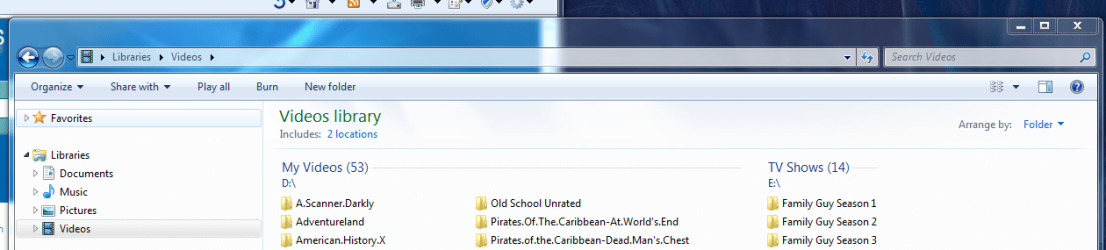
I actually like the Library feature, I click the video one and it goes right to the drive and folders where my videos are.

I have movies on one drive and tv shows on another, makes it much easier to get to the folders. And works nicely in WMP.

In XP I didn't like how Microsoft tried to organize pictures, documents, music, etc in certain folders, but with Win 7 you can put the files where you want and just change the Library properties
 

Attachments

  • library.PNG
    library.PNG
    60 KB · Views: 24

My Computer

Computer Manufacturer/Model Number
Custom Built
OS
Windows 7 Pro 64-bit
CPU
AMD Phenom II X2 550 BE
Motherboard
ASUS M4A79XTD EVO
Memory
A-Data DDR3 1600 4gb
Graphics Card(s)
HIS Radeon HD 4670
Sound Card
VIA VT1708S (8 channel onboard)
Monitor(s) Displays
Dell 23" S2309W
Screen Resolution
1920 x 1080
Hard Drives
WD 320,750gb, Seagate 500gb External Backup
PSU
Rosewill Green Series 430W
Case
Coolermaster
Cooling
Scythe SCKTN-3000
I actually like the Library feature, I click the video one and it goes right to the drive and folders where my videos are.

I have movies on one drive and tv shows on another, makes it much easier to get to the folders. And works nicely in WMP.

In XP I didn't like how Microsoft tried to organize pictures, documents, music, etc in certain folders, but with Win 7 you can put the files where you want and just change the Library properties

I'm with you on this one. I have Documents, Music, Pictures, Videos, etc. spread across 7 different hard drives. Even on Vista, it was difficult to keep track of all that.

Now, with Windows 7, I have one link for each of Documents, Videos, Music, Pictures, Downloads (This one I created myself) and Entire Computer (Another one I created myself). So much easier!
 

My Computer

Computer type
PC/Desktop
Computer Manufacturer/Model Number
Virtual Machine
OS
Windows 7 Professional 32-bit SP1
CPU
AMD A4/A6
Motherboard
Intel Corporation 440BX Desktop Reference Platform
Memory
3.00GB EDO
Graphics Card(s)
VMware SVGA 3D
Sound Card
High Definition Audio Device
Monitor(s) Displays
Generic Non-PnP Monitor on VMware SVGA 3D
Screen Resolution
1440x900
Hard Drives
1 x 60GB VMware Virtual SATA Hard Drive ATA Device
Antivirus
Kaspersky Total Security
Back
Top