Libraries Desktop Icon - Add or Remove

How to Add or Remove the Libraries Desktop Icon in Windows 7

   Information
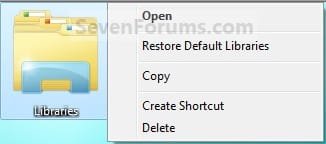
This will show you how to add or remove the default Libraries desktop icon in Windows 7. This is not like a standard shortcut.

EXAMPLE: Libraries desktop icon
1550d1229249276-libraries-desktop-icon-add-remove-libraries_desktop_icon.jpg


Here's How:
1. To Add the Libraries Desktop Icon
A) Click on the Download button below to download the file below.
Add_Libraries_Desktop_Icon.reg

Download


B) Go to step 3.
2. To Remove the Libraries Desktop Icon
A) Click on the Download button below to download the file below.
Remove_Libraries_Desktop_Icon.reg

Download


3. Save the .reg file to the desktop.

4. Right click on the downloaded .reg file, and click on Merge.

5. Click on Run, Yes, and OK when prompted.

6. Log off and log on, or restart the computer to apply.

7. When done, you can delete the downloaded .reg file if you like.
That's it,
Shawn


Attachments

Last edited:
Merge?

Hi Brink. I accidentally deleted the Libraries icon from the Task Bar and I need it back. I'm right there with you on your instructions until I get to the part where I'm supposed to find a command called Merge. All I see are the standard choices I get when I right click on a file. Where or what is Merge?

Thanks,

Andacar
 

My Computer

Computer Manufacturer/Model Number
Custom machine
OS
Windows 7 Professional 64 bit
CPU
i7 920
Motherboard
ASUS P6T Deluxe V2
Memory
6 gigabytes
Graphics Card(s)
nVidia Quadro FX 1800
Sound Card
Creative SB Audigy 2
Monitor(s) Displays
IBM 21" CRT
Screen Resolution
1600 x 1200
Hard Drives
Hitachi 1 TB Main Drive
Western Digital 1 TB Storage
Western Digital 2 TB Projects
Keyboard
Logitec Access 600
Mouse
Logitec M100
Hello Andacar,

If you don't see Merge when you right click on the downloaded .reg file, then open Default Programs to set the reg file extension to have it's Current Default program set as Registry Editor (C:\Windows\regedit.exe). Afterwards, try merging the REG file again.

Hope this helps,
Shawn
 

My Computer

Computer type
PC/Desktop
Computer Manufacturer/Model Number
Self built custom
OS
64-bit Windows 11 Pro for Workstations
CPU
Intel i7-8700K OC'd to 5 GHz
Motherboard
ASUS ROG Maximus XI Formula Z390
Memory
64 GB (4x16GB) G.SKILL TridentZ RGB DDR4 3600 MHz
Graphics Card(s)
ASUS ROG-STRIX-GTX1080TI-O11G-GAMING
Sound Card
Integrated
Monitor(s) Displays
2 x Samsung Odyssey G7 27"
Screen Resolution
2560x1440
Hard Drives
1TB Samsung 990 PRO M.2,
4TB Samsung 990 PRO PRO M.2,
TerraMaster F8 SSD Plus NAS
PSU
Seasonic Prime Titanium 850W
Case
Thermaltake Core P3
Cooling
Corsair Hydro H115i
Keyboard
Logitech wireless K800
Mouse
Logitech MX Master 4
Internet Speed
2 Gb/s Download and 100 Mb/s Upload
Antivirus
Malwarebyte Anti-Malware Premium
Browser
Google Chrome
Other Info
Logitech Z625 speaker system,
Logitech BRIO 4K Pro webcam,
HP Color LaserJet Pro MFP M477fdn,
APC SMART-UPS RT 1000 XL - SURT1000XLI,
Galaxy S23 Plus phone
Sigh... It's always a can of worms isn't it?

OK I appear to be having some security issues here. When I try to reset the program to open with I can find regedit easily enough. But the program ghosts out the checkmark for Always Use This.
 

My Computer

Computer Manufacturer/Model Number
Custom machine
OS
Windows 7 Professional 64 bit
CPU
i7 920
Motherboard
ASUS P6T Deluxe V2
Memory
6 gigabytes
Graphics Card(s)
nVidia Quadro FX 1800
Sound Card
Creative SB Audigy 2
Monitor(s) Displays
IBM 21" CRT
Screen Resolution
1600 x 1200
Hard Drives
Hitachi 1 TB Main Drive
Western Digital 1 TB Storage
Western Digital 2 TB Projects
Keyboard
Logitec Access 600
Mouse
Logitec M100
Is the box checked? If so, then that's fine.

If not, then right click on the .reg file, click on Open with, and Choose default program, then try here instead.
 

My Computer

Computer type
PC/Desktop
Computer Manufacturer/Model Number
Self built custom
OS
64-bit Windows 11 Pro for Workstations
CPU
Intel i7-8700K OC'd to 5 GHz
Motherboard
ASUS ROG Maximus XI Formula Z390
Memory
64 GB (4x16GB) G.SKILL TridentZ RGB DDR4 3600 MHz
Graphics Card(s)
ASUS ROG-STRIX-GTX1080TI-O11G-GAMING
Sound Card
Integrated
Monitor(s) Displays
2 x Samsung Odyssey G7 27"
Screen Resolution
2560x1440
Hard Drives
1TB Samsung 990 PRO M.2,
4TB Samsung 990 PRO PRO M.2,
TerraMaster F8 SSD Plus NAS
PSU
Seasonic Prime Titanium 850W
Case
Thermaltake Core P3
Cooling
Corsair Hydro H115i
Keyboard
Logitech wireless K800
Mouse
Logitech MX Master 4
Internet Speed
2 Gb/s Download and 100 Mb/s Upload
Antivirus
Malwarebyte Anti-Malware Premium
Browser
Google Chrome
Other Info
Logitech Z625 speaker system,
Logitech BRIO 4K Pro webcam,
HP Color LaserJet Pro MFP M477fdn,
APC SMART-UPS RT 1000 XL - SURT1000XLI,
Galaxy S23 Plus phone
OK, it worked, and thanks. Just one more minor snag: this doesn't seem to want to be pinned to the taskbar.
 

My Computer

Computer Manufacturer/Model Number
Custom machine
OS
Windows 7 Professional 64 bit
CPU
i7 920
Motherboard
ASUS P6T Deluxe V2
Memory
6 gigabytes
Graphics Card(s)
nVidia Quadro FX 1800
Sound Card
Creative SB Audigy 2
Monitor(s) Displays
IBM 21" CRT
Screen Resolution
1600 x 1200
Hard Drives
Hitachi 1 TB Main Drive
Western Digital 1 TB Storage
Western Digital 2 TB Projects
Keyboard
Logitec Access 600
Mouse
Logitec M100
Nope, a desktop icon like this doesn't have the option to pin to taskbar by default.

If you like, you could create a "Libraries" shortcut using wither target location below, and be able to pin it to the taskbar.

%windir%\explorer.exe

OR

%windir%\explorer.exe /e,::{031E4825-7B94-4dc3-B131-E946B44C8DD5}
 

My Computer

Computer type
PC/Desktop
Computer Manufacturer/Model Number
Self built custom
OS
64-bit Windows 11 Pro for Workstations
CPU
Intel i7-8700K OC'd to 5 GHz
Motherboard
ASUS ROG Maximus XI Formula Z390
Memory
64 GB (4x16GB) G.SKILL TridentZ RGB DDR4 3600 MHz
Graphics Card(s)
ASUS ROG-STRIX-GTX1080TI-O11G-GAMING
Sound Card
Integrated
Monitor(s) Displays
2 x Samsung Odyssey G7 27"
Screen Resolution
2560x1440
Hard Drives
1TB Samsung 990 PRO M.2,
4TB Samsung 990 PRO PRO M.2,
TerraMaster F8 SSD Plus NAS
PSU
Seasonic Prime Titanium 850W
Case
Thermaltake Core P3
Cooling
Corsair Hydro H115i
Keyboard
Logitech wireless K800
Mouse
Logitech MX Master 4
Internet Speed
2 Gb/s Download and 100 Mb/s Upload
Antivirus
Malwarebyte Anti-Malware Premium
Browser
Google Chrome
Other Info
Logitech Z625 speaker system,
Logitech BRIO 4K Pro webcam,
HP Color LaserJet Pro MFP M477fdn,
APC SMART-UPS RT 1000 XL - SURT1000XLI,
Galaxy S23 Plus phone
Did Not Work

I downloaded "remove libraries desktop icon from taskbar" restarted pc. The library folder is in the right side of the taskbar line and I need to remove it.

pic.jpg

Can this be removed, it has not always been there?
 
Last edited:

My Computer

Computer type
Laptop
Computer Manufacturer/Model Number
acer one 722
OS
windows 7 64 bit
I downloaded "remove libraries desktop icon from taskbar" restarted pc. The library folder is in the right side of the taskbar line and I need to remove it.

Hello Thunder, and welcome to Seven Forums.

Please post a screenshot showing the icon to better help.

http://www.sevenforums.com/tutorials/9733-screenshots-files-upload-post-seven-forums.html

If you mean that the library icon is on your taskbar, then this tutorial will not help with that. This tutorial is only for an icon on your actual desktop instead.

Is the library folder a toolbar on your taskbar? If so, then you should be able to use the method in the tutorial below to remove it.

Taskbar Toolbars

Hope this helps for now, :)
Shawn
 

My Computer

Computer type
PC/Desktop
Computer Manufacturer/Model Number
Self built custom
OS
64-bit Windows 11 Pro for Workstations
CPU
Intel i7-8700K OC'd to 5 GHz
Motherboard
ASUS ROG Maximus XI Formula Z390
Memory
64 GB (4x16GB) G.SKILL TridentZ RGB DDR4 3600 MHz
Graphics Card(s)
ASUS ROG-STRIX-GTX1080TI-O11G-GAMING
Sound Card
Integrated
Monitor(s) Displays
2 x Samsung Odyssey G7 27"
Screen Resolution
2560x1440
Hard Drives
1TB Samsung 990 PRO M.2,
4TB Samsung 990 PRO PRO M.2,
TerraMaster F8 SSD Plus NAS
PSU
Seasonic Prime Titanium 850W
Case
Thermaltake Core P3
Cooling
Corsair Hydro H115i
Keyboard
Logitech wireless K800
Mouse
Logitech MX Master 4
Internet Speed
2 Gb/s Download and 100 Mb/s Upload
Antivirus
Malwarebyte Anti-Malware Premium
Browser
Google Chrome
Other Info
Logitech Z625 speaker system,
Logitech BRIO 4K Pro webcam,
HP Color LaserJet Pro MFP M477fdn,
APC SMART-UPS RT 1000 XL - SURT1000XLI,
Galaxy S23 Plus phone
A recent MS-update (dont know which KB, there were several) brought back the Libraries icon to my desktop. I applied the .reg file in this thread to remove it - successfully. However, now I keep getting error messages whenever I try to do file operations on any .zip file. ("could not find this item"). They are of no consequence, as "retry" then carries out the file operation (e.g. rename, move..) without fail, but it's annoying, and based on google research, I'm somewhat sure having applied this fix here is the reason.
Just thought I'd give this as feedback.. currently looking into how I can have my cake and eat it too (i.e. no error messages but also still no %$! Libraries icon).


//edit: I have not rebooted yet, but it seems I already found a fix. I used the .reg file that was offered here (on the skydrive):
windows 7 - "Could not find this item" every time when renaming, moving, copying! win 7 explorer issue - Super User

//edit2: Have now completed a reboot and indeed the problem is fixed. (nom nom cake ;) )
 
Last edited:

My Computer

Computer type
PC/Desktop
OS
W7 Pro x64
Hello wahnsinn, :)

The items at the link you posted are unrelated to this tutorial since it doesn't involve the same registry keys.

Are you sure this tutorial is what you were referring to?
 

My Computer

Computer type
PC/Desktop
Computer Manufacturer/Model Number
Self built custom
OS
64-bit Windows 11 Pro for Workstations
CPU
Intel i7-8700K OC'd to 5 GHz
Motherboard
ASUS ROG Maximus XI Formula Z390
Memory
64 GB (4x16GB) G.SKILL TridentZ RGB DDR4 3600 MHz
Graphics Card(s)
ASUS ROG-STRIX-GTX1080TI-O11G-GAMING
Sound Card
Integrated
Monitor(s) Displays
2 x Samsung Odyssey G7 27"
Screen Resolution
2560x1440
Hard Drives
1TB Samsung 990 PRO M.2,
4TB Samsung 990 PRO PRO M.2,
TerraMaster F8 SSD Plus NAS
PSU
Seasonic Prime Titanium 850W
Case
Thermaltake Core P3
Cooling
Corsair Hydro H115i
Keyboard
Logitech wireless K800
Mouse
Logitech MX Master 4
Internet Speed
2 Gb/s Download and 100 Mb/s Upload
Antivirus
Malwarebyte Anti-Malware Premium
Browser
Google Chrome
Other Info
Logitech Z625 speaker system,
Logitech BRIO 4K Pro webcam,
HP Color LaserJet Pro MFP M477fdn,
APC SMART-UPS RT 1000 XL - SURT1000XLI,
Galaxy S23 Plus phone
Hello wahnsinn, :)

The items at the link you posted are unrelated to this tutorial since it doesn't involve the same registry keys.

Are you sure this tutorial is what you were referring to?


Yes, I've noticed myself that the keys are seemingly unrelated, but the effect was as I described, at least for me.

All I can say with certainty is this:
1) applying the MS-KB made the "Libraries" icon re-appear on my desktop
2) applying the .reg in this thread made the icon disappear again
3) at some point after that I noticed the above mentioned zip file problems
4) googling yielded many hits that suggest a connection between such problems and "Libraries"
5) applying the .reg I linked to solved the problem for me

I obviously cannot prove a causal connection between 2) and 3), it just seems likely from my point of view.

I've posted this just in case somebody else experiences similar issues.
 
Last edited:

My Computer

Computer type
PC/Desktop
OS
W7 Pro x64
Do you remember doing anything else before noticing the ZIP file problem that may have been related?

There has to be something. I'm just not sure how the two can be related unless something else was done.
 

My Computer

Computer type
PC/Desktop
Computer Manufacturer/Model Number
Self built custom
OS
64-bit Windows 11 Pro for Workstations
CPU
Intel i7-8700K OC'd to 5 GHz
Motherboard
ASUS ROG Maximus XI Formula Z390
Memory
64 GB (4x16GB) G.SKILL TridentZ RGB DDR4 3600 MHz
Graphics Card(s)
ASUS ROG-STRIX-GTX1080TI-O11G-GAMING
Sound Card
Integrated
Monitor(s) Displays
2 x Samsung Odyssey G7 27"
Screen Resolution
2560x1440
Hard Drives
1TB Samsung 990 PRO M.2,
4TB Samsung 990 PRO PRO M.2,
TerraMaster F8 SSD Plus NAS
PSU
Seasonic Prime Titanium 850W
Case
Thermaltake Core P3
Cooling
Corsair Hydro H115i
Keyboard
Logitech wireless K800
Mouse
Logitech MX Master 4
Internet Speed
2 Gb/s Download and 100 Mb/s Upload
Antivirus
Malwarebyte Anti-Malware Premium
Browser
Google Chrome
Other Info
Logitech Z625 speaker system,
Logitech BRIO 4K Pro webcam,
HP Color LaserJet Pro MFP M477fdn,
APC SMART-UPS RT 1000 XL - SURT1000XLI,
Galaxy S23 Plus phone
Can doing these registry changes and KB's and NOT rebooting cause problems like this?
 

My Computer

Computer type
PC/Desktop
Computer Manufacturer/Model Number
Home made Desktop
OS
Windows 10 Pro. 64/ version 1709 Windows 7 Pro/64
CPU
Intel i7-6800K @ 4.3
Motherboard
ASUS X-99 Deluxe II
Memory
Corsair Platinum 16 gig @2400
Graphics Card(s)
EVGA GTX 1070 OC
Monitor(s) Displays
Asus 27" LED LCD/VE278Q
Screen Resolution
1920-1080 or 1280-720 HDMI
Hard Drives
INTEL SSD 730-240 Gb Sata 3.0/
PSU
EVGA Platium 1200W
Case
Phanteks Luxe Tempered Glass 8 fans/ one radiator
Cooling
XSPC/ Water Cooled CPU
Keyboard
Das 4 Professional
Mouse
Logitech M705/MX Anywhere 2-S
Internet Speed
100 mbits
Antivirus
Microsoft Security Essentials/ Malwarebytes Premium 3.0/ SAS
Browser
I.E. 11 default/Firefox/ ISP Time Warner Cable/Spectrum
Other Info
LG BluRay Burner/
Sound system-KLipsch-THX/
Icy Dock ssd Hot Swap bays.
It just wouldn't get applied until you log out/in or restarted next, otherwise nothing else should be affected.

An update may reset items back to default, but no other issues for this.
 

My Computer

Computer type
PC/Desktop
Computer Manufacturer/Model Number
Self built custom
OS
64-bit Windows 11 Pro for Workstations
CPU
Intel i7-8700K OC'd to 5 GHz
Motherboard
ASUS ROG Maximus XI Formula Z390
Memory
64 GB (4x16GB) G.SKILL TridentZ RGB DDR4 3600 MHz
Graphics Card(s)
ASUS ROG-STRIX-GTX1080TI-O11G-GAMING
Sound Card
Integrated
Monitor(s) Displays
2 x Samsung Odyssey G7 27"
Screen Resolution
2560x1440
Hard Drives
1TB Samsung 990 PRO M.2,
4TB Samsung 990 PRO PRO M.2,
TerraMaster F8 SSD Plus NAS
PSU
Seasonic Prime Titanium 850W
Case
Thermaltake Core P3
Cooling
Corsair Hydro H115i
Keyboard
Logitech wireless K800
Mouse
Logitech MX Master 4
Internet Speed
2 Gb/s Download and 100 Mb/s Upload
Antivirus
Malwarebyte Anti-Malware Premium
Browser
Google Chrome
Other Info
Logitech Z625 speaker system,
Logitech BRIO 4K Pro webcam,
HP Color LaserJet Pro MFP M477fdn,
APC SMART-UPS RT 1000 XL - SURT1000XLI,
Galaxy S23 Plus phone
Brink,

I know this solution of yours to "Libraries Desktop Icon - Add or Remove" dates back to 2009, but I just updated a good running HP Notebook running Vista to Win 7 Home Prem just because I was tired of fighting everyone's "your OS is no longer supported" for Browsers, etc.

Upon completing the Win 7 update, I was pretty shocked to find this Libraries folder on the desktop along with a "Home Group" icon. I did the usual Google search and ran across your thread and tried it, Worked perfectly the first time. THANK YOU!!

Now I know this is not a thread about how to now remove the "Home Group"desktop icon (it's not a shortcut, and refuses to be deleted and it's not the Network icon either), but I wonder if you also have a miracle solution for this too!? I've read so many other solutions that don't work, I'm at the end of my rope.

Thanks
 

My Computer

Computer type
Laptop
Computer Manufacturer/Model Number
HP
OS
Windows 7 Home Prem
CPU
Intel Duo
Hello jazzDJ, and welcome to Seven Forums. :)

I'm glad to hear this tutorial was able to help with your Libraries desktop icon.

Hopefully, the tutorial below will help with your Homegroup desktop icon. Sometimes just refreshing (F5) the desktop may remove them if it's just a glitch.

:ar: HomeGroup Desktop Icon - Add or Remove - Windows 7 Help Forums
 

My Computer

Computer type
PC/Desktop
Computer Manufacturer/Model Number
Self built custom
OS
64-bit Windows 11 Pro for Workstations
CPU
Intel i7-8700K OC'd to 5 GHz
Motherboard
ASUS ROG Maximus XI Formula Z390
Memory
64 GB (4x16GB) G.SKILL TridentZ RGB DDR4 3600 MHz
Graphics Card(s)
ASUS ROG-STRIX-GTX1080TI-O11G-GAMING
Sound Card
Integrated
Monitor(s) Displays
2 x Samsung Odyssey G7 27"
Screen Resolution
2560x1440
Hard Drives
1TB Samsung 990 PRO M.2,
4TB Samsung 990 PRO PRO M.2,
TerraMaster F8 SSD Plus NAS
PSU
Seasonic Prime Titanium 850W
Case
Thermaltake Core P3
Cooling
Corsair Hydro H115i
Keyboard
Logitech wireless K800
Mouse
Logitech MX Master 4
Internet Speed
2 Gb/s Download and 100 Mb/s Upload
Antivirus
Malwarebyte Anti-Malware Premium
Browser
Google Chrome
Other Info
Logitech Z625 speaker system,
Logitech BRIO 4K Pro webcam,
HP Color LaserJet Pro MFP M477fdn,
APC SMART-UPS RT 1000 XL - SURT1000XLI,
Galaxy S23 Plus phone
Back
Top