Libraries Desktop Icon - Add or Remove

How to Add or Remove the Libraries Desktop Icon in Windows 7

   Information
This will show you how to add or remove the default Libraries desktop icon in Windows 7. This is not like a standard shortcut.

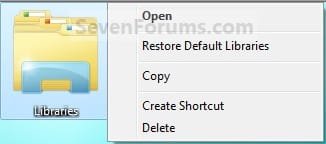
EXAMPLE: Libraries desktop icon
1550d1229249276-libraries-desktop-icon-add-remove-libraries_desktop_icon.jpg


Here's How:
1. To Add the Libraries Desktop Icon
A) Click on the Download button below to download the file below.
Add_Libraries_Desktop_Icon.reg

Download


B) Go to step 3.
2. To Remove the Libraries Desktop Icon
A) Click on the Download button below to download the file below.
Remove_Libraries_Desktop_Icon.reg

Download


3. Save the .reg file to the desktop.

4. Right click on the downloaded .reg file, and click on Merge.

5. Click on Run, Yes, and OK when prompted.

6. Log off and log on, or restart the computer to apply.

7. When done, you can delete the downloaded .reg file if you like.
That's it,
Shawn


Attachments

Last edited:
It works for me, thanks !

Juste delete these two regedit entry in :

HKEY_LOCAL_MACHINE\SOFTWARE\Microsoft\Wind ows\CurrentVersion\Explorer\Desktop\NameSpace\

{B4FB3F98-C1EA-428d-A78A-D1F5659CBA93}
{031E4825-7B94-4dc3-B131-E946B44C8DD5}
 
Last edited by a moderator:

My Computer

OS
Xp x64 - W7 x64 (build 7100)
CPU
Q6600
Motherboard
EP45 -UD3P
Memory
4gb PC2 8500
Graphics Card(s)
8800GTX
Sound Card
Xplosion
Monitor(s) Displays
2x22" samsung 225BW
w00t,

I had the exact same problem as you and figured out - after several hours of fooling around - how to get rid of the icon. I upgraded from Windows Vista to Windows 7 and was unable to remove the "Libraries" desktop icon as well, even after following the tutorial provided here. I believe the answer lies in what type of start menu I had before upgrading. Instead of the contemporary start menu, I had the classic one. The tutorial and downloads provided here add a key to the new start menu - not the old - where I believe some of my settings still are.

To get rid of the icon, you must edit the registry:


  1. Click "Start" and in the search bar type "regedit".
  2. Browse to the following folder: "[HKEY_CURRENT_USER\Software\Microsoft\Windows\CurrentVersion\Explorer\HideDesktopIcons\ClassicStartMenu]"
  3. Once there, click "Edit" then "New" then "DWORD (32-bit) Value".
  4. A new value will be created and copy and paste this as it's name: "{031E4825-7B94-4DC3-B131-E946B44C8DD5}"
  5. Double click on the value you just created and in the value data box, enter in "1".
  6. Close out of the Registry Editor.
  7. Right click on the desktop and click "Refresh" and the icon should disappear.


PERFECT!! Thanks.
 

My Computer

OS
win7
Downloads updated. :)
 

My Computer

Computer type
PC/Desktop
Computer Manufacturer/Model Number
Self built custom
OS
64-bit Windows 11 Pro for Workstations
CPU
Intel i7-8700K OC'd to 5 GHz
Motherboard
ASUS ROG Maximus XI Formula Z390
Memory
64 GB (4x16GB) G.SKILL TridentZ RGB DDR4 3600 MHz
Graphics Card(s)
ASUS ROG-STRIX-GTX1080TI-O11G-GAMING
Sound Card
Integrated
Monitor(s) Displays
2 x Samsung Odyssey G7 27"
Screen Resolution
2560x1440
Hard Drives
1TB Samsung 990 PRO M.2,
4TB Samsung 990 PRO PRO M.2,
TerraMaster F8 SSD Plus NAS
PSU
Seasonic Prime Titanium 850W
Case
Thermaltake Core P3
Cooling
Corsair Hydro H115i
Keyboard
Logitech wireless K800
Mouse
Logitech MX Master 4
Internet Speed
2 Gb/s Download and 100 Mb/s Upload
Antivirus
Malwarebyte Anti-Malware Premium
Browser
Google Chrome
Other Info
Logitech Z625 speaker system,
Logitech BRIO 4K Pro webcam,
HP Color LaserJet Pro MFP M477fdn,
APC SMART-UPS RT 1000 XL - SURT1000XLI,
Galaxy S23 Plus phone
It works for me, thanks !

Juste delete these two regedit entry in :

HKEY_LOCAL_MACHINE\SOFTWARE\Microsoft\Wind ows\CurrentVersion\Explorer\Desktop\NameSpace\

{B4FB3F98-C1EA-428d-A78A-D1F5659CBA93}
{031E4825-7B94-4dc3-B131-E946B44C8DD5}

This works but with an x64 Windows 7, those must also be removed here:

HKEY_LOCAL_MACHINE\SOFTWARE\Wow6432Node\Microsoft\Wind ows\CurrentVersion\Explorer\Desktop\NameSpace\

If you don't remove them, they'll still show if you run a 32 bit software.

Example with firefox, if you wanna save something on the desktop, the icon will still be there until you have deleted those regs from Wow6432Node
 
Last edited by a moderator:

My Computer

OS
Windows 7 x64
very interesting i was thinking about doing the same thing. also just joined so I'm not sure if this the subject for this.

i have a question. i partition my HD (250GB) so my doc are separate, but would like to use the library icons and function to list them. within the library link my files appear doubled (twice) why? can i erase the stand system one with this method and just keep mine? :confused:
 

My Computer

OS
Windows 7 Ultimate
Hello El Bori, and welcome to Seven Forums.

This tutorial will only remove the Libraries icon from the desktop.

You might check to see what folders you have included in the library to see if your files are doubled since they are in more than one of the included folders. If you have a included folder listed more than once, then you can remove it.

Could you post a screenshot of this to help clarify this and the location better? :)

Hope this helps for now,
Shawn
 

My Computer

Computer type
PC/Desktop
Computer Manufacturer/Model Number
Self built custom
OS
64-bit Windows 11 Pro for Workstations
CPU
Intel i7-8700K OC'd to 5 GHz
Motherboard
ASUS ROG Maximus XI Formula Z390
Memory
64 GB (4x16GB) G.SKILL TridentZ RGB DDR4 3600 MHz
Graphics Card(s)
ASUS ROG-STRIX-GTX1080TI-O11G-GAMING
Sound Card
Integrated
Monitor(s) Displays
2 x Samsung Odyssey G7 27"
Screen Resolution
2560x1440
Hard Drives
1TB Samsung 990 PRO M.2,
4TB Samsung 990 PRO PRO M.2,
TerraMaster F8 SSD Plus NAS
PSU
Seasonic Prime Titanium 850W
Case
Thermaltake Core P3
Cooling
Corsair Hydro H115i
Keyboard
Logitech wireless K800
Mouse
Logitech MX Master 4
Internet Speed
2 Gb/s Download and 100 Mb/s Upload
Antivirus
Malwarebyte Anti-Malware Premium
Browser
Google Chrome
Other Info
Logitech Z625 speaker system,
Logitech BRIO 4K Pro webcam,
HP Color LaserJet Pro MFP M477fdn,
APC SMART-UPS RT 1000 XL - SURT1000XLI,
Galaxy S23 Plus phone
yaY! Thanks so much for this! Worked like a charm.
 

My Computer

Computer Manufacturer/Model Number
HP Pav 2270us, Persario F700, Acer a true fightn' machine
OS
Win7 Ult. 32; Win7 Home Prem 64, WinXP On Life Support
Other Info
It's pretty?
I found this tweak elsewhere but it doesnt explain how to remove libraries AND keep documents in the start menu. I've looked at the registry strings and im not able to find the string that isolates libraries from documents.

When I install this tweak, documents is removed from that start menu and going into properties shows that documents is set to show as link.

anyone having this issue?
 

My Computer

OS
windows 7
Last edited:

My Computer

Computer type
PC/Desktop
Computer Manufacturer/Model Number
Self built custom
OS
64-bit Windows 11 Pro for Workstations
CPU
Intel i7-8700K OC'd to 5 GHz
Motherboard
ASUS ROG Maximus XI Formula Z390
Memory
64 GB (4x16GB) G.SKILL TridentZ RGB DDR4 3600 MHz
Graphics Card(s)
ASUS ROG-STRIX-GTX1080TI-O11G-GAMING
Sound Card
Integrated
Monitor(s) Displays
2 x Samsung Odyssey G7 27"
Screen Resolution
2560x1440
Hard Drives
1TB Samsung 990 PRO M.2,
4TB Samsung 990 PRO PRO M.2,
TerraMaster F8 SSD Plus NAS
PSU
Seasonic Prime Titanium 850W
Case
Thermaltake Core P3
Cooling
Corsair Hydro H115i
Keyboard
Logitech wireless K800
Mouse
Logitech MX Master 4
Internet Speed
2 Gb/s Download and 100 Mb/s Upload
Antivirus
Malwarebyte Anti-Malware Premium
Browser
Google Chrome
Other Info
Logitech Z625 speaker system,
Logitech BRIO 4K Pro webcam,
HP Color LaserJet Pro MFP M477fdn,
APC SMART-UPS RT 1000 XL - SURT1000XLI,
Galaxy S23 Plus phone
I found this tweak elsewhere but it doesnt explain how to remove libraries AND keep documents in the start menu. I've looked at the registry strings and im not able to find the string that isolates libraries from documents.

When I install this tweak, documents is removed from that start menu and going into properties shows that documents is set to show as link.

anyone having this issue?


I didn't have this issue, but I do have a question for clarification. In the start menu there are two columns, left, which is white and right, which it whatever colour you chose. Are you saying it is in neither column?
( I'm only asking because I came across someone at another board that thought a link was missing because he/she didn't see it in the white column, but all along it was there, just in the other column which they ignored until it was pointed out to them.)

If no, have to tried changing the documents selection to say, not show, or to show as a folder, save and check if it appears then, and then switch it back to the link? (just checking all bases ;) )
 

My Computer

Computer Manufacturer/Model Number
HP Pav 2270us, Persario F700, Acer a true fightn' machine
OS
Win7 Ult. 32; Win7 Home Prem 64, WinXP On Life Support
Other Info
It's pretty?
The folder is not in the right column and I went through the settings to show, disable, then show as link, etc. but i think my problem is that I havent tried you guys' remove_registry hack. I will give it a try and will report.

The computer having this trouble is my bosses so I have to ask for when the computer is available.
 

My Computer

OS
windows 7

My Computer

Computer type
PC/Desktop
Computer Manufacturer/Model Number
Self built custom
OS
64-bit Windows 11 Pro for Workstations
CPU
Intel i7-8700K OC'd to 5 GHz
Motherboard
ASUS ROG Maximus XI Formula Z390
Memory
64 GB (4x16GB) G.SKILL TridentZ RGB DDR4 3600 MHz
Graphics Card(s)
ASUS ROG-STRIX-GTX1080TI-O11G-GAMING
Sound Card
Integrated
Monitor(s) Displays
2 x Samsung Odyssey G7 27"
Screen Resolution
2560x1440
Hard Drives
1TB Samsung 990 PRO M.2,
4TB Samsung 990 PRO PRO M.2,
TerraMaster F8 SSD Plus NAS
PSU
Seasonic Prime Titanium 850W
Case
Thermaltake Core P3
Cooling
Corsair Hydro H115i
Keyboard
Logitech wireless K800
Mouse
Logitech MX Master 4
Internet Speed
2 Gb/s Download and 100 Mb/s Upload
Antivirus
Malwarebyte Anti-Malware Premium
Browser
Google Chrome
Other Info
Logitech Z625 speaker system,
Logitech BRIO 4K Pro webcam,
HP Color LaserJet Pro MFP M477fdn,
APC SMART-UPS RT 1000 XL - SURT1000XLI,
Galaxy S23 Plus phone
Thanks, easy and effective.
marinilda
 

My Computer

Computer Manufacturer/Model Number
no manufacturer, this is a builted machine
OS
Windows 7 Home Premium 32 bits
CPU
Intel 2 Duo 7500 2,93 GHz
Motherboard
Intel
Memory
Kingston 4 Gb
Graphics Card(s)
onboard
Sound Card
onboard
Monitor(s) Displays
LCD 17LG
Hard Drives
HD Seagate 250
Seagate external 250
DVD/CD LG
PSU
Is this for games? No games
Case
what is this?
Cooling
I dont know de manufacturer
Your welcome Marinilda, and welcome to Seven Forums. :)
 

My Computer

Computer type
PC/Desktop
Computer Manufacturer/Model Number
Self built custom
OS
64-bit Windows 11 Pro for Workstations
CPU
Intel i7-8700K OC'd to 5 GHz
Motherboard
ASUS ROG Maximus XI Formula Z390
Memory
64 GB (4x16GB) G.SKILL TridentZ RGB DDR4 3600 MHz
Graphics Card(s)
ASUS ROG-STRIX-GTX1080TI-O11G-GAMING
Sound Card
Integrated
Monitor(s) Displays
2 x Samsung Odyssey G7 27"
Screen Resolution
2560x1440
Hard Drives
1TB Samsung 990 PRO M.2,
4TB Samsung 990 PRO PRO M.2,
TerraMaster F8 SSD Plus NAS
PSU
Seasonic Prime Titanium 850W
Case
Thermaltake Core P3
Cooling
Corsair Hydro H115i
Keyboard
Logitech wireless K800
Mouse
Logitech MX Master 4
Internet Speed
2 Gb/s Download and 100 Mb/s Upload
Antivirus
Malwarebyte Anti-Malware Premium
Browser
Google Chrome
Other Info
Logitech Z625 speaker system,
Logitech BRIO 4K Pro webcam,
HP Color LaserJet Pro MFP M477fdn,
APC SMART-UPS RT 1000 XL - SURT1000XLI,
Galaxy S23 Plus phone
Many thanks

I'm glad someone had a fix for that obnoxious libraries icon, Windows 7 is a pain in the posterior as it is trying to get accustomed to the new location of typical settings. You'd swear there's a group of people sitting around thinking of where to hide the control panels for their new OS.... It's still the same info, just tucked away differently... Its like we pay extra to play hide and seek.... oh well, icon gone! thanks man
 

My Computer

Computer Manufacturer/Model Number
Gateway P-7805-u
OS
Windows 7
CPU
P8400 C2Duo
Memory
4 gig DDR3
Graphics Card(s)
9800 GTS Cuda 1 GB DDR3
You're welcome Marglar, and welcome to Seven Forums.

It's up to you, but you might consider giving Libraries a try though. It can be real helpful if you would like to be able to say access all of your music files in included folders in one place instead of having to go to each folder while still having the music only stored in their original locations. :)
 

My Computer

Computer type
PC/Desktop
Computer Manufacturer/Model Number
Self built custom
OS
64-bit Windows 11 Pro for Workstations
CPU
Intel i7-8700K OC'd to 5 GHz
Motherboard
ASUS ROG Maximus XI Formula Z390
Memory
64 GB (4x16GB) G.SKILL TridentZ RGB DDR4 3600 MHz
Graphics Card(s)
ASUS ROG-STRIX-GTX1080TI-O11G-GAMING
Sound Card
Integrated
Monitor(s) Displays
2 x Samsung Odyssey G7 27"
Screen Resolution
2560x1440
Hard Drives
1TB Samsung 990 PRO M.2,
4TB Samsung 990 PRO PRO M.2,
TerraMaster F8 SSD Plus NAS
PSU
Seasonic Prime Titanium 850W
Case
Thermaltake Core P3
Cooling
Corsair Hydro H115i
Keyboard
Logitech wireless K800
Mouse
Logitech MX Master 4
Internet Speed
2 Gb/s Download and 100 Mb/s Upload
Antivirus
Malwarebyte Anti-Malware Premium
Browser
Google Chrome
Other Info
Logitech Z625 speaker system,
Logitech BRIO 4K Pro webcam,
HP Color LaserJet Pro MFP M477fdn,
APC SMART-UPS RT 1000 XL - SURT1000XLI,
Galaxy S23 Plus phone
Why can't I download remove Libraries software?
I just signed on to WDs 7 Forum.
I have a problem with run-away Libraries icon siting in my taskbar which can not be reduced in its icon size. :sarc:

Windows 7 doesn't have Zip file, one needs to download 7-Zip or other feee zip/unzip softwares. You shouldn't assume everyone comes to Windows 7 is fully loaded as you guys.

Now, please explain how to unzip and select .reg file and then, look for merge if one can not find it?
 
Last edited by a moderator:

My Computer

Computer Manufacturer/Model Number
Acer Aspire 5732Z
OS
Windows 7 Home Premium
CPU
Intel T4400
Hello Presidio, and welcome to Seven Forums.

You should not have a problem downloading anything from our site since you do not need to be a member to download anything. You might check to see if you have a security program that may be blocking it.

However, the download in this tutorial will not affect anything on the taskbar. You might see this instead.

http://www.sevenforums.com/tutorials/741-taskbar-use-small-large-icons.html

Hope this helps,
Shawn

UPDATE:
For your added comments:

All editions of Windows 7 include a built in ZIP handler to open all ZIP file with. If your's is not working, then I would suggest using the ZIP download in this tutorial to restore the default ZIP associations in Windows 7. There is absolutely no need to have to use a 3rd party program to open ZIP file in any edition of Windows 7 unless you just want to.

http://www.sevenforums.com/tutorials/19449-default-file-type-associations-restore.html
 

My Computer

Computer type
PC/Desktop
Computer Manufacturer/Model Number
Self built custom
OS
64-bit Windows 11 Pro for Workstations
CPU
Intel i7-8700K OC'd to 5 GHz
Motherboard
ASUS ROG Maximus XI Formula Z390
Memory
64 GB (4x16GB) G.SKILL TridentZ RGB DDR4 3600 MHz
Graphics Card(s)
ASUS ROG-STRIX-GTX1080TI-O11G-GAMING
Sound Card
Integrated
Monitor(s) Displays
2 x Samsung Odyssey G7 27"
Screen Resolution
2560x1440
Hard Drives
1TB Samsung 990 PRO M.2,
4TB Samsung 990 PRO PRO M.2,
TerraMaster F8 SSD Plus NAS
PSU
Seasonic Prime Titanium 850W
Case
Thermaltake Core P3
Cooling
Corsair Hydro H115i
Keyboard
Logitech wireless K800
Mouse
Logitech MX Master 4
Internet Speed
2 Gb/s Download and 100 Mb/s Upload
Antivirus
Malwarebyte Anti-Malware Premium
Browser
Google Chrome
Other Info
Logitech Z625 speaker system,
Logitech BRIO 4K Pro webcam,
HP Color LaserJet Pro MFP M477fdn,
APC SMART-UPS RT 1000 XL - SURT1000XLI,
Galaxy S23 Plus phone
Wipe the annoying Libraries folder icom from Win 7 desk

Hello w00t, and welcome to Seven Forums. :)

After you have downloaded and merged the reg file in step 2, did you right click on a empty space on the desktop and click on Refresh?

Hope this helps,
Shawn

Thank you for reminding to "Refresh", cause it works, but just if you refresh. I also tried without refresh and the Libraries folder icon remained on the desktop, but after refreshing it disappeared (thanks to God - it was so annoying).

Best regards

Zsolt Pintér
 
Last edited by a moderator:

My Computer

Computer Manufacturer/Model Number
Fujitsu
OS
Win 7 Ultimate 64
CPU
Intel i7
Motherboard
Intel
Memory
Fujitsu
Graphics Card(s)
Nvidia
Sound Card
Realtek
Monitor(s) Displays
Fujitsu
You're most welcome Zsolt Pintér, and welcome to Seven Forums. :)
 

My Computer

Computer type
PC/Desktop
Computer Manufacturer/Model Number
Self built custom
OS
64-bit Windows 11 Pro for Workstations
CPU
Intel i7-8700K OC'd to 5 GHz
Motherboard
ASUS ROG Maximus XI Formula Z390
Memory
64 GB (4x16GB) G.SKILL TridentZ RGB DDR4 3600 MHz
Graphics Card(s)
ASUS ROG-STRIX-GTX1080TI-O11G-GAMING
Sound Card
Integrated
Monitor(s) Displays
2 x Samsung Odyssey G7 27"
Screen Resolution
2560x1440
Hard Drives
1TB Samsung 990 PRO M.2,
4TB Samsung 990 PRO PRO M.2,
TerraMaster F8 SSD Plus NAS
PSU
Seasonic Prime Titanium 850W
Case
Thermaltake Core P3
Cooling
Corsair Hydro H115i
Keyboard
Logitech wireless K800
Mouse
Logitech MX Master 4
Internet Speed
2 Gb/s Download and 100 Mb/s Upload
Antivirus
Malwarebyte Anti-Malware Premium
Browser
Google Chrome
Other Info
Logitech Z625 speaker system,
Logitech BRIO 4K Pro webcam,
HP Color LaserJet Pro MFP M477fdn,
APC SMART-UPS RT 1000 XL - SURT1000XLI,
Galaxy S23 Plus phone
Back
Top