Libraries - Hidden and Empty Fix

How to Fix Libraries when Hidden and Empty in Windows 7 and Windows 8

   Information
When you open your Libraries in Windows Explorer and it is empty or the libraries are hidden, then this will show you how to fix them if clicking on the Restore Default Libraries option did not help.


EXAMPLE: Libraries Hidden and Empty
NOTE: If you see faded library folders, then this also means that they are hidden.

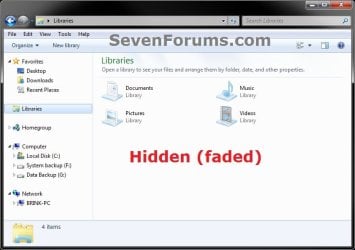
Example.jpg

Example2.jpg


OPTION ONE

Fix Hidden Empty Libraries with a BAT File


NOTE: This does the same thing as OPTION TWO below, but automatically.
1. Click on the Download button below to download the the file below.
Unhide_Libraries.bat


Download


2. Unblock the downloaded BAT file, then run it.
NOTE: You may notice a quick flash of the command prompt opening and closing at it runs.

3. Log off and log on, or restart the computer to apply.


OPTION TWO

Fix Hidden Empty Libraries in a Command Prompt


NOTE: This does the same thing as OPTION ONE above, but manually.
1. Open a command prompt.

2. Copy and past the command below into the command prompt, and press Enter.
attrib -h "%AppData%\Microsoft\Windows\Libraries\*.library-ms"
3. Close the command prompt.

4. Log off and log on, or restart the computer to apply.
That's it,
Shawn


Attachments

Last edited:
Thank you very much for this tutorial. I had been dealing with this issue for a while now. Fixed now. Even tried Microsoft tech-no-support. I had this issue happen to me on all the profiles in computer. I use Mcafee do you think that is the issue ?

@Tamara
I'm happy to hear that you got it sorted. :)
@Ronster
You're welcome, and welcome to Seven Forums. It would be hard to say if McAfee was or not since it could have been anything that may have hidden them by mistake. :)

After running your fix my libraries were visible again so I thought it was fixed. However I noticed that they were dimm or a light gray. Also everytime I edit a file for example rotate a picture with windows photo viewer that picture would dissapear. I found out that mcafee is the culprit. There is a bug with mcafee that changes the attribute from the file thats being edited, and it changes the attribute to hidden. So if anyone else is having these issues you should contact their tech support so they can run a batch file they created to take care of the light gray library issue and the hidden attribute issue or you can visit their tech support forum their is a 45 page thread on this issue. Thought Id share this with you guys.

Ronster,

Thank you for posting back with your findings and results. :)
 

My Computer

Computer type
PC/Desktop
Computer Manufacturer/Model Number
Self built custom
OS
64-bit Windows 11 Pro for Workstations
CPU
Intel i7-8700K OC'd to 5 GHz
Motherboard
ASUS ROG Maximus XI Formula Z390
Memory
64 GB (4x16GB) G.SKILL TridentZ RGB DDR4 3600 MHz
Graphics Card(s)
ASUS ROG-STRIX-GTX1080TI-O11G-GAMING
Sound Card
Integrated
Monitor(s) Displays
2 x Samsung Odyssey G7 27"
Screen Resolution
2560x1440
Hard Drives
1TB Samsung 990 PRO M.2,
4TB Samsung 990 PRO PRO M.2,
TerraMaster F8 SSD Plus NAS
PSU
Seasonic Prime Titanium 850W
Case
Thermaltake Core P3
Cooling
Corsair Hydro H115i
Keyboard
Logitech wireless K800
Mouse
Logitech MX Master 4
Internet Speed
2 Gb/s Download and 100 Mb/s Upload
Antivirus
Malwarebyte Anti-Malware Premium
Browser
Google Chrome
Other Info
Logitech Z625 speaker system,
Logitech BRIO 4K Pro webcam,
HP Color LaserJet Pro MFP M477fdn,
APC SMART-UPS RT 1000 XL - SURT1000XLI,
Galaxy S23 Plus phone
yessssSsSss

Yay! I managed to get them to show up, but they were still hidden... wasn't until I ran the file that they showed up solid. Thanks :D
 
Last edited:

My Computer

OS
Windows 7 Home Premium 64bit
Ahhhhhhhhhhh...I have things hidden in my Library! I never knew about the faded etc thingies before. Brink I can't tell you how much I thank you for all these new knowledge! TYTYTY! Going to play in the library now. *Shhhhh...tiptoes in to fix it* ;)
 

My Computer

Computer Manufacturer/Model Number
Asus G75 VW
OS
Windows 7 home premium 64
Memory
DDR3 1600 MHz SDRAM, 4 x SO-DIMM
Graphics Card(s)
NVIDIA® GeForce® GTX 660M/670M with 2GB/3GB GDDR5 VRAM
Sound Card
High definition
Monitor(s) Displays
17.3" HD with EWV (1366 x 768) / FHD 3D LED Backlight
Screen Resolution
1920x1080
Hard Drives
yep got 1
PSU
PSU?
Case
Lawyer? ;)
Cooling
Raised back cooling filter.
Keyboard
yep got 1 of those too...but keypad(laptop)
Mouse
Keypad but I use a Logic laser mouse
Internet Speed
Speedy gonzales fast
Other Info
2.5" SATA Dual HDD
1TB 5400rpm
750GB 5400rpm/7200rpm
500GB 5400rpm/7200rpm
750GB 7200rpm SSH
256GB SSD
RAID0/1 Support


Optical Drive

Blu-Ray DVD Combo
Super-Multi DVD
Blue-ray reader


Card Reader

3 -in-1 card reader ( SD/ MS/ MMC)


Camera

HD Web Camera


Networking

Integrated 802.11 b/g/n
Built-in Bluetooth™ V4.0 (Optional)
10/100/1000 Ba
Missing Parts

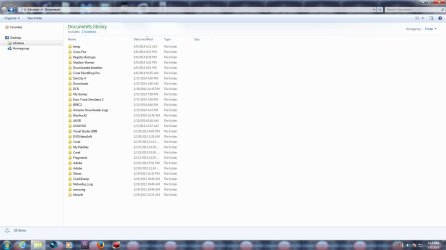
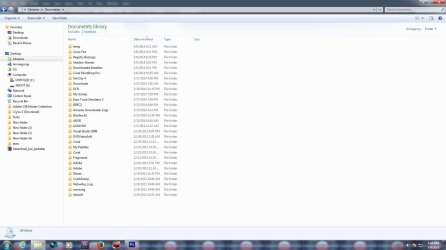
I have been looking around for a solution to a problem that I have had for about 2 days. The Windows Library is missing and incomplete at times. I can restore the defaults, but it will eventually revert back to the way it was before, and I can't see disk drives etc. The other problem is that pictures load, but the icon is blank, and for videos it shows an empty white page.

I've tried the registry fixes I have seen, but it doesn't work for long. I cannot tell if this is a hardware issue or software related? I have Windows 7 Ultimate, 64 bit and I was wondering if anyone could help? Could this be a sign of a hard drive going bad, or ram problems? Maybe a virus?
Thanks!
 

Attachments

  • Before Restore.jpg
    Before Restore.jpg
    108.5 KB · Views: 149
  • After Restore.jpg
    After Restore.jpg
    120.3 KB · Views: 139

My Computer

Computer type
PC/Desktop
OS
Win 7 Ultimate, SP1 64-bit
Last edited:

My Computer

Computer type
PC/Desktop
Computer Manufacturer/Model Number
Self built custom
OS
64-bit Windows 11 Pro for Workstations
CPU
Intel i7-8700K OC'd to 5 GHz
Motherboard
ASUS ROG Maximus XI Formula Z390
Memory
64 GB (4x16GB) G.SKILL TridentZ RGB DDR4 3600 MHz
Graphics Card(s)
ASUS ROG-STRIX-GTX1080TI-O11G-GAMING
Sound Card
Integrated
Monitor(s) Displays
2 x Samsung Odyssey G7 27"
Screen Resolution
2560x1440
Hard Drives
1TB Samsung 990 PRO M.2,
4TB Samsung 990 PRO PRO M.2,
TerraMaster F8 SSD Plus NAS
PSU
Seasonic Prime Titanium 850W
Case
Thermaltake Core P3
Cooling
Corsair Hydro H115i
Keyboard
Logitech wireless K800
Mouse
Logitech MX Master 4
Internet Speed
2 Gb/s Download and 100 Mb/s Upload
Antivirus
Malwarebyte Anti-Malware Premium
Browser
Google Chrome
Other Info
Logitech Z625 speaker system,
Logitech BRIO 4K Pro webcam,
HP Color LaserJet Pro MFP M477fdn,
APC SMART-UPS RT 1000 XL - SURT1000XLI,
Galaxy S23 Plus phone
Thank you Shawn for your response, and attempting to help with this.

I followed your link, and checked the show all folders box. I am not 100% sure it will fix it, because I don't mess around with those settings and it randomly displays everything all screwed up. As I mentioned, when the navigation pane goes funky it displays blank documents for videos instead of icons or thumbnails and nothing at all for pictures. I didn't post screenshots of that happening, but i will if it happens again.

BTW, It became apparent to me after I installed some Windows updates, and although I doubt it; could there be any sort of issue with that?
 

My Computer

Computer type
PC/Desktop
OS
Win 7 Ultimate, SP1 64-bit
Could be. You might see if doing a system restore using a restore point dated before the issues may help if it happens again.
 

My Computer

Computer type
PC/Desktop
Computer Manufacturer/Model Number
Self built custom
OS
64-bit Windows 11 Pro for Workstations
CPU
Intel i7-8700K OC'd to 5 GHz
Motherboard
ASUS ROG Maximus XI Formula Z390
Memory
64 GB (4x16GB) G.SKILL TridentZ RGB DDR4 3600 MHz
Graphics Card(s)
ASUS ROG-STRIX-GTX1080TI-O11G-GAMING
Sound Card
Integrated
Monitor(s) Displays
2 x Samsung Odyssey G7 27"
Screen Resolution
2560x1440
Hard Drives
1TB Samsung 990 PRO M.2,
4TB Samsung 990 PRO PRO M.2,
TerraMaster F8 SSD Plus NAS
PSU
Seasonic Prime Titanium 850W
Case
Thermaltake Core P3
Cooling
Corsair Hydro H115i
Keyboard
Logitech wireless K800
Mouse
Logitech MX Master 4
Internet Speed
2 Gb/s Download and 100 Mb/s Upload
Antivirus
Malwarebyte Anti-Malware Premium
Browser
Google Chrome
Other Info
Logitech Z625 speaker system,
Logitech BRIO 4K Pro webcam,
HP Color LaserJet Pro MFP M477fdn,
APC SMART-UPS RT 1000 XL - SURT1000XLI,
Galaxy S23 Plus phone
I did do a system restore to before the updates, and I had the same problem. As it is right now, there's no issues and I will keep you updated if it happens again.
Thank You,
Todd
 

My Computer

Computer type
PC/Desktop
OS
Win 7 Ultimate, SP1 64-bit
That's good news so far Todd. :)
 

My Computer

Computer type
PC/Desktop
Computer Manufacturer/Model Number
Self built custom
OS
64-bit Windows 11 Pro for Workstations
CPU
Intel i7-8700K OC'd to 5 GHz
Motherboard
ASUS ROG Maximus XI Formula Z390
Memory
64 GB (4x16GB) G.SKILL TridentZ RGB DDR4 3600 MHz
Graphics Card(s)
ASUS ROG-STRIX-GTX1080TI-O11G-GAMING
Sound Card
Integrated
Monitor(s) Displays
2 x Samsung Odyssey G7 27"
Screen Resolution
2560x1440
Hard Drives
1TB Samsung 990 PRO M.2,
4TB Samsung 990 PRO PRO M.2,
TerraMaster F8 SSD Plus NAS
PSU
Seasonic Prime Titanium 850W
Case
Thermaltake Core P3
Cooling
Corsair Hydro H115i
Keyboard
Logitech wireless K800
Mouse
Logitech MX Master 4
Internet Speed
2 Gb/s Download and 100 Mb/s Upload
Antivirus
Malwarebyte Anti-Malware Premium
Browser
Google Chrome
Other Info
Logitech Z625 speaker system,
Logitech BRIO 4K Pro webcam,
HP Color LaserJet Pro MFP M477fdn,
APC SMART-UPS RT 1000 XL - SURT1000XLI,
Galaxy S23 Plus phone
Do you think the issue might be due to either my cpu or ram, because it happened again while I could tell the computer was under heavy cpu usage? I have 8GB of ram and an AMD A6-3620 processor that's 2.2 Ghz. Also, I have been running 7 Ultimate since around December of last year, so its fairly new. I am guessing 7 Ultimate has different RAM requirements than 7 Home Premium. If that's the case, it's no big deal because I have been wanting to upgrade anyway.
 

My Computer

Computer type
PC/Desktop
OS
Win 7 Ultimate, SP1 64-bit
I wouldn't think your CPU or RAM would cause this.

If it keeps up, then you might consider reinstalling Windows to start fresh.
 

My Computer

Computer type
PC/Desktop
Computer Manufacturer/Model Number
Self built custom
OS
64-bit Windows 11 Pro for Workstations
CPU
Intel i7-8700K OC'd to 5 GHz
Motherboard
ASUS ROG Maximus XI Formula Z390
Memory
64 GB (4x16GB) G.SKILL TridentZ RGB DDR4 3600 MHz
Graphics Card(s)
ASUS ROG-STRIX-GTX1080TI-O11G-GAMING
Sound Card
Integrated
Monitor(s) Displays
2 x Samsung Odyssey G7 27"
Screen Resolution
2560x1440
Hard Drives
1TB Samsung 990 PRO M.2,
4TB Samsung 990 PRO PRO M.2,
TerraMaster F8 SSD Plus NAS
PSU
Seasonic Prime Titanium 850W
Case
Thermaltake Core P3
Cooling
Corsair Hydro H115i
Keyboard
Logitech wireless K800
Mouse
Logitech MX Master 4
Internet Speed
2 Gb/s Download and 100 Mb/s Upload
Antivirus
Malwarebyte Anti-Malware Premium
Browser
Google Chrome
Other Info
Logitech Z625 speaker system,
Logitech BRIO 4K Pro webcam,
HP Color LaserJet Pro MFP M477fdn,
APC SMART-UPS RT 1000 XL - SURT1000XLI,
Galaxy S23 Plus phone
Ok.
 

My Computer

Computer type
PC/Desktop
OS
Win 7 Ultimate, SP1 64-bit
Brink, I am confident that I now know what the problem is. As you can see from the screenshot that it's a COM Surrogate memory issue, and I am currently reading up on another sevenforum as to what to do. I'm not familiar with this issue, and I read where it might be due to a corrupt media file. Any ideas?
 

Attachments

  • Com Surrogate Memory Hog.jpg
    Com Surrogate Memory Hog.jpg
    134 KB · Views: 188

My Computer

Computer type
PC/Desktop
OS
Win 7 Ultimate, SP1 64-bit
I'm afraid that I'm not sure about the COM Surrogate issue, but there's definitely an issue with it.

It would be worth creating a new thread for this issue.
 

My Computer

Computer type
PC/Desktop
Computer Manufacturer/Model Number
Self built custom
OS
64-bit Windows 11 Pro for Workstations
CPU
Intel i7-8700K OC'd to 5 GHz
Motherboard
ASUS ROG Maximus XI Formula Z390
Memory
64 GB (4x16GB) G.SKILL TridentZ RGB DDR4 3600 MHz
Graphics Card(s)
ASUS ROG-STRIX-GTX1080TI-O11G-GAMING
Sound Card
Integrated
Monitor(s) Displays
2 x Samsung Odyssey G7 27"
Screen Resolution
2560x1440
Hard Drives
1TB Samsung 990 PRO M.2,
4TB Samsung 990 PRO PRO M.2,
TerraMaster F8 SSD Plus NAS
PSU
Seasonic Prime Titanium 850W
Case
Thermaltake Core P3
Cooling
Corsair Hydro H115i
Keyboard
Logitech wireless K800
Mouse
Logitech MX Master 4
Internet Speed
2 Gb/s Download and 100 Mb/s Upload
Antivirus
Malwarebyte Anti-Malware Premium
Browser
Google Chrome
Other Info
Logitech Z625 speaker system,
Logitech BRIO 4K Pro webcam,
HP Color LaserJet Pro MFP M477fdn,
APC SMART-UPS RT 1000 XL - SURT1000XLI,
Galaxy S23 Plus phone
Well I uninstalled the update that was said to be the issue and deleted the file that I believe was the problem, and I believe the issue is resolved. So Thank You for all the help. I don't think I need to create a new thread for it.
 

My Computer

Computer type
PC/Desktop
OS
Win 7 Ultimate, SP1 64-bit
Great news Gras. Which update caused it?
 

My Computer

Computer type
PC/Desktop
Computer Manufacturer/Model Number
Self built custom
OS
64-bit Windows 11 Pro for Workstations
CPU
Intel i7-8700K OC'd to 5 GHz
Motherboard
ASUS ROG Maximus XI Formula Z390
Memory
64 GB (4x16GB) G.SKILL TridentZ RGB DDR4 3600 MHz
Graphics Card(s)
ASUS ROG-STRIX-GTX1080TI-O11G-GAMING
Sound Card
Integrated
Monitor(s) Displays
2 x Samsung Odyssey G7 27"
Screen Resolution
2560x1440
Hard Drives
1TB Samsung 990 PRO M.2,
4TB Samsung 990 PRO PRO M.2,
TerraMaster F8 SSD Plus NAS
PSU
Seasonic Prime Titanium 850W
Case
Thermaltake Core P3
Cooling
Corsair Hydro H115i
Keyboard
Logitech wireless K800
Mouse
Logitech MX Master 4
Internet Speed
2 Gb/s Download and 100 Mb/s Upload
Antivirus
Malwarebyte Anti-Malware Premium
Browser
Google Chrome
Other Info
Logitech Z625 speaker system,
Logitech BRIO 4K Pro webcam,
HP Color LaserJet Pro MFP M477fdn,
APC SMART-UPS RT 1000 XL - SURT1000XLI,
Galaxy S23 Plus phone
Thank you.
 

My Computer

Computer type
PC/Desktop
Computer Manufacturer/Model Number
Self built custom
OS
64-bit Windows 11 Pro for Workstations
CPU
Intel i7-8700K OC'd to 5 GHz
Motherboard
ASUS ROG Maximus XI Formula Z390
Memory
64 GB (4x16GB) G.SKILL TridentZ RGB DDR4 3600 MHz
Graphics Card(s)
ASUS ROG-STRIX-GTX1080TI-O11G-GAMING
Sound Card
Integrated
Monitor(s) Displays
2 x Samsung Odyssey G7 27"
Screen Resolution
2560x1440
Hard Drives
1TB Samsung 990 PRO M.2,
4TB Samsung 990 PRO PRO M.2,
TerraMaster F8 SSD Plus NAS
PSU
Seasonic Prime Titanium 850W
Case
Thermaltake Core P3
Cooling
Corsair Hydro H115i
Keyboard
Logitech wireless K800
Mouse
Logitech MX Master 4
Internet Speed
2 Gb/s Download and 100 Mb/s Upload
Antivirus
Malwarebyte Anti-Malware Premium
Browser
Google Chrome
Other Info
Logitech Z625 speaker system,
Logitech BRIO 4K Pro webcam,
HP Color LaserJet Pro MFP M477fdn,
APC SMART-UPS RT 1000 XL - SURT1000XLI,
Galaxy S23 Plus phone
My apologies about this issue, As you know I thought the issue revolved around Libraries as your tutorial explains; so I am sorry I did not post a new thread or a response in the other forum. But thank you for your support.:D
 

My Computer

Computer type
PC/Desktop
OS
Win 7 Ultimate, SP1 64-bit
No worries. :)
 

My Computer

Computer type
PC/Desktop
Computer Manufacturer/Model Number
Self built custom
OS
64-bit Windows 11 Pro for Workstations
CPU
Intel i7-8700K OC'd to 5 GHz
Motherboard
ASUS ROG Maximus XI Formula Z390
Memory
64 GB (4x16GB) G.SKILL TridentZ RGB DDR4 3600 MHz
Graphics Card(s)
ASUS ROG-STRIX-GTX1080TI-O11G-GAMING
Sound Card
Integrated
Monitor(s) Displays
2 x Samsung Odyssey G7 27"
Screen Resolution
2560x1440
Hard Drives
1TB Samsung 990 PRO M.2,
4TB Samsung 990 PRO PRO M.2,
TerraMaster F8 SSD Plus NAS
PSU
Seasonic Prime Titanium 850W
Case
Thermaltake Core P3
Cooling
Corsair Hydro H115i
Keyboard
Logitech wireless K800
Mouse
Logitech MX Master 4
Internet Speed
2 Gb/s Download and 100 Mb/s Upload
Antivirus
Malwarebyte Anti-Malware Premium
Browser
Google Chrome
Other Info
Logitech Z625 speaker system,
Logitech BRIO 4K Pro webcam,
HP Color LaserJet Pro MFP M477fdn,
APC SMART-UPS RT 1000 XL - SURT1000XLI,
Galaxy S23 Plus phone
Back
Top