Libraries not showing up on navigation pane, "restore" not working
Hello,
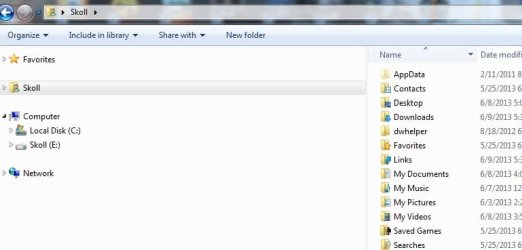
A couple of days ago I notice that the "Libraries" on the navigation panel were gone.
(see image 001.jpg)
The Libraries folder exists (in the AppData\Roaming\Microsoft\Windows\Libraries) and contains all the folders that should show.
Right clicking and choosing "restore default libraries" had no effect--not even an error message. I also try the "Include in Library" button but nothing.
After some research, I try a few things that didnt solve my problem.
I've seen this topic pop up in many different forums, and the recommended fix is always to right click and select "Restore Default Libraries." or "show all folders" As mentioned, this has no effect on my machine.
Thanks for any help,
Hello,
A couple of days ago I notice that the "Libraries" on the navigation panel were gone.
(see image 001.jpg)
The Libraries folder exists (in the AppData\Roaming\Microsoft\Windows\Libraries) and contains all the folders that should show.
Right clicking and choosing "restore default libraries" had no effect--not even an error message. I also try the "Include in Library" button but nothing.
After some research, I try a few things that didnt solve my problem.
Unhide the libraries using the Command Prompt:
attrib -h "%AppData%\Microsoft\Windows\Libraries\*.library-ms"
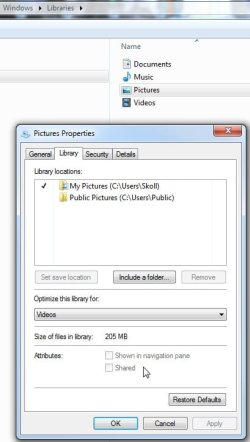
Change the Folders attribute "Shown in navigation pane" (NOTE: the post says that I should enable that checkbox but in my case is disables (see image 002) )
user the Registry Editor to see the DWORD Attributes registry value (“b080010d”)(The value was the same so no change was needed)
Run some Malware/Registry software to clean/repair
I've seen this topic pop up in many different forums, and the recommended fix is always to right click and select "Restore Default Libraries." or "show all folders" As mentioned, this has no effect on my machine.
Thanks for any help,
Attachments
My Computer
At a glance
Windows 7 Ultimate N x64AMD Phenom II X61090T 3.20GHz8GB DDR3Ati Radeon HD 6970
- Computer type
- PC/Desktop
- Computer Manufacturer/Model Number
- custom build
- OS
- Windows 7 Ultimate N x64
- CPU
- AMD Phenom II X61090T 3.20GHz
- Motherboard
- ASUS M4A89TD
- Memory
- 8GB DDR3
- Graphics Card(s)
- Ati Radeon HD 6970
- Antivirus
- Avira
- Browser
- Chrome

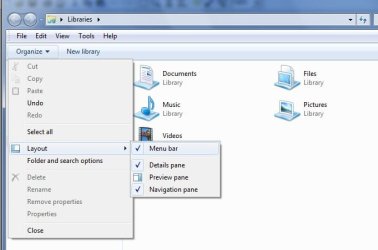
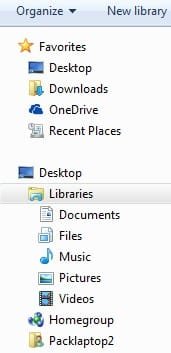
 I had the very same problem as above, and ran the restore libraries reg key. Interestingly, while it DID add my libraries, it was not as a separate entry on the nav bar, but rather shows up under the Desktop heading. That's better than not showing it at all, I guess, but I would prefer it be separate as it should be. I also don't see the library pane as an option under Organize/Layout, which I expect is part of the problem. I tried all the other options discussed here and other places, but none have worked. I also tried logging in as a different user and IT didn't have them either. For the record, if it matters, this is a Lenovo t540p, Win 7 Pro x64 (and yes, I ran the special x64 reg edit too).