
Solved Library Differences

jsquareg

New member
Power User
Local time
6:32 AM
Messages
400
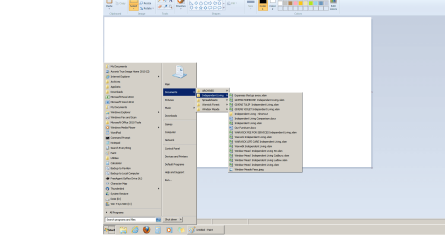
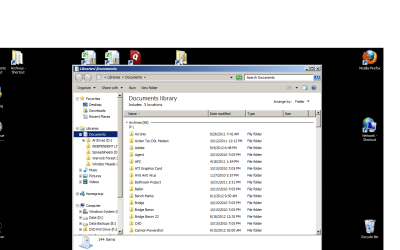
A long time ago I set up my Documents library on my Win 7 Home Edition desktop and have become quite used to it. I have just converted my HP Pavilion laptop to Win 7 from XP and tried to set up the same Documents library on it. However I can't seem to make the Pavilion look like my desktop. One screen shot below is from the desktop and the other is from the laptop.

The desktop one (the first) shows the Document library all nicely expanded and the laptop one looks like a direct presentation of Window Explorer. What do I need to do to make the laptop look like the desktop when I choose Start/Documents?

Thank you very much.
Primary Screen Shot.png

Pavilion Screen Shot.png
 

My Computer

Computer type
PC/Desktop
Computer Manufacturer/Model Number
Dell XPS-8500
OS
Windows 7 Home Premium (Retail) Full version - With SP1
CPU
3.10 Gig Intel Core i5-3350P
Motherboard
Dell 0NW73C A00
Memory
8192 Megabytes Usable Installed Memory
Monitor(s) Displays
Samsung SyncMaster [Monitor] (19.1"vis, s/n HVELA10194, Octo
Screen Resolution
1024 X 768
Hard Drives
INTEL SSDSA2CW120G3 ATA Device [Hard drive] (120.03 GB)
INTEL SSDSA2CW080G3 ATA Device [Hard drive] (80.02 GB)
Keyboard
HID Keyboard Device (HP)
Mouse
Dell (came with computer)
Internet Speed
cox high speed
Other Info
The above taken with Bel Arc Advisor
A long time ago I set up my Documents library on my Win 7 Home Edition desktop and have become quite used to it. I have just converted my HP Pavilion laptop to Win 7 from XP and tried to set up the same Documents library on it. However I can't seem to make the Pavilion look like my desktop. One screen shot below is from the desktop and the other is from the laptop.

The desktop one (the first) shows the Document library all nicely expanded and the laptop one looks like a direct presentation of Window Explorer. What do I need to do to make the laptop look like the desktop when I choose Start/Documents?

Thank you very much.
View attachment 232080

View attachment 232081

Sounds like you want something like this,

Welcome to Classic Shell
 

My Computer

Computer type
PC/Desktop
Computer Manufacturer/Model Number
Self Built
OS
Win 10 Pro x64
CPU
Intel I5-2500K @3.3GHz
Motherboard
Asrock P67 Extreme4
Memory
16GB G.Skill Ripjaws X (4x4GB)
Graphics Card(s)
EVGA GeForce 750 Ti SC 2GB
Sound Card
ASUS Xonar DG 5.1 Channels 24-bit 96KHz PCI Interface Sound
Monitor(s) Displays
auria eq2367
Screen Resolution
1920 x 1080
Hard Drives
250GB Samsung 850 EVO SSD
1TB WD Blue
1TB Hitachi
PSU
SeaSonic X 650W 80 Plus Gold
Case
Corsair Obsidian 750D
Cooling
Corsair H60, Three 140mm case fans
Keyboard
Logitech Wireless Keyboard K520
Mouse
Logitech Wireless Mouse M310
Internet Speed
Wave Broadband ~ 100 dn 5 up
Antivirus
Windows Defender, Malwarebytes Premium
Browser
Edge, IE11, Chrome
Other Info
Laptop specs: HP g7-1365dx /
CPU: AMD A6-3420M APU with Radeon(tm) HD Graphics /
RAM: Crucial 8Gb (2x4Gb) /
SSD: Crucial M4-CT128M4SSD2 ATA Device/ FW 000F /
GFX: AMD Radeon HD 6520G /
OS: Windows 10 Pro x64
A long time ago I set up my Documents library on my Win 7 Home Edition desktop and have become quite used to it. I have just converted my HP Pavilion laptop to Win 7 from XP and tried to set up the same Documents library on it. However I can't seem to make the Pavilion look like my desktop. One screen shot below is from the desktop and the other is from the laptop.

The desktop one (the first) shows the Document library all nicely expanded and the laptop one looks like a direct presentation of Window Explorer. What do I need to do to make the laptop look like the desktop when I choose Start/Documents?

Thank you very much.

View attachment 232080

View attachment 232081

Sounds like you want something like this,

Welcome to Classic Shell

Thank you.

No, That did not solve the problem. I don't want to return to an earlier shell. I just want to make my two Win 7 systems behave alike with respect to things in the Document and other libraries.
 

My Computer

Computer type
PC/Desktop
Computer Manufacturer/Model Number
Dell XPS-8500
OS
Windows 7 Home Premium (Retail) Full version - With SP1
CPU
3.10 Gig Intel Core i5-3350P
Motherboard
Dell 0NW73C A00
Memory
8192 Megabytes Usable Installed Memory
Monitor(s) Displays
Samsung SyncMaster [Monitor] (19.1"vis, s/n HVELA10194, Octo
Screen Resolution
1024 X 768
Hard Drives
INTEL SSDSA2CW120G3 ATA Device [Hard drive] (120.03 GB)
INTEL SSDSA2CW080G3 ATA Device [Hard drive] (80.02 GB)
Keyboard
HID Keyboard Device (HP)
Mouse
Dell (came with computer)
Internet Speed
cox high speed
Other Info
The above taken with Bel Arc Advisor
Can you explain what you're looking for, your first screenshot is not a native win 7 function. (Start menu flyouts)

Your second one just shows windows explorer.

You are showing two different parts, the start menu, and explorer, which part are you trying to change?
 

My Computer

Computer type
PC/Desktop
Computer Manufacturer/Model Number
Self Built
OS
Win 10 Pro x64
CPU
Intel I5-2500K @3.3GHz
Motherboard
Asrock P67 Extreme4
Memory
16GB G.Skill Ripjaws X (4x4GB)
Graphics Card(s)
EVGA GeForce 750 Ti SC 2GB
Sound Card
ASUS Xonar DG 5.1 Channels 24-bit 96KHz PCI Interface Sound
Monitor(s) Displays
auria eq2367
Screen Resolution
1920 x 1080
Hard Drives
250GB Samsung 850 EVO SSD
1TB WD Blue
1TB Hitachi
PSU
SeaSonic X 650W 80 Plus Gold
Case
Corsair Obsidian 750D
Cooling
Corsair H60, Three 140mm case fans
Keyboard
Logitech Wireless Keyboard K520
Mouse
Logitech Wireless Mouse M310
Internet Speed
Wave Broadband ~ 100 dn 5 up
Antivirus
Windows Defender, Malwarebytes Premium
Browser
Edge, IE11, Chrome
Other Info
Laptop specs: HP g7-1365dx /
CPU: AMD A6-3420M APU with Radeon(tm) HD Graphics /
RAM: Crucial 8Gb (2x4Gb) /
SSD: Crucial M4-CT128M4SSD2 ATA Device/ FW 000F /
GFX: AMD Radeon HD 6520G /
OS: Windows 10 Pro x64
Yes, I can see that I could have done a better job of explaining.

The first (Desktop) screen shot show the flyout after clicking on the little flyout arrow on Start/Documents.

The second (Laptop) shows what I got when I clicked on Start/Documents. There was no little flyout arrow on Documents.

How the little error got there on the desktop is lost in antiquity.

I hope this explains it better.

Thanks again.
 

My Computer

Computer type
PC/Desktop
Computer Manufacturer/Model Number
Dell XPS-8500
OS
Windows 7 Home Premium (Retail) Full version - With SP1
CPU
3.10 Gig Intel Core i5-3350P
Motherboard
Dell 0NW73C A00
Memory
8192 Megabytes Usable Installed Memory
Monitor(s) Displays
Samsung SyncMaster [Monitor] (19.1"vis, s/n HVELA10194, Octo
Screen Resolution
1024 X 768
Hard Drives
INTEL SSDSA2CW120G3 ATA Device [Hard drive] (120.03 GB)
INTEL SSDSA2CW080G3 ATA Device [Hard drive] (80.02 GB)
Keyboard
HID Keyboard Device (HP)
Mouse
Dell (came with computer)
Internet Speed
cox high speed
Other Info
The above taken with Bel Arc Advisor

My Computer

Computer type
PC/Desktop
Computer Manufacturer/Model Number
Self Built
OS
Win 10 Pro x64
CPU
Intel I5-2500K @3.3GHz
Motherboard
Asrock P67 Extreme4
Memory
16GB G.Skill Ripjaws X (4x4GB)
Graphics Card(s)
EVGA GeForce 750 Ti SC 2GB
Sound Card
ASUS Xonar DG 5.1 Channels 24-bit 96KHz PCI Interface Sound
Monitor(s) Displays
auria eq2367
Screen Resolution
1920 x 1080
Hard Drives
250GB Samsung 850 EVO SSD
1TB WD Blue
1TB Hitachi
PSU
SeaSonic X 650W 80 Plus Gold
Case
Corsair Obsidian 750D
Cooling
Corsair H60, Three 140mm case fans
Keyboard
Logitech Wireless Keyboard K520
Mouse
Logitech Wireless Mouse M310
Internet Speed
Wave Broadband ~ 100 dn 5 up
Antivirus
Windows Defender, Malwarebytes Premium
Browser
Edge, IE11, Chrome
Other Info
Laptop specs: HP g7-1365dx /
CPU: AMD A6-3420M APU with Radeon(tm) HD Graphics /
RAM: Crucial 8Gb (2x4Gb) /
SSD: Crucial M4-CT128M4SSD2 ATA Device/ FW 000F /
GFX: AMD Radeon HD 6520G /
OS: Windows 10 Pro x64
YES! That did the trick and now I remember. 'Tis bad to get old

Thanks again.
 

My Computer

Computer type
PC/Desktop
Computer Manufacturer/Model Number
Dell XPS-8500
OS
Windows 7 Home Premium (Retail) Full version - With SP1
CPU
3.10 Gig Intel Core i5-3350P
Motherboard
Dell 0NW73C A00
Memory
8192 Megabytes Usable Installed Memory
Monitor(s) Displays
Samsung SyncMaster [Monitor] (19.1"vis, s/n HVELA10194, Octo
Screen Resolution
1024 X 768
Hard Drives
INTEL SSDSA2CW120G3 ATA Device [Hard drive] (120.03 GB)
INTEL SSDSA2CW080G3 ATA Device [Hard drive] (80.02 GB)
Keyboard
HID Keyboard Device (HP)
Mouse
Dell (came with computer)
Internet Speed
cox high speed
Other Info
The above taken with Bel Arc Advisor
You're welcome.

Glad you got it where you want it, none of us can remember everything. :D
 

My Computer

Computer type
PC/Desktop
Computer Manufacturer/Model Number
Self Built
OS
Win 10 Pro x64
CPU
Intel I5-2500K @3.3GHz
Motherboard
Asrock P67 Extreme4
Memory
16GB G.Skill Ripjaws X (4x4GB)
Graphics Card(s)
EVGA GeForce 750 Ti SC 2GB
Sound Card
ASUS Xonar DG 5.1 Channels 24-bit 96KHz PCI Interface Sound
Monitor(s) Displays
auria eq2367
Screen Resolution
1920 x 1080
Hard Drives
250GB Samsung 850 EVO SSD
1TB WD Blue
1TB Hitachi
PSU
SeaSonic X 650W 80 Plus Gold
Case
Corsair Obsidian 750D
Cooling
Corsair H60, Three 140mm case fans
Keyboard
Logitech Wireless Keyboard K520
Mouse
Logitech Wireless Mouse M310
Internet Speed
Wave Broadband ~ 100 dn 5 up
Antivirus
Windows Defender, Malwarebytes Premium
Browser
Edge, IE11, Chrome
Other Info
Laptop specs: HP g7-1365dx /
CPU: AMD A6-3420M APU with Radeon(tm) HD Graphics /
RAM: Crucial 8Gb (2x4Gb) /
SSD: Crucial M4-CT128M4SSD2 ATA Device/ FW 000F /
GFX: AMD Radeon HD 6520G /
OS: Windows 10 Pro x64
Back
Top