
You are using an out of date browser. It may not display this or other websites correctly.
You should upgrade or use an alternative browser.
You should upgrade or use an alternative browser.
Library Docs vs. My Docs
- Thread starter rosede
- Start date

The library links are called junctions, the actual folders reside in Users\YourName\Documents...
My Computer
- Computer type
- Laptop
- Computer Manufacturer/Model Number
- HP 17-ak0xx, dv7 3173nr
- OS
- Win7 Home Premium x64 W10Pro&Home
- CPU
- A12 9720p 4+8 TurionII M520
- Motherboard
- HP 3839
- Memory
- 6GB 8GB
- Graphics Card(s)
- R7
- Monitor(s) Displays
- 24" sa550
- Screen Resolution
- 1600x900 1920x1080
- Mouse
- Logitechx2
- Internet Speed
- 120Mb/s down 12up
The library links are called junctions, the actual folders reside in Users\YourName\Documents...
Okay, but if I create a doc, or folder or whatever in one, I should be able to see it in the other, correct? That didn't happen here. I created a folder in "Library Docs", but it DIDN'T show up in "My Docs".
Thanks.
Daryl
My Computer
- OS
- 7 Home Premium 64bit

Hello Daryl, and welcome to Seven Forums.
Think of a Library as a collection point (shortcut to) of the folders/files in included folders (ex: My Documents) from other locations.
If you add a folder /file in the root of the library, then it will only show up in the default save included folder location and in the library.
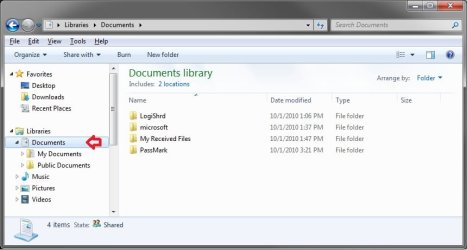
If you open the included folder while in the library, add the folder/file, then it will show up in both the library and included folder.
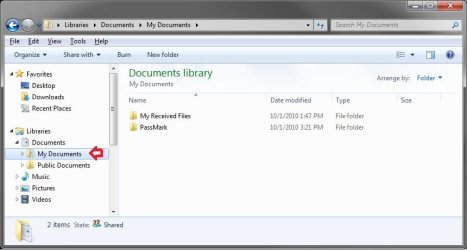
If you add the folder/file in the source (ex: C:\Users\(user-name)\My Documents) of the included folder, then it will also show up in the library and included folder.
Hope this helps,
Shawn
Think of a Library as a collection point (shortcut to) of the folders/files in included folders (ex: My Documents) from other locations.
If you add a folder /file in the root of the library, then it will only show up in the default save included folder location and in the library.
Hope this helps,
Shawn
Last edited:
My Computer
- Computer type
- PC/Desktop
- Computer Manufacturer/Model Number
- Self built custom
- OS
- 64-bit Windows 11 Pro for Workstations
- CPU
- Intel i7-8700K OC'd to 5 GHz
- Motherboard
- ASUS ROG Maximus XI Formula Z390
- Memory
- 64 GB (4x16GB) G.SKILL TridentZ RGB DDR4 3600 MHz
- Graphics Card(s)
- ASUS ROG-STRIX-GTX1080TI-O11G-GAMING
- Sound Card
- Integrated
- Monitor(s) Displays
- 2 x Samsung Odyssey G7 27"
- Screen Resolution
- 2560x1440
- Hard Drives
- 1TB Samsung 990 PRO M.2,
4TB Samsung 990 PRO PRO M.2,
TerraMaster F8 SSD Plus NAS
- PSU
- Seasonic Prime Titanium 850W
- Case
- Thermaltake Core P3
- Cooling
- Corsair Hydro H115i
- Keyboard
- Logitech wireless K800
- Mouse
- Logitech MX Master 4
- Internet Speed
- 2 Gb/s Download and 100 Mb/s Upload
- Antivirus
- Malwarebyte Anti-Malware Premium
- Browser
- Google Chrome
- Other Info
- Logitech Z625 speaker system,
Logitech BRIO 4K Pro webcam,
HP Color LaserJet Pro MFP M477fdn,
APC SMART-UPS RT 1000 XL - SURT1000XLI,
Galaxy S23 Plus phone

Think of a Library as a collection point (shortcut to) of the folders/files in included folders (ex: My Documents) from other locations.
It's like the card catalogue of your local library. It has a list of where and what everything is, but it's not actually all those things.
My Computer
- Computer Manufacturer/Model Number
- Pugh Technologies
- OS
- W7 Professional x64
- CPU
- AMD Athlon II X3 445 Rana 3.10 GHz
- Motherboard
- MSI 870A-G54
- Memory
- PNY XLR DDR3 1600 4x2GB
- Graphics Card(s)
- NVIDIA GeForce GTS 450 (fermi) 1GB GDDR5
- Sound Card
- Realtek ALC892 onboard
- Monitor(s) Displays
- ASUS VE205t, Viewsonic VX2035WM
- Screen Resolution
- 1600x900, 1600x1050
- Hard Drives
- 977GB Hitachi Hitachi HDS721010CLA332
244GB Western Digital WDC WD2500AAJS-65B4A0
488GB Western Digital WDC WD5000AAJS-00A8B0
488GB Western Digital WDC WD5000AAKS-00UU3A0
- PSU
- Antec EarthWatts EA650 650W
- Case
- ThermalTake Armor A90 Mid Tower
- Cooling
- 3x 120mm in, 1x 120mm & 200mm out, self built hydro-cooler
- Keyboard
- Logitec 55
- Mouse
- Razer Deathadder
- Internet Speed
- 20 Mbps D/L, 9 Mbps U/L
Okay, I think I see what is going on here. After some "experimentation". I realize what is going on.
I created multiple "test" folders and files. The ones that I created in Library Docs actually showed up in the public docs. The ones that I created only in My Docs showed up in Library Docs along with the test folders/files that are in Public Docs.
HMMM......I don't think that I like this "Library" concept.
Thanks for the help.
Daryl
I created multiple "test" folders and files. The ones that I created in Library Docs actually showed up in the public docs. The ones that I created only in My Docs showed up in Library Docs along with the test folders/files that are in Public Docs.
HMMM......I don't think that I like this "Library" concept.
Thanks for the help.
Daryl
My Computer
- OS
- 7 Home Premium 64bit
Daryl,
It does take a bit to get use to. However, say you have 15 different music folders spread out over several hard drives; you could include these folders in the Music library. This way you will be able to access all of your music from the library with the music still only saved at their original locations.
It does take a bit to get use to. However, say you have 15 different music folders spread out over several hard drives; you could include these folders in the Music library. This way you will be able to access all of your music from the library with the music still only saved at their original locations.
My Computer
- Computer type
- PC/Desktop
- Computer Manufacturer/Model Number
- Self built custom
- OS
- 64-bit Windows 11 Pro for Workstations
- CPU
- Intel i7-8700K OC'd to 5 GHz
- Motherboard
- ASUS ROG Maximus XI Formula Z390
- Memory
- 64 GB (4x16GB) G.SKILL TridentZ RGB DDR4 3600 MHz
- Graphics Card(s)
- ASUS ROG-STRIX-GTX1080TI-O11G-GAMING
- Sound Card
- Integrated
- Monitor(s) Displays
- 2 x Samsung Odyssey G7 27"
- Screen Resolution
- 2560x1440
- Hard Drives
- 1TB Samsung 990 PRO M.2,
4TB Samsung 990 PRO PRO M.2,
TerraMaster F8 SSD Plus NAS
- PSU
- Seasonic Prime Titanium 850W
- Case
- Thermaltake Core P3
- Cooling
- Corsair Hydro H115i
- Keyboard
- Logitech wireless K800
- Mouse
- Logitech MX Master 4
- Internet Speed
- 2 Gb/s Download and 100 Mb/s Upload
- Antivirus
- Malwarebyte Anti-Malware Premium
- Browser
- Google Chrome
- Other Info
- Logitech Z625 speaker system,
Logitech BRIO 4K Pro webcam,
HP Color LaserJet Pro MFP M477fdn,
APC SMART-UPS RT 1000 XL - SURT1000XLI,
Galaxy S23 Plus phone
Daryl,
You will get to where you will really like libraries. I too was non-accepting at first.
Brink's example is a wonderful usage.
I like not having to put all of my folders from all of my drives in one place but rather just have pointers to them via Libraries.
You will get to where you will really like libraries. I too was non-accepting at first.
Brink's example is a wonderful usage.
I like not having to put all of my folders from all of my drives in one place but rather just have pointers to them via Libraries.
My Computer
- Computer Manufacturer/Model Number
- Toshiba Satellite S875D-S7239 laptop
- OS
- MS Windows 7 Ultimate SP1 64-bit
- CPU
- AMD A10-4600M
- Motherboard
- AMD Pumori (Socket FT1)
- Memory
- 6.00 GB Dual-Channel DDR3 @ 798MHz (11-11-12-28)
- Graphics Card(s)
- AMD Radeon HD 7660G
- Sound Card
- High Definition Audio Device
- Monitor(s) Displays
- Generic PnP Monitor (1600x900@60Hz)
- Screen Resolution
- 1600x900@60Hz
- Hard Drives
- SSD 119GB Corsair CSSD-V128GB2 ATA Device
- Keyboard
- Standard PS/2 Keyboard
- Mouse
- HP Wireless Optical Mobile Mouse Model FHA-3410
- Internet Speed
- What the local pub, local coffee shop offers.
- Other Info
- Optical Drive:MATSHITA BD-CMB UJ160B ATA Device
Also have an Asus ha1002xp netbook with Win 7 Ultimate installed.
Okay, I think I see what is going on here. After some "experimentation". I realize what is going on.
I created multiple "test" folders and files. The ones that I created in Library Docs actually showed up in the public docs. The ones that I created only in My Docs showed up in Library Docs along with the test folders/files that are in Public Docs.
HMMM......I don't think that I like this "Library" concept.
Thanks for the help.
Daryl
You can set the default save location to any included folder you like. Normally, the default save location of the Libraries Documents folder is C:\Users\yourname\Documents. It looks like yours is set to C:\Users\Public\Documents.
See the pic Brink posted. Look at the top where it says "Includes: 2 locations". If you click on the locations, you can add or delete folders you wish to include in that library. If you right click on one of the locations, you can set the default save location.
My Computer
- Computer Manufacturer/Model Number
- Self Build
- OS
- Windows 7 Ultimate 64bit
- CPU
- Intel Xeon 3110 (Same as Core 2 Duo E8400) 3.0Ghz @ 3.6Ghz
- Motherboard
- Gigabyte EX38-DS4
- Memory
- 8GB G. Skill PC2-8500
- Graphics Card(s)
- PALiT GeForce 9600 GT PCI Express 2.0
- Sound Card
- OnBoard - Realtek ALC889A High Definition Audio
- Monitor(s) Displays
- Dell 24" LCD
- Screen Resolution
- 1920x1200
- Hard Drives
- Western Digital VelociRaptor WD3000GLFS - 300GB | Western Digital Caviar SE16 WD7500AAKS - 750GB | LaCie d2Next-Quadra external - 1TB
- PSU
- Corsair HS620W
- Case
- Lian Li PC-V1100b Plus II
- Cooling
- Thermalright Ultra 120 eXtreme
- Keyboard
- Logitech
- Mouse
- Logitech MX Laser
- Internet Speed
- SLOW - HughesNet Satellite Internet - SUCKS!
That's correct Fillup. 
My Computer
- Computer type
- PC/Desktop
- Computer Manufacturer/Model Number
- Self built custom
- OS
- 64-bit Windows 11 Pro for Workstations
- CPU
- Intel i7-8700K OC'd to 5 GHz
- Motherboard
- ASUS ROG Maximus XI Formula Z390
- Memory
- 64 GB (4x16GB) G.SKILL TridentZ RGB DDR4 3600 MHz
- Graphics Card(s)
- ASUS ROG-STRIX-GTX1080TI-O11G-GAMING
- Sound Card
- Integrated
- Monitor(s) Displays
- 2 x Samsung Odyssey G7 27"
- Screen Resolution
- 2560x1440
- Hard Drives
- 1TB Samsung 990 PRO M.2,
4TB Samsung 990 PRO PRO M.2,
TerraMaster F8 SSD Plus NAS
- PSU
- Seasonic Prime Titanium 850W
- Case
- Thermaltake Core P3
- Cooling
- Corsair Hydro H115i
- Keyboard
- Logitech wireless K800
- Mouse
- Logitech MX Master 4
- Internet Speed
- 2 Gb/s Download and 100 Mb/s Upload
- Antivirus
- Malwarebyte Anti-Malware Premium
- Browser
- Google Chrome
- Other Info
- Logitech Z625 speaker system,
Logitech BRIO 4K Pro webcam,
HP Color LaserJet Pro MFP M477fdn,
APC SMART-UPS RT 1000 XL - SURT1000XLI,
Galaxy S23 Plus phone
You're most welcome Daryl. I'm glad that we were able to help.
My Computer
- Computer type
- PC/Desktop
- Computer Manufacturer/Model Number
- Self built custom
- OS
- 64-bit Windows 11 Pro for Workstations
- CPU
- Intel i7-8700K OC'd to 5 GHz
- Motherboard
- ASUS ROG Maximus XI Formula Z390
- Memory
- 64 GB (4x16GB) G.SKILL TridentZ RGB DDR4 3600 MHz
- Graphics Card(s)
- ASUS ROG-STRIX-GTX1080TI-O11G-GAMING
- Sound Card
- Integrated
- Monitor(s) Displays
- 2 x Samsung Odyssey G7 27"
- Screen Resolution
- 2560x1440
- Hard Drives
- 1TB Samsung 990 PRO M.2,
4TB Samsung 990 PRO PRO M.2,
TerraMaster F8 SSD Plus NAS
- PSU
- Seasonic Prime Titanium 850W
- Case
- Thermaltake Core P3
- Cooling
- Corsair Hydro H115i
- Keyboard
- Logitech wireless K800
- Mouse
- Logitech MX Master 4
- Internet Speed
- 2 Gb/s Download and 100 Mb/s Upload
- Antivirus
- Malwarebyte Anti-Malware Premium
- Browser
- Google Chrome
- Other Info
- Logitech Z625 speaker system,
Logitech BRIO 4K Pro webcam,
HP Color LaserJet Pro MFP M477fdn,
APC SMART-UPS RT 1000 XL - SURT1000XLI,
Galaxy S23 Plus phone