Library Question: Can I integrate the "Arrange by Folder" view?

JayUSA

New member
Local time
10:54 AM
Messages
8
Library Question: Can I integrate the "Arrange by Folder" view?

Hello,

I have created a library called "America" and put 4 folders into it: "East", "West", "North" and "South".

Each of these regional folders (real folders, not libraries) contains a separate folder for each state in that region. Thus, the "West" folder contains folders called "California","Oregon", etc..

Lastly each state folder contains all types of files pertaining to the specific state.

When I open the "America" library, I would like to see an integrated (and alphabetized) listing of ALL the state folders: "Alabama", "Alaska", "Arkansas",etc..

However, when I configure the library to sort by folder, it sorts the state folders by name, but only WITHIN their respective regions. That's not my vision: I'm looking for an integrated A-to-Z list of all the folders across all the regions.

Alternatively, if I select the "Sort by name" option, then all the state folders disappear, and they are replaced by a very long list of all the component files -- it's an integrated, alphabetized list (good), but of files (bad), not the state folders that contain them.

Can anyone suggest a clever tweak to move me closer to my vision?

Thanks!!

Jay
 

My Computer My Computer

At a glance

Win 7 Pro
OS
Win 7 Pro
possibly you could arrange them manually,
this tutorial here will allow you to move the folders around to suit you preference
 

My Computer My Computer

At a glance

Microsoft Windows 7 Home Premium 64-bit 7600IIx4 amd athelon 635 processor2x2gbati radeon HD 5450
Computer Manufacturer/Model Number
Hewlett packard/p6512uk
OS
Microsoft Windows 7 Home Premium 64-bit 7600
CPU
IIx4 amd athelon 635 processor
Motherboard
FOXCONN 2AA9
Memory
2x2gb
Graphics Card(s)
ati radeon HD 5450
Sound Card
(1) Realtek High Definition Audio (2) AMD High Definition
Monitor(s) Displays
samsung lcd tv 32"
Screen Resolution
1360x 768
Hard Drives
(1) WDC WD10 01FAES-60Z2A0 SATA Disk Device (2) Maxtor OneTouch USB Device (3) ST310003 33AS USB Device (4) WD My Book 1111 USB Device
PSU
?
Cooling
air!
Keyboard
wireless hp
Mouse
wireless Hp,optical
Internet Speed
1.10mb/s
Antivirus
MSE
Browser
Firefox
Thanks for the input...

Just to be clear, I don't want to have file names appear in the library, just the state level folder names.

If I tagged all 50 of the state folders with the same tag, then selected sort by tag, would they then appear as a single, integrated and alphabetized list of folders?

Very interested to hear your thoughts,

Jay
 

My Computer My Computer

At a glance

Win 7 Pro
OS
Win 7 Pro
Make 2 Libraries, 1 called Region and 1 called States.
 

My Computer My Computer

At a glance

Windows 7 Ultimate 64bitIntel i7 3770K16GB DDR3 1333 Corsair XMS3XFX HD6950 2GB EyeFinity
Computer Manufacturer/Model Number
HAL-9000
OS
Windows 7 Ultimate 64bit
CPU
Intel i7 3770K
Motherboard
Asus Sabertooth Z77
Memory
16GB DDR3 1333 Corsair XMS3
Graphics Card(s)
XFX HD6950 2GB EyeFinity
Sound Card
Logitech G35 & Sennheiser PC135 & VIA HD
Monitor(s) Displays
23" HP 2310e, 23" Samsung B2230, 21.5" Viewsonic
Screen Resolution
5760x1080
Hard Drives
16TB of Storage
128GB & 256GB Crucial M4 SSD's, 2X 1TB WD Black, 3x 2TB WD, 3x 2TB Samsung F4, 1.5TB Seagate, WD 500GB,
PSU
Antec True Power New 650watt
Case
Cooler Master HAF-932
Cooling
Corsair H60 Hydro Cooler, 3x 230mm Fans, 2x120mm Fan
Keyboard
Logitech G15 and G13
Mouse
Logitech G700 Gaming Mouse
Internet Speed
50/10 Mbit
Other Info
Speakers : Alesis M1 Active Mk2 Studio Monitors , APC RS 1200 UPS, HP 4500DN Color Laser, HP P1006 mono Laser, Kodak 8500 Dye-Sub, Epson 1280 inkjet, Epson Worforce 610 MFC
Zepher,

Thank you for your very interesting suggestion!

Can you explain a little more precisely what you mean? Are you suggesting nested libraries or something? I can't quite envisage an implementation of your suggestion that will result in 50 alphabetized state-level folders (drawn from 4 regional folders).

Thanks!

Jay
 

My Computer My Computer

At a glance

Win 7 Pro
OS
Win 7 Pro
Right click an empty area in the libray. I the context menu select "Group by->(none)". Then your sort by name will be all folders. Actually I think you also need "Arrange By->Folder" to get the states.
 

My Computer My Computer

At a glance

Microsoft Windows 7 Home Premium 64-bit Servi...Intel(R) Core(TM) i3 CPU M 330 @ 2.13GHz8 GB DDR3Intel(R) HD Graphics
Computer type
Laptop
Computer Manufacturer/Model Number
Hewlett-Packard/G62-107SA Notebook
OS
Microsoft Windows 7 Home Premium 64-bit Service Pack 1
CPU
Intel(R) Core(TM) i3 CPU M 330 @ 2.13GHz
Motherboard
Hewlett-Packard 1425
Memory
8 GB DDR3
Graphics Card(s)
Intel(R) HD Graphics
Sound Card
Realtek High Definition Audio
Monitor(s) Displays
Builtin
Screen Resolution
1366 x 768 x 32 bits (4294967296 colors) @ 60 Hz
Hard Drives
250 GB SATA Hard Disk Drive 7200 rpm
2TB Seagate GoFlex USB 2 Drive
1TB Iomega Prestige USB 2 Drive
1.5TB Iomega Prestige USB 2 Drive (Samsung)
2TB WD MyBook Live NAS.
Mouse
Logitech Anywhere MX
Internet Speed
152 Mbs download 10 Mbs upload
Antivirus
Norton 360
Browser
Chrome
Zepher,

Thank you for your very interesting suggestion!

Can you explain a little more precisely what you mean? Are you suggesting nested libraries or something? I can't quite envisage an implementation of your suggestion that will result in 50 alphabetized state-level folders (drawn from 4 regional folders).

Thanks!

Jay

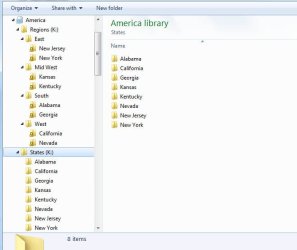
Ya, main library will be called America, inside will be a folder called Regions with the 4 Regions with the states of those regions listed inside.
Then another folder in America with the folder titled States with all the states inside.

It will look like this
America - Region - List of Regions - List of states inside selected region
.......... - States - List of the states.
this is how I see it, but I will try and see if it can be implemented.

EDIT: I can't seem to get it to work like I want it to.
I can get it to work, but you will end up with a copy of all the states, one copy in the Regions folder and one copy in a States folder, with both of those folders included in the America Library.
 

Attachments

  • america library.jpg
    america library.jpg
    44.1 KB · Views: 9

My Computer My Computer

At a glance

Windows 7 Ultimate 64bitIntel i7 3770K16GB DDR3 1333 Corsair XMS3XFX HD6950 2GB EyeFinity
Computer Manufacturer/Model Number
HAL-9000
OS
Windows 7 Ultimate 64bit
CPU
Intel i7 3770K
Motherboard
Asus Sabertooth Z77
Memory
16GB DDR3 1333 Corsair XMS3
Graphics Card(s)
XFX HD6950 2GB EyeFinity
Sound Card
Logitech G35 & Sennheiser PC135 & VIA HD
Monitor(s) Displays
23" HP 2310e, 23" Samsung B2230, 21.5" Viewsonic
Screen Resolution
5760x1080
Hard Drives
16TB of Storage
128GB & 256GB Crucial M4 SSD's, 2X 1TB WD Black, 3x 2TB WD, 3x 2TB Samsung F4, 1.5TB Seagate, WD 500GB,
PSU
Antec True Power New 650watt
Case
Cooler Master HAF-932
Cooling
Corsair H60 Hydro Cooler, 3x 230mm Fans, 2x120mm Fan
Keyboard
Logitech G15 and G13
Mouse
Logitech G700 Gaming Mouse
Internet Speed
50/10 Mbit
Other Info
Speakers : Alesis M1 Active Mk2 Studio Monitors , APC RS 1200 UPS, HP 4500DN Color Laser, HP P1006 mono Laser, Kodak 8500 Dye-Sub, Epson 1280 inkjet, Epson Worforce 610 MFC
I just tried a test using Shortcuts to the States in a State Folder shared in the America library and it works to a point but it seems to work better using actual folders than shortcuts.

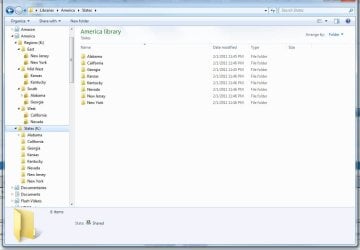
here is the Library with 2 Folders, Regions and States.
There are 2 copies of each state on the hard drive, 1 in Region and 1 in States.
Region is added to the America Library and States is added to the America Library.
 

Attachments

  • america library2.jpg
    america library2.jpg
    76.8 KB · Views: 11

My Computer My Computer

At a glance

Windows 7 Ultimate 64bitIntel i7 3770K16GB DDR3 1333 Corsair XMS3XFX HD6950 2GB EyeFinity
Computer Manufacturer/Model Number
HAL-9000
OS
Windows 7 Ultimate 64bit
CPU
Intel i7 3770K
Motherboard
Asus Sabertooth Z77
Memory
16GB DDR3 1333 Corsair XMS3
Graphics Card(s)
XFX HD6950 2GB EyeFinity
Sound Card
Logitech G35 & Sennheiser PC135 & VIA HD
Monitor(s) Displays
23" HP 2310e, 23" Samsung B2230, 21.5" Viewsonic
Screen Resolution
5760x1080
Hard Drives
16TB of Storage
128GB & 256GB Crucial M4 SSD's, 2X 1TB WD Black, 3x 2TB WD, 3x 2TB Samsung F4, 1.5TB Seagate, WD 500GB,
PSU
Antec True Power New 650watt
Case
Cooler Master HAF-932
Cooling
Corsair H60 Hydro Cooler, 3x 230mm Fans, 2x120mm Fan
Keyboard
Logitech G15 and G13
Mouse
Logitech G700 Gaming Mouse
Internet Speed
50/10 Mbit
Other Info
Speakers : Alesis M1 Active Mk2 Studio Monitors , APC RS 1200 UPS, HP 4500DN Color Laser, HP P1006 mono Laser, Kodak 8500 Dye-Sub, Epson 1280 inkjet, Epson Worforce 610 MFC
TWO great solutions!!!

Zepher and Kado,

Thank you both!!!! You both came up with interesting solutions and, impressively, they both work!!!

I had really begun to think it would not be possible!!

Infinite thanks to you both -- and I hope that many others are able to learn from your contributions here!

Thanks again,

Jay
 

My Computer My Computer

At a glance

Win 7 Pro
OS
Win 7 Pro
You are most welcome.
 

My Computer My Computer

At a glance

Microsoft Windows 7 Home Premium 64-bit Servi...Intel(R) Core(TM) i3 CPU M 330 @ 2.13GHz8 GB DDR3Intel(R) HD Graphics
Computer type
Laptop
Computer Manufacturer/Model Number
Hewlett-Packard/G62-107SA Notebook
OS
Microsoft Windows 7 Home Premium 64-bit Service Pack 1
CPU
Intel(R) Core(TM) i3 CPU M 330 @ 2.13GHz
Motherboard
Hewlett-Packard 1425
Memory
8 GB DDR3
Graphics Card(s)
Intel(R) HD Graphics
Sound Card
Realtek High Definition Audio
Monitor(s) Displays
Builtin
Screen Resolution
1366 x 768 x 32 bits (4294967296 colors) @ 60 Hz
Hard Drives
250 GB SATA Hard Disk Drive 7200 rpm
2TB Seagate GoFlex USB 2 Drive
1TB Iomega Prestige USB 2 Drive
1.5TB Iomega Prestige USB 2 Drive (Samsung)
2TB WD MyBook Live NAS.
Mouse
Logitech Anywhere MX
Internet Speed
152 Mbs download 10 Mbs upload
Antivirus
Norton 360
Browser
Chrome
Back
Top