Solved Library

tdawg12

New member
Local time
9:53 AM
Messages
4
Hi everyone, I am not sure if this is the best section to post it in, but its my first time posting on here...

I have never seen this happen before and I would like to know how to fix it.

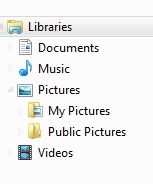
When you go into your Libraries folder you will see "Documents, Music, Pictures, and Videos"

When I click "Pictures" I see my pictures folder which is what I only want in there..
But I see 4 categories along with it as drop down menus.

They are "Public Pictures" "My Documents" and "Public Documents" I don't know how those even got there, but I was wondering how to get rid of them..

Any help is greatly appreciated,

Thank you!


Edit: Nevermind... Solved my own problem..
 
Last edited:

My Computer

OS
Windows 7 Ultimate 64 bit
Welcome to Windows Seven Forums.

What was the solution?
 

My Computer

Computer Manufacturer/Model Number
HP Pavilion Elite 495UK
OS
Windows 7 Ultimate SP1 64-Bit
CPU
Intel Core i7 870 @ 2.93GHz
Motherboard
MSI 2A9C (CPU1)
Memory
8Gb Dual-Channel DDR3 @ 664MHz
Graphics Card(s)
nVidia GeForce GTX 460 1024MB dedicated RAM
Sound Card
Realtek HD Audio
Monitor(s) Displays
HP2310i
Screen Resolution
1920 x 1080
Hard Drives
1x1954GB Hitachi HDS22020ALA 330 (RAID), 1x1954GB Hitachi External for backup and storage
PSU
460W
Case
HP Elite
Cooling
Air cooled
Keyboard
Logitech K750 solar-powered keyboard
Mouse
Logitech Wireless M180 mouse
Internet Speed
2Mb
Other Info
Pure Avanti Flow Internet Radio with iPod Dock, 64Gb iPod, HP USB Speakers, Sony MDR-V500 Headphones, Sony Vaio F-Series Laptop
I hate it when someone finds the solution to their problem and doesn't share it!
 

My Computer

Computer Manufacturer/Model Number
HP Pavilion P6616f-b
OS
Windows 7 Home Premium 64 Bit
CPU
AMD Phenom II X4 820 2.80 GHZ
Motherboard
FOXCONN 2AB1 DVT
Memory
8Gb
Graphics Card(s)
ATI Radeon HD4200
Sound Card
Realtek High Definition Audio
Monitor(s) Displays
HP 2010i 20" Widescreen 1600x900 Resolution
Hard Drives
ST375052 8AS SATA Disk Device (750.15 GB)
I hate it when someone finds the solution to their problem and doesn't share it!

I hate when people don't give people the chance to reply.. I'm sorry I couldn't reply to you right away...

all you had to do was right click on the directory under libraries where the drop downs were, and click Properties, then click to highlight what you want removed,
then click the remove button, and click apply.. then click okay.
 

My Computer

OS
Windows 7 Ultimate 64 bit
tdawg12: I may have made my remark prematurely (I hate it when someone finds the solution to their problem and doesn't share it!) Thanks for the solution. Much appreciated!
 

My Computer

Computer Manufacturer/Model Number
HP Pavilion P6616f-b
OS
Windows 7 Home Premium 64 Bit
CPU
AMD Phenom II X4 820 2.80 GHZ
Motherboard
FOXCONN 2AB1 DVT
Memory
8Gb
Graphics Card(s)
ATI Radeon HD4200
Sound Card
Realtek High Definition Audio
Monitor(s) Displays
HP 2010i 20" Widescreen 1600x900 Resolution
Hard Drives
ST375052 8AS SATA Disk Device (750.15 GB)
tdawg12: I may have made my remark prematurely (I hate it when someone finds the solution to their problem and doesn't share it!) Thanks for the solution. Much appreciated!

Thats okay! :) and your welcome! I hope it helps!
 

My Computer

OS
Windows 7 Ultimate 64 bit
When I click "Pictures" I see my pictures folder which is what I only want in there..
But I see 4 categories along with it as drop down menus.

They are "Public Pictures" "My Documents" and "Public Documents" I don't know how those even got there, but I was wondering how to get rid of them..


I have all of them too, as I'm sure most peole do, as they have been there since day one. They don't bother me because if I click on Music, or Documents or whatever it only opens those. Unless I expand the drop down the others don't come in to play.
 

My Computer

Computer Manufacturer/Model Number
HP p6608f
OS
Win 7 Home Premium x64
CPU
Intel Core i3-540 3.07 GHz
Motherboard
MS-7613 (Iona-GL8E)
Memory
4 GB (2 X 2) Dual-Channel PC-10600 DDR3 @ 665MHz (9-9-9-24)
Graphics Card(s)
Integrated Intel H57
Sound Card
Integrated Realtek ALC888S Audio
Monitor(s) Displays
17" SDM-HS73 (a vestige from my old computer)
Screen Resolution
1280 X 1024
Hard Drives
750GB SATA 7200 RPM
PSU
250W
Keyboard
HP USB keyboard
Mouse
HP USB optical mouse
Internet Speed
15Mbps/1Mbps
When I click "Pictures" I see my pictures folder which is what I only want in there..
But I see 4 categories along with it as drop down menus.

They are "Public Pictures" "My Documents" and "Public Documents" I don't know how those even got there, but I was wondering how to get rid of them..


I have all of them too, as I'm sure most peole do, as they have been there since day one. They don't bother me because if I click on Music, or Documents or whatever it only opens those. Unless I expand the drop down the others don't come in to play.
When you expand Pictures under Libraries you should only see My Pictures and Public Pictures as shown below: This is the default.
 

Attachments

  • Capture.PNG
    Capture.PNG
    2.7 KB · Views: 17

My Computer

Computer Manufacturer/Model Number
HP Pavilion P6616f-b
OS
Windows 7 Home Premium 64 Bit
CPU
AMD Phenom II X4 820 2.80 GHZ
Motherboard
FOXCONN 2AB1 DVT
Memory
8Gb
Graphics Card(s)
ATI Radeon HD4200
Sound Card
Realtek High Definition Audio
Monitor(s) Displays
HP 2010i 20" Widescreen 1600x900 Resolution
Hard Drives
ST375052 8AS SATA Disk Device (750.15 GB)
Back
Top