Life cam vx1000

rfxcasey

New member
Local time
5:16 AM
Messages
13
Hi every time I start my machine it tries to install drivers for my lifecam vx1000 but then stays that the drivers are not digitally signed and stops the installation. How do I get this camera working? Try to install manually but the same message pops up. Says can't install driver cause it's not digitally signed by Microsoft.
 

My Computer

OS
Windows 7
Hi every time I start my machine it tries to install drivers for my lifecam vx1000 but then stays that the drivers are not digitally signed and stops the installation. How do I get this camera working?

Hi and welcome to SF!
Go to Software Download and download the driver. Install it and see if the problem is solved. Let us know the results!


"PLEASE REP ANYONE WHO HELPS YOU"
 

My Computer

Computer Manufacturer/Model Number
WALLONN7 / LIN BLACK SERIES II
OS
Windows 7 Ultimate x64 SP1
CPU
AMD PHENOM II X6 1090T 3.2GHz
Motherboard
GIGABYTE GA-890FXA-UD7
Memory
8GB G.SKILL RIPJAWS - F3-10666CL7D
Graphics Card(s)
SAPPHIRE ATI RADEON HD 5870 VAPOR X OC
Sound Card
REALTEK DOLBY HOME THEATER
Monitor(s) Displays
LED LG W2486L
Screen Resolution
1080p
Hard Drives
SEAGATE 1TB -ST31000528AS - AHCI MODE - AS SATA
PSU
ZALMAN ZM1000-HP 1000W
Case
THERMALTAKE XASER VI VG4000SWA
Cooling
140MM x3 / 120MM x1 AIR COOLING - THERMALTAKE
Keyboard
MICROSOFT DIGITAL MEDIA KEYBOARD 3000 - USB
Mouse
MICROSOFT BASIC OPTICAL MOUSE 2.0 - USB
Internet Speed
600KBPS
Other Info
MICROSOFT XBOX 360 CONTROLLER
Already done that, that is where I got the driver from to manually try installing after the auto update driver installer failed. Is there some kind of security setting I can change to bypass the digitally signing check. It's funny cause I installed a 3rd party driver the other day for my sound card and that installed fine but the microsoft camera will not install on a microsoft os.
 

My Computer

OS
Windows 7
Open the start menu and type "compmgmt.msc / s" without quotes and hit enter. Click on "Device Manager" in the opened window and find your camera. Right click on it in the manager and then uninstall. In the box that opens, select the field that says "delete the device driver. " Then make a clean registry using Ccleaner. Disconnect the camera from PC and try installing the driver you downloaded from Microsoft website. Replug it when you prompt to. Let us know the results.


"PLEASE REP ANYONE WHO HELPS YOU"
 

My Computer

Computer Manufacturer/Model Number
WALLONN7 / LIN BLACK SERIES II
OS
Windows 7 Ultimate x64 SP1
CPU
AMD PHENOM II X6 1090T 3.2GHz
Motherboard
GIGABYTE GA-890FXA-UD7
Memory
8GB G.SKILL RIPJAWS - F3-10666CL7D
Graphics Card(s)
SAPPHIRE ATI RADEON HD 5870 VAPOR X OC
Sound Card
REALTEK DOLBY HOME THEATER
Monitor(s) Displays
LED LG W2486L
Screen Resolution
1080p
Hard Drives
SEAGATE 1TB -ST31000528AS - AHCI MODE - AS SATA
PSU
ZALMAN ZM1000-HP 1000W
Case
THERMALTAKE XASER VI VG4000SWA
Cooling
140MM x3 / 120MM x1 AIR COOLING - THERMALTAKE
Keyboard
MICROSOFT DIGITAL MEDIA KEYBOARD 3000 - USB
Mouse
MICROSOFT BASIC OPTICAL MOUSE 2.0 - USB
Internet Speed
600KBPS
Other Info
MICROSOFT XBOX 360 CONTROLLER
Tried everything you said to the T and it's still not working.
 

My Computer

OS
Windows 7
Tried everything you said to the T and it's still not working.

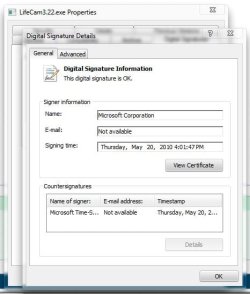
Not sure why thats saying not digitally signed, I just downloaded from here,

Download Webcam & Headset Software

Checked the properties, digital signature tab, details button,
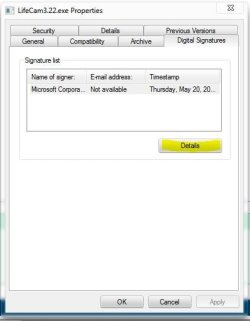
details.JPG Capture.JPG

Everything checks out there.

Are you saving the file to your computer? I always save the download, right click, properties, then click the unblock button, apply, OK.

Then right click, run as admin to install, that might help.

Just curious, do you have service pack 1 installed?

I was getting a message like that for my USB host controller after SP1, found this solution for it,

Win7 SP1 - "Standard Enhanced PCI to USB Host Controller" - Microsoft Answers

After uninstalling, it automatically reinstalled and the issue was fixed.

 

My Computer

Computer type
PC/Desktop
Computer Manufacturer/Model Number
Self Built
OS
Win 10 Pro x64
CPU
Intel I5-2500K @3.3GHz
Motherboard
Asrock P67 Extreme4
Memory
16GB G.Skill Ripjaws X (4x4GB)
Graphics Card(s)
EVGA GeForce 750 Ti SC 2GB
Sound Card
ASUS Xonar DG 5.1 Channels 24-bit 96KHz PCI Interface Sound
Monitor(s) Displays
auria eq2367
Screen Resolution
1920 x 1080
Hard Drives
250GB Samsung 850 EVO SSD
1TB WD Blue
1TB Hitachi
PSU
SeaSonic X 650W 80 Plus Gold
Case
Corsair Obsidian 750D
Cooling
Corsair H60, Three 140mm case fans
Keyboard
Logitech Wireless Keyboard K520
Mouse
Logitech Wireless Mouse M310
Internet Speed
Wave Broadband ~ 100 dn 5 up
Antivirus
Windows Defender, Malwarebytes Premium
Browser
Edge, IE11, Chrome
Other Info
Laptop specs: HP g7-1365dx /
CPU: AMD A6-3420M APU with Radeon(tm) HD Graphics /
RAM: Crucial 8Gb (2x4Gb) /
SSD: Crucial M4-CT128M4SSD2 ATA Device/ FW 000F /
GFX: AMD Radeon HD 6520G /
OS: Windows 10 Pro x64
Hey again, not new to PCs but only installed 7 the other day so total newb with it. My computer did download and install some major updates yesterday including a service pack update. Its actually installing the updates right now so I will let you know if something changes.

Yeah I downloaded the setup file from MS straight to my downloads folder. Apparently the updater exe tries to download something else from MS and that is actually what's borked. The exact error message was that the installer can't download the update because it isn't digitally signed so maybe it's not the driver itself. An associate told me he thinks from what he read on the net (I'm been reading a bit too) that the update has a bug.

What I was planning on doing was just telling 7 to ignore the cam update so it quits bugging me and just use the driver that 7 installed for the cam at install.

I use the camera for as a Freetrack head tracking system for my flight simulator so I checked and its working fine in that capacity. YouTube - FS2004 - Gatwick Landing - FreeTrack Head Tracker. I have a visible light filter and the brightness and everything turned all the way down so it will only see the IR LEDs on my 3 point cap I put on my head.

I have a new problem though. Seems this updating just through up a Fatal Error C0000034 applying operation 282 or 115099. It's just stuck on the Win 7 splash screen now. Great, now what do I do?
 

My Computer

OS
Windows 7
Back
Top