
UserNameInvalid
New member
- Local time
- 3:35 AM
- Messages
- 1
I am using 2 monitor setup and second screen used to play full screen video from YouTube with auto play = on, so don't really need to move mouse on second screen more than once an hour to switch new video etc.
However working with two screens is annoying in a way when mouse and application windows are jumping to second monitor where i don't need them because its used for full screen video playback only.
When in two monitor mode:
However working with two screens is annoying in a way when mouse and application windows are jumping to second monitor where i don't need them because its used for full screen video playback only.
When in two monitor mode:
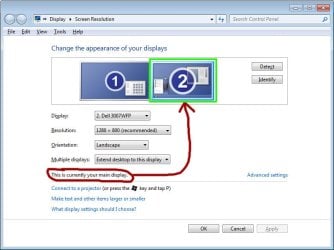
- How to limit mouse to "main display" (green on image)?
- How to limit apps from going off "main display" (green on image)?
Attachments
My Computer
At a glance
Windows 7 x64
- Computer type
- Laptop
- OS
- Windows 7 x64

