
Limited access

Halbezar

New member
Local time
7:07 PM
Messages
10
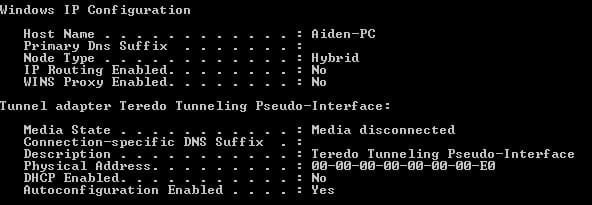
I'm having problems connecting to the internet. It was fine yesterday but today iv'e got nothing. Tried a few different tips/techniques from other forums but still no luck. Below is what i get when i type ipconfig /all in the Command Prompt
CMP.JPG
 

My Computer

Computer Manufacturer/Model Number
Advent Centurion CPD1303
OS
Windows 7 Home premium 64 bit
CPU
AMD Phenom II X2 545 Processor
Memory
4GB
Graphics Card(s)
ATI Radeon HD 5550
Sound Card
ATI Hi-def, Realtek Hi-def
Monitor(s) Displays
LG Flatron M2262D
Screen Resolution
1920x1080
Hard Drives
500GB 7200rpm SATA II
Mouse
Labtec media wireless desktop 800
Is this a common problem as it seems to happen to others i have noticed
 

My Computer

Computer Manufacturer/Model Number
Advent Centurion CPD1303
OS
Windows 7 Home premium 64 bit
CPU
AMD Phenom II X2 545 Processor
Memory
4GB
Graphics Card(s)
ATI Radeon HD 5550
Sound Card
ATI Hi-def, Realtek Hi-def
Monitor(s) Displays
LG Flatron M2262D
Screen Resolution
1920x1080
Hard Drives
500GB 7200rpm SATA II
Mouse
Labtec media wireless desktop 800
Bump this thread
 

My Computer

Computer Manufacturer/Model Number
Advent Centurion CPD1303
OS
Windows 7 Home premium 64 bit
CPU
AMD Phenom II X2 545 Processor
Memory
4GB
Graphics Card(s)
ATI Radeon HD 5550
Sound Card
ATI Hi-def, Realtek Hi-def
Monitor(s) Displays
LG Flatron M2262D
Screen Resolution
1920x1080
Hard Drives
500GB 7200rpm SATA II
Mouse
Labtec media wireless desktop 800
Hi, welcome to the forums :)

What heppens when you right-click the network icon (bottom right) and select Troublshoot Problems?


OS
 

My Computer

Computer Manufacturer/Model Number
Compaq Desktop
OS
Windows 7 Ultimate x64
CPU
AMD Sempron Dual Core
Memory
3GB
Graphics Card(s)
NVIDIA GeForce 6150SE nForce 430
Screen Resolution
1024x768
Hard Drives
150GB Sata
It says "there might be a problem with the driver for the local area connection adapter"/ "there might be a problem with the driver for the wireless network connection adapter"
 

My Computer

Computer Manufacturer/Model Number
Advent Centurion CPD1303
OS
Windows 7 Home premium 64 bit
CPU
AMD Phenom II X2 545 Processor
Memory
4GB
Graphics Card(s)
ATI Radeon HD 5550
Sound Card
ATI Hi-def, Realtek Hi-def
Monitor(s) Displays
LG Flatron M2262D
Screen Resolution
1920x1080
Hard Drives
500GB 7200rpm SATA II
Mouse
Labtec media wireless desktop 800
Can you give the make and model of your machine and if possible please fill in your System Specs
 

My Computer

Computer Manufacturer/Model Number
Compaq Desktop
OS
Windows 7 Ultimate x64
CPU
AMD Sempron Dual Core
Memory
3GB
Graphics Card(s)
NVIDIA GeForce 6150SE nForce 430
Screen Resolution
1024x768
Hard Drives
150GB Sata
I only know so much of the specs. I'm going to fill the rest of the system specs Asap.

But the make is Advent and the model is Centurion CPD1303
 

My Computer

Computer Manufacturer/Model Number
Advent Centurion CPD1303
OS
Windows 7 Home premium 64 bit
CPU
AMD Phenom II X2 545 Processor
Memory
4GB
Graphics Card(s)
ATI Radeon HD 5550
Sound Card
ATI Hi-def, Realtek Hi-def
Monitor(s) Displays
LG Flatron M2262D
Screen Resolution
1920x1080
Hard Drives
500GB 7200rpm SATA II
Mouse
Labtec media wireless desktop 800
I'm currently lost for what to suggest...The Advent support page is just a contact number, nothing else :shock:
 

My Computer

Computer Manufacturer/Model Number
Compaq Desktop
OS
Windows 7 Ultimate x64
CPU
AMD Sempron Dual Core
Memory
3GB
Graphics Card(s)
NVIDIA GeForce 6150SE nForce 430
Screen Resolution
1024x768
Hard Drives
150GB Sata
Well thanks for looking. Anyone else got any ideas? I'm stumped as to why this would suddenly happen
 

My Computer

Computer Manufacturer/Model Number
Advent Centurion CPD1303
OS
Windows 7 Home premium 64 bit
CPU
AMD Phenom II X2 545 Processor
Memory
4GB
Graphics Card(s)
ATI Radeon HD 5550
Sound Card
ATI Hi-def, Realtek Hi-def
Monitor(s) Displays
LG Flatron M2262D
Screen Resolution
1920x1080
Hard Drives
500GB 7200rpm SATA II
Mouse
Labtec media wireless desktop 800
Did this happen about 2 days ago? There were a couple of updates out that affected the other halfs' laptop. To cure the problem I did a system restore to a point about a week ago and the laptop was back to normal.
 

My Computer

OS
win7
Yes it was a couple of days ago. I might try that but would it happen again eventually?
 

My Computer

Computer Manufacturer/Model Number
Advent Centurion CPD1303
OS
Windows 7 Home premium 64 bit
CPU
AMD Phenom II X2 545 Processor
Memory
4GB
Graphics Card(s)
ATI Radeon HD 5550
Sound Card
ATI Hi-def, Realtek Hi-def
Monitor(s) Displays
LG Flatron M2262D
Screen Resolution
1920x1080
Hard Drives
500GB 7200rpm SATA II
Mouse
Labtec media wireless desktop 800
You may need to update your network card drivers ... or if they were updated (without you knowing), then possibly a roll back is in order.
 

My Computer

Computer type
PC/Desktop
Computer Manufacturer/Model Number
Bruce ... somewhere in his 40's
OS
Windows 7 Ultimate 32bit SP1
CPU
Intel(R) Core(TM)2 Quad CPU @ 2.40GHz, 2400 MHz
Motherboard
INTEL/D975XBX2
Memory
4 GB
Graphics Card(s)
ATI Radeon HD 2600 Pro
Monitor(s) Displays
Samsung SyncMaster 914v
Screen Resolution
1280 x 1024
Hard Drives
2/500GB each ... ST3500630AS ATA Device.
One is not connected
PSU
Rocketfish 700 W
Case
G.Skill Gigabyte Chassis
Keyboard
Standard PS/2 Keyboard
Mouse
Microsoft PS/2 Mouse
Internet Speed
DSL
Antivirus
Avira Internet Security
Browser
IE 11
Other Info
ATI HDMI Audio
System Restore has solved the problem. It was something to do with updates.
 
Last edited:

My Computer

Computer Manufacturer/Model Number
Advent Centurion CPD1303
OS
Windows 7 Home premium 64 bit
CPU
AMD Phenom II X2 545 Processor
Memory
4GB
Graphics Card(s)
ATI Radeon HD 5550
Sound Card
ATI Hi-def, Realtek Hi-def
Monitor(s) Displays
LG Flatron M2262D
Screen Resolution
1920x1080
Hard Drives
500GB 7200rpm SATA II
Mouse
Labtec media wireless desktop 800
How do i stop updates that will affect my connection? Can i install those updates that previously caused the problem since Windows update keeps pestering me.
 

My Computer

Computer Manufacturer/Model Number
Advent Centurion CPD1303
OS
Windows 7 Home premium 64 bit
CPU
AMD Phenom II X2 545 Processor
Memory
4GB
Graphics Card(s)
ATI Radeon HD 5550
Sound Card
ATI Hi-def, Realtek Hi-def
Monitor(s) Displays
LG Flatron M2262D
Screen Resolution
1920x1080
Hard Drives
500GB 7200rpm SATA II
Mouse
Labtec media wireless desktop 800
You seem to have confirmed my suspicions re the latest updates. I would say that if you have automatic updates switched on then, yes it will happen again when it tries to re-apply the updates the next time. I am going to investigate further and apply the updates one by one until the connection gets screwed. It may take a little time as there were a load of updates applied at the time. I'll getback on this one.
 

My Computer

OS
win7
Ive also found recently that installing direct x creates the same problem. I still haven't installed any of those windows updates. I'm not sure which one (or however many) causes the problem. There are 62 updates and one optional update. I will list them eventually

Edit: I'm going to try installing 10 at a time and see which ones cause the problem
 
Last edited:

My Computer

Computer Manufacturer/Model Number
Advent Centurion CPD1303
OS
Windows 7 Home premium 64 bit
CPU
AMD Phenom II X2 545 Processor
Memory
4GB
Graphics Card(s)
ATI Radeon HD 5550
Sound Card
ATI Hi-def, Realtek Hi-def
Monitor(s) Displays
LG Flatron M2262D
Screen Resolution
1920x1080
Hard Drives
500GB 7200rpm SATA II
Mouse
Labtec media wireless desktop 800
Back
Top