
Limited connection,168.254.x.x ip problem

krsistheone

New member
Local time
11:28 PM
Messages
2
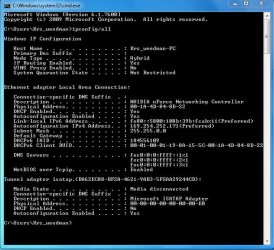
hey guys!I'm having serious trouble finding any solution...my internet connection worked fine until yesterday,when my pc restarted for no reason.after that,I received the "limited access or no connectivity" message....I followed many forums instructions,I reinstalled network drivers,I reinstalled the OS,but no result...I'm kinda new in those pc matters...and at one point I'm gettin' stucked.I'm pretty sure that isn't routers fault,because I plugged the internet cable on my older pc and it worked just fine.so,based on these images,can someone help me? thank you very much
 

Attachments
  • Capture1.JPG
    Capture1.JPG
    73.6 KB · Views: 8
  • Capture.JPG
    Capture.JPG
    33.1 KB · Views: 3

My Computer My Computer

At a glance

Windows 7 Ultimate x64
Computer type
PC/Desktop
OS
Windows 7 Ultimate x64
Restarts for no reason are often in response to a fatal system error. I'm not a net guru. The tunnel adapter info shows a physical address of all zeros. I'd guess that can't be good. But a networking expert, esp. one familiar with all the hardware, could provide more insight than I.
 

My Computer My Computer

At a glance

Windows 7 32 bitAMD 5200+ dual core2 GBNVidia GeForce 6150SE 128 MB
Computer Manufacturer/Model Number
HP Media Center
OS
Windows 7 32 bit
CPU
AMD 5200+ dual core
Memory
2 GB
Graphics Card(s)
NVidia GeForce 6150SE 128 MB
Monitor(s) Displays
CRT
Screen Resolution
1280x1024
Hard Drives
500 GB Sata internal :

SIIG USB 3.0 docking stations w/WD Caviar Black 6 Gb/s drives
Keyboard
PS/2
Mouse
PS/2 Wheel Mouse
Other Info
SIIG USB 3.0 PCIexpress card.
hey guys!I'm having serious trouble finding any solution...my internet connection worked fine until yesterday,when my pc restarted for no reason.after that,I received the "limited access or no connectivity" message....I followed many forums instructions,I reinstalled network drivers,I reinstalled the OS,but no result...I'm kinda new in those pc matters...and at one point I'm gettin' stucked.I'm pretty sure that isn't routers fault,because I plugged the internet cable on my older pc and it worked just fine.so,based on these images,can someone help me? thank you very much

This 169- IP means that you aren't getting an IP from the router.

Rebooting or resetting your router is required to fix this type of problem. It sometimes helps to start by resetting the modem then plug the router into it after the lights settle down. Seeing as how you reinstalled the entire OP system I'd say the machine is ok.

Just because another machine is working from your router doesn't mean it doesn't need a reset, this type of logic doesn't work. :)
 

My Computer My Computer

At a glance

Windows 7 Ult, Windows 8.1 Pro,Q9650-4.275GHz, E8600 4.5GHz, E6750-3.8GHzG.Skill PC2 9600 1200Mhz 5 5 5 15 2TGTX480
Computer type
PC/Desktop
Computer Manufacturer/Model Number
Home built
OS
Windows 7 Ult, Windows 8.1 Pro,
CPU
Q9650-4.275GHz, E8600 4.5GHz, E6750-3.8GHz
Motherboard
Evga 780i FTW
Memory
G.Skill PC2 9600 1200Mhz 5 5 5 15 2T
Graphics Card(s)
GTX480
Sound Card
Asus Xonar D2
Monitor(s) Displays
HannsG
Screen Resolution
1680X1050
Hard Drives
GSkill Phoenix Pro 120GB SSD
PSU
ThermalTake Toughpower 1000Watt modular
Case
ThermalTake XaserV
Cooling
Xigmatek S1283
Keyboard
Logitech G15
Mouse
Logitech G9
Internet Speed
T1
Ensure you have a reliable physical connection to the router. Most problems are physical layer. Check the cables and as Chev suggested restart the router. If you have the luxury of having another computer or device, try to connect to the router with another device to rule out your machine, although it looks like you tried several solutions on that workstation. You can even go so far as to reset most routers to factory by holding a paperclip on a little reset button if you choose to go this far. Let us know!
 

My Computer My Computer

At a glance

Windows 7 Profession x64Intel Core i516 GB DDR3Intel HD Graphics
Computer type
PC/Desktop
Computer Manufacturer/Model Number
Build
OS
Windows 7 Profession x64
CPU
Intel Core i5
Motherboard
Intel DB75EN
Memory
16 GB DDR3
Graphics Card(s)
Intel HD Graphics
Sound Card
Realtek High Definition Audio
Monitor(s) Displays
Dual Viewsonic TD2220 touchscreen displays
Hard Drives
Seagate 500GB 7200 RPM
Case
Slimline
Cooling
Standard Intel heat sink / fan.
Keyboard
Microsoft boring keyboard - it works!
I've restarted the router as the indications above...but still not working... :(
 

My Computer My Computer

At a glance

Windows 7 Ultimate x64
Computer type
PC/Desktop
OS
Windows 7 Ultimate x64
I would not ignore the "reboot for no reason." It might be a good idea to run some diagnostics on the network hardware. Windows will reboot on a hard error. That might be a clue what happened.
 

My Computer My Computer

At a glance

Windows 7 32 bitAMD 5200+ dual core2 GBNVidia GeForce 6150SE 128 MB
Computer Manufacturer/Model Number
HP Media Center
OS
Windows 7 32 bit
CPU
AMD 5200+ dual core
Memory
2 GB
Graphics Card(s)
NVidia GeForce 6150SE 128 MB
Monitor(s) Displays
CRT
Screen Resolution
1280x1024
Hard Drives
500 GB Sata internal :

SIIG USB 3.0 docking stations w/WD Caviar Black 6 Gb/s drives
Keyboard
PS/2
Mouse
PS/2 Wheel Mouse
Other Info
SIIG USB 3.0 PCIexpress card.
I've restarted the router as the indications above...but still not working... :(

I think you mentioned reinstalling the Op system since the reboot problem so I assume this machine is clean installed and appears to have the NVidia driver installed.

Are there any yellow ! under Network Adaptors in Device Manager?

Have you tried restarting the machine and bleeding all power? Tried a different Ethernet cable etc.
 

My Computer My Computer

At a glance

Windows 7 Ult, Windows 8.1 Pro,Q9650-4.275GHz, E8600 4.5GHz, E6750-3.8GHzG.Skill PC2 9600 1200Mhz 5 5 5 15 2TGTX480
Computer type
PC/Desktop
Computer Manufacturer/Model Number
Home built
OS
Windows 7 Ult, Windows 8.1 Pro,
CPU
Q9650-4.275GHz, E8600 4.5GHz, E6750-3.8GHz
Motherboard
Evga 780i FTW
Memory
G.Skill PC2 9600 1200Mhz 5 5 5 15 2T
Graphics Card(s)
GTX480
Sound Card
Asus Xonar D2
Monitor(s) Displays
HannsG
Screen Resolution
1680X1050
Hard Drives
GSkill Phoenix Pro 120GB SSD
PSU
ThermalTake Toughpower 1000Watt modular
Case
ThermalTake XaserV
Cooling
Xigmatek S1283
Keyboard
Logitech G15
Mouse
Logitech G9
Internet Speed
T1
I'd be inclined to pick up a cheap PCI-E network card and give that a try.
 

My Computer My Computer

At a glance

W7 Pro x64 SP1 | W10 Pro IP x64 | W8.1 Pro x6...i7-4790k @ 4GHz (4.4GHz Boost)16GB DDR3 Kingston HyperX Fury @ 1600MHz CL 9...EVGA GTX 980 Classified
Computer type
PC/Desktop
Computer Manufacturer/Model Number
Custom Build
OS
W7 Pro x64 SP1 | W10 Pro IP x64 | W8.1 Pro x64 VM | Linux Mint VM
CPU
i7-4790k @ 4GHz (4.4GHz Boost)
Motherboard
ASUS Sabertooth Z87 (BIOS Rev 2004)
Memory
16GB DDR3 Kingston HyperX Fury @ 1600MHz CL 9-9-9-27
Graphics Card(s)
EVGA GTX 980 Classified
Sound Card
Realtek Onboard
Monitor(s) Displays
Samsung S27D390
Screen Resolution
1920 x 1080
Hard Drives
240GB Intel 520 Series SSD |
Samsung 850 EVO 120GB SSD |
2TB WD Caviar Black |
2TB WD Caviar Green
PSU
Corsair HX850-80 Gold Modular
Case
Cooler Master Silencio 650
Cooling
Corsair H80i w/2 x Corsair SP120 | 2 x 120mm Noctua NF-S12B
Keyboard
Microsoft Sidewinder X4
Mouse
Gigabyte M6900 optical
Internet Speed
152mb
Antivirus
F-Secure
Browser
Firefox 38.0
Other Info
Backup Rig: Win 7 Pro 64-bit | AMD A10-5800k | ASUS F2A85-V Pro | 8GB Samsung DDR3 @1600MHz | 120GB Toshiba SDD | 2TB Seagate HDD | Cooler Master Silencio 550
Back
Top