Limiting wireless clients using 'Start IP Address'

videobruce

New member
Member
VIP
Local time
4:29 PM
Messages
182
I hope I can explain this correctly, sorry if I don't. Some 'assumption' on my part is included.

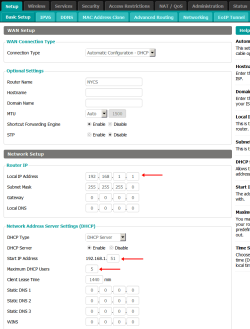
I assign static IP addresses to the clients, always have done so. Two Desktops, One Laptop, two DVR's one ATA (VoIP adapter) and now one 'Streaming box. All wired except a Laptop.

Not a problem until I assigned one to this Streaming box (Fire TV 2).

Looking at the attachments, specific the 2nd one, I assigned '31' (last segment/octet in the address) to the FTV. It showed correctly in that screen.
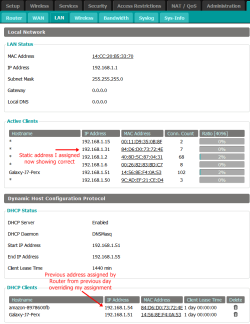
When I looked at the LAN page in the Router, it the last IP segment/octet was '54' which is in the allowable 'limit range' I specified, not the static '31' I assigned in the device.

Today, I now see it is showing correctly as '31' with what appears to be the former Router assignment (if that is the correct term) as '54' at the bottom of the page which I assume is a 'history' list.

Can this behavior be due to "lease time"?

When I initially connected the device to the Router, it was in auto assigned address mode. Can I assume the 'clock' started running at that point before I set a static address??

I hope that made sense.
 

Attachments
  • Limit number of clients.png
    Limit number of clients.png
    65.3 KB · Views: 2
  • Limit number of clients LAN page.png
    Limit number of clients LAN page.png
    61.2 KB · Views: 0

My Computers

System One System Two

  • Computer type
    Laptop
    Computer Manufacturer/Model Number
    Toshiba
    OS
    Win7 x64
    CPU
    AMD
  • Computer type
    PC/Desktop
    System Manufacturer/Model Number
    AMD based MB
    OS
    Win 7 Pro x64
    CPU
    AMD FX-8350
    Motherboard
    Gigabyte GA-970A-D3P
    Memory
    16GB
    Graphics Card(s)
    nVidia GeForce 1060
    Monitor(s) Displays
    25"
    Screen Resolution
    1920x1200
    Hard Drives
    two SSD;
    two 4TB HDD
    PSU
    700watt Seasonic
    Internet Speed
    300MB up & down
    Browser
    Firefox
    Other Info
    BD Recorder
I just wanted to know if my assumptions etc. were correct or did I miss a few? :o
 

My Computers

System One System Two

  • Computer type
    Laptop
    Computer Manufacturer/Model Number
    Toshiba
    OS
    Win7 x64
    CPU
    AMD
  • Computer type
    PC/Desktop
    System Manufacturer/Model Number
    AMD based MB
    OS
    Win 7 Pro x64
    CPU
    AMD FX-8350
    Motherboard
    Gigabyte GA-970A-D3P
    Memory
    16GB
    Graphics Card(s)
    nVidia GeForce 1060
    Monitor(s) Displays
    25"
    Screen Resolution
    1920x1200
    Hard Drives
    two SSD;
    two 4TB HDD
    PSU
    700watt Seasonic
    Internet Speed
    300MB up & down
    Browser
    Firefox
    Other Info
    BD Recorder
If it had an IP on lease it would retain that for the duration of the lease and then get the correct one when it re applys
 

My Computer

Computer type
PC/Desktop
OS
win 8 32 bit
What got me was this one specific device showed the assigned static IP in it's user menu correctly, but it wasn't in effect at the time. I would think when I entered it, it would either error out, or give a some type of message.

It's all good now, I'm just trying to understand why it happened. I prefer the idea of specific, always used devices always showing the same address.
 

My Computers

System One System Two

  • Computer type
    Laptop
    Computer Manufacturer/Model Number
    Toshiba
    OS
    Win7 x64
    CPU
    AMD
  • Computer type
    PC/Desktop
    System Manufacturer/Model Number
    AMD based MB
    OS
    Win 7 Pro x64
    CPU
    AMD FX-8350
    Motherboard
    Gigabyte GA-970A-D3P
    Memory
    16GB
    Graphics Card(s)
    nVidia GeForce 1060
    Monitor(s) Displays
    25"
    Screen Resolution
    1920x1200
    Hard Drives
    two SSD;
    two 4TB HDD
    PSU
    700watt Seasonic
    Internet Speed
    300MB up & down
    Browser
    Firefox
    Other Info
    BD Recorder
It seems quite normal to me, for the sequence of events you describe. The simple explanation is that the computer is using the "31" address, but while it initialy was on DHCP it got the "51" assigned, and at the time you took the screenshots that assignment was still valid. I don't see any problem with that.

The key point is to understand what means each table. My understanding according to both screenshots is this:
The first one is labeled "active clients". It means it refers to the devices using the router right now. You can see the MAC and IP addresses of each one (it doesn't informs or cares about how each one got those for now). Basically it shows the answer to "who is plugged to me right now?".
The second table says "DHCP clients", that refers to what devices have requested an automatically assigned IP address from the router and what responses the router gave. The fundamental information this table gives is "this MAC address requested an IP, and I gave this one", nothing more. It doesn't says what the device actually did with that IP address or even if the device is still alive. Only the MAC=>IP mappings the router itself created.

Note that you can see both tables because the router has both functions, as a router itself and as a DHCP server. Should you use an external server, only the first table would exist, and the other would be in a separate computer. Each table refers to a completely separate service.

So, my understanding of how you reached to that situation is that the following events happened:
1) The device is not yet connected. Neither table displays it.
2) The device is connected using its default configuration, that is, DHCP. So it issues a request for an IP address and connects to the network using that. At this point, it appears in both tables, with the "54" that the router gave to it. The lease time began counting. This is the case of the "Galaxy J7" shown there, using DHCP.
3) It was reconfigured to use a fixed IP ("31"). It disconnected from the network and reconnected, using the new IP address. This is what you see in the first table you posted. But, the previous DHCP request was still in effect, the router keep it reserved (until the lease time expires), even if it's no longer used, so it remains with the previous IP, and this is the second table you captured.
4) At some point in the future from your screenshot, the lease time expires, then the DHCP table deletes the "54" row from it, making it available to anyone else. At this point, the device only appears in the first table. This is also the case with all others devices shown, likely having fixed IPs.
 

My Computer

Computer type
Laptop
Computer Manufacturer/Model Number
Toshiba Sattelite A665-S6092
OS
Windows 7 Ultimate x64
CPU
Intel Core i7-740QM
Memory
8 GB DDR3
Graphics Card(s)
NVIDIA GeForce 330GT
Screen Resolution
1366x768
Hard Drives
Samsung 840 SSD 500GB
1TB USB3 external HD
Cooling
Coolermaster Notepal U3 notebook cooling pad
Internet Speed
3mbps ASDL
Antivirus
ClamWin 0.98.7
Browser
Opera 12.17 x86 (main), Firefox 38 (sec), IE11 (last resort)
Back
Top