

Starting off with my current setup and my expectations, I have 2 Samsung monitors that do not have speakers built in; however, they do have a audio out in the form of one mini port. So what I was hoping to do is have both monitors output the sound from HDMI through mini, into a stereo splitter, into my line in (blue audio port) on my onboard soundcard. I am having no such luck. I have a dual monitor setup where Monitor 1 is PC Monitor 1 and Xbox 360 1, while monitor 2 is PC Monitor 2 and Xbox 360 2. So my hope was that when my friend and I were playing xbox, the audio would go in from the xbox out through the mini output, and into my line in, eventually going out my optical audio port to my soundbar setup.
While I understand this is complicated, it's the only way I can really get this to work, since my sound bar will only take one source at a time, I either am the only one with sound on my xbox using optical, or we both have it by using the PC as the source.
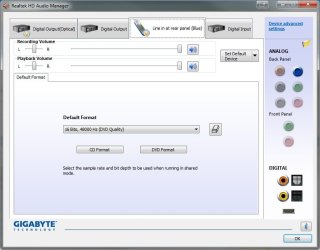
I have updated my audio drivers to the newest (they're Realtek audio drivers), and I have everything hooked up exactly as it needs to be. I tried testing the line in with my phone to see if that would pick up any audio, and no such luck there either. I know that the monitors can control sound, because they both have audio controls on the interface, but they just don't have speakers.
If anyone could help me troubleshoot what I'm doing wrong with my sound settings, I would appreciate it. Thank you.
While I understand this is complicated, it's the only way I can really get this to work, since my sound bar will only take one source at a time, I either am the only one with sound on my xbox using optical, or we both have it by using the PC as the source.
I have updated my audio drivers to the newest (they're Realtek audio drivers), and I have everything hooked up exactly as it needs to be. I tried testing the line in with my phone to see if that would pick up any audio, and no such luck there either. I know that the monitors can control sound, because they both have audio controls on the interface, but they just don't have speakers.
If anyone could help me troubleshoot what I'm doing wrong with my sound settings, I would appreciate it. Thank you.
Attachments
My Computer
At a glance
Windows 7 Pro 64 bitAMD Phenom II X4 9252 x 4gb DDR3 1333Radeon 6950 2gb
- OS
- Windows 7 Pro 64 bit
- CPU
- AMD Phenom II X4 925
- Motherboard
- Gigabyte GA-870A-UD3
- Memory
- 2 x 4gb DDR3 1333
- Graphics Card(s)
- Radeon 6950 2gb
- Sound Card
- Onboard
- Monitor(s) Displays
- Samsung BX2431 (x2)
- Screen Resolution
- 1920-1080 (x2)
- Hard Drives
- 120GB OCZ Vertex 2 &
750GB & 250gb Seagate &
1TB Samsung
- PSU
- Corsair 750TX
- Case
- Antec 900
- Cooling
- Cooler Master 212
- Keyboard
- Logitech Illuminated Keyboard
- Mouse
- Razer Deathadder
- Internet Speed
- 12 Mb
