

Im not sure if this has been discussed before but I was curious what everyone thought about this little app for creating junctions.
It is called Link Shell Extention:
Link Shell Extension
Although junctions can be created through a command line, this does make things a bit easier.
I found it quite usefull for my Steam Games, although the junctions are also useful for moving other folders which otherwise have no option to move.
For example, the Cache in Media Browser if you do not want it on the OS drive.
At any count, a quick rundown on how it works.
As many of you know, STEAM installs its games to the Steam/steamapps/common
Folder.
Theres usually no other way to move the games without breaking them if you want particular ones on a different drive/location.
In my case, I want FO New Vegas on my secondary SSD, not on the spinning drive where most other games reside.
1. Create a Folder at the new location.
Mine is Drive D (my Vertex SSD) and called it STEAM games
2. Copy the game(or folder) at its original location and paste it to the new location you want to use.
3.Delete the game/folder from its original location.
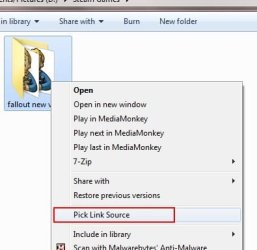
4.Right click the game/folder in its new location, and you will notice you have a couple new options in the Context menu.
Choose "Pick Link Source"
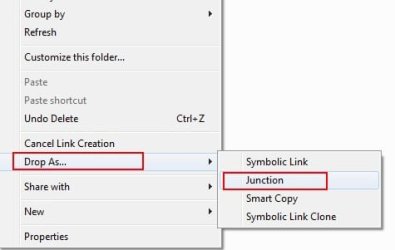
5. Now navigate back to the original location, and right click anywhere in blank, open space.
You can now choose to cancell the Link Creation, or create one.
Choose "Drop As" and then 'Junction"
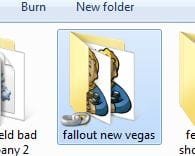
You will end up with a folder with little chains on at the bottom, signifying a junction.
And thats it. The new location will now be used.
Thoughts on this?
It is called Link Shell Extention:
Link Shell Extension
Although junctions can be created through a command line, this does make things a bit easier.
I found it quite usefull for my Steam Games, although the junctions are also useful for moving other folders which otherwise have no option to move.
For example, the Cache in Media Browser if you do not want it on the OS drive.
At any count, a quick rundown on how it works.
As many of you know, STEAM installs its games to the Steam/steamapps/common
Folder.
Theres usually no other way to move the games without breaking them if you want particular ones on a different drive/location.
In my case, I want FO New Vegas on my secondary SSD, not on the spinning drive where most other games reside.
1. Create a Folder at the new location.
Mine is Drive D (my Vertex SSD) and called it STEAM games
2. Copy the game(or folder) at its original location and paste it to the new location you want to use.
3.Delete the game/folder from its original location.
4.Right click the game/folder in its new location, and you will notice you have a couple new options in the Context menu.
Choose "Pick Link Source"
5. Now navigate back to the original location, and right click anywhere in blank, open space.
You can now choose to cancell the Link Creation, or create one.
Choose "Drop As" and then 'Junction"
You will end up with a folder with little chains on at the bottom, signifying a junction.
And thats it. The new location will now be used.
Thoughts on this?
Attachments
My Computer
At a glance
Windows 7 Home Premium 64bitIntel Core i7 2700k8GB Mushkin Redline Ridgebacks @1866EVGA GTX570 SC
- Computer Manufacturer/Model Number
- Custom (Self Build)
- OS
- Windows 7 Home Premium 64bit
- CPU
- Intel Core i7 2700k
- Motherboard
- eVGA P67 SLI
- Memory
- 8GB Mushkin Redline Ridgebacks @1866
- Graphics Card(s)
- EVGA GTX570 SC
- Sound Card
- XiFi Titanium HD
- Monitor(s) Displays
- LG W2453V
- Screen Resolution
- 1920x1080
- Hard Drives
- Intel 320 80GB -- Intel X25-V 40GB --WD Black 1TB x2 -- WD Blue 640GB
- PSU
- Seasonic x750
- Case
- Corsair 600T SE White
- Cooling
- eVGA Superclocked CPU Cooler
- Keyboard
- Saitek Cyborg
- Antivirus
- Kaspersky
- Browser
- IE
- Other Info
- LG BD/DVD
