
Hi I have a similar problem as this post, but apparently not with the same solution...
http://www.sevenforums.com/sound-audio/28725-volume-mixer-issue-sound-control.html
I run W7 with a Apple BT keyboard (small silver). I like the volume buttons to function, so I installed AutoHotKey and an unofficial apple keyboard support tingy.
The problem is this. When I lower or higher the volume, I can see a transparrent bar in the middle of the sceen, but nothing happens. The mute button works.
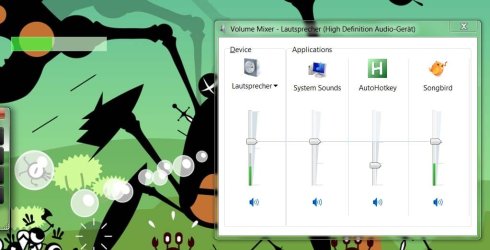
I then launch the volume mixer, and there I can see that everything mute when I press the mute button. But when I press the increase/decrese buttons, only the "AutoHotKey"-bar moves (and does not result in anything). If I take the "Lautsprecher"-bar and drag it with the mouse everything moves.
I want everything to move when I drag the AutoHotKey-bar (push keyboard buttons).
I guess there is some itsy bittsy menu that I missed....
http://www.sevenforums.com/sound-audio/28725-volume-mixer-issue-sound-control.html
http://www.sevenforums.com/sound-audio/28725-volume-mixer-issue-sound-control.html
I run W7 with a Apple BT keyboard (small silver). I like the volume buttons to function, so I installed AutoHotKey and an unofficial apple keyboard support tingy.
The problem is this. When I lower or higher the volume, I can see a transparrent bar in the middle of the sceen, but nothing happens. The mute button works.
I then launch the volume mixer, and there I can see that everything mute when I press the mute button. But when I press the increase/decrese buttons, only the "AutoHotKey"-bar moves (and does not result in anything). If I take the "Lautsprecher"-bar and drag it with the mouse everything moves.
I want everything to move when I drag the AutoHotKey-bar (push keyboard buttons).
I guess there is some itsy bittsy menu that I missed....
http://www.sevenforums.com/sound-audio/28725-volume-mixer-issue-sound-control.html
Attachments
Last edited:
My Computer
- OS
- Windows 7 64bit (Windows XP x64, dual boot)