Solved Links to newly installed programmes under start menu shows "(empty)"

dammika

New member
Local time
2:16 AM
Messages
4
Links to newly installed programmes under start menu shows "(empty)"

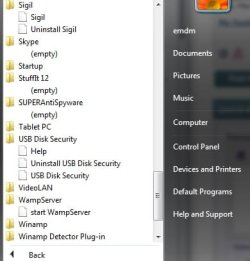
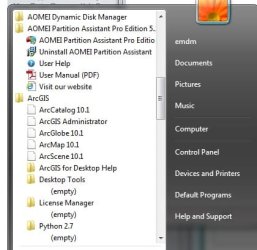
I have a HP 630 lapto installed Win7 Pro x64 OS. Links to exe files for some recently installed programmes under All programmes in start menu show empty. i.e. when I click to the programme folder appeared under the start menu, it shows as "(empty)" or just a short cut without link to the relevant programme. (i.e no link for the executable file is available).

I didn't restore the machine after installing relevant programmes.

Pl help me to rectify this problem

Thanks in advance.


A screen shot of the same is as follows.
 

Attachments
  • start menu.jpg
    start menu.jpg
    26.3 KB · Views: 18
  • start menu2.jpg
    start menu2.jpg
    21.7 KB · Views: 13
Last edited:

My Computer My Computer

At a glance

win 7 Prof. x64
OS
win 7 Prof. x64

My Computer My Computer

At a glance

Windows 7 Pro 32Intel(R) Core(TM) i5 CPU M 540 @ 2.53GHz4,00 GB (Usable 2,98)NVIDIA NVS 5100M
Computer type
Laptop
Computer Manufacturer/Model Number
HP Elitebook 8540p
OS
Windows 7 Pro 32
CPU
Intel(R) Core(TM) i5 CPU M 540 @ 2.53GHz
Motherboard
Hewlett-Packard 1521
Memory
4,00 GB (Usable 2,98)
Graphics Card(s)
NVIDIA NVS 5100M
Sound Card
NVIDIA High Definition Audio
Screen Resolution
1600x900
Hard Drives
INTEL SSDSA2CW120G3
Antivirus
F-Secure Internet Security
Browser
IE, Firefox, Opera
Other Info
Sandboxie,
SRP (Software Restriction Policy),
EMET (Enhanced Mitigation Experience Toolkit),
WFC (Windows Firewall Control by BiniSoft),
Malwarebytes Premium
Thanks for the reply.
I tried that thred but not sucees because oldest previous programmes are two days back. I am using KAV 6 for windows work stations, Malwarebytes and Regisry Mechanics.

Thanks
 

My Computer My Computer

At a glance

win 7 Prof. x64
OS
win 7 Prof. x64

My Computer My Computer

At a glance

Win7 Pro-64 Biti7-2600-3.4GHz8 GIG DDR3onboard
Computer Manufacturer/Model Number
Put together
OS
Win7 Pro-64 Bit
CPU
i7-2600-3.4GHz
Motherboard
ASRock Z68M
Memory
8 GIG DDR3
Graphics Card(s)
onboard
Sound Card
onboard
Hard Drives
Seagate 1TB 7200RPM
PSU
680 W
Case
black
Cooling
stock fans
Keyboard
Microsoft
Mouse
Microsoft optical
First of all I would like to thank both Tookery and BrightBlessing for providing information.

It was required to change permission of current user as full control for relevant folder/file, before copying short cut to "C:\ProgramData\Microsoft\Windows\Start Menu\Programs\relevant folder/file. Once the permission changed it was OK.

Thanks again.
 

My Computer My Computer

At a glance

win 7 Prof. x64
OS
win 7 Prof. x64
Back
Top