Linux Foundation releases Windows Secure Boot fix

Golden

000
VIP
SF Team
Local time
3:48 PM
Messages
19,301
Location
South Australia

My Computer

Computer type
PC/Desktop
Computer Manufacturer/Model Number
Golden Mk. I.4
OS
Windows 10 Pro x64 ; Xubuntu x64
CPU
Intel i7 860 @ 2.80 GHz O/C'ed to 4.0GHz
Motherboard
Gigabyte P55A-UD3R Rev.1. Award BIOS F13
Memory
16GB Corsair Vengance DDR3 @ 661 MHz Dual Channel (9-9-9-24)
Graphics Card(s)
EVGA NVidia GTX 560 1024MB
Sound Card
Realtek Integrated
Monitor(s) Displays
Dual Samsung SyncMaster 2494HS
Screen Resolution
1920*1080 and 1920*1080
Hard Drives
1*Samsung 840 EVO 120GB SSD;
1*OCZ Vertex 2 60GB SSD;
2*Samsung F3 SpinPoint 1TB in RAID0;
1*Samsung F1 SpinPoint 1TB;
2*Western Digital 1TB External USB 3.0
1*Western Digital 500GB External USB 3.0
1*Seagate 500GB External USB 2.0
PSU
Thermaltake ToughPower QFan 750W
Case
Thermaltake Element S VK60001W2Z
Cooling
Corsair H60 Water Cooling, 2*230mm and 2*80mm case fans
Keyboard
Logitech G110
Mouse
Logitech MX518
With all this hassle regarding uEFI and secure boot, I will definitely be building my next computer.
 

My Computer

Computer Manufacturer/Model Number
Customized build from CyberPower
OS
Windows 7 Home Premium 64bit SP 1
CPU
Intel i5 2500k
Motherboard
Asus P8P67 Deluxe
Memory
8 gigabytes Corsair PC3-12800 DDR3
Graphics Card(s)
EVGA GeForce GTX 460 superclocked
Sound Card
Integrated
Monitor(s) Displays
ViewSonic 23" LCD
Screen Resolution
1980 x 1080
Hard Drives
120 Gb Samsung 840 Pro SSD
120 Gb Kingston Hyper X SSD
1 Tb WD Caviar Black HDD
PSU
Coolermaster 1000 watt modular
Case
Coolermaster HAF X full tower
Cooling
Coolermaster Hyper 212 plus
Keyboard
Logitech USB
Mouse
Microsoft 3 button
Internet Speed
download 1.5 Mb/sec upload 300Kb/sec
Who really cares. Regardless of how many use this app it will not give raise to the Linux OS. I been using Linux Suse for ten years now and still it has not improved to the level of OS X (whatever) or Windows 7. Until it does it will remain a geek OS (including me).
 

My Computer

Computer Manufacturer/Model Number
HP Pavilion a4302f
OS
Win 7 Pro x64, VM Win XP, Win7 Pro Sandbox, Kubuntu 11
CPU
AMD Athlon(tm) II X4 640 @ 3.0 Gbz
Memory
12GB 1066MHz DDR3 SDRAM - 2x4GB, 2x2GB
Graphics Card(s)
ATI Radeon HD 4350 HD Graphics/Audio with 512MB
Sound Card
Realtek High Definition Audio
Monitor(s) Displays
1. Dell 23" SP2307, 2. Mitsublishi 40" HDTV, Hannspree 25"
Screen Resolution
1. 2048x1152, 2. 1920-1080, 3. 1920x1200
Hard Drives
Int: 1 120 Gig SSD i
1 - 2.5" 500 USB External HDD
1 -1 Tb USB External HDD
Case
Mid Tower
Cooling
Standard Fans - 5 fans (very quiet)
Keyboard
Microsoft Wireless 2000
Mouse
Microsoft Wireless Mouse 5000
Internet Speed
10 Mbit (realistically 500 Kbit - 1.2 Mbit)
Other Info
Speakers - Bose Desktop (Excellent Sound)
1 external CD|DVD\Blue-ray Recorders/Players (Sony)
Feeling happy for Linux, ill thoughts for Microsoft and UEFI Secure Boot for restricting user rights under the guise of "security".
 

My Computer

Computer type
PC/Desktop
Computer Manufacturer/Model Number
N/A (custom-built)
OS
Windows 7 Ultimate x64 SP1
CPU
Intel Core i7 2700K @ 3.5GHz (TurboBoost disabled)
Motherboard
ASUS P8Z68-V/GEN3
Memory
16GB (4x4GB) Kingston HyperX DDR3 1600MHz @ 1333MHz
Graphics Card(s)
Nvidia EVGA GeForce GTX 1060 6GB
Sound Card
Realtek High Definition Audio (motherboard integrated)
Monitor(s) Displays
NEC Multisync EX231W
Screen Resolution
1920x1080 @ 60Hz via DVI-D
Hard Drives
2x Western Digital 1TB SATA3 Caviar Black Internal HDD // 1x WD 500GB USB 3.0 "My Passport Essential" External HDD // 1x WD 1TB USB 3.0 "My Passport Essential" External HDD // 2x WD 2TB USB 3.0 "My Passport Essential" External HDD
PSU
Corsair Professional Series Gold AX850
Case
Antec 300
Cooling
Air-cooling
Keyboard
Steelseries 6Gv2
Mouse
Steelseries Sensei RAW Glossy, Logitech M500
Internet Speed
DSL (AT&T)
Antivirus
Microsoft Security Essentials
Browser
Pale Moon, Mozilla Firefox 12, Opera 12, Chromium, IE9
Other Info
Virtual Machines (VirtualBox):
* Japanese Windows XP Professional SP3
* Japanese Windows 7 Professional SP1
Feeling happy for Linux, ill thoughts for Microsoft and UEFI Secure Boot for restricting user rights under the guise of "security".

Secure boot: technical types spreading half-baked information

Linux distributions are making slow progress on implementing measures to ensure that their images available for download are bootable on hardware that has secure boot turned on.


Secure boot is a feature of the UEFI, the Unified Extensible Firmware Interface, a replacement for the BIOS.

Microsoft has implemented this feature on hardware certified for Windows 8 in a way that requires the exchange of cryptographic keys; since the company controls the key-signing authority, anyone who wants to create a bootable medium has to necessarily obtain a key from Redmond.

Misinformation is rife about secure boot, simply because people confuse UEFI with secure boot and think that support for the former means support for the latter. Many so-called technical types are as guilty as others of spreading wrong information.


mjg59 | Secure Boot distribution support


“Microsoft's real aim is to kill the aftermarket in used computers that have Win 8 installed by not allowing you to install something other than Windows”
Microsoft could just have refused to sign UEFI bootloaders. They didn't. That doesn't really fit in with what you're claiming.


If I buy a computer with Windows 8 and Secure Boot, will I still be able to install Linux? - Super User

First of all, Secure Boot is not something that Microsoft came up with. They're the first to widely implement it, but they didn't invent it. It's part of the UEFI specification, which is basically a newer replacement for the old BIOS that you're probably used to. UEFI is basically the software that talks between the OS and the hardware. UEFI standards are created by a group called the "UEFI Forum", which is made up of computing industry representatives including Microsoft, Apple, Intel, AMD, and a handful of computer manufacturers.
 

My Computer

OS
ME/XP/Vista/Win7
I did say "UEFI Secure Boot", IE: I was referring to the Secure Boot part of UEFI specifically, and also said I harbor ill will towards both MS and UEFI Secure Boot for what's happening on most PCs now. Not sure what you were going for there unless you were trying to reinforce my point.
 

My Computer

Computer type
PC/Desktop
Computer Manufacturer/Model Number
N/A (custom-built)
OS
Windows 7 Ultimate x64 SP1
CPU
Intel Core i7 2700K @ 3.5GHz (TurboBoost disabled)
Motherboard
ASUS P8Z68-V/GEN3
Memory
16GB (4x4GB) Kingston HyperX DDR3 1600MHz @ 1333MHz
Graphics Card(s)
Nvidia EVGA GeForce GTX 1060 6GB
Sound Card
Realtek High Definition Audio (motherboard integrated)
Monitor(s) Displays
NEC Multisync EX231W
Screen Resolution
1920x1080 @ 60Hz via DVI-D
Hard Drives
2x Western Digital 1TB SATA3 Caviar Black Internal HDD // 1x WD 500GB USB 3.0 "My Passport Essential" External HDD // 1x WD 1TB USB 3.0 "My Passport Essential" External HDD // 2x WD 2TB USB 3.0 "My Passport Essential" External HDD
PSU
Corsair Professional Series Gold AX850
Case
Antec 300
Cooling
Air-cooling
Keyboard
Steelseries 6Gv2
Mouse
Steelseries Sensei RAW Glossy, Logitech M500
Internet Speed
DSL (AT&T)
Antivirus
Microsoft Security Essentials
Browser
Pale Moon, Mozilla Firefox 12, Opera 12, Chromium, IE9
Other Info
Virtual Machines (VirtualBox):
* Japanese Windows XP Professional SP3
* Japanese Windows 7 Professional SP1
I did say "UEFI Secure Boot", IE: I was referring to the Secure Boot part of UEFI specifically, and also said I harbor ill will towards both MS and UEFI Secure Boot for what's happening on most PCs now. Not sure what you were going for there unless you were trying to reinforce my point.

Feeling happy for Linux, ill thoughts for Microsoft and UEFI Secure Boot for restricting user rights under the guise of "security".

Q: What restricting of user rights.
A: NONE.
 

My Computer

OS
ME/XP/Vista/Win7
This is appropriate, a pattern of behavior exists with MS.

Embrace, extend and extinguish - Wikipedia, the free encyclopedia

"Embrace, extend, and extinguish",[1] also known as "Embrace, extend, and exterminate",[2] is a phrase that the U.S. Department of Justice found[3] was used internally by Microsoft[4] to describe its strategy for entering product categories involving widely used standards, extending those standards with proprietary capabilities, and then using those differences to disadvantage its competitors.


You must also be an expert Linux user to even try to get this to work at this point.

I dont see how any cant see and if they still cant see then its no use trying to make them see.
 

My Computer

OS
Windows 7 Ultimate x64
I did say "UEFI Secure Boot", IE: I was referring to the Secure Boot part of UEFI specifically, and also said I harbor ill will towards both MS and UEFI Secure Boot for what's happening on most PCs now. Not sure what you were going for there unless you were trying to reinforce my point.

Feeling happy for Linux, ill thoughts for Microsoft and UEFI Secure Boot for restricting user rights under the guise of "security".

Q: What restricting of user rights.
A: NONE.

When people need to grovel to Microsoft to get permission (aka: buying a UEFI Secure Boot security key from MS) to run the operating systems of their choice on their computers (disabling UEFI Secure Boot may or may not be an option), that is a clear restriction of what a user can do with hardware that they own and is an obvious ethical problem.

UEFI Secure Boot may have been conceived with computer security and user safety in mind, but in reality it's currently only being used to facilitate monopolization of the market and create artificial incompatibility between operating systems (including older MS operating systems like Windows XP and 7) and UEFI Secure Boot-enabled hardware. A user should always have the right to install whatever they wish on their computers, no hardware or software vendor should be in a position to dictate what a user can and cannot do.
 

My Computer

Computer type
PC/Desktop
Computer Manufacturer/Model Number
N/A (custom-built)
OS
Windows 7 Ultimate x64 SP1
CPU
Intel Core i7 2700K @ 3.5GHz (TurboBoost disabled)
Motherboard
ASUS P8Z68-V/GEN3
Memory
16GB (4x4GB) Kingston HyperX DDR3 1600MHz @ 1333MHz
Graphics Card(s)
Nvidia EVGA GeForce GTX 1060 6GB
Sound Card
Realtek High Definition Audio (motherboard integrated)
Monitor(s) Displays
NEC Multisync EX231W
Screen Resolution
1920x1080 @ 60Hz via DVI-D
Hard Drives
2x Western Digital 1TB SATA3 Caviar Black Internal HDD // 1x WD 500GB USB 3.0 "My Passport Essential" External HDD // 1x WD 1TB USB 3.0 "My Passport Essential" External HDD // 2x WD 2TB USB 3.0 "My Passport Essential" External HDD
PSU
Corsair Professional Series Gold AX850
Case
Antec 300
Cooling
Air-cooling
Keyboard
Steelseries 6Gv2
Mouse
Steelseries Sensei RAW Glossy, Logitech M500
Internet Speed
DSL (AT&T)
Antivirus
Microsoft Security Essentials
Browser
Pale Moon, Mozilla Firefox 12, Opera 12, Chromium, IE9
Other Info
Virtual Machines (VirtualBox):
* Japanese Windows XP Professional SP3
* Japanese Windows 7 Professional SP1
UEFI & Secure Boot are not Mircosoft.

Unified Extensible Firmware Interface - Wikipedia, the free encyclopedia

specification was developed by Intel.

The UEFI specification is managed by the Unified EFI Forum.

King Artur said:
Feeling happy for Linux, ill thoughts for Microsoft and UEFI Secure Boot for restricting user rights under the guise of "security".
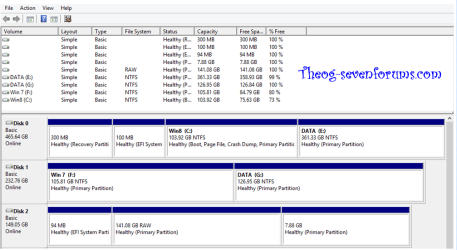
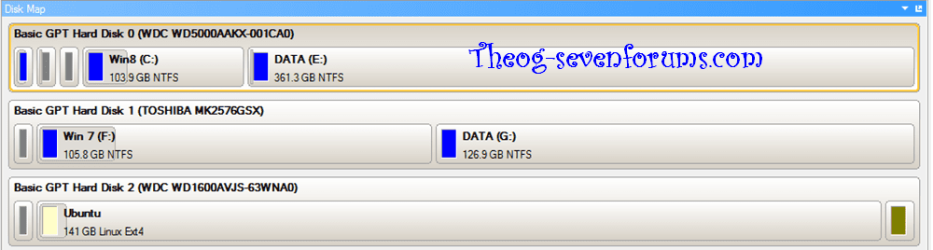
My test rig with UEFI & Secure Boot.

HDD1 = Windows 8 in uEFI mode
HDD2 = Windows 7 in uEFI mode
HDD3 = Ubuntu in uEFI mode

8-7-Linux-001.PNG

8-7-Linux-002.PNG

theog said:
Q: What restricting of user rights.
A: NONE.
 

My Computer

OS
ME/XP/Vista/Win7
Samsung Users & Sam Varghese

Q: What restricting of user rights.
A: NONE.

What about these Samsung users?
http://www.sevenforums.com/news/276413-samsung-laptops-bricked-booting-linux-using-uefi.html
It seems that the dreaded nebulous HW/SW mismatch is responsible.

How about Sam Varghese?
From this link:
Secure boot: technical types spreading half-baked information
I tested out a recent Sabayon image yesterday and while it does offer a menu that leads one to believe that it will boot after a key is installed, none of the keys provided work.
Sabayon users can't use it.

Garrett mentioned that Ubuntu 64-bit will boot on secure boot-enabled devices;
...
I tested it out sometime back and verified it; I also pointed out that it would not install on the same disk as Windows 8. One had to use a second disk.
This restricts anyone who doesn't have 2xHDD or 2xSSD (or some combination).

Garrett also mentioned that the recent test builds of Fedora 18 would support secure boot; while this is correct, the distribution cannot yet be installed on such systems, no matter if one has a single disk or two.
Fedora users can't use it.

I tested out an openSUSE 12.3 Milestone 2 release a few days back. It does not support secure boot yet - no ifs, or buts or shoulds.
OpenSUSE users can't use it.

The latest Debian test releases cannot boot on secure boot-enabled hardware either.
Debian users can't use it.

The only party who might benefit from this mess is MS (the OEMs and Linux Distro producers don't).
 

My Computer

Computer type
PC/Desktop
Computer Manufacturer/Model Number
n/a
OS
W7 Ultimate SP1, LM19.2 MATE, W10 Home 1703, W10 Pro 1703 VM, #All 64 bit
CPU
AMD Phenom II x6 1100T, 3.3 GHz
Motherboard
ASUS M4A88T-M/USB3 (AM3)
Memory
12GB DDR3 1333 G-Skill (4GB x 2), G-Skill (2GB x 2)
Graphics Card(s)
NVIDIA GeForce GTX 660
Sound Card
Realtek?
Monitor(s) Displays
Samsung S23B350
Screen Resolution
1920x1080
Hard Drives
WD Green 2TB (SATA), WD Green 3TB (SATA), WD Blue 4TB (SATA), WD Blue 6TB (SATA)
PSU
Cooler Master
Case
Antec GX300 Tower
Cooling
3x Antec TRICOOL 120mm Fans
Mouse
Wired Optical
Internet Speed
DSL
Antivirus
Avast
Browser
Pale Moon (64 bit)
Other Info
2018-12-27 Upgraded HDDs
2015-12-10 Upgraded case, graphics card, storage
2015-08-15 Upgraded motherboard & RAM
2015-07-15 Upgraded LM17.1 to LM17.2
UEFI & Secure Boot are not Mircosoft.

You're missing the entire point. Any piece of computer that is "certified" for use with Windows 8, as in any computer that gets to party with the Windows 8 sticker, is obliged by Microsoft's requirements to activate UEFI Secure Boot and as a consequence bars any OS that does not have a security key from Microsoft from booting up. Computers that are "certified" for use with Windows 8 are going to make up the majority of the consumer desktop/laptop market. You see where this is going?

Microsoft through their Windows 8 certification program and abuse of UEFI Secure Boot is dictating what operating system a user can run on their hardware, in this case specifically Windows 8 and nothing else, unless the other software vendors and developers in question decide to pay Microsoft for the right to boot up on UEFI Secure Boot-enabled Windows 8-certified PCs.

Microsoft to stop Linux, older Windows, from running on Windows 8 PCs | ZDNet
The link above sums up what Microsoft is doing with UEFI Secure Boot nicely, I believe.

In addition, Microsoft has proven themselves to be anything but expedient and cooperative in distributing security keys even when Linux put up the white flag and decided to buy one in lieu of a workaround around UEFI Secure Boot.

You can say that Microsoft isn't stepping on users' rights all you want, but the fact remains that Microsoft is abusing UEFI Secure Boot in such a way as to forcibly ensure a Windows 8 monopoly on the general consumer PC market.
 

My Computer

Computer type
PC/Desktop
Computer Manufacturer/Model Number
N/A (custom-built)
OS
Windows 7 Ultimate x64 SP1
CPU
Intel Core i7 2700K @ 3.5GHz (TurboBoost disabled)
Motherboard
ASUS P8Z68-V/GEN3
Memory
16GB (4x4GB) Kingston HyperX DDR3 1600MHz @ 1333MHz
Graphics Card(s)
Nvidia EVGA GeForce GTX 1060 6GB
Sound Card
Realtek High Definition Audio (motherboard integrated)
Monitor(s) Displays
NEC Multisync EX231W
Screen Resolution
1920x1080 @ 60Hz via DVI-D
Hard Drives
2x Western Digital 1TB SATA3 Caviar Black Internal HDD // 1x WD 500GB USB 3.0 "My Passport Essential" External HDD // 1x WD 1TB USB 3.0 "My Passport Essential" External HDD // 2x WD 2TB USB 3.0 "My Passport Essential" External HDD
PSU
Corsair Professional Series Gold AX850
Case
Antec 300
Cooling
Air-cooling
Keyboard
Steelseries 6Gv2
Mouse
Steelseries Sensei RAW Glossy, Logitech M500
Internet Speed
DSL (AT&T)
Antivirus
Microsoft Security Essentials
Browser
Pale Moon, Mozilla Firefox 12, Opera 12, Chromium, IE9
Other Info
Virtual Machines (VirtualBox):
* Japanese Windows XP Professional SP3
* Japanese Windows 7 Professional SP1
Please. Any PC that is certified for Windows 8, has mandatory requirement for non-ARM systems to have SecureBoot user configurable, i.e., can turn it off. You want to install something other then Windows 8, turn SecureBoot off. And be done with it. SecureBoot is a none issue.

http://msdn.microsoft.com/en-us/library/windows/hardware/jj128256.aspx
Under: System.Fundamentals.Firmware.UEFISecureBoot, Section 18
Mandatory. Enable/Disable Secure Boot. On non-ARM systems, it is required to implement the ability to disable Secure Boot via firmware setup. A physically present user must be allowed to disable Secure Boot via firmware setup without possession of PKpriv. A Windows Server may also disable Secure Boot remotely using a strongly authenticated (preferably public-key based) out-of-band management connection, such as to a baseboard management controller or service processor. Programmatic disabling of Secure Boot either during Boot Services or after exiting EFI Boot Services MUST NOT be possible. Disabling Secure Boot must not be possible on ARM systems.

For the majority of users who use computers (They don't dual-boot, or run some other system). SecureBoot is a damn good thing to have. For us, the minority users which is a very small minority, we can turn it off or configure it. So enough with this bullshit about it taking away user's rights.
 

My Computer

Computer type
PC/Desktop
Computer Manufacturer/Model Number
Alienware Aurora ALX R4
OS
Windows 10 Pro (x64)
CPU
Intel Core i7-3930K (3.2GHz - 4.5GHz)
Motherboard
Alienware Aurora-R4 x79
Memory
4x Samsung 4GB PC3-12800 DDR3 (16GB 1600MHz)
Graphics Card(s)
Nvidia Geforce GTX 690
Sound Card
SteelSeries Siberia Elite
Monitor(s) Displays
Dell UltraSharp U3011
Screen Resolution
2560x1600
Hard Drives
Samsung 850 Pro 256 GB, Seagate 1TB Desktop Hybrid HDD, 2x Western Digital 4TB Green HDD
PSU
875W Some Dell PSU <.<
Case
Alienware Aurora ALX
Cooling
Custom Liquid Cooling (EK CPU & GPU blocks) dual EK 480RAD
Keyboard
Logitech G710+ Mechanical
Mouse
Logitech G700s
Internet Speed
Verizon Fios (50 mbps average)
Other Info
Server: Intel NUC D54250WYK: i5-4250U, 16GB, 256 GB mSATA, Windows Server 2012 R2

My Computer

Computer type
PC/Desktop
Computer Manufacturer/Model Number
home built
OS
Multi-Boot W7_Pro_x64 W8.1_Pro_x64 W10_Pro_x64 +Linux_VMs +Chromium_VM
CPU
AMD Athlon II x4 620
Motherboard
Gigabyte GA-MA785G-UD3H
Memory
6GB GSkill DDR2 800
Graphics Card(s)
AMD 4670 GPU + AMD 4200 IGP
Sound Card
on board Realtek ALC889A
Monitor(s) Displays
RCA 40" LCD TV, Insignia 32" LCD TV, HP 15" LCD monitor
Screen Resolution
1680 x 1050
Hard Drives
OCZ Vertex 3 120GB,
Samsung F3 1TB (3),
Several others - WD, Seagate, Hitachi, ...
PSU
Corsair 500 W
Case
Rosewill mid tower
Cooling
CM 90mm rifle
Keyboard
Gyration wireless, Logitech wireless, Dell USB wired
Mouse
Gyration wireless, Logitech wireless, V7 USB wired
Internet Speed
Spectrum - 100Mbps D / 10Mbps U
Antivirus
Avast, MBAM3, EMET, WinPatrol
Browser
Pale Moon, Firefox, IE
Other Info
2 multi-boot PC's
Mainly HTPC/Office/Gen purpose (no gaming).
Trendnet USB KVM.
LG DVD burner/Blue Ray Player.
Tray system for removable SATA backup drives.

Not currently OCd, under-volted.
I use Hybrid sleep, rarely re-boot or shutdown.

Hauppauge HD-PVR, Avermedia PCIe TV Tuner, Hauppauge PCI TV Tuner.
Windows Hardware Certification Requirements for Client and Server Systems
Under: System.Fundamentals.Firmware.UEFISecureBoot, Section 18

I will admit I was unaware MS had changed its stance from leaving the ability to enable/disable UEFI Secure Boot to the discretion of hardware vendors to mandating that such a feature be present for certification. I stand corrected in that regard and support that mandate.

That said, I still remain skeptical of MS's willingness to act honorably especially when it is obvious MS wants to forcibly make Metro and its associated closed-ecosystem the next big thing. I honestly hate the direction general computing is going and MS's antics certainly aren't helping.
 

My Computer

Computer type
PC/Desktop
Computer Manufacturer/Model Number
N/A (custom-built)
OS
Windows 7 Ultimate x64 SP1
CPU
Intel Core i7 2700K @ 3.5GHz (TurboBoost disabled)
Motherboard
ASUS P8Z68-V/GEN3
Memory
16GB (4x4GB) Kingston HyperX DDR3 1600MHz @ 1333MHz
Graphics Card(s)
Nvidia EVGA GeForce GTX 1060 6GB
Sound Card
Realtek High Definition Audio (motherboard integrated)
Monitor(s) Displays
NEC Multisync EX231W
Screen Resolution
1920x1080 @ 60Hz via DVI-D
Hard Drives
2x Western Digital 1TB SATA3 Caviar Black Internal HDD // 1x WD 500GB USB 3.0 "My Passport Essential" External HDD // 1x WD 1TB USB 3.0 "My Passport Essential" External HDD // 2x WD 2TB USB 3.0 "My Passport Essential" External HDD
PSU
Corsair Professional Series Gold AX850
Case
Antec 300
Cooling
Air-cooling
Keyboard
Steelseries 6Gv2
Mouse
Steelseries Sensei RAW Glossy, Logitech M500
Internet Speed
DSL (AT&T)
Antivirus
Microsoft Security Essentials
Browser
Pale Moon, Mozilla Firefox 12, Opera 12, Chromium, IE9
Other Info
Virtual Machines (VirtualBox):
* Japanese Windows XP Professional SP3
* Japanese Windows 7 Professional SP1
Back
Top