
List of Available Hotfixes for Windows 7

Article ID: 2698555 - Last Review: March 13, 2014 - Revision: 11.0
Microsoft .NET Framework Repair Tool is available

Intro:
The Microsoft .NET Framework Repair Tool detects frequently occurring issues that affect the Microsoft .NET Framework setup or updates. The tool tries to resolve those issues by applying known fixes or by repairing the corrupted installations of the supported .NET Framework versions. The tool has an easy-to-use wizard-based user interface (UI). It also supports command line usage together with more advance options.

Last Updated: 03/13/2014
Release: v1.2
Version: 4.5.52207.36207
Supported Languages: English (United States)

http://support.microsoft.com/kb/2698555/en-us


You can use the .NET Framework Repair Tool to correct setup problems for the following configurations:
  • The .NET Framework 4.5.1 on the following operating systems:
    • Windows Vista Service Pack 2 (SP2)
    • Windows Server 2008 Service Pack 2 (SP2)
    • Windows 7 Service Pack 1 (SP1)
    • Windows Server 2008 R2 Service Pack 1 (SP1)
  • The .NET Framework 4.5 on the following operating systems:
    • Windows Vista Service Pack 2 (SP2)
    • Windows Server 2008 Service Pack 2 (SP2)
    • Windows 7 Service Pack 1 (SP1)
    • Windows Server 2008 R2 Service Pack 1 (SP1)
  • The .NET Framework 4 on the following operating systems:
    • Windows XP Service Pack 3 (SP3)
    • Windows Server 2003 Service Pack 2 (SP2)
    • Windows Vista Service Pack 2 (SP2)
    • Windows Server 2008 Service Pack 2 (SP2)
    • Windows 7
    • Windows 7 Service Pack 1 (SP1)
    • Windows Server 2008 R2
    • Windows Server 2008 R2 Service Pack 1 (SP1)
  • The .NET Framework 3.5 SP1 on the following operating systems:
    • Windows XP Service Pack 3 (SP3)
    • Windows Server 2003 Service Pack 2 (SP2)
    • Windows Server 2003 R2 Service Pack 2 (SP2)
    • Windows Vista Service Pack 2 (SP2)
    • Windows Server 2008 Service Pack 2 (SP2)
  • The .NET Framework 3.0 SP2 on the following operating systems:
    • Windows XP Service Pack 3 (SP3)
    • Windows Server 2003 Service Pack 2 (SP2)
    • Windows Server 2003 R2 Service Pack 2 (SP2)
  • The .NET Framework 2.0 SP2 on the following operating systems:
    • Windows XP Service Pack 3 (SP3)
    • Windows Server 2003 Service Pack 2 (SP2)
    • Windows Server 2003 R2 Service Pack 2 (SP2)
Direct Download:
http://www.microsoft.com/en-us/download/details.aspx?id=30135
 
Last edited:

My Computer My Computer

At a glance

Windows 7 Professional SP1 - x64 [Non-UEFI Boot]Ivy Bridge Core i5 3570K (Delidded)G.Skill "Ares" DDR3 PC3-12800 - 1600MHz (16Gb)Asus Dual-RX480-O4G
Computer type
PC/Desktop
Computer Manufacturer/Model Number
Custom Build
OS
Windows 7 Professional SP1 - x64 [Non-UEFI Boot]
CPU
Ivy Bridge Core i5 3570K (Delidded)
Motherboard
Asus P8Z77-V LE PLUS
Memory
G.Skill "Ares" DDR3 PC3-12800 - 1600MHz (16Gb)
Graphics Card(s)
Asus Dual-RX480-O4G
Sound Card
Creative Sound Blaster Z w/5.1 sound system
Monitor(s) Displays
Asus IPS 23"
Screen Resolution
16/9
Hard Drives
Internal:
500Go Sata 6Gb/s (x2)
500Go Sata 3Gb/s (x2)
SSD 60Go Sata 6Gb/s
PSU
In Win C 900W Series 80+ Platinum
Case
Thermaltake Chaser A71
Cooling
Custom Water Cooling Loop
Keyboard
Cooler Master QuickFire XTi
Mouse
Razer Imperator 2012 (4G)
Antivirus
MSE
Browser
IE 11.0.xxx Rtm
Other Info
"Raid0" with Intel Smart Response Technology (HDD/SSD)
-Article ID: 2923884 - Last Review: March 12, 2014 - Revision: 1.0
Invalid subnet masks occur after IP configuration change and computer restart in Windows 7 or Windows Server 2008 R2.

Symptoms:


Consider the following scenario:
  • You have a computer that is running Windows 7 or Windows Server 2008 R2.
  • The network adapter on this computer is configured to use multiple IPv4 addresses.
  • The IPv4 addresses are located in different IP subnets.
  • You make a change to the IP configuration, and then you restart the computer.
In this scenario, the subnet masks may be invalid.

Applies to

  • Windows 7 Enterprise
  • Windows 7 Professional
  • Windows 7 Ultimate
  • Windows Server 2008 R2 Datacenter
  • Windows Server 2008 R2 Enterprise
  • Windows Server 2008 R2 Foundation
  • Windows Server 2008 R2 Standard
Review and request hotfix:
Invalid subnet masks occur after IP configuration change and computer restart in Windows 7 or Windows Server 2008 R2

-------------------------------------------------------------------------------------------------------------

-Article ID: 2918833 - Last Review: March 11, 2014 - Revision: 1.0
Third-party IMEs give users unprotected access to your Windows 7-based or Windows Server 2008 R2-based system.

Symptoms:


Consider the following scenario:
  • You have a computer that's running Windows 7 or Windows Server 2008 R2.
  • You install a third-party Input Method Editor (IME).
In this scenario, another user may be able to compromise your system by viewing, deleting, and changing your files and folders without entering a password. This problem may occur even if you have a screen lock enabled on your system.


Applies to
  • Windows 7 Enterprise
  • Windows 7 Professional
  • Windows 7 Ultimate
  • Windows Server 2008 R2 Datacenter
  • Windows Server 2008 R2 Enterprise
  • Windows Server 2008 R2 Foundation
  • Windows Server 2008 R2 Standard
Review and request hotfix:
Third-party IMEs give users unprotected access to your Windows 7-based or Windows Server 2008 R2-based system

----------------------------------------------------------------------------------------------------------

For Haswell users!

-Article ID: 2923766 - Last Review: March 11, 2014 - Revision: 2.0
Black screen when you plug in a monitor on a computer or open a lid of a laptop that is running Windows 7 or Windows Server 2008 R2.

Symptoms:
Assume that you have a computer that is running Window 7 Service Pack 1 (SP1) or Windows Server 2008 R2 SP1. The computer is installed with Intel Shark Bay platform GPU model that uses Embedded DisplayPort (eDP). In this situation, you encounter one of the following issues:
  • On a desktop, you plug out an external display device, such as a monitor, and then plug in the same or another monitor, it shows a black screen.
  • On a laptop, you close the lid of the laptop,and then open it, it shows a black screen.
Cause:
This issue occurs because the system does not send a DxgkDdiCommitVidPn call when a display device is unplugged or a laptop lid is closed.

Review and request hotfix:
http://support.microsoft.com/kb/2923766/en-us
 
Last edited:

My Computer My Computer

At a glance

Windows 7 Professional SP1 - x64 [Non-UEFI Boot]Ivy Bridge Core i5 3570K (Delidded)G.Skill "Ares" DDR3 PC3-12800 - 1600MHz (16Gb)Asus Dual-RX480-O4G
Computer type
PC/Desktop
Computer Manufacturer/Model Number
Custom Build
OS
Windows 7 Professional SP1 - x64 [Non-UEFI Boot]
CPU
Ivy Bridge Core i5 3570K (Delidded)
Motherboard
Asus P8Z77-V LE PLUS
Memory
G.Skill "Ares" DDR3 PC3-12800 - 1600MHz (16Gb)
Graphics Card(s)
Asus Dual-RX480-O4G
Sound Card
Creative Sound Blaster Z w/5.1 sound system
Monitor(s) Displays
Asus IPS 23"
Screen Resolution
16/9
Hard Drives
Internal:
500Go Sata 6Gb/s (x2)
500Go Sata 3Gb/s (x2)
SSD 60Go Sata 6Gb/s
PSU
In Win C 900W Series 80+ Platinum
Case
Thermaltake Chaser A71
Cooling
Custom Water Cooling Loop
Keyboard
Cooler Master QuickFire XTi
Mouse
Razer Imperator 2012 (4G)
Antivirus
MSE
Browser
IE 11.0.xxx Rtm
Other Info
"Raid0" with Intel Smart Response Technology (HDD/SSD)
-Article ID: 2927901 - Last Review: March 11, 2014 - Revision: 1.0
SetDefaultPrinter sets a wrong default printer in Windows 7 or Windows Server 2008 R2.

Symptoms:
Assume that you have a computer that is running Windows 7 Service Pack 1 (SP1) or Windows Server 2008 R2 SP1. When a service on the computer impersonates a user and then calls SetDefaultPrinter to set a default printer, you find the default printer is set to a wrong printer rather than to the expected one.

Cause:
This issue occurs because when the impersonated user calls SetDefaultPrinter to set a default printer, some registry values may be set in the wrong user profile. These values will be set in the service account's profile rather than in the impersonated user's profile.

Review and request hotfix:
SetDefaultPrinter sets a wrong default printer in Windows 7 or Windows Server 2008 R2

------------------------------------------------------------------------------------------------------------

-Article ID: 2918893 - Last Review: March 12, 2014 - Revision: 1.0
User profile corruption after you lose network connectivity or hibernate a Windows 7-based computer.

Symptoms:
Consider the following scenario:
  • You log on to a computer that's running Windows 7 or Windows Server 2008 R2 and that has Roaming User Profiles enabled for you.
  • You log off, and as your user profile is being uploaded to the server, you unexpectedly lose network connectivity. This may occur if you close the display on a portable computer or by other means of putting the computer into a suspended state such as hibernation or sleep.
  • You restart or wake up the computer.
  • You try to log on to the computer again.
In this scenario, there is a small chance that a file may have been corrupted during the last upload. This might be the ntuser.dat file, and this file represents the user's registry. This could lead to a corrupted profile, and in that situation, you can't log on. Or, the computer may now be in an unstable state.

Applies to
  • Windows 7 Enterprise
  • Windows 7 Professional
  • Windows Server 2008 R2 Standard
Review and request hotfix:
User profile corruption after you lose network connectivity or hibernate a Windows 7-based computer

-------------------------------------------------------------------------------------------------------------

-Article ID: 2800095 - Last Review: March 12, 2014 - Revision: 2.0
Wudfhost.exe crashes when you plug in a USB-ICCD-compliant smart card device into a Windows computer.

Symptoms:
Assume that you plug in a USB-ICCD-compliant smart card device into a computer that is running Windows 8, Windows Server 2012, Windows 7 Service Pack 1 (SP1), or Windows Server 2008 R2 SP1. In this situation, the Wudfhost.exe process crashes and the smart card interface is not available.

Cause:
For Windows 8 and Windows Server 2012, this issue occurs because the USB bulk pipe of the device is not checked by the computer.

For Windows 7 and Windows Server 2008 R2, this issue occurs because the asynchronous reader does not behave as required and causes stack overflow. The stack overflow is caused by an asynchronous read starting from the same thread as the previous one in the completion routine of the previous asynchronous read.

Review and request hotfix:
Wudfhost.exe crashes when you plug in a USB-ICCD-compliant smart card device into a Windows computer

Note: Might superseded the Kb Article ID 2519922:
-Article ID: 2519922 - Last Review: February 16, 2012 - Revision: 2.0
The WUDFUsbccidDriver.dll driver crashes when you use a fingerprint reader for Windows logon or for some WBF-based applications in Windows 7 or in Windows Server 2008 R2. => see post #186
 

My Computer My Computer

At a glance

Windows 7 Professional SP1 - x64 [Non-UEFI Boot]Ivy Bridge Core i5 3570K (Delidded)G.Skill "Ares" DDR3 PC3-12800 - 1600MHz (16Gb)Asus Dual-RX480-O4G
Computer type
PC/Desktop
Computer Manufacturer/Model Number
Custom Build
OS
Windows 7 Professional SP1 - x64 [Non-UEFI Boot]
CPU
Ivy Bridge Core i5 3570K (Delidded)
Motherboard
Asus P8Z77-V LE PLUS
Memory
G.Skill "Ares" DDR3 PC3-12800 - 1600MHz (16Gb)
Graphics Card(s)
Asus Dual-RX480-O4G
Sound Card
Creative Sound Blaster Z w/5.1 sound system
Monitor(s) Displays
Asus IPS 23"
Screen Resolution
16/9
Hard Drives
Internal:
500Go Sata 6Gb/s (x2)
500Go Sata 3Gb/s (x2)
SSD 60Go Sata 6Gb/s
PSU
In Win C 900W Series 80+ Platinum
Case
Thermaltake Chaser A71
Cooling
Custom Water Cooling Loop
Keyboard
Cooler Master QuickFire XTi
Mouse
Razer Imperator 2012 (4G)
Antivirus
MSE
Browser
IE 11.0.xxx Rtm
Other Info
"Raid0" with Intel Smart Response Technology (HDD/SSD)
Those next Three Hotfixes are related to Group Policy (GPO) settings and Trusted Root Certification not properly managed.
You can choose install them by oder given, version following themselves.

1) -Article ID: 2842986 - Last Review: June 12, 2013 - Revision: 1.0
The "Trusted Root Certification Authorities" setting cannot be removed from a GPO in Windows 7 or Windows Server 2008 R2.

Symptoms:
Consider the following scenarios.

Scenario 1
  • On a computer that is running Windows 7 or Windows Server 2008 R2, you use the Group Policy Management Console (MMC) snap-in to connect to a domain controller.
  • You locate and then enable the following policies in a Group Policy Object (GPO):
    • Computer Configuration\Windows Settings\Security Settings\Public Key Policies\Certificate Services Client – Auto-Enrollment
    • Computer Configuration\Windows Settings\Security Settings\Public Key Policies\Certificate Path Validation Settings
  • You update the GPO and then make sure that the policies are enabled successfully.
In this scenario, the Trusted Root Certification Authorities setting is set silently and unintentionally in the background. Additionally, this setting cannot be removed from the GPO even after you set the Certificate Services Client – Auto-Enrollment setting and the Certificate Path Validation Settings setting to Not Configured.

Scenario 2
  • On a computer that is running Windows 7 or Windows Server 2008 R2, you use the Group Policy Management Console (MMC) snap-in to connect to a domain controller.
  • You locate and then enable the following policy in a Group Policy Object (GPO):
    • System\Internet Communication Management \Internet Communication settings\Turn off Automatic Root Certificates Update
  • You update the GPO and then make sure that the policies are enabled successfully.
    In this scenario, the Trusted Root Certification Authorities setting is set silently and unintentionally in the background. Additionally, these settings cannot be removed from the GPO even after you set the Turn off Automatic Root Certificates Update setting to Not Configured.
Review and request hotfix:
The "Trusted Root Certification Authorities" setting cannot be removed from a GPO in Windows 7 or Windows Server 2008 R2

2) -Article ID: 2924678 - Last Review: March 11, 2014 - Revision: 2.0
"Trusted Publishers" settings are unmanageable in a Group Policy Object in Windows 7 SP1 or Windows Server 2008 R2 SP1.

Symptoms:
Consider the following scenario:
  • You use the Group Policy Management Console (GPMC) on a computer that runs Windows 7 Service Pack 1 (SP1) or Windows Server 2008 R2 SP1 to manage a domain.
  • You locate and then enable the following policy in a Group Policy Object (GPO): Computer Configuration\Policies\Windows Settings\Security Settings\Public Key Policies\Trusted Publishers
  • You update the GPO and then make sure that the policy is enabled successfully.
In this situation, the Trusted Root Certification Authorities setting is set silently and unintentionally in the background. Additionally, this setting cannot be removed from the GPO even after you set the Certificate Services Client – Auto-Enrollment setting, Turn off Automatic Root Certificates Update setting and Certificate Path Validation Settings setting to Not Configured.

Note If KB 2842986 is installed, the Trusted Publishers setting is not displayed in GPMC. However, this setting can be displayed from the GPO after you set the Certificate Services Client – Auto-Enrollment setting. For more information about update 2842986, click the following article number to view the article in the Microsoft Knowledge Base: (Post above) 2842986 The "Trusted Root Certification Authorities" setting cannot be removed from a GPO in Windows 7 or Windows Server 2008 R2.

Review and request hotfix:
"Trusted Publishers" settings are unmanageable in a Group Policy Object in Windows 7 SP1 or Windows Server 2008 R2 SP1

3) -Article ID: 2912760 - Last Review: March 11, 2014 - Revision: 1.0
Logon Windows 7 freezes when a GPO setting name contains two consecutive "%" characters.

Symptoms:
Consider the following scenario:
  • You have a domain controller that runs Windows Server 2008 R2 and a Windows 7 client.
  • You create a test user and set the user’s home share to a network home share in user's properties.
  • You make the home share inaccessible, for example, stop the home share.
  • You create a new Group Policy Object (GPO), and link it to user’s Organizational Unit (OU).
  • You edit the GPO for the "Folder" settings in Group Policy Preference (GPP), to set the path to "%HOMESHARE%%HOMEPATH%Outlook Personal Folders".
  • You disable the Fast Logon on the Windows 7 client.
  • You try to log on the client by using the test user.
In this scenario, the logon operation freezes.

Review and request hotfix:
Logon Windows 7 freezes when a GPO setting name contains two consecutive "%" characters

--------------------------------------------------------------------------------------------------------------


-Article ID: 2903025 - Last Review: March 12, 2014 - Revision: 2.0
Antivirus software doesn't check whether a file is digitally signed in Windows.

Symptoms:
Consider the following scenario:
  • You have a computer that's running Windows 8.1, Windows Server 2012 R2, Windows 8, Windows 7 Service Pack 1 (SP1) or Windows Server 2008 R2 SP1.
  • You have antivirus software such as Kaspersky Antivirus software installed on the computer.
  • The antivirus software can check whether a file is digitally signed.
  • You receive a specifically crafted or damaged signed file through an email message, an Internet download, or by any other channel.
In this scenario, the antivirus program does not check whether the file is digitally signed, and then the program stops responding. After that, the computer is unprotected, and the antivirus software cannot be restarted, even manually.

Applies to
  • Windows 8.1 Enterprise, when used with:
    • Windows 8.1
    • Windows 8.1 Pro
    • Windows RT 8.1
  • Windows Server 2012 R2 Datacenter
  • Windows Server 2012 R2 Essentials
  • Windows Server 2012 R2 Foundation
  • Windows Server 2012 R2 Standard
  • Windows 8 Enterprise
  • Windows 8
  • Windows 8 Pro
  • Windows 7 Service Pack 1, when used with:
    • Windows 7 Enterprise
    • Windows 7 Home Basic
    • Windows 7 Home Premium
    • Windows 7 Professional
    • Windows 7 Starter
    • Windows 7 Ultimate
  • Windows Server 2008 R2 Service Pack 1, when used with:
    • Windows Server 2008 R2 Enterprise
    • Windows Server 2008 R2 Datacenter
    • Windows Server 2008 R2 Foundation
    • Windows Server 2008 R2 Standard
    • Windows Server 2008 R2 for Itanium-Based Systems
    • Windows Web Server 2008 R2
Review and request hotfix:
Antivirus software doesn't check whether a file is digitally signed in Windows
 

My Computer My Computer

At a glance

Windows 7 Professional SP1 - x64 [Non-UEFI Boot]Ivy Bridge Core i5 3570K (Delidded)G.Skill "Ares" DDR3 PC3-12800 - 1600MHz (16Gb)Asus Dual-RX480-O4G
Computer type
PC/Desktop
Computer Manufacturer/Model Number
Custom Build
OS
Windows 7 Professional SP1 - x64 [Non-UEFI Boot]
CPU
Ivy Bridge Core i5 3570K (Delidded)
Motherboard
Asus P8Z77-V LE PLUS
Memory
G.Skill "Ares" DDR3 PC3-12800 - 1600MHz (16Gb)
Graphics Card(s)
Asus Dual-RX480-O4G
Sound Card
Creative Sound Blaster Z w/5.1 sound system
Monitor(s) Displays
Asus IPS 23"
Screen Resolution
16/9
Hard Drives
Internal:
500Go Sata 6Gb/s (x2)
500Go Sata 3Gb/s (x2)
SSD 60Go Sata 6Gb/s
PSU
In Win C 900W Series 80+ Platinum
Case
Thermaltake Chaser A71
Cooling
Custom Water Cooling Loop
Keyboard
Cooler Master QuickFire XTi
Mouse
Razer Imperator 2012 (4G)
Antivirus
MSE
Browser
IE 11.0.xxx Rtm
Other Info
"Raid0" with Intel Smart Response Technology (HDD/SSD)
-Article ID: 2926456 - Last Review: March 11, 2014 - Revision: 1.0
Error 0x800004005 occurs when an IUIAutomation method is called for a node that has many descendant nodes in Windows 7 and Windows Server 2008 R2.

Symptoms:
Consider the following scenario:
In this scenario, the call fails because of a time-out condition. Additionally, a "0x800004005" error is generated.

Note This problem also occurs when the (IUIAutomation::ElementFromHandleBuildCache method (Windows))
is called.

NOTE: To enable this fix, you must create or modify the following registry subkeys.

Registry subkeys

On x86-based and on x64-based systems: HKEY_CURRENT_USER\Software\Microsoft\UIA

On x64-based systems only: HKEY_CURRENT_USER\Software\wow6432Node\Microsoft\UIA

DWORD name: Timeout
DWORD value: Set to a value in milliseconds (ms)

How it works: UI Automation

Applies to

  • Windows 7 Enterprise
  • Windows 7 Professional
  • Windows 7 Ultimate
  • Windows Server 2008 R2 Datacenter
  • Windows Server 2008 R2 Enterprise
  • Windows Server 2008 R2 Standard
Review and request hotfix:
Error 0x800004005 occurs when an IUIAutomation method is called for a node that has many descendant nodes in Windows 7 and Windows Server 2008 R2

Note 2: Regarding the Timeout (ms) to set, i beleive it is 2 seconds (hex: 2000) at default setting but you might want to read some more here:

The Microsoft Windows UI Automation blog
Chapter (bottom of the page): Timeouts interacting with unresponsive providers
 
Last edited:

My Computer My Computer

At a glance

Windows 7 Professional SP1 - x64 [Non-UEFI Boot]Ivy Bridge Core i5 3570K (Delidded)G.Skill "Ares" DDR3 PC3-12800 - 1600MHz (16Gb)Asus Dual-RX480-O4G
Computer type
PC/Desktop
Computer Manufacturer/Model Number
Custom Build
OS
Windows 7 Professional SP1 - x64 [Non-UEFI Boot]
CPU
Ivy Bridge Core i5 3570K (Delidded)
Motherboard
Asus P8Z77-V LE PLUS
Memory
G.Skill "Ares" DDR3 PC3-12800 - 1600MHz (16Gb)
Graphics Card(s)
Asus Dual-RX480-O4G
Sound Card
Creative Sound Blaster Z w/5.1 sound system
Monitor(s) Displays
Asus IPS 23"
Screen Resolution
16/9
Hard Drives
Internal:
500Go Sata 6Gb/s (x2)
500Go Sata 3Gb/s (x2)
SSD 60Go Sata 6Gb/s
PSU
In Win C 900W Series 80+ Platinum
Case
Thermaltake Chaser A71
Cooling
Custom Water Cooling Loop
Keyboard
Cooler Master QuickFire XTi
Mouse
Razer Imperator 2012 (4G)
Antivirus
MSE
Browser
IE 11.0.xxx Rtm
Other Info
"Raid0" with Intel Smart Response Technology (HDD/SSD)
-Article ID: 2925489 - Last Review: March 12, 2014 - Revision: 1.0
You cannot establish an IPsec connection with certain third-party devices in Windows 7 Service Pack 1 or Windows Server 2008 R2 Service Pack 1.

Symptoms:
Consider the following scenario:
  • You have a computer that is running Windows 7 Service Pack 1 or Windows Server 2008 R2 Service Pack 1.
  • You try to set up an Internet Protocol security (IPsec) connection with certain third-party devices that use Internet Key Exchange version 1 (IKEv1) together with Advanced Encryption Standard-Galois Message Authentication Code (AES-GMAC-128, AES-GMAC-192 or AES-GMAC-256) as an integrity algorithm.
In this scenario, you cannot establish the IPsec connection.

Cause:
This problem occurs because the transform identifier that is used for AES-GMAC integrity algorithms in Windows is incorrect.

Review and request hotfix:
You cannot establish an IPsec connection with certain third-party devices in Windows 7 Service Pack 1 or Windows Server 2008 R2 Service Pack 1

Note:
Might superseded the Kb Article ID 2862152:

-Article ID: 2862152 - Last Review: December 2, 2013 - Revision: 2.0
Microsoft security advisory: Vulnerability in DirectAccess and IPsec could allow security feature bypass

Microsoft security advisory: Vulnerability in DirectAccess and IPsec could allow security feature bypass

that came with automated Windows Update "Patch Tuesday" November 12, 2013. Formerly made to be activated by IT Administrators (by registry settings), the Microsoft security advisory bulletin (2862152) is NOT activated by default after applying the security update ID: 2862152.

Applies to:
Windows 7 Service Pack 1
Windows Server 2008 R2 Service Pack 1

----------------------------------------------------------------------------------------------------------

-Article ID: 2928496 - Last Review: March 11, 2014 - Revision: 1.0
Wmiprvse.exe freezes in Windows 7 or Windows Server 2008 R2.

Symptoms:
Windows Management Instrumentation (WMI) client applications (such as Citrix XenApp 6) freeze in Windows 7 Service Pack 1 (SP1) or in Windows Server 2008 R2 SP1.

Cause:
This issue occurs because WMI client requests are blocked in the Wmiprvse.exe process. The Wmiprvse.exe process encounters a deadlock situation when the Netcfgx.dll file calls the registry APIs in the initialization routine.

Review and request hotfix:
Wmiprvse.exe freezes in Windows 7 or Windows Server 2008 R2
 

My Computer My Computer

At a glance

Windows 7 Professional SP1 - x64 [Non-UEFI Boot]Ivy Bridge Core i5 3570K (Delidded)G.Skill "Ares" DDR3 PC3-12800 - 1600MHz (16Gb)Asus Dual-RX480-O4G
Computer type
PC/Desktop
Computer Manufacturer/Model Number
Custom Build
OS
Windows 7 Professional SP1 - x64 [Non-UEFI Boot]
CPU
Ivy Bridge Core i5 3570K (Delidded)
Motherboard
Asus P8Z77-V LE PLUS
Memory
G.Skill "Ares" DDR3 PC3-12800 - 1600MHz (16Gb)
Graphics Card(s)
Asus Dual-RX480-O4G
Sound Card
Creative Sound Blaster Z w/5.1 sound system
Monitor(s) Displays
Asus IPS 23"
Screen Resolution
16/9
Hard Drives
Internal:
500Go Sata 6Gb/s (x2)
500Go Sata 3Gb/s (x2)
SSD 60Go Sata 6Gb/s
PSU
In Win C 900W Series 80+ Platinum
Case
Thermaltake Chaser A71
Cooling
Custom Water Cooling Loop
Keyboard
Cooler Master QuickFire XTi
Mouse
Razer Imperator 2012 (4G)
Antivirus
MSE
Browser
IE 11.0.xxx Rtm
Other Info
"Raid0" with Intel Smart Response Technology (HDD/SSD)
microsoft_logo_56x56.png
Windows Client 2000/XP/Vista/Windows 7 Operating System Management Pack for Operations Manager 2007

The Microsoft Windows Client 2000/XP/Vista/Windows 7 Operating System Management Pack provides fundamental monitoring basics for computers running Windows Client 2000, XP, Vista, or Windows 7 operating systems.

The Windows Client Monitoring Management Pack is built to detects, diagnose, and resolve hardware and software problems pertaining to Client 2000, XP, Vista, and Windows 7 operating systems. Information and analysis on the issues that the system detected are collected by the MPs through an agent on the client machine, and sent to OpsMgr where this data is converted into health state, alerts (if need be) and processed for business critical and aggregate reports. The MP gives a clear picture of catastrophic failures in your mission critical machines, trend-based alerts of significant changes to computer groups, in-depth views of health of individual machines, and reports that provide a landscape view of the health of all monitored clients.

Feature Summary
  • Key Processor Performance Indicators
  • Logical and Physical disk performance and free space
  • Memory utilization
  • Network health
  • Health monitoring of key Windows Operating System services
  • Comprehensive performance collections
  • Availability and event reports
Release History

  • 3/23/2007 - Original release of the English version of Client 2000/XP management packs, version 6.0.5000.0
  • 5/11/2007 - Original release of the English version of Vista management pack, version 1.0
  • 1/15/2008 - Guide update of Client 2000/XP management packs, version 6.0.5000.0
  • 2/22/2008 - Updated release of Client 2000/XP management packs, version 6.0.6278.0
  • 5/27/2008 - Release onto Microsoft Download Center of Client 2000/XP management packs, version 6.0.6278.0
  • 2/16/2009 - Update release that includes business Critical monitoring for Vista and bug fixes for performance and aggregate monitoring, version 6.0.6520.0
  • 10/26/2009 - Updated release, version 6.0.6729.0, with bug fixes for Vista MP and support for monitoring Windows 7
  • 3/21/2014 - Bug fix release on Aggregate Reports, version 6.0.7120.0
Download Windows Client 2000/XP/Vista/Windows 7 Operating System Management Pack for Operations Manager 2007 from Official Microsoft Download Center
 

My Computer My Computer

At a glance

Windows 7 Professional SP1 - x64 [Non-UEFI Boot]Ivy Bridge Core i5 3570K (Delidded)G.Skill "Ares" DDR3 PC3-12800 - 1600MHz (16Gb)Asus Dual-RX480-O4G
Computer type
PC/Desktop
Computer Manufacturer/Model Number
Custom Build
OS
Windows 7 Professional SP1 - x64 [Non-UEFI Boot]
CPU
Ivy Bridge Core i5 3570K (Delidded)
Motherboard
Asus P8Z77-V LE PLUS
Memory
G.Skill "Ares" DDR3 PC3-12800 - 1600MHz (16Gb)
Graphics Card(s)
Asus Dual-RX480-O4G
Sound Card
Creative Sound Blaster Z w/5.1 sound system
Monitor(s) Displays
Asus IPS 23"
Screen Resolution
16/9
Hard Drives
Internal:
500Go Sata 6Gb/s (x2)
500Go Sata 3Gb/s (x2)
SSD 60Go Sata 6Gb/s
PSU
In Win C 900W Series 80+ Platinum
Case
Thermaltake Chaser A71
Cooling
Custom Water Cooling Loop
Keyboard
Cooler Master QuickFire XTi
Mouse
Razer Imperator 2012 (4G)
Antivirus
MSE
Browser
IE 11.0.xxx Rtm
Other Info
"Raid0" with Intel Smart Response Technology (HDD/SSD)
-Article ID: 2831206 - Last Review: March 20, 2014 - Revision: 3.0
DFS network path goes offline in Windows 7 or Windows Server 2008 R2 when Transparent Caching Group Policy setting is enabled.

Symptoms:
Consider the following scenario:
  • You enable the Transparent Caching Group Policy setting on a computer that is running Windows 7 or Windows Server 2008 R2.
  • You access a Distributed File System (DFS) share by using a nested DFS link from the computer.
  • In poor network conditions, the Transparent Caching feature enables shared files to be pinned by using client-side caching (CSC).
In this scenario, DFS network path goes offline and does not come back online.

Cause:
This issue occurs because a slow link detection setting transfers the file paths that are pinned by using the Transparent Caching feature to offline.

Note The expected behavior is that the slow link detection setting ignores file paths that are only be pinned by the Transparent Caching feature.

Applies to

  • Windows Server 2008 R2 Enterprise
  • Windows Server 2008 R2 Datacenter
  • Windows Server 2008 R2 Foundation
  • Windows Server 2008 R2 Standard
  • Windows Web Server 2008 R2
  • Windows 7 Enterprise
  • Windows 7 Home Basic
  • Windows 7 Home Premium
  • Windows 7 Professional
  • Windows 7 Starter
  • Windows 7 Ultimate
Review and request hotfix:
DFS network path goes offline in Windows 7 or Windows Server 2008 R2 when Transparent Caching Group Policy setting is enabled
 

My Computer My Computer

At a glance

Windows 7 Professional SP1 - x64 [Non-UEFI Boot]Ivy Bridge Core i5 3570K (Delidded)G.Skill "Ares" DDR3 PC3-12800 - 1600MHz (16Gb)Asus Dual-RX480-O4G
Computer type
PC/Desktop
Computer Manufacturer/Model Number
Custom Build
OS
Windows 7 Professional SP1 - x64 [Non-UEFI Boot]
CPU
Ivy Bridge Core i5 3570K (Delidded)
Motherboard
Asus P8Z77-V LE PLUS
Memory
G.Skill "Ares" DDR3 PC3-12800 - 1600MHz (16Gb)
Graphics Card(s)
Asus Dual-RX480-O4G
Sound Card
Creative Sound Blaster Z w/5.1 sound system
Monitor(s) Displays
Asus IPS 23"
Screen Resolution
16/9
Hard Drives
Internal:
500Go Sata 6Gb/s (x2)
500Go Sata 3Gb/s (x2)
SSD 60Go Sata 6Gb/s
PSU
In Win C 900W Series 80+ Platinum
Case
Thermaltake Chaser A71
Cooling
Custom Water Cooling Loop
Keyboard
Cooler Master QuickFire XTi
Mouse
Razer Imperator 2012 (4G)
Antivirus
MSE
Browser
IE 11.0.xxx Rtm
Other Info
"Raid0" with Intel Smart Response Technology (HDD/SSD)
It has been a little while...some hotfixes were around but only revised Kb articles ones and are not that newer.


-Article ID: 2939652 - Last Review: April 9, 2014 - Revision: 1.0
WM_DEVICECHANGE messages are delayed after a SATA hard disk is removed.

Symptoms:
Consider the following scenario:
  • You have a computer that is running Windows 7 Service Pack 1 or Windows Server 2008 R2 Service Pack 1.
  • The computer has a Serial ATA (SATA) hard disk installed.
  • The SATA mode has been configured to use the Advanced Host Controller Interface (AHCI) specification.
  • You remove the SATA hard disk.
In this scenario, it takes more than 60 seconds for the WM_DEVICECHANGE
(Detecting Media Insertion or Removal (Windows))
message to be received by an application.

Applies to

  • Windows 7 Service Pack 1
  • Windows Server 2008 R2 Service Pack 1.
Review and request hotfix:
WM_DEVICECHANGE messages are delayed after a SATA hard disk is removed

--------------------------------------------------------------------------------------------------------------

-Article ID: 2936943 - Last Review: April 8, 2014 - Revision: 2.0
Registry.pol is corrupted after an abnormal termination during the writing process in Windows Server 2012 and Windows Server 2008 R2 SP1.

Symptoms:
Consider the following scenario:
  • You manage rules by using the Windows Firewall snap-in in the Group Policy Management Console (GPMC) feature on a Windows Server 2012 or Windows Server 2008 R2 SP1-based computer.
  • The writing process is interrupted abnormally. For example, this situation can be caused by terminating Microsoft Management Console (MMC), logging off of the session, or clicking End Now to cancel the writing process.
In this scenario, the Registry.pol file is corrupted. Several firewall rules and other necessary policies may be missing from the file.

Cause:
This issue occurs because the system does not handle the writing process as expected, and it cannot write back all the changes to disk.

Applies to

  • Windows Server 2012 Datacenter
  • Windows Server 2012 Essentials
  • Windows Server 2012 Foundation
  • Windows Server 2012 Standard
  • Windows 8 Enterprise
  • Windows 8
  • Windows 8 Pro
  • Windows Server 2008 R2 Datacenter
  • Windows Server 2008 R2 Enterprise
  • Windows Server 2008 R2 for Itanium-Based Systems
  • Windows Server 2008 R2 Foundation
  • Windows Server 2008 R2 Standard
  • Windows Web Server 2008 R2
  • Windows 7 Enterprise
  • Windows 7 Home Basic
  • Windows 7 Home Premium
  • Windows 7 Professional
  • Windows 7 Starter
  • Windows 7 Ultimate
Review and request hotfix:
Registry.pol is corrupted after an abnormal termination during the writing process in Windows Server 2012 and Windows Server 2008 R2 SP1
 

My Computer My Computer

At a glance

Windows 7 Professional SP1 - x64 [Non-UEFI Boot]Ivy Bridge Core i5 3570K (Delidded)G.Skill "Ares" DDR3 PC3-12800 - 1600MHz (16Gb)Asus Dual-RX480-O4G
Computer type
PC/Desktop
Computer Manufacturer/Model Number
Custom Build
OS
Windows 7 Professional SP1 - x64 [Non-UEFI Boot]
CPU
Ivy Bridge Core i5 3570K (Delidded)
Motherboard
Asus P8Z77-V LE PLUS
Memory
G.Skill "Ares" DDR3 PC3-12800 - 1600MHz (16Gb)
Graphics Card(s)
Asus Dual-RX480-O4G
Sound Card
Creative Sound Blaster Z w/5.1 sound system
Monitor(s) Displays
Asus IPS 23"
Screen Resolution
16/9
Hard Drives
Internal:
500Go Sata 6Gb/s (x2)
500Go Sata 3Gb/s (x2)
SSD 60Go Sata 6Gb/s
PSU
In Win C 900W Series 80+ Platinum
Case
Thermaltake Chaser A71
Cooling
Custom Water Cooling Loop
Keyboard
Cooler Master QuickFire XTi
Mouse
Razer Imperator 2012 (4G)
Antivirus
MSE
Browser
IE 11.0.xxx Rtm
Other Info
"Raid0" with Intel Smart Response Technology (HDD/SSD)
-Article ID: 2939399 - Last Review: April 9, 2014 - Revision: 1.0
An update to disable the Chat feature in Remote Assistance (MSRA.exe) is available for Windows 7 SP1 and Windows Server 2008 R2 SP1.

Summary:
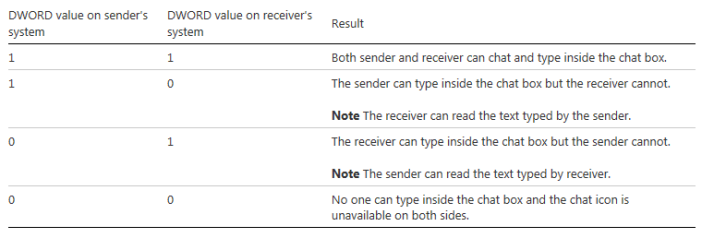
This hotfix lets an administrator disable the Chat feature in Remote Assistance (MSRA.exe) for Windows 7 Service Pack 1 (SP1) and Windows Server 2008 R2 SP1. The Chat feature at both the novice and expert sides is controlled by the following registry subkey:

Code:
HKEY_LOCAL_MACHINE\System\CurrentControlSet\Control\Remote Assistance\fEnableChatControl

The administrator can disable the Chat feature by setting the subkey to 0. After the subkey is set to 0, the user cannot type into the chat box, and the chat icon is unavailable.

More information:
To control the Chat feature, you must install this hotfix on all the systems in your environment. You can learn how to control the Chat feature in the "Registry information" section.

Registry information:
To change the functionality of the Chat feature, change the registry subkey as described in the following table.

Note: You must be an administrator to make these changes.

Applies to

  • Windows 7 Service Pack 1
  • Windows Server 2008 R2 Service Pack 1
Review and request hotfix:
http://support.microsoft.com/kb/2939399/en-us
 

Attachments

  • Capture.PNG
    Capture.PNG
    7.6 KB · Views: 1

My Computer My Computer

At a glance

Windows 7 Professional SP1 - x64 [Non-UEFI Boot]Ivy Bridge Core i5 3570K (Delidded)G.Skill "Ares" DDR3 PC3-12800 - 1600MHz (16Gb)Asus Dual-RX480-O4G
Computer type
PC/Desktop
Computer Manufacturer/Model Number
Custom Build
OS
Windows 7 Professional SP1 - x64 [Non-UEFI Boot]
CPU
Ivy Bridge Core i5 3570K (Delidded)
Motherboard
Asus P8Z77-V LE PLUS
Memory
G.Skill "Ares" DDR3 PC3-12800 - 1600MHz (16Gb)
Graphics Card(s)
Asus Dual-RX480-O4G
Sound Card
Creative Sound Blaster Z w/5.1 sound system
Monitor(s) Displays
Asus IPS 23"
Screen Resolution
16/9
Hard Drives
Internal:
500Go Sata 6Gb/s (x2)
500Go Sata 3Gb/s (x2)
SSD 60Go Sata 6Gb/s
PSU
In Win C 900W Series 80+ Platinum
Case
Thermaltake Chaser A71
Cooling
Custom Water Cooling Loop
Keyboard
Cooler Master QuickFire XTi
Mouse
Razer Imperator 2012 (4G)
Antivirus
MSE
Browser
IE 11.0.xxx Rtm
Other Info
"Raid0" with Intel Smart Response Technology (HDD/SSD)
-Article ID: 2932722 - Last Review: April 9, 2014 - Revision: 1.0
Internet Explorer stops responding when you try to save a file from a WebDAV folder.

Symptoms:
Consider the following scenario:
  • You install Internet Information Services (IIS) on a server that is running Windows Server 2008 R2 or Windows Server 2012.
  • You configure the server as a Web Distributed Authoring and Versioning (WebDAV) server.
  • You map a network drive to the WebDAV folder on a client computer that is running Windows 7 or Windows 8.
  • You start Internet Explorer 9 or Internet Explorer 10 on the client. On the Tools menu, you click View downloads, click Options, set the network drive in the Default download location box, and then click OK.
  • You access a web server from Internet Explorer 9 or Internet Explorer 10, select a file, and then click Save.
In this scenario, Internet Explorer stops responding for a while, and the file cannot be saved.

To apply this hotfix, you must be running one of the following operating systems:
  • Windows 7 Service Pack 1 (SP1)
  • Windows Server 2008 R2 Service Pack 1 (SP1)
  • Windows 8
  • Windows Server 2012
Review and request hotfix:
Internet Explorer stops responding when you try to save a file from a WebDAV folder
 

My Computer My Computer

At a glance

Windows 7 Professional SP1 - x64 [Non-UEFI Boot]Ivy Bridge Core i5 3570K (Delidded)G.Skill "Ares" DDR3 PC3-12800 - 1600MHz (16Gb)Asus Dual-RX480-O4G
Computer type
PC/Desktop
Computer Manufacturer/Model Number
Custom Build
OS
Windows 7 Professional SP1 - x64 [Non-UEFI Boot]
CPU
Ivy Bridge Core i5 3570K (Delidded)
Motherboard
Asus P8Z77-V LE PLUS
Memory
G.Skill "Ares" DDR3 PC3-12800 - 1600MHz (16Gb)
Graphics Card(s)
Asus Dual-RX480-O4G
Sound Card
Creative Sound Blaster Z w/5.1 sound system
Monitor(s) Displays
Asus IPS 23"
Screen Resolution
16/9
Hard Drives
Internal:
500Go Sata 6Gb/s (x2)
500Go Sata 3Gb/s (x2)
SSD 60Go Sata 6Gb/s
PSU
In Win C 900W Series 80+ Platinum
Case
Thermaltake Chaser A71
Cooling
Custom Water Cooling Loop
Keyboard
Cooler Master QuickFire XTi
Mouse
Razer Imperator 2012 (4G)
Antivirus
MSE
Browser
IE 11.0.xxx Rtm
Other Info
"Raid0" with Intel Smart Response Technology (HDD/SSD)
-Article ID: 2932119 - Last Review: April 10, 2014 - Revision: 1.0
Incorrect DNS queries cause unnecessary network traffic when you start GPMC or GPUpdate in Windows 7 SP1 or Windows Server 2008 R2 SP1.

Symptoms:
You have a computer that is running Windows 7 Service Pack 1 or Windows Server 2008 R2 Service Pack 1. When you start the Microsoft Group Policy Management Console (GPMC) or Group Policy Refresh (GPUpdate), some incorrect DNS queries are generated. This causes unnecessary network traffic.

Cause:
This problem occurs because queries to service location (SRV) resource records are not bypassed correctly when Group Policy APIs are called.

Review and request hotfix:
Incorrect DNS queries cause unnecessary network traffic when you start GPMC or GPUpdate in Windows 7 SP1 or Windows Server 2008 R2 SP1
 

My Computer My Computer

At a glance

Windows 7 Professional SP1 - x64 [Non-UEFI Boot]Ivy Bridge Core i5 3570K (Delidded)G.Skill "Ares" DDR3 PC3-12800 - 1600MHz (16Gb)Asus Dual-RX480-O4G
Computer type
PC/Desktop
Computer Manufacturer/Model Number
Custom Build
OS
Windows 7 Professional SP1 - x64 [Non-UEFI Boot]
CPU
Ivy Bridge Core i5 3570K (Delidded)
Motherboard
Asus P8Z77-V LE PLUS
Memory
G.Skill "Ares" DDR3 PC3-12800 - 1600MHz (16Gb)
Graphics Card(s)
Asus Dual-RX480-O4G
Sound Card
Creative Sound Blaster Z w/5.1 sound system
Monitor(s) Displays
Asus IPS 23"
Screen Resolution
16/9
Hard Drives
Internal:
500Go Sata 6Gb/s (x2)
500Go Sata 3Gb/s (x2)
SSD 60Go Sata 6Gb/s
PSU
In Win C 900W Series 80+ Platinum
Case
Thermaltake Chaser A71
Cooling
Custom Water Cooling Loop
Keyboard
Cooler Master QuickFire XTi
Mouse
Razer Imperator 2012 (4G)
Antivirus
MSE
Browser
IE 11.0.xxx Rtm
Other Info
"Raid0" with Intel Smart Response Technology (HDD/SSD)
-Article ID: 2916915 - Last Review: April 10, 2014 - Revision: 4.0
Outlook may take two to three minutes to connect to an Office 365 mailbox.

Symptoms:
Consider the following scenario:
  • You have a third-party proxy server that enables communication only over port 80.
  • You configure a computer that is running one of the following operating systems to use this proxy server for all protocols:
    • Windows 8.1
    • Windows Server 2012 R2
    • Windows 7
    • Windows Server 2008 R2
  • You configure the proxy bypass list to contain settings for internal servers.
  • You enable the Bypass proxy server for local addresses option.
  • You configure Microsoft Outlook 2010 or Microsoft Outlook 2013 to connect to the newest Microsoft Office 365 mailbox (Wave15).
  • You start Outlook 2013, and it tries to connect to Outlook.Office365.com.
In this scenario, it takes two to three minutes to obtain the initial connection.

Cause:
This problem occurs because RPC waits for the direct connection to time out before it selects the proxy server. This causes the delay.

This hotfix adds the following non-user-configurable registry key:

Registry location:
HKEY_LOCAL_MACHINE\Software\Microsoft\Rpc

DWORD name: ConnectionOptionsFlag
DWORD value: 00000001

Note: Changing this registry key will not change the RPC behavior. This key is added only to indicate the presence of a new HTTP connection option.

Note: See chapter "Resolution" for further explanations on the "How to".

Applies to

  • Windows 8.1
  • Windows 8.1 Enterprise
  • Windows 8.1 Pro
  • Windows Server 2012 R2 Datacenter
  • Windows Server 2012 R2 Essentials
  • Windows Server 2012 R2 Foundation
  • Windows Server 2012 R2 Standard
  • Windows 7 Professional
  • Windows 7 Enterprise
  • Windows 7 Ultimate
  • Windows Server 2008 R2 Datacenter
  • Windows Server 2008 R2 Enterprise
  • Windows Server 2008 R2 Foundation
  • Windows Server 2008 R2 Standard
  • Microsoft Outlook 2013
  • Microsoft Outlook 2010
Review and request hotfix:
Outlook may take two to three minutes to connect to an Office 365 mailbox
 

My Computer My Computer

At a glance

Windows 7 Professional SP1 - x64 [Non-UEFI Boot]Ivy Bridge Core i5 3570K (Delidded)G.Skill "Ares" DDR3 PC3-12800 - 1600MHz (16Gb)Asus Dual-RX480-O4G
Computer type
PC/Desktop
Computer Manufacturer/Model Number
Custom Build
OS
Windows 7 Professional SP1 - x64 [Non-UEFI Boot]
CPU
Ivy Bridge Core i5 3570K (Delidded)
Motherboard
Asus P8Z77-V LE PLUS
Memory
G.Skill "Ares" DDR3 PC3-12800 - 1600MHz (16Gb)
Graphics Card(s)
Asus Dual-RX480-O4G
Sound Card
Creative Sound Blaster Z w/5.1 sound system
Monitor(s) Displays
Asus IPS 23"
Screen Resolution
16/9
Hard Drives
Internal:
500Go Sata 6Gb/s (x2)
500Go Sata 3Gb/s (x2)
SSD 60Go Sata 6Gb/s
PSU
In Win C 900W Series 80+ Platinum
Case
Thermaltake Chaser A71
Cooling
Custom Water Cooling Loop
Keyboard
Cooler Master QuickFire XTi
Mouse
Razer Imperator 2012 (4G)
Antivirus
MSE
Browser
IE 11.0.xxx Rtm
Other Info
"Raid0" with Intel Smart Response Technology (HDD/SSD)
-Article ID: 2927111 - Last Review: April 11, 2014 - Revision: 1.0
A BITS multirange transfer of a large file fails.

Symptoms:
On a computer that is running Windows 7 Service Pack 1, a Background Intelligent Transfer Service (BITS) multirange transfer of a large file fails consistently.

A .wim image may typically be over the 4 gigabyte (GB) limitation. In this case, the download of the image through BITS fails. Additionally, the following error message is logged in the PullD.log file:

Code:
<![LOG[CPullDPResponse::ReportPackageState return value 0x00000000.]LOG]!><time="time" date="date" component="PullDP" context="" type="1" thread="4252" file="pulldpresponse.cpp:375">
<![LOG[Created FullDownload DTS job for package WKS00084, version 2]LOG]!><time="time" date="date" component="PullDP" context="" type="1" thread="4252" file="pulldppkgcontjob.cpp:634">
<![LOG[Start Download package WKS00084 version 2]LOG]!><time="time" date="date" component="PullDP" context="" type="1" thread="4308" file="pulldppkgjob.cpp:331">
<![LOG[ExecuteJob (2-InProgress) WKS00084.2 for package WKS00084, version 2]LOG]!><time="time" date="date" component="PullDP" context="" type="1" thread="4252" file="pulldppkgcontjob.cpp:179">
<![LOG[WKS00084.2, 0x0 : DownloadingData]LOG]!><time="time" date="date" component="PullDP" context="" type="1" thread="5104" file="pulldpservice.cpp:721">
<![LOG[WKS00084.2, 0x80004005 : BITS error: 'Unspecified error
' Context: 'The error occurred while the remote file was being processed.

The following error message may also be logged many times in the DataTransferService.log from the pull-distribution point:

Code:
datetime CDTSJob::HandleErrors: DTS Job '{9AA2CAA8-FFF9-466F-AB4C-F5E7DA828AF0}' BITS Job '{733409C7-C94C-4483-8BFC-7E440451FC82}' under user 'S-1-5-18' OldErrorCount 0 NewErrorCount 1 ErrorCode 0x80004005 3888 (0x0F30)

Then, after the retries are completed, you may find the following error message in the DataTransferService.log:

Code:
datetime DTS job {A810A272-FE69-4E3C-B2EF-8B4FDB533806} BITS job {C72D8837-6C8D-4A8F-9D62-4EC3804D3429} failed to download source file http://SCCM.server.com:80/SMS_DP_SMSPKG$/LAB0002D/sccm?/win8-base.wim to destination E:\SMS_DP$\LAB0002D\LAB0002D.1\win8-base.wim with error 0x80190194 3552 (0x0DE0)err 80190194
# for hex 0x80190194 / decimal -2145844844
BG_E_HTTP_ERROR_404
# 1 matches found for "80190194"

Applies to

  • Windows 7 Service Pack 1
  • Windows Server 2008 R2 Service Pack 1
Note: Might superseded the
-Article ID: 2863374 - Last Review: August 13, 2013 - Revision: 1.0
The BITS bandwidth limitation transitions are not applied to the ongoing transfers in Windows 7 Service Pack 1 or Windows Server 2008 R2 Service Pack 1


Review and request hotfix:
A BITS multirange transfer of a large file fails
 

My Computer My Computer

At a glance

Windows 7 Professional SP1 - x64 [Non-UEFI Boot]Ivy Bridge Core i5 3570K (Delidded)G.Skill "Ares" DDR3 PC3-12800 - 1600MHz (16Gb)Asus Dual-RX480-O4G
Computer type
PC/Desktop
Computer Manufacturer/Model Number
Custom Build
OS
Windows 7 Professional SP1 - x64 [Non-UEFI Boot]
CPU
Ivy Bridge Core i5 3570K (Delidded)
Motherboard
Asus P8Z77-V LE PLUS
Memory
G.Skill "Ares" DDR3 PC3-12800 - 1600MHz (16Gb)
Graphics Card(s)
Asus Dual-RX480-O4G
Sound Card
Creative Sound Blaster Z w/5.1 sound system
Monitor(s) Displays
Asus IPS 23"
Screen Resolution
16/9
Hard Drives
Internal:
500Go Sata 6Gb/s (x2)
500Go Sata 3Gb/s (x2)
SSD 60Go Sata 6Gb/s
PSU
In Win C 900W Series 80+ Platinum
Case
Thermaltake Chaser A71
Cooling
Custom Water Cooling Loop
Keyboard
Cooler Master QuickFire XTi
Mouse
Razer Imperator 2012 (4G)
Antivirus
MSE
Browser
IE 11.0.xxx Rtm
Other Info
"Raid0" with Intel Smart Response Technology (HDD/SSD)
-Article ID: 2939180 - Last Review: April 11, 2014 - Revision: 2.0
RDP session freezes when you connect to a remote virtual machine that is running Windows 7 SP1.

Symptoms:
Consider the following scenario:
  • You have a virtual machine that is running Windows 7 Service Pack 1 (SP1).
  • You install the Remote Desktop Protocol (RDP) 8.0 Host, and you enable it by using Group Policy.
  • You connect remotely to the virtual machine.
In this scenario, the remote desktop occasionally hangs, and then it recovers automatically in one of the following situations:
  • You wait for 120 seconds.
  • You minimize and then maximize the remote desktop client window.
Applies to

  • Windows 7 Service Pack 1, when used with:
    • Windows 7 Enterprise
    • Windows 7 Home Basic
    • Windows 7 Home Premium
    • Windows 7 Professional
    • Windows 7 Starter
    • Windows 7 Ultimate
Review and request hotfix:
RDP session freezes when you connect to a remote virtual machine that is running Windows 7 SP1
 

My Computer My Computer

At a glance

Windows 7 Professional SP1 - x64 [Non-UEFI Boot]Ivy Bridge Core i5 3570K (Delidded)G.Skill "Ares" DDR3 PC3-12800 - 1600MHz (16Gb)Asus Dual-RX480-O4G
Computer type
PC/Desktop
Computer Manufacturer/Model Number
Custom Build
OS
Windows 7 Professional SP1 - x64 [Non-UEFI Boot]
CPU
Ivy Bridge Core i5 3570K (Delidded)
Motherboard
Asus P8Z77-V LE PLUS
Memory
G.Skill "Ares" DDR3 PC3-12800 - 1600MHz (16Gb)
Graphics Card(s)
Asus Dual-RX480-O4G
Sound Card
Creative Sound Blaster Z w/5.1 sound system
Monitor(s) Displays
Asus IPS 23"
Screen Resolution
16/9
Hard Drives
Internal:
500Go Sata 6Gb/s (x2)
500Go Sata 3Gb/s (x2)
SSD 60Go Sata 6Gb/s
PSU
In Win C 900W Series 80+ Platinum
Case
Thermaltake Chaser A71
Cooling
Custom Water Cooling Loop
Keyboard
Cooler Master QuickFire XTi
Mouse
Razer Imperator 2012 (4G)
Antivirus
MSE
Browser
IE 11.0.xxx Rtm
Other Info
"Raid0" with Intel Smart Response Technology (HDD/SSD)
-Article ID: 2931129 - Last Review: April 21, 2014 - Revision: 2.0
"0x0000007E" Stop error on IPMIDrv!KCSRequestResponseEngine in Windows Server.

Symptoms:
On a computer that is running Windows Server 2012 R2, Windows Server 2012, or Windows Server 2008 R2, you receive a Stop error message that resembles the following:
Code:
STOP: 0x0000007E (parameter1, parameter2, parameter3, parameter4)


Notes
  • This Stop error occurs in IPMIDrv!KCSRequestResponseEngine.
  • This Stop error describes a SYSTEM_THREAD_EXCEPTION_NOT_HANDLED issue.
  • The parameters in this Stop error message vary, depending on the configuration of the computer.
  • Not all "Stop 0x0000007E" errors are caused by this issue.
Cause:
This issue occurs because the baseboard management controller generates a non-communication interrupt, and then the Intelligent Platform Management Interface (IPMI) driver sets an event for the interrupt unexpectedly.

Resolution:
To resolve this issue for Windows 8.1 and Windows Server 2012 R2, install update 2919355, or install the hotfix that is described in this article.
To resolve this issue for Windows 8 and Windows Server 2012, install update rollup 2934016, or install the hotfix that is described in this article.
To resolve this issue for Windows 7 Service Pack 1 (SP1) and Windows Server 2008 R2 SP1, install the hotfix that is described in this article.

Applies to

  • Windows Server 2012 R2 Datacenter
  • Windows Server 2012 R2 Essentials
  • Windows Server 2012 R2 Foundation
  • Windows Server 2012 R2 Standard
  • Windows 8.1 Enterprise
  • Windows 8.1
  • Windows 8.1 Pro
  • Windows 8.1 RTM
  • Windows Server 2012 Datacenter
  • Windows Server 2012 Essentials
  • Windows Server 2012 Foundation
  • Windows Server 2012 Standard
  • Windows 8 Enterprise
  • Windows 8
  • Windows 8 Pro
  • Windows Server 2008 R2 Datacenter
  • Windows Server 2008 R2 Enterprise
  • Windows Server 2008 R2 for Itanium-Based Systems
  • Windows Server 2008 R2 Foundation
  • Windows Server 2008 R2 Standard
  • Windows Web Server 2008 R2
  • Windows 7 Enterprise
  • Windows 7 Home Basic
  • Windows 7 Home Premium
  • Windows 7 Professional
  • Windows 7 Starter
  • Windows 7 Ultimate
Review and request hotfix:
"0x0000007E" Stop error on IPMIDrv!KCSRequestResponseEngine in Windows Server

Note: Might superseded the:
-Article ID: 2674913 - Last Review: March 14, 2012 - Revision: 1.1
IPMI subsystem cannot obtain power information when the BMC interrupt is enabled on a computer that is running Windows Vista, Windows Server 2008, Windows 7, or Windows Server 2008 R2. => see post: #186
 

My Computer My Computer

At a glance

Windows 7 Professional SP1 - x64 [Non-UEFI Boot]Ivy Bridge Core i5 3570K (Delidded)G.Skill "Ares" DDR3 PC3-12800 - 1600MHz (16Gb)Asus Dual-RX480-O4G
Computer type
PC/Desktop
Computer Manufacturer/Model Number
Custom Build
OS
Windows 7 Professional SP1 - x64 [Non-UEFI Boot]
CPU
Ivy Bridge Core i5 3570K (Delidded)
Motherboard
Asus P8Z77-V LE PLUS
Memory
G.Skill "Ares" DDR3 PC3-12800 - 1600MHz (16Gb)
Graphics Card(s)
Asus Dual-RX480-O4G
Sound Card
Creative Sound Blaster Z w/5.1 sound system
Monitor(s) Displays
Asus IPS 23"
Screen Resolution
16/9
Hard Drives
Internal:
500Go Sata 6Gb/s (x2)
500Go Sata 3Gb/s (x2)
SSD 60Go Sata 6Gb/s
PSU
In Win C 900W Series 80+ Platinum
Case
Thermaltake Chaser A71
Cooling
Custom Water Cooling Loop
Keyboard
Cooler Master QuickFire XTi
Mouse
Razer Imperator 2012 (4G)
Antivirus
MSE
Browser
IE 11.0.xxx Rtm
Other Info
"Raid0" with Intel Smart Response Technology (HDD/SSD)
-Article ID: 2791738 - Last Review: April 29, 2014 - Revision: 3.0
Network device has a number at the end of the device name in Windows 7, Windows 8, or Windows 8.1.

Summary:
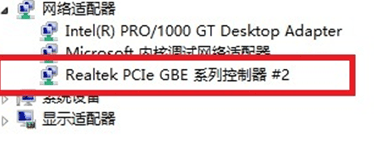
On a computer that is running Windows 8.1, Windows 8, or Windows 7, when you install, remove, and then reinstall two versions of a network driver to the same device, it can cause the device name to have a number (such as "#2" or "#3") after the name in Device Manager, even though a single device is installed.

The following picture shows an example:

(See Attached Images)

Resolution:
A hotfix is available that prevents the duplicate friendly name issue from occurring, but the hotfix must be installed before the new version of the driver is installed. The link for this hotfix is available at the following Microsoft website:

-Article ID: 2846340 - Last Review: April 21, 2014 - Revision: 6.0
Duplicate friendly names of network adapters are displayed in Windows


To apply this hotfix, you must be running one of the following operating systems:
  • Windows Vista Service Pack 2 (SP2)
  • Windows Server 2008 SP2
  • Windows 7 Service Pack 1 (SP1)
  • Windows Server 2008 R2 Service Pack 1 (SP1)
  • Windows 8
  • Windows Server 2012
Note: just above resolution hotfix does not apply to Windows 8.1 (Only the article ID: 2791738).

Infos:
This occurs because of the way that Windows builds the friendly name for the device. It does not affect the functionality of the device.

Applies to

  • Windows 8.1 Enterprise
  • Windows 8.1
  • Windows 8 Pro
  • Windows 8 Enterprise
  • Windows 8
  • Windows 7 Professional
  • Windows 7 Enterprise
Review and request hotfix:
Network device has a number at the end of the device name in Windows 7, Windows 8, or Windows 8.1
 

Attachments

  • 2791737.png
    2791737.png
    21 KB · Views: 51

My Computer My Computer

At a glance

Windows 7 Professional SP1 - x64 [Non-UEFI Boot]Ivy Bridge Core i5 3570K (Delidded)G.Skill "Ares" DDR3 PC3-12800 - 1600MHz (16Gb)Asus Dual-RX480-O4G
Computer type
PC/Desktop
Computer Manufacturer/Model Number
Custom Build
OS
Windows 7 Professional SP1 - x64 [Non-UEFI Boot]
CPU
Ivy Bridge Core i5 3570K (Delidded)
Motherboard
Asus P8Z77-V LE PLUS
Memory
G.Skill "Ares" DDR3 PC3-12800 - 1600MHz (16Gb)
Graphics Card(s)
Asus Dual-RX480-O4G
Sound Card
Creative Sound Blaster Z w/5.1 sound system
Monitor(s) Displays
Asus IPS 23"
Screen Resolution
16/9
Hard Drives
Internal:
500Go Sata 6Gb/s (x2)
500Go Sata 3Gb/s (x2)
SSD 60Go Sata 6Gb/s
PSU
In Win C 900W Series 80+ Platinum
Case
Thermaltake Chaser A71
Cooling
Custom Water Cooling Loop
Keyboard
Cooler Master QuickFire XTi
Mouse
Razer Imperator 2012 (4G)
Antivirus
MSE
Browser
IE 11.0.xxx Rtm
Other Info
"Raid0" with Intel Smart Response Technology (HDD/SSD)
Microsoft .NET Framework 4.5.2 for Windows

microsoft_logo_56x56.png

Microsoft .NET Framework 4.5.2 (Offline Installer) for Windows Vista SP2, Windows 7 SP1, Windows 8, Windows 8.1, Windows Server 2008 SP2, Windows Server 2008 R2 SP1, Windows Server 2012 and Windows Server 2012 R2.


The Microsoft .NET Framework 4.5.2 is a highly compatible, in-place update to the Microsoft .NET Framework 4, Microsoft .NET Framework 4.5 and Microsoft .NET Framework 4.5.1. The offline package can be used in situations where the web installer cannot be used due to lack of internet connectivity.

This version of the .NET Framework runs side-by-side with the .NET Framework 3.5 SP1 and earlier versions, but performs an in-place update for the .NET Framework 4, .NET Framework 4.5 and .NET Framework 4.5.1.

Download The Microsoft .NET Framework 4.5.2 (Offline Installer):
Download Microsoft .NET Framework 4.5.2 (Offline Installer) for Windows Vista SP2, Windows 7 SP1, Windows 8, Windows 8.1, Windows Server 2008 SP2, Windows Server 2008 R2 SP1, Windows Server 2012 and Windows Server 2012 R2 from Official Microsoft Down


Microsoft .NET Framework 4.5.2 Language Pack (Offline Installer) for Windows
The .NET Framework 4.5.2 Language Pack contains localized resources for supported languages.

Download The Microsoft .NET Framework 4.5.2 Language Pack (Offline Installer):
Download Microsoft .NET Framework 4.5.2 Language Pack (Offline Installer) for Windows Vista SP2, Windows 7 SP1, Windows 8, Windows 8.1, Windows Server 2008 SP2, Windows Server 2008 R2 SP1, Windows Server 2012 and Windows Server 2012 R2 from Official
 

My Computer My Computer

At a glance

Windows 7 Professional SP1 - x64 [Non-UEFI Boot]Ivy Bridge Core i5 3570K (Delidded)G.Skill "Ares" DDR3 PC3-12800 - 1600MHz (16Gb)Asus Dual-RX480-O4G
Computer type
PC/Desktop
Computer Manufacturer/Model Number
Custom Build
OS
Windows 7 Professional SP1 - x64 [Non-UEFI Boot]
CPU
Ivy Bridge Core i5 3570K (Delidded)
Motherboard
Asus P8Z77-V LE PLUS
Memory
G.Skill "Ares" DDR3 PC3-12800 - 1600MHz (16Gb)
Graphics Card(s)
Asus Dual-RX480-O4G
Sound Card
Creative Sound Blaster Z w/5.1 sound system
Monitor(s) Displays
Asus IPS 23"
Screen Resolution
16/9
Hard Drives
Internal:
500Go Sata 6Gb/s (x2)
500Go Sata 3Gb/s (x2)
SSD 60Go Sata 6Gb/s
PSU
In Win C 900W Series 80+ Platinum
Case
Thermaltake Chaser A71
Cooling
Custom Water Cooling Loop
Keyboard
Cooler Master QuickFire XTi
Mouse
Razer Imperator 2012 (4G)
Antivirus
MSE
Browser
IE 11.0.xxx Rtm
Other Info
"Raid0" with Intel Smart Response Technology (HDD/SSD)
System Update Readiness Tool for Windows 7

windows_symbol_clr_56x56.png
System Update Readiness Tool for Windows 7 for x64-based Systems (KB947821) [May 2014]

This tool is being offered because an inconsistency was found in the Windows servicing store which may prevent the successful installation of future updates, service packs, and software. This tool checks your computer for such inconsistencies and tries to resolve issues if found.

x64bits

x32bits
 

My Computer My Computer

At a glance

Windows 7 Professional SP1 - x64 [Non-UEFI Boot]Ivy Bridge Core i5 3570K (Delidded)G.Skill "Ares" DDR3 PC3-12800 - 1600MHz (16Gb)Asus Dual-RX480-O4G
Computer type
PC/Desktop
Computer Manufacturer/Model Number
Custom Build
OS
Windows 7 Professional SP1 - x64 [Non-UEFI Boot]
CPU
Ivy Bridge Core i5 3570K (Delidded)
Motherboard
Asus P8Z77-V LE PLUS
Memory
G.Skill "Ares" DDR3 PC3-12800 - 1600MHz (16Gb)
Graphics Card(s)
Asus Dual-RX480-O4G
Sound Card
Creative Sound Blaster Z w/5.1 sound system
Monitor(s) Displays
Asus IPS 23"
Screen Resolution
16/9
Hard Drives
Internal:
500Go Sata 6Gb/s (x2)
500Go Sata 3Gb/s (x2)
SSD 60Go Sata 6Gb/s
PSU
In Win C 900W Series 80+ Platinum
Case
Thermaltake Chaser A71
Cooling
Custom Water Cooling Loop
Keyboard
Cooler Master QuickFire XTi
Mouse
Razer Imperator 2012 (4G)
Antivirus
MSE
Browser
IE 11.0.xxx Rtm
Other Info
"Raid0" with Intel Smart Response Technology (HDD/SSD)
-Article ID: 2918550 - Last Review: May 8, 2014 - Revision: 3.0
Computer leaks nonpaged pool memory when IPSEC traffic is configured to use AuthIP without encryption in Windows.

Symptoms:
Assume that a Windows-based computer is configured by using a specific IP Security (IPsec) rule (AuthNoEncap - AuthIP with NULL Encryption). When the computer receives User Datagram Protocol (UDP) traffic, a nonpaged pool leak occurs. If there is a large volume of traffic, the computer may become unresponsive.


For example, you may encounter this issue in the following scenario:
  • You configure the computers in a domain to use Authenticated IP (AuthIP) only for IPsec and without encryption.
  • In the domain, a computer sends a large volume of UDP traffic to a remote computer.
In this scenario, nonpaged pool memory usage increases on the remote computer. High UDP network traffic can completely exhaust the nonpaged pool memory. This causes the remote computer to become unresponsive until it is restarted.

Note Windows-based computers that host the DNS Server role are an example of a workload susceptible to this memory leak, because they service UDP-formatted DNS queries from a large collection of unique clients. However, the issue can apply to any remote computer that receives sufficient UDP traffic.

Prerequisites: To apply this hotfix, you must be running one of the following operating systems:

  • Windows 7 Service Pack 1 (SP1)
  • Windows Server 2008 R2 Service Pack 1 (SP1)
  • Windows 8
  • Windows Server 2012
  • Windows 8.1
  • Windows Server 2012 R2
Review and request hotfix:
Computer leaks nonpaged pool memory when IPSEC traffic is configured to use AuthIP without encryption in Windows

------------------------------------------------------------------------------------------------------------

-Article ID: 2958122 - Last Review: May 13, 2014 - Revision: 1.0
NetLogon 3210 events are logged after MSA renews it password in Windows 7 SP1 and Windows Server 2008 R2 SP1.

Symptoms:
On a computer that's running Windows 7 Service Pack 1 (SP1) or Windows Server 2008 R2 SP1, the Managed Service Account (MSA) renews its password one time every 30 days. After MSA renews its password, the system starts to report NetLogon 3210 events, and the security channel connection to the domain controller is disrupted. The NetLogon 3210 events are logged in the System log, and they resemble the following:

Log Name: System
Source: NETLOGON
Date: datetime
Event ID: 3210
Task Category: None
Level: Error
Keywords: Classic
User: N/A
Computer: computer_name
Description:
This computer could not authenticate with \\computer_name, a Windows domain controller for domain domain_name, and therefore this computer might deny logon requests. This inability to authenticate might be caused by another computer on the same network using the same name or the password for this computer account is not recognized. If this message appears again, contact your system administrator.


Note To recover from this problem, you must restart the computer or restart the NetLogon service.

Applies to

  • Windows 7 Service Pack 1
  • Windows Server 2008 R2 Service Pack 1
Review and request hotfix:
NetLogon 3210 events are logged after MSA renews it password in Windows 7 SP1 and Windows Server 2008 R2 SP1

-------------------------------------------------------------------------------------------------------------

-Article ID: 2956671 - Last Review: May 13, 2014 - Revision: 1.0
High memory usage by mobsync.exe when you try to synchronize items in Windows 7.

Symptoms:
You have a computer that is running Windows 7. When you try to synchronize items that have long file names, the computer slows down, and the mobsync.exe process experiences high memory usage.

Cause:
This problem occurs because of an issue in the Client-Side Caching extension (Cscui.dll) when files have long paths.

Applies to

  • Windows 7 Enterprise
  • Windows 7 Professional
  • Windows 7 Ultimate
Review and request hotfix:
High memory usage by mobsync.exe when you try to synchronize items in Windows 7

------------------------------------------------------------------------------------------------------------

-Article ID: 2952507 - Last Review: May 13, 2014 - Revision: 1.0
"0x00000050" Stop error when you browse files by using Windows Explorer on a remote desktop in Windows 7 SP1 or Windows 8.1.

Symptoms:
Consider the following scenario:


  • You have a computer that is running Windows 7 Service Pack (SP1), Windows 2008 R2 SP1, Windows RT 8.1, Windows 8.1, or Windows Server 2012 R2.
  • You use Windows Explorer to browse files through remote desktop.
In this scenario, the operating system crashes, and you receive a Stop error message on the computer that resembles the following:


Code:
STOP: 0x00000050 ( parameter1, parameter2, parameter3, parameter4 )


Notes
  • This Stop error describes a PAGE_FAULT_IN_NONPAGED_AREA issue.
  • The parameters in this error message vary, depending on the configuration of the computer.
  • Not all "0x00000050" Stop errors are caused by this issue.
Applies to

  • Windows 8.1 Enterprise
  • Windows 8.1 Pro
  • Windows 8.1
  • Windows RT 8.1
  • Windows 7 Service Pack 1, when used with:
    • Windows 7 Enterprise
    • Windows 7 Home Basic
    • Windows 7 Professional
    • Windows 7 Home Premium
    • Windows 7 Starter
    • Windows 7 Ultimate
  • Windows Server 2008 R2 Service Pack 1, when used with:
    • Windows Server 2008 R2 Enterprise
    • Windows Server 2008 R2 Datacenter
    • Windows Server 2008 R2 for Itanium-Based Systems
    • Windows Server 2008 R2 Foundation
    • Windows Server 2008 R2 Standard
    • Windows Web Server 2008 R2
Note: just above resolution hotfix does not apply to Windows 8.1.
Refer inside this Article ID: 2952507 to the "Resolution" chapter: To resolve this issue for Windows RT 8.1, Windows 8.1, and Windows Server 2012 R2, install update rollup 2955164.


Review and request hotfix:
"0x00000050" Stop error when you browse files by using Windows Explorer on a remote desktop in Windows 7 SP1 or Windows 8.1

--------------------------------------------------------------------------------------------------------

-Article ID: 980380 - Last Review: May 14, 2014 - Revision: 3.0
Windows stops responding if SMB v1 protocol is used to access shared files.

Symptoms:
When you use Server Message Block (SMB) version 1 protocol to access some shared files by using a computer that is running Windows Server 2008 R2, Windows 7, Windows Server 2008, or Windows Vista, the computer stops responding under a heavy stress situation. Additionally, the computer does not recover until you force the computer to restart.

Cause:
This issue occurs because of a deadlock in the Mrxsmb10.sys driver.

Applies to

  • Windows 7 Enterprise
  • Windows 7 Professional
  • Windows 7 Ultimate
  • Windows Server 2008 R2 Datacenter
  • Windows Server 2008 R2 Enterprise
  • Windows Server 2008 R2 for Itanium-Based Systems
  • Windows Server 2008 R2 Foundation
  • Windows Server 2008 R2 Standard
  • Windows Vista Business
  • Windows Vista Enterprise
  • Windows Vista Home Basic
  • Windows Vista Home Premium
  • Windows Vista Starter
  • Windows Vista Ultimate
  • Windows HPC Server 2008
  • Windows Server 2008 Datacenter without Hyper-V
  • Windows Server 2008 Enterprise without Hyper-V
  • Windows Server 2008 for Itanium-Based Systems
  • Windows Server 2008 Standard without Hyper-V
  • Windows Server 2008 Datacenter
  • Windows Server 2008 Enterprise
  • Windows Server 2008 Standard
  • Windows Web Server 2008
Review and request hotfix:
http://support.microsoft.com/kb/980380/en-us
 
Last edited:

My Computer My Computer

At a glance

Windows 7 Professional SP1 - x64 [Non-UEFI Boot]Ivy Bridge Core i5 3570K (Delidded)G.Skill "Ares" DDR3 PC3-12800 - 1600MHz (16Gb)Asus Dual-RX480-O4G
Computer type
PC/Desktop
Computer Manufacturer/Model Number
Custom Build
OS
Windows 7 Professional SP1 - x64 [Non-UEFI Boot]
CPU
Ivy Bridge Core i5 3570K (Delidded)
Motherboard
Asus P8Z77-V LE PLUS
Memory
G.Skill "Ares" DDR3 PC3-12800 - 1600MHz (16Gb)
Graphics Card(s)
Asus Dual-RX480-O4G
Sound Card
Creative Sound Blaster Z w/5.1 sound system
Monitor(s) Displays
Asus IPS 23"
Screen Resolution
16/9
Hard Drives
Internal:
500Go Sata 6Gb/s (x2)
500Go Sata 3Gb/s (x2)
SSD 60Go Sata 6Gb/s
PSU
In Win C 900W Series 80+ Platinum
Case
Thermaltake Chaser A71
Cooling
Custom Water Cooling Loop
Keyboard
Cooler Master QuickFire XTi
Mouse
Razer Imperator 2012 (4G)
Antivirus
MSE
Browser
IE 11.0.xxx Rtm
Other Info
"Raid0" with Intel Smart Response Technology (HDD/SSD)
Back
Top