List of Available Hotfixes for Windows 7

This can help you to trace the errors code in the Device Manager for peripherals errors.

-Article ID: 310123 - Last Review: April 23, 2015 - Revision: 16.1
Error codes in Device Manager in Windows.

Summary:
You probably reached this article because Device Manager reported an error code, and you are not sure how to resolve it. In this article, we will help you find your error code and suggest what you might try to correct the error.

Common Resolution:
First, try any of the following common resolutions to correct the error:

1) Run an Automated Troubleshooting service
2) Update the Device Driver

Error codes in Device Manager:
If the common resolutions did not help you resolve your problem or were not available, locate your error code in the following table, and follow the recommended resolutions for that error code.
Note This table does not contain all error codes generated by Device Manager.

If these methods does not resolve your problem, unfortunately, you might have to reinstall Windows. :eek:

View More:
https://support.microsoft.com/fr-fr/kb/310123/en-us
 

My Computer My Computer

At a glance

Windows 7 Professional SP1 - x64 [Non-UEFI Boot]Ivy Bridge Core i5 3570K (Delidded)G.Skill "Ares" DDR3 PC3-12800 - 1600MHz (16Gb)Asus Dual-RX480-O4G
Computer type
PC/Desktop
Computer Manufacturer/Model Number
Custom Build
OS
Windows 7 Professional SP1 - x64 [Non-UEFI Boot]
CPU
Ivy Bridge Core i5 3570K (Delidded)
Motherboard
Asus P8Z77-V LE PLUS
Memory
G.Skill "Ares" DDR3 PC3-12800 - 1600MHz (16Gb)
Graphics Card(s)
Asus Dual-RX480-O4G
Sound Card
Creative Sound Blaster Z w/5.1 sound system
Monitor(s) Displays
Asus IPS 23"
Screen Resolution
16/9
Hard Drives
Internal:
500Go Sata 6Gb/s (x2)
500Go Sata 3Gb/s (x2)
SSD 60Go Sata 6Gb/s
PSU
In Win C 900W Series 80+ Platinum
Case
Thermaltake Chaser A71
Cooling
Custom Water Cooling Loop
Keyboard
Cooler Master QuickFire XTi
Mouse
Razer Imperator 2012 (4G)
Antivirus
MSE
Browser
IE 11.0.xxx Rtm
Other Info
"Raid0" with Intel Smart Response Technology (HDD/SSD)
-Article ID: 3045645 - Last Review: April 28, 2015 - Revision: 1.0
Update to force a UAC prompt when a customized .sdb file is created in Windows.

Summary:
This article describes an update that is available when a customized .sdb file is created in Windows 8, Windows RT, Windows Server 2012, Windows 7 Service Pack 1 (SP1), or Windows Server 2008 R2 SP1.

Applies to

  • Windows Server 2012 Datacenter
  • Windows Server 2012 Standard
  • Windows Server 2012 Essentials
  • Windows Server 2012 Foundation
  • Windows 8 Enterprise
  • Windows 8 Pro
  • Windows 8
  • Windows RT
  • Windows Server 2008 R2 Service Pack 1, when used with:
    • Windows Server 2008 R2 Datacenter
    • Windows Server 2008 R2 Enterprise
    • Windows Server 2008 R2 Standard
    • Windows Server 2008 R2 Foundation
    • Windows Server 2008 R2 for Itanium-Based Systems
  • Windows 7 Service Pack 1, when used with:
    • Windows 7 Ultimate
    • Windows 7 Enterprise
    • Windows 7 Professional
    • Windows 7 Home Premium
    • Windows 7 Home Basic
    • Windows 7 Starter
The following files are available for download from the Microsoft Download Center:
https://support.microsoft.com/fr-fr/kb/3045645

Note: Not much infos about that one above. Those .dll & sdbinst.exe are databases installation for applications compatibility files

------------------------------------------------------------------------------------------------------------

-Article ID: 3020369 - Last Review: April 28, 2015 - Revision: 2.0
Update 2819745 installation fails on a read-only domain controller (RODC) in Windows Server 2008 R2.

Symptoms:
This issue occurs when you try to upgrade to Windows Management Framework (WMF) 4.0 by installing update 2819745 on an RODC in Windows Server 2008 R2 Service Pack 1 (SP1).

Cause:
This issue occurs because the Protect object from accidental deletion option is enabled on the domain root object. Therefore, the installation of the update cannot proceed.
Applies to

  • Windows Server 2008 R2 Service Pack 1, when used with:
    • Windows Server 2008 R2 Datacenter
    • Windows Server 2008 R2 Enterprise
    • Windows Server 2008 R2 Standard
    • Windows Server 2008 R2 Foundation
    • Windows Server 2008 R2 for Itanium-Based Systems
  • Windows 7 Service Pack 1, when used with:
    • Windows 7 Ultimate
    • Windows 7 Enterprise
    • Windows 7 Professional
    • Windows 7 Home Premium
    • Windows 7 Home Basic
    • Windows 7 Starter
The following files are available for download from the Microsoft Download Center:
https://support.microsoft.com/fr-fr/kb/3020369/en-us

------------------------------------------------------------------------------------------------------------

This one might be for those that wish to upgrade to the later version of Windows (supposed to be 10).

-Article ID: 3046480 - Last Review: April 28, 2015 - Revision: 1.0
Update helps to determine whether to migrate the .NET Framework 1.1 when you upgrade Windows 8.1 or Windows 7.

This article describes an update that has effect when you upgrade Windows 8.1 or Windows 7 to a later version of Windows.

About this update:
This update enables the system to determine whether to migrate the Microsoft .NET Framework 1.1 to a later version of Windows when you upgrade from Windows 8.1 or Windows 7 to a later version of Windows. This determination is based on the usage of the .NET Framework 1.1.
Applies to

  • Windows 8.1 Enterprise
  • Windows 8.1 Pro
  • Windows 8.1
  • Windows RT 8.1
  • Windows 7 Service Pack 1, when used with:
    • Windows 7 Ultimate
    • Windows 7 Enterprise
    • Windows 7 Professional
    • Windows 7 Home Premium
    • Windows 7 Home Basic
    • Windows 7 Starter
The following files are available for download from the Microsoft Download Center:
https://support.microsoft.com/fr-fr/kb/3046480/en-us
 
Last edited:

My Computer My Computer

At a glance

Windows 7 Professional SP1 - x64 [Non-UEFI Boot]Ivy Bridge Core i5 3570K (Delidded)G.Skill "Ares" DDR3 PC3-12800 - 1600MHz (16Gb)Asus Dual-RX480-O4G
Computer type
PC/Desktop
Computer Manufacturer/Model Number
Custom Build
OS
Windows 7 Professional SP1 - x64 [Non-UEFI Boot]
CPU
Ivy Bridge Core i5 3570K (Delidded)
Motherboard
Asus P8Z77-V LE PLUS
Memory
G.Skill "Ares" DDR3 PC3-12800 - 1600MHz (16Gb)
Graphics Card(s)
Asus Dual-RX480-O4G
Sound Card
Creative Sound Blaster Z w/5.1 sound system
Monitor(s) Displays
Asus IPS 23"
Screen Resolution
16/9
Hard Drives
Internal:
500Go Sata 6Gb/s (x2)
500Go Sata 3Gb/s (x2)
SSD 60Go Sata 6Gb/s
PSU
In Win C 900W Series 80+ Platinum
Case
Thermaltake Chaser A71
Cooling
Custom Water Cooling Loop
Keyboard
Cooler Master QuickFire XTi
Mouse
Razer Imperator 2012 (4G)
Antivirus
MSE
Browser
IE 11.0.xxx Rtm
Other Info
"Raid0" with Intel Smart Response Technology (HDD/SSD)
-Article ID: 3042826 - Last Review: April 30, 2015 - Revision: 1.0
POSIX subsystem crashes when you try to create a Telnet session in Windows.

Symptoms:
Assume that a computer is running a Telnet service of subsystem for Unix-based applications in Windows 8, Windows Server 2012, Windows 7, or Windows Server 2008 R2. You establish a Telnet session on a client, and then close the Telnet session without closing the other processes that were spawned in the same Telnet session. When you try to create a new Telnet session, the Psxss.exe process crashes.

Cause:
This issue occurs because a property of the Psxss.exe process is not updated when the Telnet session is closed. Therefore, when a new session is created, the property is invalid, and it causes the crash.
Applies to

  • Windows Server 2012 Datacenter
  • Windows Server 2012 Standard
  • Windows Server 2012 Essentials
  • Windows Server 2012 Foundation
  • Windows 8 Enterprise
  • Windows 8 Pro
  • Windows 8
  • Windows Server 2008 R2 Service Pack 1, when used with:
    • Windows Server 2008 R2 Datacenter
    • Windows Server 2008 R2 Enterprise
    • Windows Server 2008 R2 Standard
    • Windows Server 2008 R2 Foundation
    • Windows Server 2008 R2 for Itanium-Based Systems
  • Windows 7 Service Pack 1, when used with:
    • Windows 7 Ultimate
    • Windows 7 Enterprise
    • Windows 7 Professional
    • Windows 7 Home Basic
    • Windows 7 Home Premium
    • Windows 7 Starter
Review and request hotfix:
https://support.microsoft.com/fr-fr/kb/3042826/en-us

---------------------------------------------------------------------------------------------------------------

-Article ID: 3062591 - Last Review: May 1, 2015 - Revision: 1.0
Microsoft security advisory: Local Administrator Password Solution (LAPS) now available: May 1, 2015.

Summary:
Microsoft is now offering the Local Administrator Password Solution (LAPS). This provides a solution to the issue of using a common local account with an identical password on every computer in a domain. LAPS resolves this issue by setting a different, random password for the common local administrator account on every computer in the domain. Domain administrators who use this solution can determine which users, such as helpdesk administrators, are authorized to read passwords.

Microsoft has released a Microsoft security advisory about this issue for IT professionals. The security advisory contains additional security-related information. To view the security advisory, go to the following Microsoft website: https://technet.microsoft.com/library/security/3062591
Applies to

  • Windows Server 2012 R2 Datacenter
  • Windows Server 2012 R2 Standard
  • Windows Server 2012 R2 Essentials
  • Windows Server 2012 R2 Foundation
  • Windows 8.1 Enterprise
  • Windows 8.1 Pro
  • Windows Server 2012 Datacenter
  • Windows Server 2012 Standard
  • Windows Server 2012 Essentials
  • Windows Server 2012 Foundation
  • Windows 8 Enterprise
  • Windows 8 Pro
  • Windows Server 2008 R2 Service Pack 1, when used with:
    • Windows Server 2008 R2 Datacenter
    • Windows Server 2008 R2 Enterprise
    • Windows Server 2008 R2 Standard
    • Windows Web Server 2008 R2
    • Windows Server 2008 R2 Foundation
  • Windows 7 Service Pack 1, when used with:
    • Windows 7 Ultimate
    • Windows 7 Enterprise
    • Windows 7 Professional
  • Windows Server 2008 Service Pack 2, when used with:
    • Windows Server 2008 Datacenter
    • Windows Server 2008 Enterprise
    • Windows Server 2008 Standard
    • Windows Web Server 2008
    • Windows Server 2008 Foundation
  • Windows Vista Service Pack 2, when used with:
    • Windows Vista Ultimate
    • Windows Vista Enterprise
    • Windows Vista Business
  • Microsoft Windows Server 2003 Service Pack 2, when used with:
    • Microsoft Windows Server 2003, Datacenter Edition (32-bit x86)
    • Microsoft Windows Server 2003, Enterprise Edition (32-bit x86)
    • Microsoft Windows Server 2003, Standard Edition (32-bit x86)
    • Microsoft Windows Server 2003, Web Edition
    • Microsoft Windows Server 2003, Datacenter x64 Edition
    • Microsoft Windows Server 2003, Enterprise x64 Edition
    • Microsoft Windows Server 2003, Standard x64 Edition
The following file is available for download from the Microsoft Download Center:
https://support.microsoft.com/fr-fr/kb/3062591/en-us
 

My Computer My Computer

At a glance

Windows 7 Professional SP1 - x64 [Non-UEFI Boot]Ivy Bridge Core i5 3570K (Delidded)G.Skill "Ares" DDR3 PC3-12800 - 1600MHz (16Gb)Asus Dual-RX480-O4G
Computer type
PC/Desktop
Computer Manufacturer/Model Number
Custom Build
OS
Windows 7 Professional SP1 - x64 [Non-UEFI Boot]
CPU
Ivy Bridge Core i5 3570K (Delidded)
Motherboard
Asus P8Z77-V LE PLUS
Memory
G.Skill "Ares" DDR3 PC3-12800 - 1600MHz (16Gb)
Graphics Card(s)
Asus Dual-RX480-O4G
Sound Card
Creative Sound Blaster Z w/5.1 sound system
Monitor(s) Displays
Asus IPS 23"
Screen Resolution
16/9
Hard Drives
Internal:
500Go Sata 6Gb/s (x2)
500Go Sata 3Gb/s (x2)
SSD 60Go Sata 6Gb/s
PSU
In Win C 900W Series 80+ Platinum
Case
Thermaltake Chaser A71
Cooling
Custom Water Cooling Loop
Keyboard
Cooler Master QuickFire XTi
Mouse
Razer Imperator 2012 (4G)
Antivirus
MSE
Browser
IE 11.0.xxx Rtm
Other Info
"Raid0" with Intel Smart Response Technology (HDD/SSD)
-Article ID: 3054251 - Last Review: May 12, 2015 - Revision: 1.0
Stop Error in Rdbss.sys and unsaved documents in Windows 7 SP1 or Windows Server 2008 R2 SP1.

Symptoms:
On a computer that is running Windows 7 Service Pack 1 (SP1) or Windows Server 2008 R2 SP1, the system crashes and you receive a Stop error in the Rdbss.sys process. Additionally, any unsaved documents are lost.

Applies to

  • Windows Server 2008 R2 Service Pack 1
  • Windows 7 Service Pack 1
Review and request hotfix:
https://support.microsoft.com/fr-fr/kb/3054251/en-us

-----------------------------------------------------------------------------------------------------------

-Article ID: 3051475 - Last Review: May 12, 2015 - Revision: 1.0
Cookies are not passed as part of a session when you make an HTTP connection in Windows 7 or Windows Server 2008 R2.

Symptoms:
When you make an HTTP connection on a Windows 7-based or Windows Server 2008 R2-based computer, cookies that are usually passed as part of the session are not included if the destination uniform resource identifier (URI) contains a period (.).

Cause:
This problem occurs because of a bug in the Windows operating system that causes the cookie not to be sent to the server through the WebIO component.

Applies to

  • Windows Server 2008 R2 Datacenter
  • Windows Server 2008 R2 Enterprise
  • Windows Server 2008 R2 Foundation
  • Windows Server 2008 R2 Standard
  • Windows 7 Enterprise
  • Windows 7 Professional
  • Windows 7 Ultimate
Review and request hotfix:
https://support.microsoft.com/fr-fr/kb/3051475/en-us

--------------------------------------------------------------------------------------------------------

-Article ID: 3042839 - Last Review: May 12, 2015 - Revision: 1.0
Mstscax.dll file leaks handles on a Remote Desktop Protocol 8.1 client in Windows 7 or Windows Server 2008 R2.

Symptoms:
Assume that you have Remote Desktop Protocol (RDP) 8.1 applied on a computer that's running Windows 7 Service Pack 1 (SP1) or Windows Server 2008 R2 SP1. When you exit the RDP connection, handles are not closed. This causes a handle leak in the Remote Desktop Active X control Mstscax.dll.

Prerequisites To apply this hotfix, you must have the following installed:
- Service Pack 1 for Windows 7 or Windows Server 2008 R2
- Update 2830477
Applies to

  • Windows Server 2008 R2 Service Pack 1, when used with:
    • Windows Server 2008 R2 Enterprise
    • Windows Server 2008 R2 Standard
  • Windows 7 Service Pack 1, when used with:
    • Windows 7 Enterprise
    • Windows 7 Professional
    • Windows 7 Ultimate
Review and request hotfix:
https://support.microsoft.com/fr-fr/kb/3042839/en-us
 

My Computer My Computer

At a glance

Windows 7 Professional SP1 - x64 [Non-UEFI Boot]Ivy Bridge Core i5 3570K (Delidded)G.Skill "Ares" DDR3 PC3-12800 - 1600MHz (16Gb)Asus Dual-RX480-O4G
Computer type
PC/Desktop
Computer Manufacturer/Model Number
Custom Build
OS
Windows 7 Professional SP1 - x64 [Non-UEFI Boot]
CPU
Ivy Bridge Core i5 3570K (Delidded)
Motherboard
Asus P8Z77-V LE PLUS
Memory
G.Skill "Ares" DDR3 PC3-12800 - 1600MHz (16Gb)
Graphics Card(s)
Asus Dual-RX480-O4G
Sound Card
Creative Sound Blaster Z w/5.1 sound system
Monitor(s) Displays
Asus IPS 23"
Screen Resolution
16/9
Hard Drives
Internal:
500Go Sata 6Gb/s (x2)
500Go Sata 3Gb/s (x2)
SSD 60Go Sata 6Gb/s
PSU
In Win C 900W Series 80+ Platinum
Case
Thermaltake Chaser A71
Cooling
Custom Water Cooling Loop
Keyboard
Cooler Master QuickFire XTi
Mouse
Razer Imperator 2012 (4G)
Antivirus
MSE
Browser
IE 11.0.xxx Rtm
Other Info
"Raid0" with Intel Smart Response Technology (HDD/SSD)
-Article ID: 3056066 - Last Review: May 12, 2015 - Revision: 1.0
Backups fail for VMs with pre-existing software snapshots that use shadow storage set to a different drive in Windows 7 and Windows Server 2008 R2.

Symptoms:
Consider the following scenario:
  • You have virtual machines (VMs) that use the Volume Shadow Copy Service (VSS) together with a hardware-based shadow copy provider.
  • The VMs have pre-existing software snapshots that use shadow storage.
  • The shadow storage for these snapshots is set to a different drive.
  • You take a quiesced snapshot of the VM.
In this scenario, the backup process stops responding for several minutes. This causes the whole VM to stop responding. Therefore, backup failures might occur.
Applies to

  • Windows Server 2008 R2 Datacenter
  • Windows Server 2008 R2 Enterprise
  • Windows Server 2008 R2 Foundation
  • Windows Server 2008 R2 Standard
  • Windows 7 Enterprise
  • Windows 7 Professional
  • Windows 7 Ultimate
Review and request hotfix:
https://support.microsoft.com/fr-fr/kb/3056066/en-us

-----------------------------------------------------------------------------------------------------------

-Article ID: 2672277 - Last Review: May 12, 2015 - Revision: 2.0
Some services are preloaded unexpectedly on an IIS 7.5 server in Windows.

Symptoms:
Consider the following scenario:
  • You install the Windows Server AppFabric feature on an Internet Information Services (IIS) 7.5 server that is running Windows 8.1, Windows Server 2012 R2, Windows 7 service Pack 1 (SP1), or Windows Server 2008 R2 SP1.
  • You create a website, and then you add multiple applications to the website.
  • These applications are running under different application pools.
  • You enable the auto-start feature for different services in these applications.
  • You deploy a new service to run under the same website. Or, you restart an existing service.
In this scenario, all the services in these applications are preloaded in all the application pools. The expected behavior is that the services are isolated to their specific application pools.

For example, you create a website that is named MySite on an IIS 7.5 server. MySite includes two applications, which are named App1 and App2. MySite and App1 run in an application pool that is named AppPool1. App2 runs in an application pool that is named AppPool2. In App1, you enable the auto-start feature for a service that is named service_App1. In App2, you enable the auto-start feature for a service that is named service_App2. When you deploy a new service_App3 in application App3, and then run the service in application pool AppPool3, service_App1 and service_App2 are also loaded in the application pool AppPool3. However, only service_App3 should be loaded.

Cause:
This issue occurs because of an error in the W3wphost.dll file. This error causes services to be preloaded in multiple application pools after a configuration change.
Applies to

  • Microsoft Internet Information Services 7.5
  • Windows Server 2012 R2 Datacenter
  • Windows Server 2012 R2 Essentials
  • Windows Server 2012 R2 Standard
  • Windows Server 2012 R2 Foundation
  • Windows 8.1 Enterprise
  • Windows 8.1 Pro
  • Windows 8.1
  • Windows Server 2008 R2 Service Pack 1, when used with:
    • Windows Server 2008 R2 Standard
    • Windows Server 2008 R2 Enterprise
    • Windows Server 2008 R2 Datacenter
    • Windows Server 2008 R2 for Itanium-Based Systems
  • Windows 7 Service Pack 1, when used with:
    • Windows 7 Professional
    • Windows 7 Enterprise
    • Windows 7 Ultimate
Review and request hotfix:
https://support.microsoft.com/fr-fr/kb/2672277/en-us
 

My Computer My Computer

At a glance

Windows 7 Professional SP1 - x64 [Non-UEFI Boot]Ivy Bridge Core i5 3570K (Delidded)G.Skill "Ares" DDR3 PC3-12800 - 1600MHz (16Gb)Asus Dual-RX480-O4G
Computer type
PC/Desktop
Computer Manufacturer/Model Number
Custom Build
OS
Windows 7 Professional SP1 - x64 [Non-UEFI Boot]
CPU
Ivy Bridge Core i5 3570K (Delidded)
Motherboard
Asus P8Z77-V LE PLUS
Memory
G.Skill "Ares" DDR3 PC3-12800 - 1600MHz (16Gb)
Graphics Card(s)
Asus Dual-RX480-O4G
Sound Card
Creative Sound Blaster Z w/5.1 sound system
Monitor(s) Displays
Asus IPS 23"
Screen Resolution
16/9
Hard Drives
Internal:
500Go Sata 6Gb/s (x2)
500Go Sata 3Gb/s (x2)
SSD 60Go Sata 6Gb/s
PSU
In Win C 900W Series 80+ Platinum
Case
Thermaltake Chaser A71
Cooling
Custom Water Cooling Loop
Keyboard
Cooler Master QuickFire XTi
Mouse
Razer Imperator 2012 (4G)
Antivirus
MSE
Browser
IE 11.0.xxx Rtm
Other Info
"Raid0" with Intel Smart Response Technology (HDD/SSD)
Article ID: 3042058 - Last Review: May 12, 2015 - Revision: 1.0
Microsoft security advisory: Update to default cipher suite priority order: May 12, 2015

Summary:
Microsoft has released a Microsoft security advisory about this issue for IT professionals. The security advisory contains additional security-related information. To view the security advisory, visit the following Microsoft website: https://technet.microsoft.com/library/security/3042058


More information:

To configure the SSL Cipher Suite Order Group Policy setting

  1. At a command prompt, type gpedit.msc, and then press Enter. The Local Group Policy Editor is displayed.
  2. Expand Computer Configuration, expand Administrative Templates, expand Network, and then click SSL Configuration Settings.
  3. Under SSL Configuration Settings, click SSL Cipher Suite Order.
  4. In the SSL Cipher Suite Order pane, scroll to the bottom.
  5. Follow the instructions that are labeled How to modify this setting.
Notes
  • You have to restart the computer after you change this setting for the changes to take effect.
  • The list of cipher suites is limited to 1,023 characters.
  • Using Group Policy as described here is the supported method of updating the cipher suite priority ordering. Updating the registry settings for the default priority ordering is not supported. If you change these registry settings, this update will reset them to the default settings.
See Prerequisites that apply to Windows 8, Windows 8.1,Windows Server 2012 R2.

Note Windows 7 users should also install update ID: 3020369
Applies to


  • Windows Server 2012 R2 Datacenter
  • Windows Server 2012 R2 Standard
  • Windows Server 2012 R2 Essentials
  • Windows Server 2012 R2 Foundation
  • Windows 8.1 Enterprise
  • Windows 8.1 Pro
  • Windows 8.1
  • Windows RT 8.1
  • Windows Server 2012 Datacenter
  • Windows Server 2012 Standard
  • Windows Server 2012 Essentials
  • Windows Server 2012 Foundation
  • Windows 8 Enterprise
  • Windows 8 Pro
  • Windows 8
  • Windows RT
  • Windows Server 2008 R2 Service Pack 1
  • Windows 7 Service Pack 1

Review:
https://support.microsoft.com/fr-fr/kb/3042058/en-us


------------------------------------------------------------------------------------------------------------

-Article ID: 3020338 - Last Review: May 15, 2015 - Revision: 2.0
Application does not work correctly after you apply update 3006226 in Windows.

Symptoms:
After you apply update 3006226, an application that calls the SafeArrayRedim function does not work correctly.

This issue occurs in Windows Server 2012 R2, Windows 8.1, Windows RT 8.1, Windows Server 2012, Windows 8, Windows RT, Windows Server 2008 R2 Service Pack 1 (SP1), Windows 7 SP1, Windows Embedded Standard 7 SP1, Windows Server 2008 Service Pack 2 (SP2), Windows Vista SP2, or Windows Server 2003 SP2. You can resolve this issue by using the update or hotfix in this article. Before you install this update or hotfix, check out the prerequisites section.

Cause:
This issue occurs because update 3006226 (November 11, 2014) does not correctly change the lower bound of an array to the requested value if the number of elements is unchanged.


To resolve this issue, we have released an update through Windows Update and Microsoft Download Center. We also have released a hotfix for Windows Server 2012 R2, Windows 8.1, Windows RT 8.1, Windows Server 2012, Windows 8, Windows RT, Windows Server 2008 R2, Windows 7, and Windows Embedded Standard 7 (See Methods 1, 2, & 3).

Applies to

  • Windows Server 2012 R2 Datacenter
  • Windows Server 2012 R2 Standard
  • Windows Server 2012 R2 Essentials
  • Windows Server 2012 R2 Foundation
  • Windows 8.1 Enterprise
  • Windows 8.1 Pro
  • Windows 8.1
  • Windows RT 8.1
  • Windows Server 2012 Datacenter
  • Windows Server 2012 Standard
  • Windows Server 2012 Essentials
  • Windows Server 2012 Foundation
  • Windows 8 Enterprise
  • Windows 8 Pro
  • Windows 8
  • Windows RT
  • Windows Server 2008 R2 Service Pack 1, when used with:
    • Windows Server 2008 R2 Datacenter
    • Windows Server 2008 R2 Enterprise
    • Windows Server 2008 R2 Standard
    • Windows Server 2008 R2 Foundation
    • Windows Server 2008 R2 for Itanium-Based Systems
  • Windows 7 Service Pack 1, when used with:
    • Windows 7 Ultimate
    • Windows 7 Enterprise
    • Windows 7 Professional
    • Windows 7 Home Premium
    • Windows 7 Home Basic
    • Windows 7 Starter
  • Windows Embedded Standard 7 Service Pack 1
  • Windows Server 2008 Service Pack 2, when used with:
    • Windows Server 2008 Datacenter
    • Windows Server 2008 Enterprise
    • Windows Server 2008 Foundation
    • Windows Server 2008 Standard
    • Windows Server 2008 for Itanium-Based Systems
  • Windows Vista Service Pack 2, when used with:
    • Windows Vista Ultimate
    • Windows Vista Enterprise
    • Windows Vista Business
    • Windows Vista Home Premium
    • Windows Vista Home Basic
    • Windows Vista Starter
  • Microsoft Windows Server 2003 Service Pack 2, when used with:
    • Microsoft Windows Server 2003, Datacenter x64 Edition
    • Microsoft Windows Server 2003, Datacenter Edition (32-bit x86)
    • Microsoft Windows Server 2003, Datacenter Edition for Itanium-Based Systems
    • Microsoft Windows Server 2003, Enterprise x64 Edition
    • Microsoft Windows Server 2003, Enterprise Edition (32-bit x86)
    • Microsoft Windows Server 2003, Enterprise Edition for Itanium-based Systems
    • Microsoft Windows Server 2003, Standard x64 Edition
    • Microsoft Windows Server 2003, Standard Edition (32-bit x86)
Review and request hotfix or at Microsoft download Center:
https://support.microsoft.com/fr-fr/kb/3020338/en-us

Note: Some Operating System might already have this update since it also came with WU.

------------------------------------------------------------------------------------------------------

-Article ID: 3051658 - Last Review: May 15, 2015 - Revision: 1.0
You cannot add other users to access an encrypted file in Windows.

This article describes an issue that occurs when you share an encrypted file with another user in Windows RT 8.1, Windows 8.1, Windows Server 2012 R2, Windows 7 Service Pack 1 (SP1), or Windows Server 2008 R2 SP1.
Applies to

  • Windows Server 2012 R2 Datacenter
  • Windows Server 2012 R2 Standard
  • Windows Server 2012 R2 Essentials
  • Windows Server 2012 R2 Foundation
  • Windows 8.1 Enterprise
  • Windows 8.1 Pro
  • Windows 8.1
  • Windows RT 8.1
  • Windows Server 2008 R2 Service Pack 1, when used with:
    • Windows Server 2008 R2 Datacenter
    • Windows Server 2008 R2 Enterprise
    • Windows Server 2008 R2 Standard
    • Windows Server 2008 R2 Foundation
    • Windows Server 2008 R2 for Itanium-Based Systems
  • Windows 7 Service Pack 1, when used with:
    • Windows 7 Ultimate
    • Windows 7 Enterprise
    • Windows 7 Professional
    • Windows 7 Home Premium
    • Windows 7 Home Basic
    • Windows 7 Starter
Review and request hotfix:
https://support.microsoft.com/fr-fr/kb/3051658/en-us

 
Last edited:

My Computer My Computer

At a glance

Windows 7 Professional SP1 - x64 [Non-UEFI Boot]Ivy Bridge Core i5 3570K (Delidded)G.Skill "Ares" DDR3 PC3-12800 - 1600MHz (16Gb)Asus Dual-RX480-O4G
Computer type
PC/Desktop
Computer Manufacturer/Model Number
Custom Build
OS
Windows 7 Professional SP1 - x64 [Non-UEFI Boot]
CPU
Ivy Bridge Core i5 3570K (Delidded)
Motherboard
Asus P8Z77-V LE PLUS
Memory
G.Skill "Ares" DDR3 PC3-12800 - 1600MHz (16Gb)
Graphics Card(s)
Asus Dual-RX480-O4G
Sound Card
Creative Sound Blaster Z w/5.1 sound system
Monitor(s) Displays
Asus IPS 23"
Screen Resolution
16/9
Hard Drives
Internal:
500Go Sata 6Gb/s (x2)
500Go Sata 3Gb/s (x2)
SSD 60Go Sata 6Gb/s
PSU
In Win C 900W Series 80+ Platinum
Case
Thermaltake Chaser A71
Cooling
Custom Water Cooling Loop
Keyboard
Cooler Master QuickFire XTi
Mouse
Razer Imperator 2012 (4G)
Antivirus
MSE
Browser
IE 11.0.xxx Rtm
Other Info
"Raid0" with Intel Smart Response Technology (HDD/SSD)
-Article ID: 3029432 - Last Review: May 19, 2015 - Revision: 2.0
The logon process for new users takes significantly longer as the number of user profiles increases in Windows.

Symptoms:

Consider the following scenario:
  • You have a Windows Server 2012 R2 or Windows Server 2008 R2-based domain environment that contains Windows 8.1 or Windows 7 domain clients.
  • The Windows 8.1 or Windows 7 domain clients have two disk drives. They are Drive C and Drive D.
  • There are more than 500 users in the organizational unit (OU) on the Active Directory domain.
  • There is a Group Policy setting for the users in the OU to redirect certain folders as follows:
    • The Downloads folder is redirected to D:\Users\%USERNAME%\Downloads.
    • The Music folder is redirected to D:\Users\%USERNAME%\Music.
    • The Pictures folder is redirected to D:\Users\%USERNAME%\Pictures.
    • The Videos folder is redirected to D:\Users\%USERNAME%\Videos.
  • There is no problem for these users to apply such a Group Policy setting.
  • Some new Active Directory users are created in the same OU.
In this scenario, as the number of user profiles increases, the logon process for new users takes significantly longer. For example, the logon process may take as long as 6 hours.

To resolve this issue, we have released an update through Windows Update and Microsoft Download Center for Windows 8.1 and Windows Server 2012 R2. And we also have released a hotfix for Windows 7 and Windows Server 2008 R2.

Method 3: Hotfix package for Windows 7 and Windows Server 2008 R2.

Applies to

  • Windows Server 2012 R2 Datacenter
  • Windows Server 2012 R2 Standard
  • Windows Server 2012 R2 Essentials
  • Windows Server 2012 R2 Foundation
  • Windows 8.1 Enterprise
  • Windows 8.1 Pro
  • Windows 8.1
  • Windows RT 8.1
  • Windows Server 2008 R2 Service Pack 1, when used with:
    • Windows Server 2008 R2 Datacenter
    • Windows Server 2008 R2 Enterprise
    • Windows Server 2008 R2 Standard
    • Windows Server 2008 R2 Foundation
  • Windows 7 Service Pack 1, when used with:
    • Windows 7 Ultimate
    • Windows 7 Enterprise
    • Windows 7 Professional
    • Windows 7 Home Premium
    • Windows 7 Home Basic
    • Windows 7 Starter
Review and request hotfix:
https://support.microsoft.com/fr-fr/kb/3029432/en-us
 

My Computer My Computer

At a glance

Windows 7 Professional SP1 - x64 [Non-UEFI Boot]Ivy Bridge Core i5 3570K (Delidded)G.Skill "Ares" DDR3 PC3-12800 - 1600MHz (16Gb)Asus Dual-RX480-O4G
Computer type
PC/Desktop
Computer Manufacturer/Model Number
Custom Build
OS
Windows 7 Professional SP1 - x64 [Non-UEFI Boot]
CPU
Ivy Bridge Core i5 3570K (Delidded)
Motherboard
Asus P8Z77-V LE PLUS
Memory
G.Skill "Ares" DDR3 PC3-12800 - 1600MHz (16Gb)
Graphics Card(s)
Asus Dual-RX480-O4G
Sound Card
Creative Sound Blaster Z w/5.1 sound system
Monitor(s) Displays
Asus IPS 23"
Screen Resolution
16/9
Hard Drives
Internal:
500Go Sata 6Gb/s (x2)
500Go Sata 3Gb/s (x2)
SSD 60Go Sata 6Gb/s
PSU
In Win C 900W Series 80+ Platinum
Case
Thermaltake Chaser A71
Cooling
Custom Water Cooling Loop
Keyboard
Cooler Master QuickFire XTi
Mouse
Razer Imperator 2012 (4G)
Antivirus
MSE
Browser
IE 11.0.xxx Rtm
Other Info
"Raid0" with Intel Smart Response Technology (HDD/SSD)
-Article ID: 3065979 - Last Review: May 21, 2015 - Revision: 1.0
"GsDraw error (1): GenericError" error occurs and application crashes when you create text outline in Windows.

Symptoms:
This issue occurs after you install security update 3045171 (patch Tuesday May 12, 2015). You experience a crash when you use Windows GDI+ to create text outline-based path objects on a computer that is running Windows 7 Service Pack 1 (SP1) or an earlier version of Windows.
Applies to

  • Windows Server 2008 R2 Service Pack 1, when used with:
    • Windows Server 2008 R2 Datacenter
    • Windows Server 2008 R2 Enterprise
    • Windows Server 2008 R2 Standard
    • Windows Server 2008 R2 Foundation
    • Windows Server 2008 R2 for Itanium-Based Systems
  • Windows 7 Service Pack 1, when used with:
    • Windows 7 Ultimate
    • Windows 7 Enterprise
    • Windows 7 Professional
    • Windows 7 Home Premium
    • Windows 7 Home Basic
    • Windows 7 Starter
  • Windows Embedded Standard 7
  • Windows Vista Service Pack 2, when used with:
    • Windows Vista Ultimate
    • Windows Vista Enterprise
    • Windows Vista Business
    • Windows Vista Home Premium
    • Windows Vista Home Basic
    • Windows Vista Starter
  • Microsoft Windows Server 2003 Service Pack 2
  • Microsoft Windows Server 2003, Datacenter Edition (32-bit x86)
  • Microsoft Windows Server 2003, Enterprise Edition (32-bit x86)
  • Microsoft Windows Server 2003, Standard Edition (32-bit x86)
  • Microsoft Windows Server 2003, Web Edition
  • Microsoft Windows Server 2003, Datacenter x64 Edition
  • Microsoft Windows Server 2003, Enterprise x64 Edition
  • Microsoft Windows Server 2003, Standard x64 Edition
  • Microsoft Windows Server 2003, Datacenter Edition for Itanium-Based Systems
  • Microsoft Windows Server 2003, Enterprise Edition for Itanium-based Systems
The following files are available for download from the Microsoft Download Center:
https://support.microsoft.com/fr-fr/kb/3065979/en-us
 

My Computer My Computer

At a glance

Windows 7 Professional SP1 - x64 [Non-UEFI Boot]Ivy Bridge Core i5 3570K (Delidded)G.Skill "Ares" DDR3 PC3-12800 - 1600MHz (16Gb)Asus Dual-RX480-O4G
Computer type
PC/Desktop
Computer Manufacturer/Model Number
Custom Build
OS
Windows 7 Professional SP1 - x64 [Non-UEFI Boot]
CPU
Ivy Bridge Core i5 3570K (Delidded)
Motherboard
Asus P8Z77-V LE PLUS
Memory
G.Skill "Ares" DDR3 PC3-12800 - 1600MHz (16Gb)
Graphics Card(s)
Asus Dual-RX480-O4G
Sound Card
Creative Sound Blaster Z w/5.1 sound system
Monitor(s) Displays
Asus IPS 23"
Screen Resolution
16/9
Hard Drives
Internal:
500Go Sata 6Gb/s (x2)
500Go Sata 3Gb/s (x2)
SSD 60Go Sata 6Gb/s
PSU
In Win C 900W Series 80+ Platinum
Case
Thermaltake Chaser A71
Cooling
Custom Water Cooling Loop
Keyboard
Cooler Master QuickFire XTi
Mouse
Razer Imperator 2012 (4G)
Antivirus
MSE
Browser
IE 11.0.xxx Rtm
Other Info
"Raid0" with Intel Smart Response Technology (HDD/SSD)
-Article ID: 3066710 - Last Review: May 21, 2015 - Revision: 1.0
2015 - Egypt DST changes - hotfix.

This article describes a hotfix that corrects the daylight saving time (DST) setting for Egypt in 2015.

Summary:
In 2014, Microsoft provided a Fix it solution to adjust the DST setting for Egypt to accommodate the observance of Ramadan. However, after that Fix it is applied, the DST settings for Egypt might not be correct on some systems. This hotfix corrects this setting where it is necessary.

Applies to

  • Windows Server 2012 R2 Datacenter
  • Windows Server 2012 R2 Standard
  • Windows Server 2012 R2 Foundation
  • Windows 8.1 Enterprise
  • Windows 8.1 Pro
  • Windows 8.1
  • Windows Server 2012 Datacenter
  • Windows Server 2012 Standard
  • Windows Server 2012 Essentials
  • Windows Server 2012 Foundation
  • Windows 8 Enterprise
  • Windows 8 Pro
  • Windows 8
  • Windows Server 2008 R2 Datacenter
  • Windows Server 2008 R2 Enterprise
  • Windows Server 2008 R2 Standard
  • Windows Server 2008 R2 Foundation
  • Windows 7 Enterprise
  • Windows 7 Ultimate
  • Windows 7 Professional
  • Windows 7 Home Premium
  • Windows 7 Home Basic
  • Windows 7 Starter
  • Windows Server 2008 Datacenter
  • Windows Server 2008 Enterprise
  • Windows Server 2008 Standard
  • Windows Server 2008 Foundation
  • Windows Vista Enterprise
  • Windows Vista Ultimate
  • Windows Vista Business
  • Windows Vista Home Premium
  • Windows Vista Home Basic
  • Windows Vista Starter
  • Microsoft Windows Server 2003 R2 Datacenter Edition (32-Bit x86)
  • Microsoft Windows Server 2003 R2 Datacenter x64 Edition
  • Microsoft Windows Server 2003 R2 Enterprise Edition (32-Bit x86)
  • Microsoft Windows Server 2003 R2 Enterprise x64 Edition
  • Microsoft Windows Server 2003 R2 Standard Edition (32-bit x86)
  • Microsoft Windows Server 2003 R2 Standard x64 Edition
  • Microsoft Windows Server 2003, Datacenter Edition (32-bit x86)
  • Microsoft Windows Server 2003, Datacenter x64 Edition
  • Microsoft Windows Server 2003, Enterprise Edition (32-bit x86)
  • Microsoft Windows Server 2003, Enterprise x64 Edition
  • Microsoft Windows Server 2003, Standard Edition (32-bit x86)
  • Microsoft Windows Server 2003, Standard x64 Edition
Review and request hotfix:
https://support.microsoft.com/fr-fr/kb/3066710/en-us
 

My Computer My Computer

At a glance

Windows 7 Professional SP1 - x64 [Non-UEFI Boot]Ivy Bridge Core i5 3570K (Delidded)G.Skill "Ares" DDR3 PC3-12800 - 1600MHz (16Gb)Asus Dual-RX480-O4G
Computer type
PC/Desktop
Computer Manufacturer/Model Number
Custom Build
OS
Windows 7 Professional SP1 - x64 [Non-UEFI Boot]
CPU
Ivy Bridge Core i5 3570K (Delidded)
Motherboard
Asus P8Z77-V LE PLUS
Memory
G.Skill "Ares" DDR3 PC3-12800 - 1600MHz (16Gb)
Graphics Card(s)
Asus Dual-RX480-O4G
Sound Card
Creative Sound Blaster Z w/5.1 sound system
Monitor(s) Displays
Asus IPS 23"
Screen Resolution
16/9
Hard Drives
Internal:
500Go Sata 6Gb/s (x2)
500Go Sata 3Gb/s (x2)
SSD 60Go Sata 6Gb/s
PSU
In Win C 900W Series 80+ Platinum
Case
Thermaltake Chaser A71
Cooling
Custom Water Cooling Loop
Keyboard
Cooler Master QuickFire XTi
Mouse
Razer Imperator 2012 (4G)
Antivirus
MSE
Browser
IE 11.0.xxx Rtm
Other Info
"Raid0" with Intel Smart Response Technology (HDD/SSD)
-Article ID: 3009986 - Last Review: June 9, 2015 - Revision: 1.0
A copy or move operation is unsuccessful if a symbolic link is included in Windows 7 or Windows Server 2008 R2.

Symptoms:
When you try to copy or move items in Windows 7 or Windows Server 2008 R2, the operation is unsuccessful if a symbolic link is included. Additionally, you receive an error message that resembles the following:
There is not enough space on location. You need an additional n.nn MB to copy these files.

Note In this error message, location represents the actual target drive and n.nn represents the actual indicated size in megabytes of required space.
Applies to

  • Windows Server 2008 R2 Datacenter
  • Windows Server 2008 R2 Enterprise
  • Windows Server 2008 R2 Standard
  • Windows 7 Enterprise
  • Windows 7 Professional
  • Windows 7 Ultimate
Review and request hotfix:
https://support.microsoft.com/fr-fr/kb/3009986/en-us
 

My Computer My Computer

At a glance

Windows 7 Professional SP1 - x64 [Non-UEFI Boot]Ivy Bridge Core i5 3570K (Delidded)G.Skill "Ares" DDR3 PC3-12800 - 1600MHz (16Gb)Asus Dual-RX480-O4G
Computer type
PC/Desktop
Computer Manufacturer/Model Number
Custom Build
OS
Windows 7 Professional SP1 - x64 [Non-UEFI Boot]
CPU
Ivy Bridge Core i5 3570K (Delidded)
Motherboard
Asus P8Z77-V LE PLUS
Memory
G.Skill "Ares" DDR3 PC3-12800 - 1600MHz (16Gb)
Graphics Card(s)
Asus Dual-RX480-O4G
Sound Card
Creative Sound Blaster Z w/5.1 sound system
Monitor(s) Displays
Asus IPS 23"
Screen Resolution
16/9
Hard Drives
Internal:
500Go Sata 6Gb/s (x2)
500Go Sata 3Gb/s (x2)
SSD 60Go Sata 6Gb/s
PSU
In Win C 900W Series 80+ Platinum
Case
Thermaltake Chaser A71
Cooling
Custom Water Cooling Loop
Keyboard
Cooler Master QuickFire XTi
Mouse
Razer Imperator 2012 (4G)
Antivirus
MSE
Browser
IE 11.0.xxx Rtm
Other Info
"Raid0" with Intel Smart Response Technology (HDD/SSD)
-Article ID: 3063060 - Last Review: June 9, 2015 - Revision: 1.0
Network connectivity dropped when time is adjusted on a DHCP client that is running Windows 7 SP1 or Windows Server 2008 R2 SP1.

Symptoms:
Consider the following scenario:
  • You have Dynamic Host Configuration Protocol (DHCP) installed on a server that is running Windows Server 2008 R2 Service Pack 1 (SP1).
  • You have the DHCP server configured to use the Active Scope option. Also, the lease time is set to five minutes.
  • You install update 2459530 on a Windows 7 SP1 DHCP client and connect it to the same subnet as the DHCP server.
  • You force a time jump of more than five minutes in the future on the DHCP client.
  • You wait several minutes until the current lease is considered to be expired.

  • In this scenario, you notice that network connectivity is lost for at least five minutes.
Applies to

  • Windows 7 Service Pack 1
Review and request hotfix:
https://support.microsoft.com/fr-fr/kb/3063060/en-us

----------------------------------------------------------------------------------------------------------

-Article ID: 3060738 - Last Review: June 9, 2015 - Revision: 1.0
Significant delays occur when obtaining data from Active Directory in Excel 2013 on a computer that is running Windows 7.

Symptoms:
On a computer that is running Windows 7, you run a macro in Microsoft Excel 2013 to use the Active Directory provider to retrieve data from an Active Directory database. In this situation, significant delays occur when you obtain the data.

Cause:
This problem occurs because of a because of a performance issue in the Lightweight Directory Access Protocol (LDAP) Schema Parser.
Applies to

  • Windows 7 Enterprise
  • Windows 7 Professional
  • Windows 7 Ultimate
Review and request hotfix:
https://support.microsoft.com/fr-fr/kb/3060738/en-us
 

My Computer My Computer

At a glance

Windows 7 Professional SP1 - x64 [Non-UEFI Boot]Ivy Bridge Core i5 3570K (Delidded)G.Skill "Ares" DDR3 PC3-12800 - 1600MHz (16Gb)Asus Dual-RX480-O4G
Computer type
PC/Desktop
Computer Manufacturer/Model Number
Custom Build
OS
Windows 7 Professional SP1 - x64 [Non-UEFI Boot]
CPU
Ivy Bridge Core i5 3570K (Delidded)
Motherboard
Asus P8Z77-V LE PLUS
Memory
G.Skill "Ares" DDR3 PC3-12800 - 1600MHz (16Gb)
Graphics Card(s)
Asus Dual-RX480-O4G
Sound Card
Creative Sound Blaster Z w/5.1 sound system
Monitor(s) Displays
Asus IPS 23"
Screen Resolution
16/9
Hard Drives
Internal:
500Go Sata 6Gb/s (x2)
500Go Sata 3Gb/s (x2)
SSD 60Go Sata 6Gb/s
PSU
In Win C 900W Series 80+ Platinum
Case
Thermaltake Chaser A71
Cooling
Custom Water Cooling Loop
Keyboard
Cooler Master QuickFire XTi
Mouse
Razer Imperator 2012 (4G)
Antivirus
MSE
Browser
IE 11.0.xxx Rtm
Other Info
"Raid0" with Intel Smart Response Technology (HDD/SSD)
-Article ID: 3062741 - Last Review: June 19, 2015 - Revision: 5.0
2015 - Morocco Ramadan DST changes – end date hotfix

Summary:
As it did in 2014, Morocco is temporarily transitioning out of DST for the observation of Ramadan in 2015.

To do this, the DST period is suspended during the Muslim month of Ramadan (03:00 on Sunday, June 14, 2015 to 02:00 on Sunday July 19, 2015, in the Gregorian calendar).

During this period, clocks will be turned back to Standard Time. This suspension of the DST schedule is designed to shorten evenings, making it easier for Muslims to observe the Ramadan fast during hours of daylight. DST will resume at the end of the Ramadan observation on July 19, 2015.

We are releasing two hotfixes to automatically make these changes to the operating system for 2015.

Note Time zone history does not account for the Ramadan period that is set by these hotfix solutions.

More Infos:
To suspend the Windows DST adjustment for Morocco for 2015 install update 3062740 now (see also post #274 -Incorrect DST start settings for Morocco in 2015) .
That hotfix will revert the system clock to Standard Time.


To restore the DST adjustment on all systems, install hotfix 3062741 before June 28, 2015.

Note The announced time zone changes apply only to the 2015 calendar year. To return the system to the default DST settings for Morocco in 2016, you must install the December 2015 cumulative time zone update for Windows when that cumulative update is available.

Review & request hotfix:
https://support.microsoft.com/fr-fr/kb/3062741/en-us
 

My Computer My Computer

At a glance

Windows 7 Professional SP1 - x64 [Non-UEFI Boot]Ivy Bridge Core i5 3570K (Delidded)G.Skill "Ares" DDR3 PC3-12800 - 1600MHz (16Gb)Asus Dual-RX480-O4G
Computer type
PC/Desktop
Computer Manufacturer/Model Number
Custom Build
OS
Windows 7 Professional SP1 - x64 [Non-UEFI Boot]
CPU
Ivy Bridge Core i5 3570K (Delidded)
Motherboard
Asus P8Z77-V LE PLUS
Memory
G.Skill "Ares" DDR3 PC3-12800 - 1600MHz (16Gb)
Graphics Card(s)
Asus Dual-RX480-O4G
Sound Card
Creative Sound Blaster Z w/5.1 sound system
Monitor(s) Displays
Asus IPS 23"
Screen Resolution
16/9
Hard Drives
Internal:
500Go Sata 6Gb/s (x2)
500Go Sata 3Gb/s (x2)
SSD 60Go Sata 6Gb/s
PSU
In Win C 900W Series 80+ Platinum
Case
Thermaltake Chaser A71
Cooling
Custom Water Cooling Loop
Keyboard
Cooler Master QuickFire XTi
Mouse
Razer Imperator 2012 (4G)
Antivirus
MSE
Browser
IE 11.0.xxx Rtm
Other Info
"Raid0" with Intel Smart Response Technology (HDD/SSD)
-Article ID: 3070714 - Last Review: 07/14/2015 21:16:00 - Revision: 1.0
"0x000000B8" Stop error during MPIO path failover in Windows Server 2008 R2 SP1.

Symptoms:
Consider the following scenario:
  • You configure a computer that is running Windows Server 2008 R2 Service Pack 1 (SP1) to use Microsoft Multipath I/O (MPIO).
  • You connect a storage device that is configured to use Asymmetric Logical Unit Access (ALUA) to the computer.
  • There are two standby and two active paths.
  • A failover occurs on both active paths.
In this scenario, the operating system becomes unresponsive, and you receive a Stop error that resembles the following:
Code:
STOP: 0x000000B8 (parameter1, parameter2, parameter3, parameter4)

Notes
  • This Stop error indicates an ATTEMPTED_SWITCH_FROM_DPC issue.
  • The parameters in this Stop error message vary, depending on the configuration of the computer.
  • Not all "0x000000B8" Stop errors are caused by this issue.
Applies to
  • Windows Server 2008 R2 Service Pack 1
  • Windows 7 Service Pack 1
Review & request hotfix: https://support.microsoft.com/en-us/kb/3070714

----------------------------------------------------------------------------------------------------------

This one is a mini tutorial provided by MS that include an automated "Fix-it Solution" and a "Do It Yourself" chapter too.

-Article ID: 3064207 - Last Review: 07/14/2015 07:46:00 - Revision: 1.0
Speed up your computer

Summary:
No matter how good you are about keeping your computer clean and up-to-date, they tend to slow down after time. Fortunately, there are a lot of ways to help speed them up― without upgrading your hardware.

Depending on the version of Windows running on your device, you can either use the free automated tool from Microsoft to diagnose and resolve some of the issues that slow your computer down or follow the steps detailed below to identify and fix the issues yourself.

About the Fix-it Tool:
Microsoft Fix it is a free tool that can automatically diagnose and improve system performance. Common scenarios that this tool can identify include:

  • Power saver settings
  • Multiple anti-virus programs running on the same device
  • Unnecessary programs running at startup
  • Not enough hard drive space
  • Too many unused programs
  • Leftover programs
  • Old, cached, and temporary files
  • Too many programs running in the background
  • Data corruption
  • Hard disk fragmentation
  • Missing Windows updates or outdated drivers
    Note: Microsoft Fix it is currently NOT AVAILABLE for Windows 8.1 and Windows 8.
More Infos:
https://support.microsoft.com/en-us/kb/3064207
 

My Computer My Computer

At a glance

Windows 7 Professional SP1 - x64 [Non-UEFI Boot]Ivy Bridge Core i5 3570K (Delidded)G.Skill "Ares" DDR3 PC3-12800 - 1600MHz (16Gb)Asus Dual-RX480-O4G
Computer type
PC/Desktop
Computer Manufacturer/Model Number
Custom Build
OS
Windows 7 Professional SP1 - x64 [Non-UEFI Boot]
CPU
Ivy Bridge Core i5 3570K (Delidded)
Motherboard
Asus P8Z77-V LE PLUS
Memory
G.Skill "Ares" DDR3 PC3-12800 - 1600MHz (16Gb)
Graphics Card(s)
Asus Dual-RX480-O4G
Sound Card
Creative Sound Blaster Z w/5.1 sound system
Monitor(s) Displays
Asus IPS 23"
Screen Resolution
16/9
Hard Drives
Internal:
500Go Sata 6Gb/s (x2)
500Go Sata 3Gb/s (x2)
SSD 60Go Sata 6Gb/s
PSU
In Win C 900W Series 80+ Platinum
Case
Thermaltake Chaser A71
Cooling
Custom Water Cooling Loop
Keyboard
Cooler Master QuickFire XTi
Mouse
Razer Imperator 2012 (4G)
Antivirus
MSE
Browser
IE 11.0.xxx Rtm
Other Info
"Raid0" with Intel Smart Response Technology (HDD/SSD)
Getting frustrated? Here some tips & tricks to sort it out! :)

-Article ID: 3081048 - Last Review: July 24, 2015 - Revision: 1.0
The "Get Windows 10" app doesn’t appear in Windows 7 or 8.1

Symptoms:
If you have Windows 7 or 8.1, you may be expecting to see the Get Windows 10 app, a small Windows icon in your system tray. This app gives you the opportunity to get a free copy of Windows 10.

If you have Windows 7 or Windows 8.1 but aren’t seeing the icon, this article will help you find out why, and if you can get the app.

Cause:

Some possible causes are:
  1. If your device is or has been connected to a domain, or is managed by a system administrator, it may be blocked from the upgrade reservation. Check with your IT administrator.
  2. If your copy of Windows is not genuine, or if you have a Volume License copy (intended for businesses), the icon will not appear. To check this, open a Command Prompt (from the Start menu or screen, search for cmd, right-click on Command Prompt in the results and select Run as administrator), type slmgr /dli and then hit Enter. A window will appear with the channel in the Description line (Retail, OEM, or Volume), and the License Status. If your copy of Windows is not activated, refer to Knowledge Base article 950929 for more information. If you have a Volume License copy, it does not qualify for the free upgrade.
If neither of these causes are the case with your copy of Windows, try the Resolution steps below.

Resolution:Try the following troubleshooting steps:
https://support.microsoft.com/en-us/kb/3081048
 

My Computer My Computer

At a glance

Windows 7 Professional SP1 - x64 [Non-UEFI Boot]Ivy Bridge Core i5 3570K (Delidded)G.Skill "Ares" DDR3 PC3-12800 - 1600MHz (16Gb)Asus Dual-RX480-O4G
Computer type
PC/Desktop
Computer Manufacturer/Model Number
Custom Build
OS
Windows 7 Professional SP1 - x64 [Non-UEFI Boot]
CPU
Ivy Bridge Core i5 3570K (Delidded)
Motherboard
Asus P8Z77-V LE PLUS
Memory
G.Skill "Ares" DDR3 PC3-12800 - 1600MHz (16Gb)
Graphics Card(s)
Asus Dual-RX480-O4G
Sound Card
Creative Sound Blaster Z w/5.1 sound system
Monitor(s) Displays
Asus IPS 23"
Screen Resolution
16/9
Hard Drives
Internal:
500Go Sata 6Gb/s (x2)
500Go Sata 3Gb/s (x2)
SSD 60Go Sata 6Gb/s
PSU
In Win C 900W Series 80+ Platinum
Case
Thermaltake Chaser A71
Cooling
Custom Water Cooling Loop
Keyboard
Cooler Master QuickFire XTi
Mouse
Razer Imperator 2012 (4G)
Antivirus
MSE
Browser
IE 11.0.xxx Rtm
Other Info
"Raid0" with Intel Smart Response Technology (HDD/SSD)
Even if the links had been already provided here, there's a Microsoft tutorial to make your life easier!

-Article ID: 3080541 - Last Review: 07/28/2015 17:27:00 - Revision: 1.0
How to manage Windows 10 notifications and upgrade options


Microsoft is making Windows 10 available to organizations where Windows 7 or Windows 8.1 is deployed. If you have Windows 7 or Windows 8.1 deployed in your organization, Windows 10 will be offered to you. This article describes how to block or enable notification and upgrade options for Windows 10.


Note The following Windows editions will not receive the Windows 10 upgrade:
  • Windows 7 Enterprise
  • Windows 8
  • Windows 8.1 Enterprise
  • Windows RT
  • Windows RT 8.1
  • Windows Embedded Standard 7
  • Windows Embedded POSReady 7
  • Windows Embedded 8 Standard or Windows Embedded 8
  • Windows Embedded 8.1 Industry
More Infos:
https://support.microsoft.com/en-us/kb/3080541
 

My Computer My Computer

At a glance

Windows 7 Professional SP1 - x64 [Non-UEFI Boot]Ivy Bridge Core i5 3570K (Delidded)G.Skill "Ares" DDR3 PC3-12800 - 1600MHz (16Gb)Asus Dual-RX480-O4G
Computer type
PC/Desktop
Computer Manufacturer/Model Number
Custom Build
OS
Windows 7 Professional SP1 - x64 [Non-UEFI Boot]
CPU
Ivy Bridge Core i5 3570K (Delidded)
Motherboard
Asus P8Z77-V LE PLUS
Memory
G.Skill "Ares" DDR3 PC3-12800 - 1600MHz (16Gb)
Graphics Card(s)
Asus Dual-RX480-O4G
Sound Card
Creative Sound Blaster Z w/5.1 sound system
Monitor(s) Displays
Asus IPS 23"
Screen Resolution
16/9
Hard Drives
Internal:
500Go Sata 6Gb/s (x2)
500Go Sata 3Gb/s (x2)
SSD 60Go Sata 6Gb/s
PSU
In Win C 900W Series 80+ Platinum
Case
Thermaltake Chaser A71
Cooling
Custom Water Cooling Loop
Keyboard
Cooler Master QuickFire XTi
Mouse
Razer Imperator 2012 (4G)
Antivirus
MSE
Browser
IE 11.0.xxx Rtm
Other Info
"Raid0" with Intel Smart Response Technology (HDD/SSD)
-Article ID: 2661358 - Last Review: 08/10/2015 00:47:00 - Revision: 8.0
Minimum service pack levels for Microsoft VC++ Redistributable Packages.

Summary:
The Microsoft Download Center pages for Microsoft Visual C++ Redistributable Packages do not consistently show the specific minimum service pack levels that are required for the target operating systems. This article indicates the minimum service pack level for these Redistributable Packages.

More Infos:
The following lists indicate the supported operating systems and service packs levels for each Microsoft Visual C++ Redistributable Package. Each list also includes a link to the Microsoft Download Center page for that package. Because some Redistributable Packages were tested and published before newer Windows versions, newer Windows versions may not be listed in the "Supported platforms" section on the download page. When a new Windows version is released, testing is done to ensure that the compatibility between the Microsoft Visual C++ Redistributable Package and Windows is maintained.

The support lifecycle for the VC++ redistributables is tied to the lifecycles of both the corresponding Visual Studio version and the Windows platform on which it is used.


Applies to
  • Windows 8
  • Windows 8 Enterprise
  • Windows 8 Pro
  • Windows 7 Enterprise
  • Windows 7 Home Premium
  • Windows 7 Professional
  • Windows 7 Ultimate
  • Windows Server 2012 Standard
  • Windows Server 2012 Datacenter
  • Windows Server 2012 Foundation
  • Windows Server 2008 Standard
  • Windows Server 2008 Enterprise
  • Windows Server 2008 Foundation
  • Windows Server 2008 R2 Datacenter
  • Windows Server 2008 R2 Enterprise
  • Windows Server 2008 R2 Foundation
  • Windows Server 2008 R2 Standard
  • Microsoft Windows Server 2003 R2 Enterprise Edition (32-Bit x86)
  • Microsoft Windows Server 2003 R2 Enterprise Edition KN
  • Microsoft Windows Server 2003 R2 Enterprise x64 Edition
  • Microsoft Windows Server 2003 R2 Standard Edition (32-bit x86)
  • Microsoft Windows Server 2003 R2 Standard x64 Edition
  • Microsoft Windows Server 2003, Standard Edition (32-bit x86)
  • Microsoft Windows Server 2003, Web Edition
  • Microsoft Windows XP Home Edition
  • Microsoft Windows XP Professional
  • Windows Vista Enterprise
  • Windows Vista Home Basic
  • Windows Vista Ultimate
  • Microsoft Windows 98 Standard Edition
  • Windows Server 2012 R2 Standard
  • Windows Server 2012 R2 Datacenter
  • Windows Server 2012 R2 Foundation
  • Windows 10
Microsoft Download Links:
https://support.microsoft.com/en-us/kb/2661358
 

My Computer My Computer

At a glance

Windows 7 Professional SP1 - x64 [Non-UEFI Boot]Ivy Bridge Core i5 3570K (Delidded)G.Skill "Ares" DDR3 PC3-12800 - 1600MHz (16Gb)Asus Dual-RX480-O4G
Computer type
PC/Desktop
Computer Manufacturer/Model Number
Custom Build
OS
Windows 7 Professional SP1 - x64 [Non-UEFI Boot]
CPU
Ivy Bridge Core i5 3570K (Delidded)
Motherboard
Asus P8Z77-V LE PLUS
Memory
G.Skill "Ares" DDR3 PC3-12800 - 1600MHz (16Gb)
Graphics Card(s)
Asus Dual-RX480-O4G
Sound Card
Creative Sound Blaster Z w/5.1 sound system
Monitor(s) Displays
Asus IPS 23"
Screen Resolution
16/9
Hard Drives
Internal:
500Go Sata 6Gb/s (x2)
500Go Sata 3Gb/s (x2)
SSD 60Go Sata 6Gb/s
PSU
In Win C 900W Series 80+ Platinum
Case
Thermaltake Chaser A71
Cooling
Custom Water Cooling Loop
Keyboard
Cooler Master QuickFire XTi
Mouse
Razer Imperator 2012 (4G)
Antivirus
MSE
Browser
IE 11.0.xxx Rtm
Other Info
"Raid0" with Intel Smart Response Technology (HDD/SSD)
-Article ID: 3082849 - Last Review: 08/12/2015 17:18:00 - Revision: 1.0
Internet Explorer 11 WebOC application freezes because of memory leak in Windows 8.1 or Windows 7.

This article describes an issue in which Internet Explorer 11 Web Object Control (WebOC) application freezes in Windows 8.1, Windows Server 2012 R2, Windows Server 2012, Windows 7 Service Pack 1 (SP1), or Windows Server 2008 R2 SP1.

Symptoms:
When a page is loading in a WebOC control, a memory leak may occur. Eventually, the WebOC application freezes.

See Prerequisites section, please.


Applies to
  • Windows Server 2012 R2 Datacenter
  • Windows Server 2012 R2 Standard
  • Windows Server 2012 R2 Essentials
  • Windows Server 2012 R2 Foundation
  • Windows 8.1 Enterprise
  • Windows 8.1 Pro
  • Windows 8.1
  • Windows Server 2008 R2 Service Pack 1
  • Windows 7 Service Pack 1
Review & request hotfix:
https://support.microsoft.com/en-us/kb/3082849

-------------------------------------------------------------------------------------------------------

-Article ID: 3075623 - Last Review: 08/12/2015 02:09:00 - Revision: 1.0
Configuring registry policy processing causes MUP to ignore Group Policy setting in Windows 7 or Windows Server 2008 R2.

Symptoms:
If registry policy processing Group Policy setting is set to Enabled and the Process even if the Group Policy objects have not changed option is selected, there is a reliability issue in Multiple UNC Provider (MUP).

Gpedit.msc=>Computer Setting=>Administrative Templates=>System=>Group Policy=>registry policy processing


Applies to
  • Windows Server 2008 R2 Service Pack 1
  • Windows 7 Service Pack 1
Review & request hotfix:
https://support.microsoft.com/en-us/kb/3075623
 
Last edited:

My Computer My Computer

At a glance

Windows 7 Professional SP1 - x64 [Non-UEFI Boot]Ivy Bridge Core i5 3570K (Delidded)G.Skill "Ares" DDR3 PC3-12800 - 1600MHz (16Gb)Asus Dual-RX480-O4G
Computer type
PC/Desktop
Computer Manufacturer/Model Number
Custom Build
OS
Windows 7 Professional SP1 - x64 [Non-UEFI Boot]
CPU
Ivy Bridge Core i5 3570K (Delidded)
Motherboard
Asus P8Z77-V LE PLUS
Memory
G.Skill "Ares" DDR3 PC3-12800 - 1600MHz (16Gb)
Graphics Card(s)
Asus Dual-RX480-O4G
Sound Card
Creative Sound Blaster Z w/5.1 sound system
Monitor(s) Displays
Asus IPS 23"
Screen Resolution
16/9
Hard Drives
Internal:
500Go Sata 6Gb/s (x2)
500Go Sata 3Gb/s (x2)
SSD 60Go Sata 6Gb/s
PSU
In Win C 900W Series 80+ Platinum
Case
Thermaltake Chaser A71
Cooling
Custom Water Cooling Loop
Keyboard
Cooler Master QuickFire XTi
Mouse
Razer Imperator 2012 (4G)
Antivirus
MSE
Browser
IE 11.0.xxx Rtm
Other Info
"Raid0" with Intel Smart Response Technology (HDD/SSD)
-Article ID: 3090303 - Last Review: August 28, 2015 - Revision: 1.0
Windows freezes or applications freeze after you install security update 3076895.

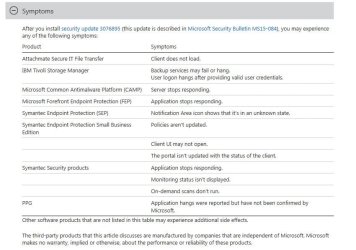
Symptoms:
After you install security update 3076895 (this update is described in Microsoft Security Bulletin MS15-084), you may experience any of the following symptoms:

(see screenshot)

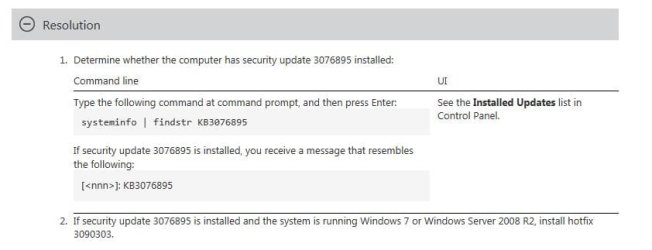
Resolution:
Determine whether the computer has security update 3076895 installed:

(see screenshot)

Review & request hotfix:
https://support.microsoft.com/en-us/kb/3090303

Note: This kb3090303 above had been superseded by the: September 2015 update to fix Windows or application freezes after you install security update 3076895 through Windows Update listed as Optional update.
 

Attachments

  • Symptoms.JPG
    Symptoms.JPG
    68.6 KB · Views: 3
  • Resolution.JPG
    Resolution.JPG
    31.7 KB · Views: 2
Last edited:

My Computer My Computer

At a glance

Windows 7 Professional SP1 - x64 [Non-UEFI Boot]Ivy Bridge Core i5 3570K (Delidded)G.Skill "Ares" DDR3 PC3-12800 - 1600MHz (16Gb)Asus Dual-RX480-O4G
Computer type
PC/Desktop
Computer Manufacturer/Model Number
Custom Build
OS
Windows 7 Professional SP1 - x64 [Non-UEFI Boot]
CPU
Ivy Bridge Core i5 3570K (Delidded)
Motherboard
Asus P8Z77-V LE PLUS
Memory
G.Skill "Ares" DDR3 PC3-12800 - 1600MHz (16Gb)
Graphics Card(s)
Asus Dual-RX480-O4G
Sound Card
Creative Sound Blaster Z w/5.1 sound system
Monitor(s) Displays
Asus IPS 23"
Screen Resolution
16/9
Hard Drives
Internal:
500Go Sata 6Gb/s (x2)
500Go Sata 3Gb/s (x2)
SSD 60Go Sata 6Gb/s
PSU
In Win C 900W Series 80+ Platinum
Case
Thermaltake Chaser A71
Cooling
Custom Water Cooling Loop
Keyboard
Cooler Master QuickFire XTi
Mouse
Razer Imperator 2012 (4G)
Antivirus
MSE
Browser
IE 11.0.xxx Rtm
Other Info
"Raid0" with Intel Smart Response Technology (HDD/SSD)
-Article ID: 2990941 - Last Review: 09/08/2015 21:37:00 - Revision: 8.0
Update to add native driver support in NVM Express in Windows 7 and Windows Server 2008 R2.

This article describes an update to add native driver support for an installation of NVM Express (NVMe) that uses the PCI Express (PCIe) bus in Windows 7 Service Pack 1 (SP1) or Windows Server 2008 R2 SP1.

Note: After you install this hotfix, you may receive a "0x0000007E" Stop error. To fix the Stop error, install Hotfix 3087873

The IOCTL_SCSI_MINIPORT_FIRMWARE control code is not implemented in Windows 7 SP1 or Windows Server 2008 R2 SP1. Therefore, you cannot update the firmware on NVME devices that are running these operating systems. The control code was made available starting from Windows 8.1.


Applies to
  • Windows Server 2008 R2 Service Pack 1
  • Windows 7 Service Pack 1
Review & request hotfix:
https://support.microsoft.com/en-us/kb/2990941

-----------------------------------------------------------------------------------------------------

-Article ID: 3067902 - Last Review: 09/08/2015 21:11:00 - Revision: 1.0
Can't connect to RemoteApps if Terminal Services Easy Print driver freezes in Windows Server 2008 R2.

This article describes an issue that occurs after Terminal Services Easy Print driver freezes in Windows Server 2008 R2 Service Pack 1.

Symptoms:

Consider the following scenario:
  • You install Hotfix 2719704 on a Windows Server 2008 R2-based server.
  • You connect to a RemoteApp program that's hosted on a Windows Server 2008 R2-based server and use Terminal Services Easy Print.
  • You're disconnected from the RemoteApp program because of certain network problems.
  • In this scenario, the Terminal Service Easy Print printer driver freezes, and users can’t connect to RemoteApps on the server any longer.
Applies to
  • Windows Server 2008 R2 Service Pack 1
  • Windows 7 Service Pack 1
Review & request hotfix:
https://support.microsoft.com/en-us/kb/3067902
 

My Computer My Computer

At a glance

Windows 7 Professional SP1 - x64 [Non-UEFI Boot]Ivy Bridge Core i5 3570K (Delidded)G.Skill "Ares" DDR3 PC3-12800 - 1600MHz (16Gb)Asus Dual-RX480-O4G
Computer type
PC/Desktop
Computer Manufacturer/Model Number
Custom Build
OS
Windows 7 Professional SP1 - x64 [Non-UEFI Boot]
CPU
Ivy Bridge Core i5 3570K (Delidded)
Motherboard
Asus P8Z77-V LE PLUS
Memory
G.Skill "Ares" DDR3 PC3-12800 - 1600MHz (16Gb)
Graphics Card(s)
Asus Dual-RX480-O4G
Sound Card
Creative Sound Blaster Z w/5.1 sound system
Monitor(s) Displays
Asus IPS 23"
Screen Resolution
16/9
Hard Drives
Internal:
500Go Sata 6Gb/s (x2)
500Go Sata 3Gb/s (x2)
SSD 60Go Sata 6Gb/s
PSU
In Win C 900W Series 80+ Platinum
Case
Thermaltake Chaser A71
Cooling
Custom Water Cooling Loop
Keyboard
Cooler Master QuickFire XTi
Mouse
Razer Imperator 2012 (4G)
Antivirus
MSE
Browser
IE 11.0.xxx Rtm
Other Info
"Raid0" with Intel Smart Response Technology (HDD/SSD)
-Article ID: 3095316 - Last Review: 09/16/2015 04:42:00 - Revision: 2.0
Update enables you to specify port number in the Enterprise Mode Site List XML file in Internet Explorer 11 in Windows 7.

Summary:
This article describes a hotfix that enables you to specify a port number in the Enterprise Mode Site List XML file in Internet Explorer 11 in Windows 7 Service Pack 1 (SP1) or Windows Server 2008 R2 SP1.

For example, the following line specifies the Enterprise Mode behavior for port 80 on a contoso.com site:
<domain>contoso.com:80</domain>

See Prerequisites section


Applies to
  • Windows Server 2008 R2 Service Pack 1
  • Windows 7 Service Pack 1
Review & request hotfix (to enable this functionality):
https://support.microsoft.com/en-us/kb/3095316

---------------------------------------------------------------------------------------------------

-Article ID: 3079821 - Last Review: 09/16/2015 02:27:00 - Revision: 1.0
Update that enables Windows 7 and Windows Server 2008 R2 KMS hosts to activate Windows 10.

This update extends KMS for Windows 7 Service Pack 1 (SP1) and Windows Server 2008 R2 SP1 to enable the activation of Windows 10-based clients.
For more information about KMS, see: Understanding KMS.


Applies to
  • Windows Server 2008 R2 Service Pack 1
  • Windows 7 Service Pack 1
From Microsfot Download Center:
https://support.microsoft.com/en-us/kb/3079821

---------------------------------------------------------------------------------------

-Article ID: 3081377 - Last Review: 09/15/2015 17:02:00 - Revision: 1.0
Client requests take a long time and memory leak occurs when you run an application in Windows 7 or Windows Vista.

Symptoms:
This issue occurs if the application is based on Microsoft Component Services (COM+) and is registered as single-threaded in Windows 7, Windows Server 2008 R2, Windows Vista, or Windows Server 2008. Eventually, the application may freeze.

Cause:
This issue occurs because Object Contexts sometimes aren't released.


Applies to
  • Windows Server 2008 R2 Service Pack 1
  • Windows 7 Service Pack 1
  • Windows Server 2008 Service Pack 2
  • Windows Vista Service Pack 2
Review & request hotfix:
https://support.microsoft.com/en-us/kb/3081377

-------------------------------------------------------------------------------

Article ID: 3086911 - Last Review: 09/14/2015 07:34:00 - Revision: 1.0
Offline File status is displayed incorrectly in File Explorer in Windows 7 SP1

Symptoms:
Assume that you access a file or a folder over a third-party network on the offline share. In this situation, File Explorer displays Offline status as "Online" and Offline availability as "Not available" in the details pane.

Cause:
This issue occurs because of a problem in File Explorer.

Resolution:
This known issue for Windows 7 Service Pack 1 (SP1) is under investigation. The KB article will be updated when a resolution is available.

https://support.microsoft.com/en-us/kb/3086911
 
Last edited:

My Computer My Computer

At a glance

Windows 7 Professional SP1 - x64 [Non-UEFI Boot]Ivy Bridge Core i5 3570K (Delidded)G.Skill "Ares" DDR3 PC3-12800 - 1600MHz (16Gb)Asus Dual-RX480-O4G
Computer type
PC/Desktop
Computer Manufacturer/Model Number
Custom Build
OS
Windows 7 Professional SP1 - x64 [Non-UEFI Boot]
CPU
Ivy Bridge Core i5 3570K (Delidded)
Motherboard
Asus P8Z77-V LE PLUS
Memory
G.Skill "Ares" DDR3 PC3-12800 - 1600MHz (16Gb)
Graphics Card(s)
Asus Dual-RX480-O4G
Sound Card
Creative Sound Blaster Z w/5.1 sound system
Monitor(s) Displays
Asus IPS 23"
Screen Resolution
16/9
Hard Drives
Internal:
500Go Sata 6Gb/s (x2)
500Go Sata 3Gb/s (x2)
SSD 60Go Sata 6Gb/s
PSU
In Win C 900W Series 80+ Platinum
Case
Thermaltake Chaser A71
Cooling
Custom Water Cooling Loop
Keyboard
Cooler Master QuickFire XTi
Mouse
Razer Imperator 2012 (4G)
Antivirus
MSE
Browser
IE 11.0.xxx Rtm
Other Info
"Raid0" with Intel Smart Response Technology (HDD/SSD)
Back
Top