
lit screen/ but blank

Bentley

New member
Local time
3:33 PM
Messages
2
I have just replaced my 17 " screen on my toshiba Satellite P205-S6327 as the old one gave up the ghost last week. I was using a remote monitor while waiting for the new screen to arrive. I watched a you tube on how to change a screen out and it looked easy enough- I am an engineer by profession and fix pretty much anything. When I got the new screen back in; I put the battery back in and then powered up- all I get is a white screen , even brightness all the way around - unlke the old one that had a spider shape in the top left hand side and uneven patterns everywhere else. Am I missing something here ? I am back to using the remote monitor again -no problem !
 

My Computer

Computer type
Laptop
Computer Manufacturer/Model Number
toshiba Satellite P205-S6327
OS
windows 7 x 64
Hard Drives
hybrid 500gb
Antivirus
Vipre // Hitman pro
Browser
mozilla firefox
Hello and welcome Bentley mate take a look at this and retrace your steps
Toshiba laptop DIY disassembly instructions < read thoroughly about the ribbon cable fittings as they are contrary to say the least after done a few Toshies:) Those little black lugs are very fiddly and if you have not got another pair of hands they can be very difficult to hold in and lock in and there are some that are really quite small.
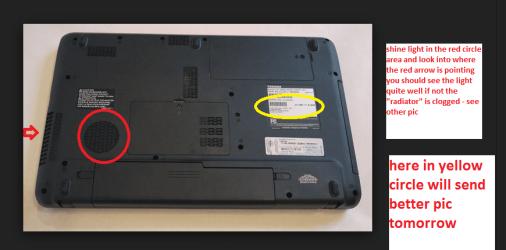
You need this from the disassembly guides
Toshiba Satellite P205 P200 screen removal guide - Page 1 < your machine.

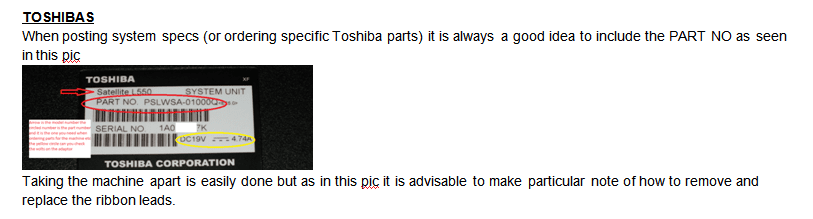
When you replaced the screen did you get the right part for it as you should have had to quote the PART No as in my pic
Anyway see this it will be a bit scrabbled though


GENERALINFO

As a general rule of thumb toreplace the thermal compound in a laptop there are two areas to be concernedwith that is the CPU and the GPU (graphics) see pics of them before and afterremoving the heatsink assembly. How you apply the compound is your choice Iprefer to use a cleaner and prepsolution as in the Arctic cleaning kit -http://www.arcticsilver.com/arcticlean.htm and the compound from Artic - http://www.arcticsilver.com/as5.htm but the choice of compound isyours.

To make the job easier because thedies are very shiny I prefer to clean with solution 1 then prep with solution 2 then use a vinylglove and spread a very thin layer / smear on the heatsink and the die – thenadd a tiny half grain of rice size dot of compound the the centre of the die/sand reattach the heatsink assembly. DO NOT apply more than that.

DO NOT over tighten the retainingscrews / bolts

Oncedone and before you reassemble now is the best time to make sure the “radiator”and fan assembly is clear of dust and crud (stuck on dirt).

TIPIfyou use compressed air to clean the dust from the fan DO NOT let the fan spin it is not designed to spin at speedsexceeding what it was meant to and will if left spinning with the air blastwill wreck the bearing. If the fan is tight to turn then it needs replacing asthe bearings are usually sealed.

PersonallyI attach some fine fabric over my air intake when done to catch the largerrubbish see last pic.


TOSHIBAS

When posting system specs (orordering specific Toshiba parts) it is always a good idea to include the PARTNO as seen in this pic


Taking the machine apart is easilydone but as in this pic it is advisable to make particular note of how toremove and replace the ribbon leads.
 

Attachments

  • TOSH BOTTOM.PNG
    TOSH BOTTOM.PNG
    78.4 KB · Views: 0
  • PART NO.PNG
    PART NO.PNG
    18.8 KB · Views: 0

My Computer

Computer type
PC/Desktop
Computer Manufacturer/Model Number
Own build (new) Desk1 / Asus ROG Win 7 / Desk2 1st build
OS
Desk1 7 Home Prem / Desk2 10 Pro / Main lap Asus ROG 10 Pro 2 laptop Toshiba 7 Pro Asus P2520 7 & 10
CPU
Desk1 i5 3750K / Laptop i7 GTX 860M / Desk2 i5 2500
Motherboard
Desk1 Asus P877-V / Desk2 Gigabyte H67 UD3H / Laptop ?
Memory
Desk1 8GB (1866) / Desk2 16GB (1333) / Laptop 8Gb DDR3
Graphics Card(s)
Desk 1& 2NVidia GTX 650 & Laptops on board Intel
Sound Card
Desk 1 & 2 -XONAR DG Realtek High Def audio Laptop
Monitor(s) Displays
Desk 1 Benq HD 2450 / Desk2 Philips 24" / Laptop 17.5"
Screen Resolution
1920x1080 D1 & D2 & Laptop 1
Hard Drives
Desk1 Samsung 120GB 830 SSD
Asus ROG 256GB 850 Pro SSD
Desk2 Samsung 840 256 SSD
Toshiba 120GB EVO
PSU
Desk 1 Corsair HX 1050/ Laptop ? / Desk 2 Corsair HX 650
Case
Desk 1 Cooler HAF XM ? Toshiba laptop / Desk2 Coolermaster
Cooling
Fans on all Desk1 -2 Desk2 - all Coolermasters 5 Laptop ?
Keyboard
Desk 1 MS Sidewinder X6 Desk 2 MS Sidewinder X 4
Mouse
Desk 1&2 - Gigabyte MS 900 gamer - laptop - Logitec wireless
Internet Speed
ADSL2+
Other Info
One other Desktop (tester) and spare Toshba laptop both with SSD's
Running Kaspersky 2016 ISS on all machines config'd identically
Logitec audio stereo systems on each machine (x3)
Canon MG5250MFC
Router/modem TP-Link running WPA2SK
It sounds like you're getting the backlight lit up but aren't getting a video signal. I would check the ribbon cables that go to the screen and make sure that they are seated properly, and the connector is properly closed and latched. Being an engineer, you're probably familiar with those types of ribbon connectors, but they're easy to overlook, and/or not get seated right.
 

My Computer

Computer type
PC/Desktop
Computer Manufacturer/Model Number
Mellon Labs (custom build)
OS
Win 7 Pro x64/Win 10 Pro x64 dual boot
CPU
AMD FX 8350 Vishera @ 4200
Motherboard
ASUS M5A97 R2.0
Memory
16 GB Mushkin Blackline DDR3-2400 @ 1866 (9-10-10-10-31)
Graphics Card(s)
XFX Radeon R9 280 Double D Black Edition
Sound Card
Realtek HD Audio on MB. Sounds great.
Monitor(s) Displays
Acer 24", Acer 22"
Screen Resolution
3840 x 1080
Hard Drives
1 x Mushkin Chronos 120 GB SSD (Win 10)
1 x Samsung 850 EVO 250 GB SSD (Win 7)
1 x WD 1TB SATA Blue
1 x WD 1TB SATA Green
PSU
Corsair TX-750
Case
CoolerMaster HAF 912+
Cooling
Coolermaster Seidon 240M Liquid AIO. 6 case fans
Keyboard
Logitech G710+
Mouse
Logitech G500s
Internet Speed
Much better since I got fiber, but still way overpriced.
Antivirus
MSE, Malware Bytes for scanning
Browser
Firefox
Other Info
Corsair VOID USB headphones.

A Mellon Labs X-1 - LCD Smartie driven system status display.

Brought to you by the letter E
It sounds like you're getting the backlight lit up but aren't getting a video signal. I would check the ribbon cables that go to the screen and make sure that they are seated properly, and the connector is properly closed and latched. Being an engineer, you're probably familiar with those types of ribbon connectors, but they're easy to overlook, and/or not get seated right.
Yep MH just what I was thinking as I have found just out of alignment with those things can prevent it from working thats why I said read thoroughly that first link where it shows those lugs . Plus I always clean as best ne can the connections before replacing them.

Having said that it could also be the wrong part because the PART No I quoted has to be right because of where the machine was manufactured and where for. - it - the new one could also be a dud:(
 

My Computer

Computer type
PC/Desktop
Computer Manufacturer/Model Number
Own build (new) Desk1 / Asus ROG Win 7 / Desk2 1st build
OS
Desk1 7 Home Prem / Desk2 10 Pro / Main lap Asus ROG 10 Pro 2 laptop Toshiba 7 Pro Asus P2520 7 & 10
CPU
Desk1 i5 3750K / Laptop i7 GTX 860M / Desk2 i5 2500
Motherboard
Desk1 Asus P877-V / Desk2 Gigabyte H67 UD3H / Laptop ?
Memory
Desk1 8GB (1866) / Desk2 16GB (1333) / Laptop 8Gb DDR3
Graphics Card(s)
Desk 1& 2NVidia GTX 650 & Laptops on board Intel
Sound Card
Desk 1 & 2 -XONAR DG Realtek High Def audio Laptop
Monitor(s) Displays
Desk 1 Benq HD 2450 / Desk2 Philips 24" / Laptop 17.5"
Screen Resolution
1920x1080 D1 & D2 & Laptop 1
Hard Drives
Desk1 Samsung 120GB 830 SSD
Asus ROG 256GB 850 Pro SSD
Desk2 Samsung 840 256 SSD
Toshiba 120GB EVO
PSU
Desk 1 Corsair HX 1050/ Laptop ? / Desk 2 Corsair HX 650
Case
Desk 1 Cooler HAF XM ? Toshiba laptop / Desk2 Coolermaster
Cooling
Fans on all Desk1 -2 Desk2 - all Coolermasters 5 Laptop ?
Keyboard
Desk 1 MS Sidewinder X6 Desk 2 MS Sidewinder X 4
Mouse
Desk 1&2 - Gigabyte MS 900 gamer - laptop - Logitec wireless
Internet Speed
ADSL2+
Other Info
One other Desktop (tester) and spare Toshba laptop both with SSD's
Running Kaspersky 2016 ISS on all machines config'd identically
Logitec audio stereo systems on each machine (x3)
Canon MG5250MFC
Router/modem TP-Link running WPA2SK
Thanks for your suggestions - I will re-do the connection and see if it makes a difference.
 

My Computer

Computer type
Laptop
Computer Manufacturer/Model Number
toshiba Satellite P205-S6327
OS
windows 7 x 64
Hard Drives
hybrid 500gb
Antivirus
Vipre // Hitman pro
Browser
mozilla firefox
Thanks for your suggestions - I will re-do the connection and see if it makes a difference.
Ok mate I know it is a darn nuisance and Toshibas seem not to be the quality stuff they used to put out years ago.
 

My Computer

Computer type
PC/Desktop
Computer Manufacturer/Model Number
Own build (new) Desk1 / Asus ROG Win 7 / Desk2 1st build
OS
Desk1 7 Home Prem / Desk2 10 Pro / Main lap Asus ROG 10 Pro 2 laptop Toshiba 7 Pro Asus P2520 7 & 10
CPU
Desk1 i5 3750K / Laptop i7 GTX 860M / Desk2 i5 2500
Motherboard
Desk1 Asus P877-V / Desk2 Gigabyte H67 UD3H / Laptop ?
Memory
Desk1 8GB (1866) / Desk2 16GB (1333) / Laptop 8Gb DDR3
Graphics Card(s)
Desk 1& 2NVidia GTX 650 & Laptops on board Intel
Sound Card
Desk 1 & 2 -XONAR DG Realtek High Def audio Laptop
Monitor(s) Displays
Desk 1 Benq HD 2450 / Desk2 Philips 24" / Laptop 17.5"
Screen Resolution
1920x1080 D1 & D2 & Laptop 1
Hard Drives
Desk1 Samsung 120GB 830 SSD
Asus ROG 256GB 850 Pro SSD
Desk2 Samsung 840 256 SSD
Toshiba 120GB EVO
PSU
Desk 1 Corsair HX 1050/ Laptop ? / Desk 2 Corsair HX 650
Case
Desk 1 Cooler HAF XM ? Toshiba laptop / Desk2 Coolermaster
Cooling
Fans on all Desk1 -2 Desk2 - all Coolermasters 5 Laptop ?
Keyboard
Desk 1 MS Sidewinder X6 Desk 2 MS Sidewinder X 4
Mouse
Desk 1&2 - Gigabyte MS 900 gamer - laptop - Logitec wireless
Internet Speed
ADSL2+
Other Info
One other Desktop (tester) and spare Toshba laptop both with SSD's
Running Kaspersky 2016 ISS on all machines config'd identically
Logitec audio stereo systems on each machine (x3)
Canon MG5250MFC
Router/modem TP-Link running WPA2SK
Back
Top