Solved Liteon DVD RW doesn't work in my pc

Seyed

New member
Local time
8:39 PM
Messages
14
Location
Kabul
Hello guys. I have a problem with my new DVD RW. When I bought this DVD RW, I have a problem with my HDD and bluescreen error. Then I changed place of their SATA socket. Now the bluescreen error have solved but my DVD RW doesn't work! it works in boot and I have installed a new copy of Win 7 by it, but in windows it doesn't work and it's icon is in my computer page.
By the way, there is a CD-Rom icon in my computer window, although I haven't a CD-Rom.
Please solve this problem.
thanks a lot.
 
Last edited:

My Computer My Computer

Computer type
PC/Desktop
OS
Windows 7 Ultimate 32bit
CPU
AMD Athlon 64 Dual core 7750
Motherboard
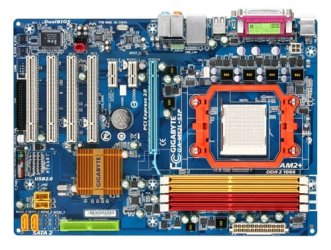
Gigabyte M52L-S3P
Memory
2 GB DDR2 6400 Patriot + 2 GB DDR2 6400 Kingston (4 GB )
Graphics Card(s)
Nvidia Geforce 9400 GT 512 MB
Sound Card
on board
Monitor(s) Displays
CRT Samsung 17"
Screen Resolution
1024*768
Hard Drives
Seagate 500 GB
Keyboard
PS2
Mouse
Optical PS2
Internet Speed
512 kb/s
Antivirus
ESET Smart Security 7
Browser
Mozilla Firefox 32
Other Info
2 SATA sockets
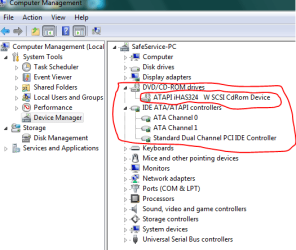
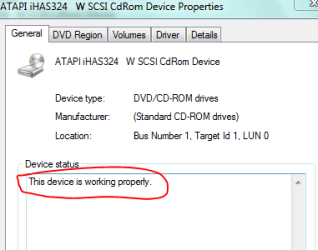
What is listed in the Device Manager for the DVD drive? Does it show an error code? or does it show Working OK?
 

My Computer My Computer

Computer type
PC/Desktop
Computer Manufacturer/Model Number
My Own Build
OS
Windows 10 64 bit
CPU
Intel i7 6700K
Motherboard
ASUS ROG Maximus VIII Hero
Memory
16GB Corsair Dominator
Graphics Card(s)
Intel CPU Graphics
Sound Card
RealTek
Monitor(s) Displays
27" Dell S2719dgf
Screen Resolution
2560X1440
Hard Drives
1 TB Samsung 850 EVO SSD for Win 10 Pro
500GB Samsung 850 EVO SSD for Win 10 Insider
2 TB drive for backup
PSU
EVGA Supernova 750G2
Case
BeQuiet Silent Base 600
Cooling
Deepcool Captain 120EX
Keyboard
Microsoft Wireless 2000
Mouse
Microsoft wireless
Internet Speed
100 MB/sec (Cable)
Antivirus
Microsoft Defender and Malwarebytes
Browser
Edge/Firefox
Other Info
Cakewalk (Sonar) by BandLab and Studio One 4.1 Pro recording studio software. MOTU 896Mk3 Hybrid recording interface, Frontier Tranzport wireless control unit, Behringer X-Touch Control Surface.
Five USB connected optical drives for CD Audio production using Nero BurningROM
Yes. It is in device manager list and written "work properly".Capture.PNG
Capture2.PNG
 

My Computer My Computer

Computer type
PC/Desktop
OS
Windows 7 Ultimate 32bit
CPU
AMD Athlon 64 Dual core 7750
Motherboard
Gigabyte M52L-S3P
Memory
2 GB DDR2 6400 Patriot + 2 GB DDR2 6400 Kingston (4 GB )
Graphics Card(s)
Nvidia Geforce 9400 GT 512 MB
Sound Card
on board
Monitor(s) Displays
CRT Samsung 17"
Screen Resolution
1024*768
Hard Drives
Seagate 500 GB
Keyboard
PS2
Mouse
Optical PS2
Internet Speed
512 kb/s
Antivirus
ESET Smart Security 7
Browser
Mozilla Firefox 32
Other Info
2 SATA sockets
The ATAPI suggests you have an PATA (IDE) type drive connected and not a SATA. If that is the case the drive must be set for either "Cable Select" or "Master".

My CD/DVD burner drives are PATA.

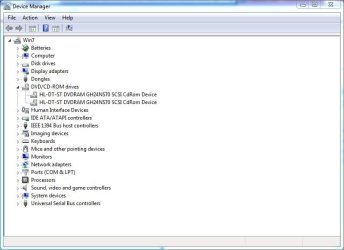
Here is what the Device Manager shows.
 

Attachments

  • cd drives.JPG
    cd drives.JPG
    46.2 KB · Views: 0
  • cd status.JPG
    cd status.JPG
    29.3 KB · Views: 16

My Computer My Computer

Computer type
PC/Desktop
Computer Manufacturer/Model Number
My Own Build
OS
Windows 10 64 bit
CPU
Intel i7 6700K
Motherboard
ASUS ROG Maximus VIII Hero
Memory
16GB Corsair Dominator
Graphics Card(s)
Intel CPU Graphics
Sound Card
RealTek
Monitor(s) Displays
27" Dell S2719dgf
Screen Resolution
2560X1440
Hard Drives
1 TB Samsung 850 EVO SSD for Win 10 Pro
500GB Samsung 850 EVO SSD for Win 10 Insider
2 TB drive for backup
PSU
EVGA Supernova 750G2
Case
BeQuiet Silent Base 600
Cooling
Deepcool Captain 120EX
Keyboard
Microsoft Wireless 2000
Mouse
Microsoft wireless
Internet Speed
100 MB/sec (Cable)
Antivirus
Microsoft Defender and Malwarebytes
Browser
Edge/Firefox
Other Info
Cakewalk (Sonar) by BandLab and Studio One 4.1 Pro recording studio software. MOTU 896Mk3 Hybrid recording interface, Frontier Tranzport wireless control unit, Behringer X-Touch Control Surface.
Five USB connected optical drives for CD Audio production using Nero BurningROM
Thank you. but what should I do now? I had use PATA to SATA converter, but the problem persists.
it may depends on Firmware or not?
 

My Computer My Computer

Computer type
PC/Desktop
OS
Windows 7 Ultimate 32bit
CPU
AMD Athlon 64 Dual core 7750
Motherboard
Gigabyte M52L-S3P
Memory
2 GB DDR2 6400 Patriot + 2 GB DDR2 6400 Kingston (4 GB )
Graphics Card(s)
Nvidia Geforce 9400 GT 512 MB
Sound Card
on board
Monitor(s) Displays
CRT Samsung 17"
Screen Resolution
1024*768
Hard Drives
Seagate 500 GB
Keyboard
PS2
Mouse
Optical PS2
Internet Speed
512 kb/s
Antivirus
ESET Smart Security 7
Browser
Mozilla Firefox 32
Other Info
2 SATA sockets
Do you have the drive set as "Master"??? On the back panel there is an area with jumpers. The jumper should be on the Master. I can't tell you where that is as it is not always the same location. There should be markings on the drive to indicate which is the Master.

The other problem could be the PATA to SATA converter.
 

My Computer My Computer

Computer type
PC/Desktop
Computer Manufacturer/Model Number
My Own Build
OS
Windows 10 64 bit
CPU
Intel i7 6700K
Motherboard
ASUS ROG Maximus VIII Hero
Memory
16GB Corsair Dominator
Graphics Card(s)
Intel CPU Graphics
Sound Card
RealTek
Monitor(s) Displays
27" Dell S2719dgf
Screen Resolution
2560X1440
Hard Drives
1 TB Samsung 850 EVO SSD for Win 10 Pro
500GB Samsung 850 EVO SSD for Win 10 Insider
2 TB drive for backup
PSU
EVGA Supernova 750G2
Case
BeQuiet Silent Base 600
Cooling
Deepcool Captain 120EX
Keyboard
Microsoft Wireless 2000
Mouse
Microsoft wireless
Internet Speed
100 MB/sec (Cable)
Antivirus
Microsoft Defender and Malwarebytes
Browser
Edge/Firefox
Other Info
Cakewalk (Sonar) by BandLab and Studio One 4.1 Pro recording studio software. MOTU 896Mk3 Hybrid recording interface, Frontier Tranzport wireless control unit, Behringer X-Touch Control Surface.
Five USB connected optical drives for CD Audio production using Nero BurningROM
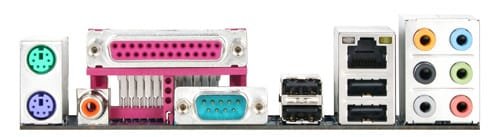
Yes. HDD is master0 and DVD RW is master1. What do you mean about back panel. I put two pictures from my main board:
1094.jpg

1093.jpg
I appreciate your helps.
 

My Computer My Computer

Computer type
PC/Desktop
OS
Windows 7 Ultimate 32bit
CPU
AMD Athlon 64 Dual core 7750
Motherboard
Gigabyte M52L-S3P
Memory
2 GB DDR2 6400 Patriot + 2 GB DDR2 6400 Kingston (4 GB )
Graphics Card(s)
Nvidia Geforce 9400 GT 512 MB
Sound Card
on board
Monitor(s) Displays
CRT Samsung 17"
Screen Resolution
1024*768
Hard Drives
Seagate 500 GB
Keyboard
PS2
Mouse
Optical PS2
Internet Speed
512 kb/s
Antivirus
ESET Smart Security 7
Browser
Mozilla Firefox 32
Other Info
2 SATA sockets
I found the answer! the problem was with my Power Supply. I removed additional lamps to have more power. DVD RW has no problem now, Because of enough Watts! :party:
 

My Computer My Computer

Computer type
PC/Desktop
OS
Windows 7 Ultimate 32bit
CPU
AMD Athlon 64 Dual core 7750
Motherboard
Gigabyte M52L-S3P
Memory
2 GB DDR2 6400 Patriot + 2 GB DDR2 6400 Kingston (4 GB )
Graphics Card(s)
Nvidia Geforce 9400 GT 512 MB
Sound Card
on board
Monitor(s) Displays
CRT Samsung 17"
Screen Resolution
1024*768
Hard Drives
Seagate 500 GB
Keyboard
PS2
Mouse
Optical PS2
Internet Speed
512 kb/s
Antivirus
ESET Smart Security 7
Browser
Mozilla Firefox 32
Other Info
2 SATA sockets
Back
Top