Little 2 Problems needs hElp!

Digital7

New member
Member
VIP
Local time
9:52 PM
Messages
86
Location
USA
I have a little problem which is really annoying...i have Rocketdock skin that supose to have different application indicator then just black but my Rocketdock after reinstalling it million times still does only shows the black indicator...

really annoying!

here's screenshot to show that...

question.gif


second problem
it never shows the minimized windows...on dock rather it minimizes them on taskbar :/

anyways to minimize the windows on top of Rocketdock?

Thanks for all the help folks! :D
 

My Computer

Computer Manufacturer/Model Number
AlienWare GodFatheriZed!
OS
WIN 7 x64
CPU
I7 550
Memory
8 GB DDR3
Graphics Card(s)
9800 GTX Turbo Dual
Monitor(s) Displays
21" Samsung True Colors HD + 25 SYNC Master
Screen Resolution
1680*1050
Hard Drives
Total 1.5 TB
20 views....no help plz :) Bump!
 

My Computer

Computer Manufacturer/Model Number
AlienWare GodFatheriZed!
OS
WIN 7 x64
CPU
I7 550
Memory
8 GB DDR3
Graphics Card(s)
9800 GTX Turbo Dual
Monitor(s) Displays
21" Samsung True Colors HD + 25 SYNC Master
Screen Resolution
1680*1050
Hard Drives
Total 1.5 TB

My Computer

Computer type
Laptop
Computer Manufacturer/Model Number
Toshiba P775-S7100
OS
Windows 7 Professional SP1 64-bit
CPU
Intel Core i5-2450M @2.5 GHz
Memory
6 GB DDR3 1333MHz
Graphics Card(s)
Intel HD 3000
Monitor(s) Displays
Built-in 17.3" LED; 22" Insignia NS-L22Q-10A
Screen Resolution
1600x900; 1360x768
Hard Drives
750 GB Hitachi
1TB Seagate FreeAgent External
Internet Speed
Verizon DSL Speed(Down/Up): 3360 Kbps / 800 Kbps
Antivirus
MSE and MBAM Pro
Browser
IE10
ok Petey7...i completly forgot this was not one of my gaming forums...sorry for bumping...

and i am using 1.3.5

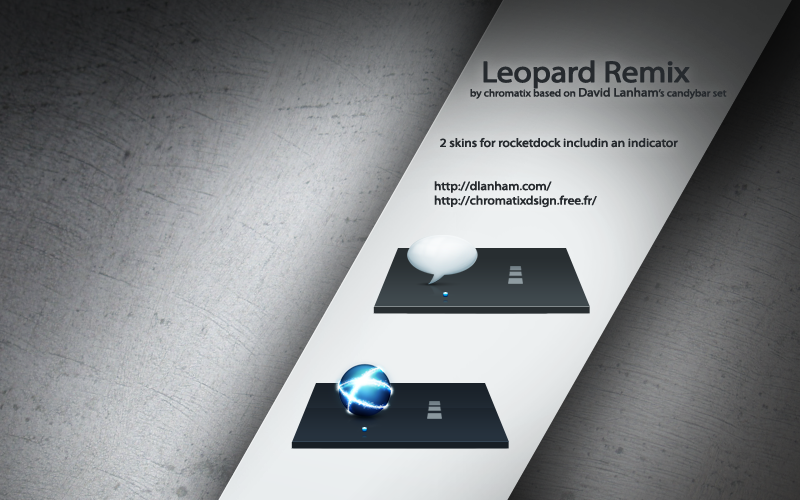
and i want to make my dock something like this in manner of indicator!

leopard_remix_by_chromatix.png
 

My Computer

Computer Manufacturer/Model Number
AlienWare GodFatheriZed!
OS
WIN 7 x64
CPU
I7 550
Memory
8 GB DDR3
Graphics Card(s)
9800 GTX Turbo Dual
Monitor(s) Displays
21" Samsung True Colors HD + 25 SYNC Master
Screen Resolution
1680*1050
Hard Drives
Total 1.5 TB
From what I have read (I have not actually used rocket dock, as I find it redundant with the new taskbar, but to each his own) RocketDock should let you minimize programs directly to it. This is not to say that it will not still appear on the taskbar, but that you can maximize/restore the program from rocketdock. Perhaps the skin you are using is causing the problem.
 

My Computer

Computer type
Laptop
Computer Manufacturer/Model Number
Toshiba P775-S7100
OS
Windows 7 Professional SP1 64-bit
CPU
Intel Core i5-2450M @2.5 GHz
Memory
6 GB DDR3 1333MHz
Graphics Card(s)
Intel HD 3000
Monitor(s) Displays
Built-in 17.3" LED; 22" Insignia NS-L22Q-10A
Screen Resolution
1600x900; 1360x768
Hard Drives
750 GB Hitachi
1TB Seagate FreeAgent External
Internet Speed
Verizon DSL Speed(Down/Up): 3360 Kbps / 800 Kbps
Antivirus
MSE and MBAM Pro
Browser
IE10
also the indicator never seems to change from black arrow?//// and if anyone can suggest replacement for a dock that has stacks...and has skins...and no fixed location require by software like XWindows Does!

i would be happy camper!
 

My Computer

Computer Manufacturer/Model Number
AlienWare GodFatheriZed!
OS
WIN 7 x64
CPU
I7 550
Memory
8 GB DDR3
Graphics Card(s)
9800 GTX Turbo Dual
Monitor(s) Displays
21" Samsung True Colors HD + 25 SYNC Master
Screen Resolution
1680*1050
Hard Drives
Total 1.5 TB
Back
Top